
Local Trade Copier Review 2026: MT4 and MT5 Copier Pricing and Setup
Our Local Trade Copier review covers how the copier runs inside your own MT4 and MT5 terminals, what it costs per PC or VPS, the 7-day trial, its prop firm features and the alternatives.

Published
Local Trade Copier review: the short answer
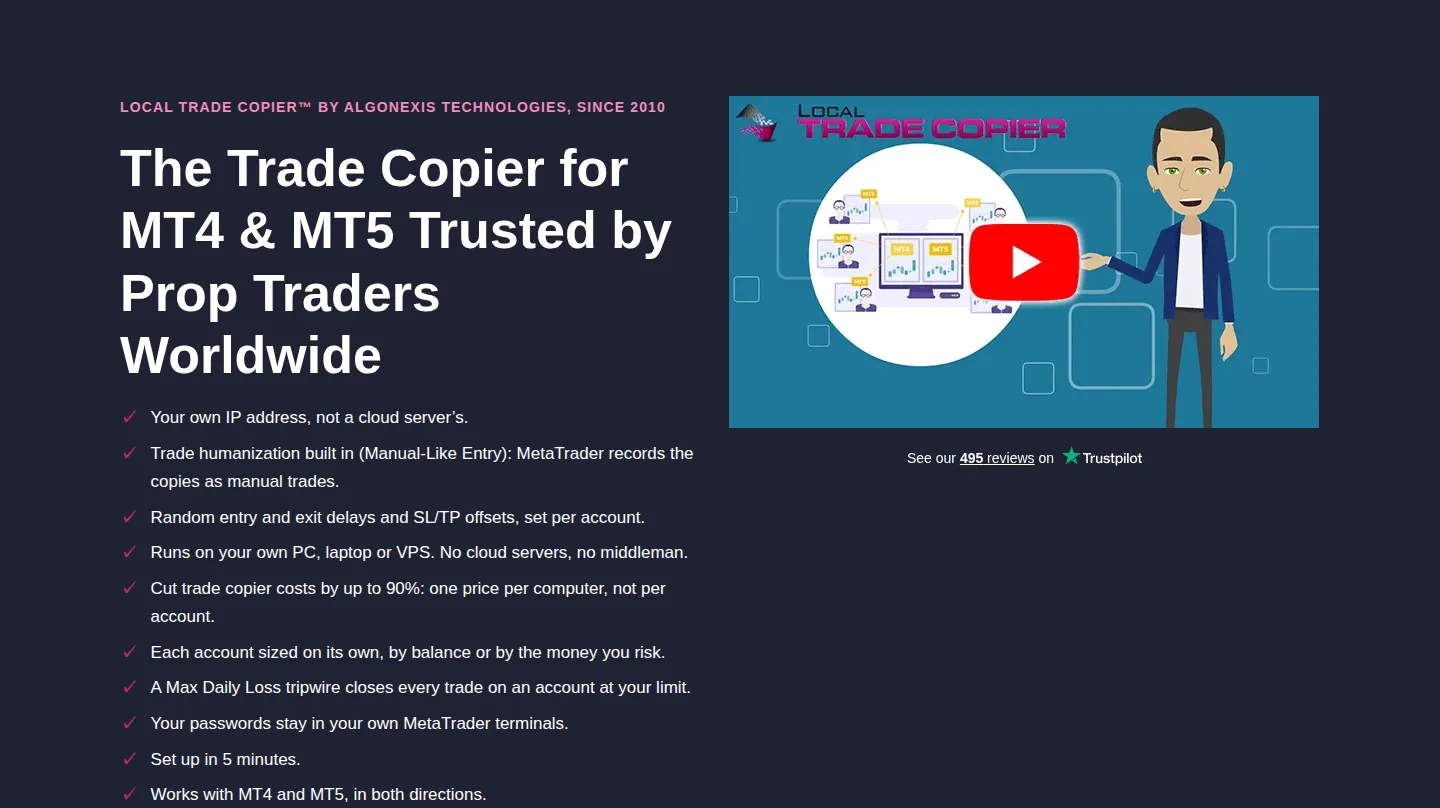
Local Trade Copier is a good choice if you run many MetaTrader accounts and are happy to keep them all on one Windows PC or VPS. It copies between MT4 and MT5 in every direction, it charges per computer rather than per account (from €29 a month for one PC or VPS with unlimited accounts), and it offers a 7-day free trial. It is a poor fit if your accounts live on different machines, because it only copies between terminals on the same computer, or if you want a copier that keeps running without a machine of your own.
This review is built from the vendor's own pages, checked on 20 November 2026. We haven't run the software ourselves, so any speed figure below is the developer's published claim. You can compare it with the other products on our forex trade copier comparison.
What is Local Trade Copier?
Local Trade Copier (LTC) is a trade copier for MetaTrader 4 and MetaTrader 5, sold at mt4copier.com by Algonexis Technologies. Its developer, Rimantas Petrauskas, created it in 2010, and the site claims more than 15,000 licenses sold since then. You place a trade on one account, the master, and the copier repeats it on every follower account, each sized by its own rules.
The word "local" is the whole idea. LTC runs as Expert Advisors inside your own MetaTrader terminals on your own PC, laptop or VPS, so no cloud service logs in to your accounts and your passwords stay in your terminals. The price follows from that design: you pay for each computer the copier runs on, and every account on that computer is included.
This review is about mt4copier.com's Local Trade Copier, not similarly named products such as FRZ Local Trade Copier or the Local Trade Copier sold by AutoFxPro, which come from other developers and have their own pricing and terms.
How Local Trade Copier works
LTC has two parts, both Expert Advisors. LTC Server runs on each master account and watches it for new, changed and closed trades. LTC Client runs on each follower account and opens the copies, using the lot sizing and filters you set for that account. Every account needs its own MetaTrader terminal, so copying one master to five followers means six terminals running at the same time.
The two sides talk through files on the computer's disk rather than over the internet. According to the developer's speed test page, LTC Server writes each master trade to a small local file, and each LTC Client checks for it every 0.1 to 0.2 seconds before sending the copy to its own broker.
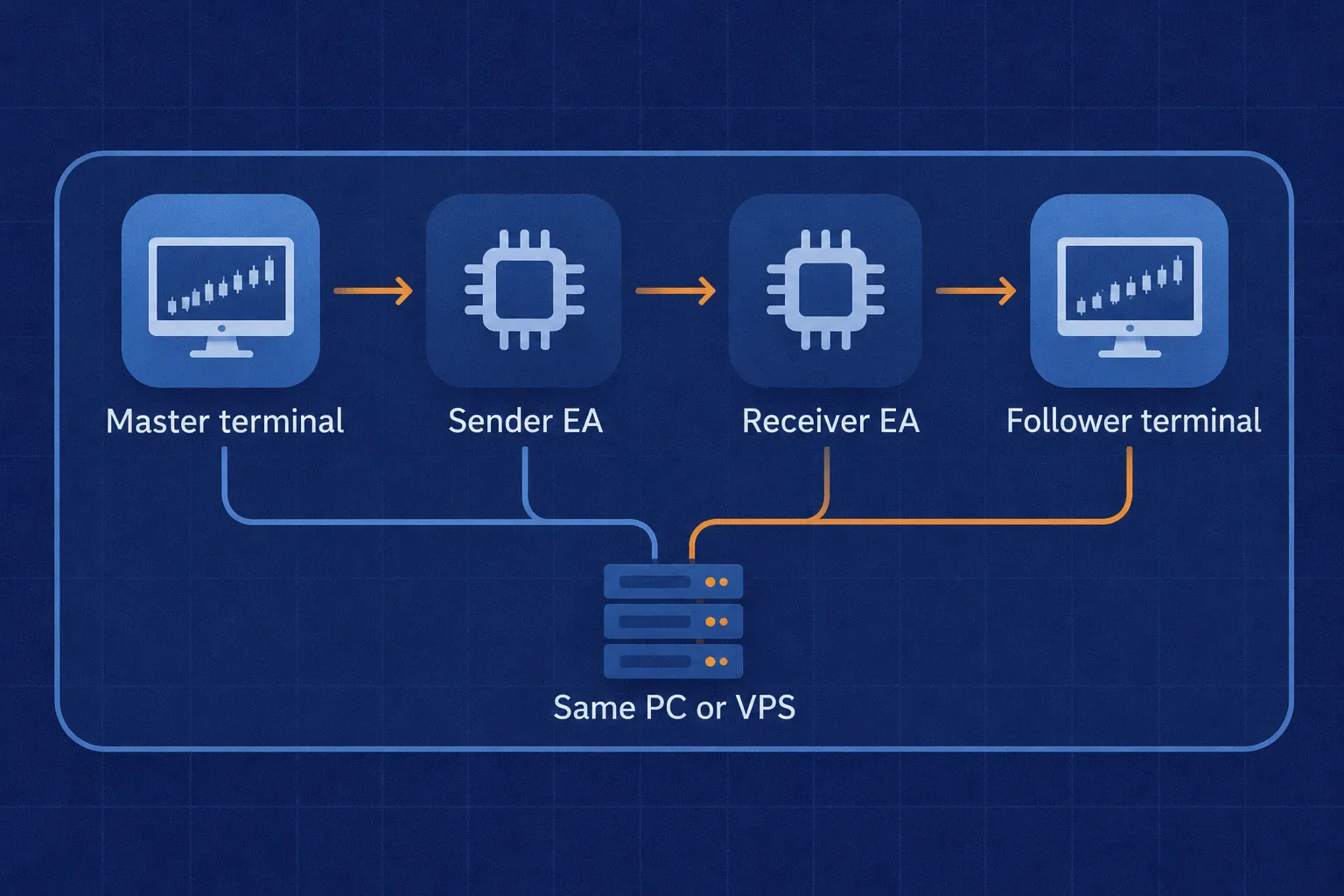
That design brings the product's one hard limit, which the vendor states in its FAQ: LTC copies between terminals on the same PC or VPS, not between different computers. If your master account trades from your laptop and your followers sit on a VPS, you either move everything to one machine or choose a cloud copier.
Setting it up
The vendor's quick start guide puts setup at about five minutes once your terminals are installed and logged in. An auto-installer copies the EAs into the terminals you pick. You attach LTC Server to one chart on each master account with your license key, and LTC Client to one chart on each follower, which needs no key. Both work with their default settings.
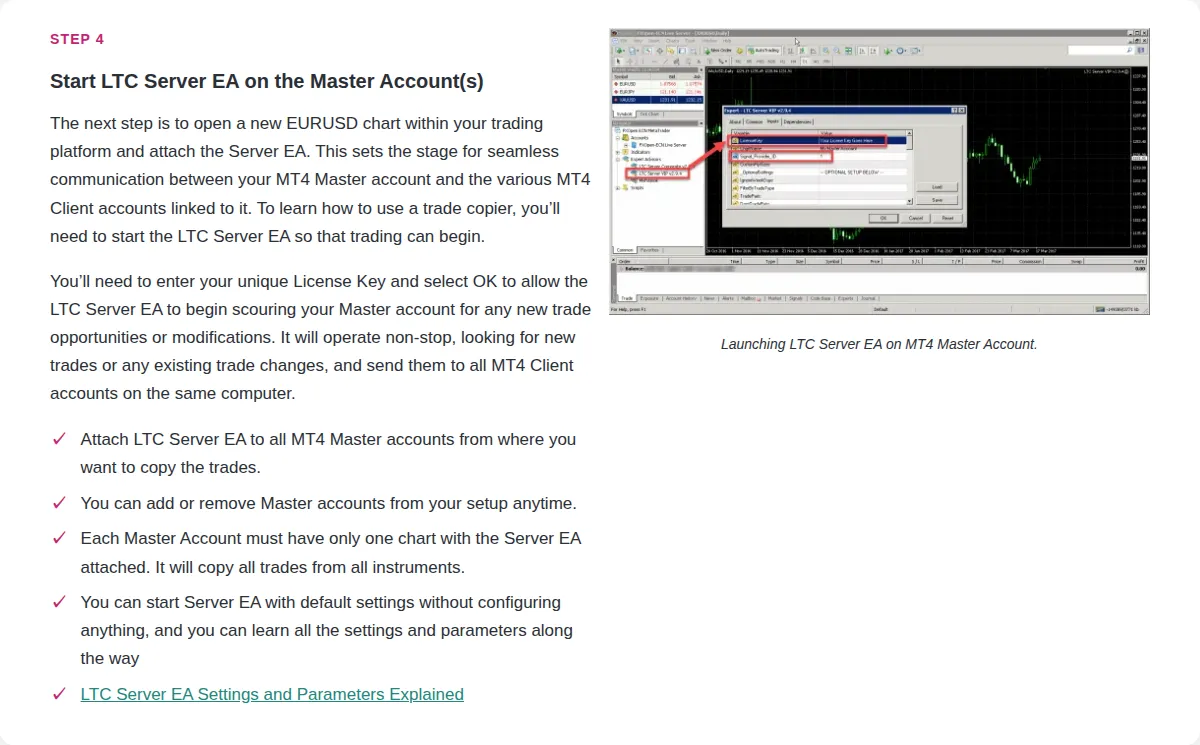
Each follower's options are documented on the LTC Client inputs page, and the vendor says most setups only change the money management settings.
Local Trade Copier pricing and free trial
Local Trade Copier has three plans on its pricing page, and all of them copy to unlimited MT4 and MT5 accounts. The plans differ in how many computers can run the copier at the same time and in four advanced features.
| Plan | Computers | Monthly | Yearly |
|---|---|---|---|
| Personal | 1 PC or VPS | €29 | €290 |
| Manager | 5 PCs or VPSs | €89 | €890 |
| VIP | 15 PCs or VPSs | €199 | €1,990 |
The yearly price works out to two months free. Manager and VIP add Position Size Splitting, a Martingale Mode for MT4, the MAAB trade filter and copying across Windows user profiles; everything else, including Manual-Like Execution and the daily loss limit, is on every plan.
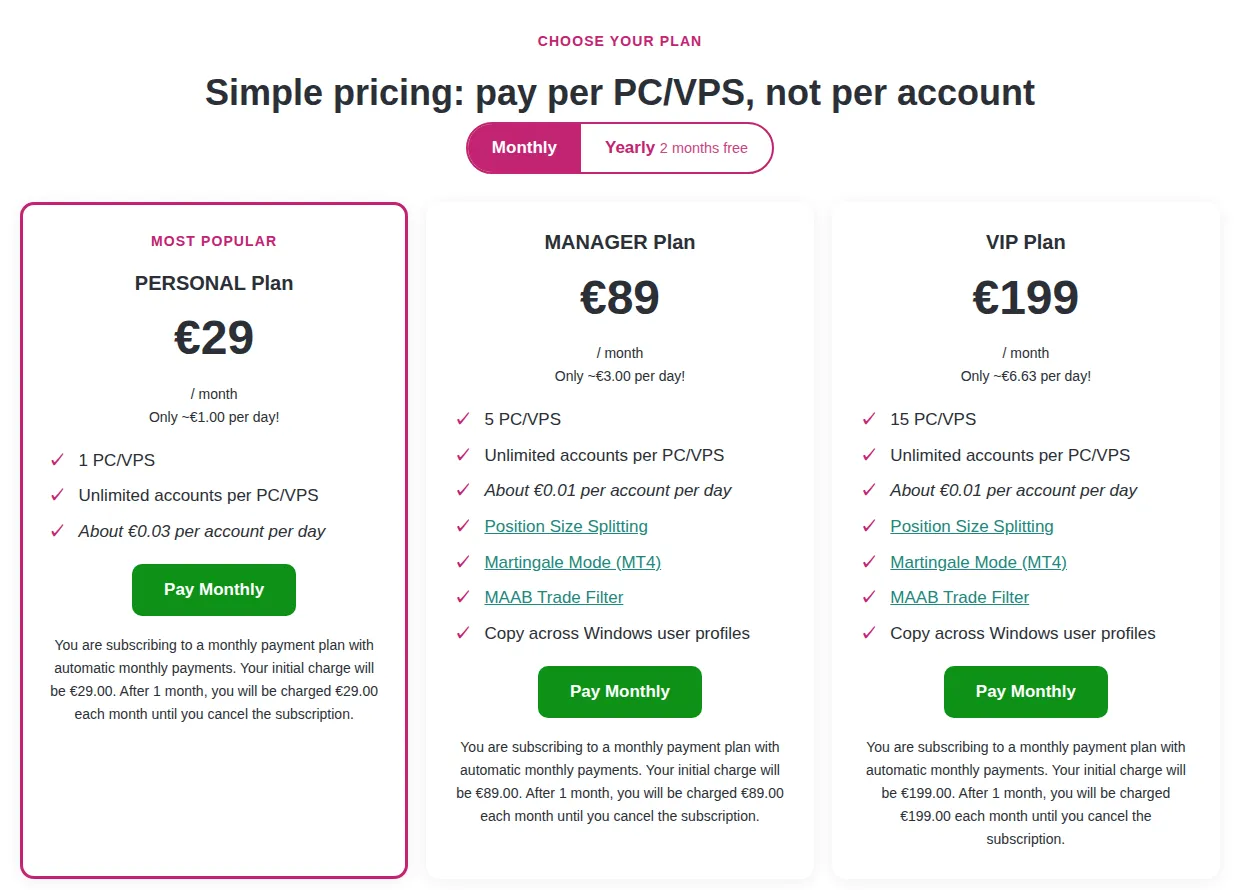
The license limits how many computers run the copier at once, and you can move it to another PC or VPS as often as you like. Every VPS counts as one computer however many terminals it runs. For someone running ten accounts, that is the main argument for LTC: the bill stays at €29 a month, where a per-account cloud copier such as Duplikium, which starts at €9 per account a month, would cost from €90.
Is there a free download?
No, Local Trade Copier isn't free, but you can try it for free. The trial page offers seven days free, after which it continues as the Personal plan at €29 a month unless you cancel. The download link arrives by email after checkout.
After you pay, the pricing page describes a 30-day conditional money-back guarantee: you get a refund if the software doesn't work as described and support can't fix it. There is no refund if your broker or prop firm blocks EA trading, or if you decide it isn't for you without asking support for help first. That makes the trial the right place to check that your brokers allow Expert Advisors.
Local Trade Copier for MT5 and MT4
Local Trade Copier works on both MetaTrader 4 and MetaTrader 5, and one subscription includes both. Because the platforms are built differently, you get a Local Trade Copier EA for MT4 and a separate EA for MT5 in the same download.
Copying MT4 to MT5 and MT5 to MT4
The pricing page lists all four routes on every plan: MT4 to MT4, MT4 to MT5, MT5 to MT5 and MT5 to MT4. The common use is keeping MT4 tools at a prop firm or broker that only offers MT5: the MT4 account stays the master, and LTC copies its trades to the MT5 account.
The vendor's FAQ names two platform details worth knowing:
- Stop-limit orders: MT4 has no buy stop-limit or sell stop-limit orders, so MT5 stop-limit orders are not copied to MT4 accounts. Regular buy stop, sell stop, buy limit and sell limit orders copy both ways.
- MT5 netting accounts: Since version 3.1.10, released on 6 November 2026 according to the changelog, LTC Server also works on MT5 netting accounts as a master. Each opening deal is copied as its own trade.
Other platforms and Mac
LTC is Windows software. The vendor says many customers run it on a Mac through Wine, and suggests a VPS as the alternative. Its MT4 to DXtrade page also says a one-way MetaTrader-to-DXtrade copier is included in the subscription, for DXtrade brokers such as HeroFx but not FTMO's DXtrade accounts.
Local Trade Copier isn't sold on the MQL5 Market: the developer's MQL5 seller profile lists other tools, so listings there under similar names are other developers' products. The MT4 and MT5 versions come from mt4copier.com.
Key features
The features that matter most are the ones that size, filter and shape each follower's copies. All of these come from the vendor's homepage and Client EA documentation.
- Lot sizing per account. The default mode scales each copy to the follower's balance compared with the master's. You can instead copy the same lot, multiply it, use a fixed lot, or risk a percentage or an amount of money per trade, which needs a stop loss on the master trade.
- Max Daily Loss. A per-account limit that closes every trade on that account, manual ones included, when the loss reaches it.
- Manual-Like Execution Mode. LTC Client opens each copy through MetaTrader's New Order window, so MetaTrader records it as a manual trade rather than one placed by an expert. The vendor says these copies open about 2 to 5 seconds after the master trade, and random delays and SL/TP offsets can be added per account.
- Symbol mapping. Prefix and suffix rules, custom mapping, and since 3.1.10 matching by a symbol's description, for brokers that name instruments differently.
- Filters. Magic number and symbol filters, price deviation limits, reverse copying and FIFO settings for US accounts.
- Several masters. A follower can merge several masters into one portfolio, and an account you can only watch through its investor password can be a master.
The vendor also promotes copying a licensed EA's trades from the one account it is registered to onto your other accounts. Check the EA's license terms first, since the copier doesn't change what that license allows.
Copy speed: what the developer publishes
The developer publishes his own copy speed test, updated in November 2026. He ran LTC 3.1.8 on default settings with demo accounts at five brokers on one Windows VPS in the Netherlands. By his figures, a new trade from an MT5 master reached MT5 followers in a median of about 0.8 seconds, with 9 of 10 copies done within about 1.2 seconds. An MT4 master took a median of about 1 to 1.2 seconds, and closes took about 0.5 seconds.
These are the developer's numbers from demo accounts, not our test, and he notes he hasn't measured live accounts. If you need copies faster than about a second, compare the latency figures other vendors publish on our comparison page.
Running Local Trade Copier on a VPS
Because the copier only works while every terminal is open, the master and all followers need to run around the clock on the same machine. A home PC can do that, but sleep settings, Windows updates and broadband outages all stop the copying. A Windows forex VPS keeps the whole setup online without your own computer, and the vendor's FAQ suggests a VPS for Mac users too.

Size the VPS for the terminals, not for the copier. The vendor's guide is about 4 terminals on 1 CPU core and 4 GB of RAM, about 25 on 6 cores and 16 GB, and about 150 on 20 cores and 32 GB, with CPU and RAM kept below 70% for the fastest copies. Its fast trade copier guide also recommends a VPS near your brokers. Since the license counts computers, putting every account on one larger VPS keeps you on the Personal plan.
Prop firm fit
Local Trade Copier is built with prop firm traders in mind, and its prop firm page lists the reasons. Each terminal trades from your own IP address rather than a cloud server shared with other traders, each challenge and funded account is sized on its own, and Max Daily Loss can close an account's trades below the firm's limit, for example at 4% on an account with a 5% daily limit.
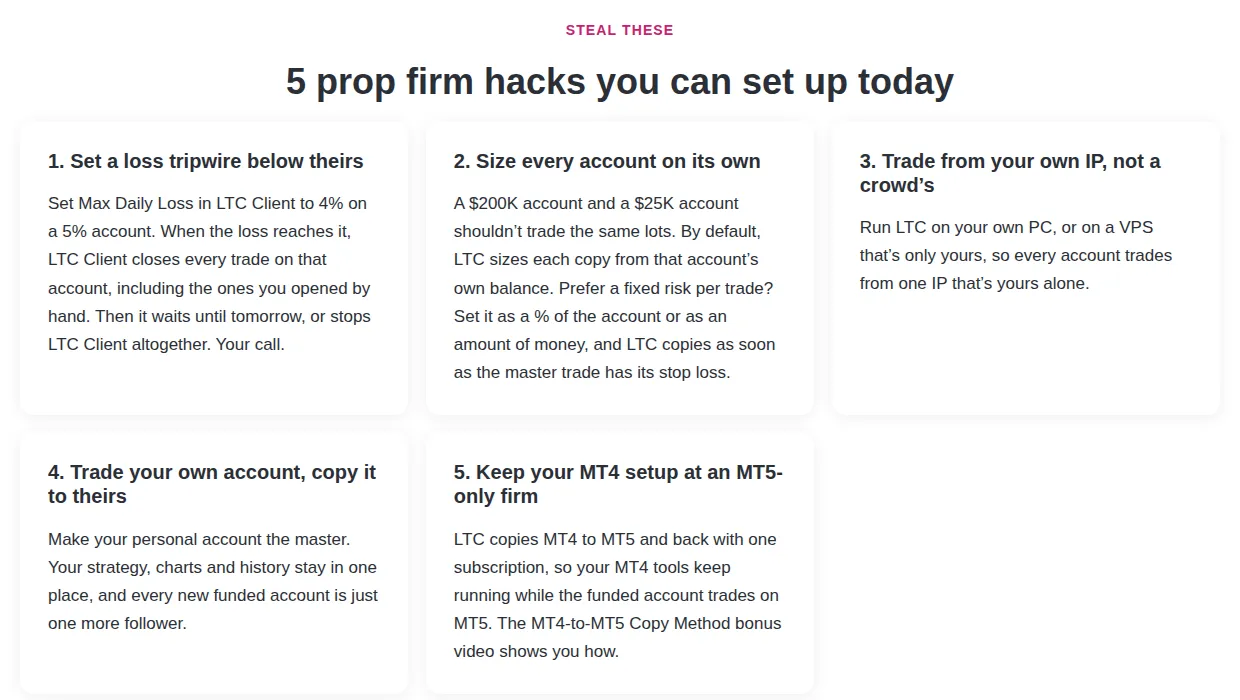
The vendor is careful about one point, and so should you be. It says it doesn't sell LTC as "undetectable": Manual-Like Execution changes how a copy is placed, not what an account's rules allow. Its trial page notes that most prop firms allow copying between your own accounts, but each firm sets its own rules, so read them before you connect a funded account.
Pros and cons
Pros
- Flat price for many accounts. €29 a month covers every account on one PC or VPS, so large setups cost far less than per-account cloud copiers.
- Every MT4 and MT5 direction. MT4 to MT5 and back are included, with both versions in one subscription.
- Accounts stay on your machine. No third party holds your passwords or logs in to your accounts, and each terminal trades from your own IP.
- Detailed controls. Per-account sizing, a daily loss limit, symbol mapping, filters, reverse copying and Manual-Like Execution are on every plan.
- Long track record. Developed since 2010, with a public changelog and current documentation.
Cons
- One computer only. It can't copy between terminals on different PCs or VPSs.
- MetaTrader only for accounts. Apart from the one-way DXtrade copier, it doesn't reach cTrader, TradeLocker or futures platforms.
- You run the infrastructure. Every terminal must stay open, so in practice you need a VPS and the RAM to match.
- Copies take about a second. That is the developer's own median, slower than the figures several cloud copiers advertise.
- Conditional refund. No refund if your broker or prop firm blocks EAs, so check that during the trial.
- Support on weekdays only. Email support runs Monday to Friday, usually within 24 to 48 hours, with an AI assistant in between.
Who Local Trade Copier suits
Local Trade Copier suits traders who run several MT4 or MT5 accounts and can keep them all on one VPS: prop firm traders with a handful of challenges and funded accounts, account managers with client accounts, and algorithmic traders who want one EA's trades on every account. The more accounts you run, the better the per-computer price looks.
It suits less well if you only copy between two accounts, where a free copier may be enough, or if your accounts are spread over several machines or platforms.
Alternatives to Local Trade Copier
The alternatives split by where the copier runs. All prices are from each vendor's own pages as listed on our forex trade copier hub.
- FX Blue Personal Trade Copier is a free copier for MT4 and MT5 terminals on the same computer, with lot sizing, symbol mapping and reverse copying.
- Duplikium runs in the cloud from €9 per account a month and reaches MT4, MT5, cTrader, DXtrade and more, with nothing to keep running on your side.
- Heron Copier is a cloud copier from $19 a month for two accounts that covers MetaTrader, cTrader, DXtrade, TradeLocker and Match-Trader, and also copies Telegram signals.
- Social Trader Tools is a web-based MT4 and MT5 copier from $20 a month for two accounts, aimed at account managers and signal sellers.
For a wider look at MetaTrader copiers, see our comparison of the best trade copiers for MT4 and MT5.
Verdict
Local Trade Copier is built for one job: copying between many MetaTrader accounts on one Windows machine, at a price that doesn't rise with every account you add. MT4 and MT5 in every direction, per-account risk controls and the daily loss limit make it a strong fit for prop firm traders and account managers who run their own VPS.
Its limits come from the same design: it can't copy between computers, it covers MetaTrader rather than every platform, and its copies take about a second by the developer's own figures. Start with the 7-day trial on the VPS you plan to use, confirm that each broker and prop firm allows EAs, and consider the yearly plan once the setup runs the way you want.
Frequently Asked Questions
Is Local Trade Copier free?
No. Local Trade Copier has a 7-day free trial, after which it costs €29 a month for one PC or VPS on the Personal plan, or €290 a year. There is no free version or free download beyond the trial.
Does Local Trade Copier work on MT5?
Yes. One subscription includes the Local Trade Copier EA for MT5 and the EA for MT4, and it copies MT5 to MT5, MT5 to MT4, MT4 to MT5 and MT4 to MT4. MT5 stop-limit orders are the exception: MT4 has no such order type, so they aren't copied to MT4 accounts.
Where do I download the Local Trade Copier EA for MT4 or MT5?
From mt4copier.com. The download link arrives by email after you start the trial or buy a plan. Local Trade Copier isn't listed on the MQL5 Market, so products there under similar names come from other developers.
Can Local Trade Copier copy between two computers?
No. The vendor states that it copies only between MetaTrader terminals on the same PC or VPS. To copy between machines or locations, you need a cloud copier such as Duplikium or Heron Copier.
Can I use Local Trade Copier on prop firm accounts?
Yes, and the vendor markets it for that use. Whether copying is allowed is up to each prop firm, so read its rules on trade copiers and EAs first.
Is Local Trade Copier the same as FRZ Local Trade Copier?
No. FRZ Local Trade Copier is a different product from another developer, and so is the Local Trade Copier sold by AutoFxPro. This review covers Local Trade Copier from mt4copier.com by Algonexis Technologies.
Matthew Hinkle
Lead Writer & Full Time Retail Trader
Matthew is NYCServers' lead writer. In addition to being passionate about forex trading, he is also an active trader himself. Matt has advanced knowledge of useful indicators, trading systems, and analysis.
- Forex Trading
- Technical Analysis
- Trading Systems
- Market Indicators
Written by Matthew on
View profile