

Copiix Review 2026: A Free Local Trade Copier for MT4, MT5 and cTrader
Our Copiix review covers how the free Copiix trade copier works on one PC or VPS, what the €9 donation unlocks, MT4 and MT5 setup, prop firm use and the alternatives.

Published

Copiix is a free trade copier that runs on your own computer or VPS and copies trades between MetaTrader 4, MetaTrader 5 and cTrader accounts, with NinjaTrader 8 in beta. The core copier costs nothing, needs no registration and has no account limit. An optional donation from €9, which lasts 30 days, unlocks extras such as webhooks, remote copying to other machines and an experimental Telegram copier. This review explains how the Copiix trade copier works and who it suits, using the vendor's website and documentation as checked on 20 November 2026. We haven't run it on live accounts, so any speed figure below is Copiix's own claim.
What Is Copiix?
Copiix describes itself as a "free local trade copier": a desktop program, the Copiix Console, plus an Expert Advisor for MT4 and MT5, a cBot for cTrader and a NinjaScript strategy for NinjaTrader 8. You run the trading terminals and the Console on the same machine, mark one terminal as the source of trades and the others as receivers, and Copiix repeats each trade on the receiving accounts.
According to its About page, Copiix now belongs to High Frequency Trading Network Pte Ltd, the Singapore-based group behind the TradingFXVPS hosting brand. The site's footer dates the project from 2023, and the changelog shows regular releases through 2026, the latest being version 3.241 on 15 November 2026.
The pitch is cost. Copiix's homepage promises "no subscription, no registration" and copying "across unlimited accounts", which sets it apart from paid local copiers that charge per machine and from cloud copiers that charge per account.
How the Copiix Trade Copier Works
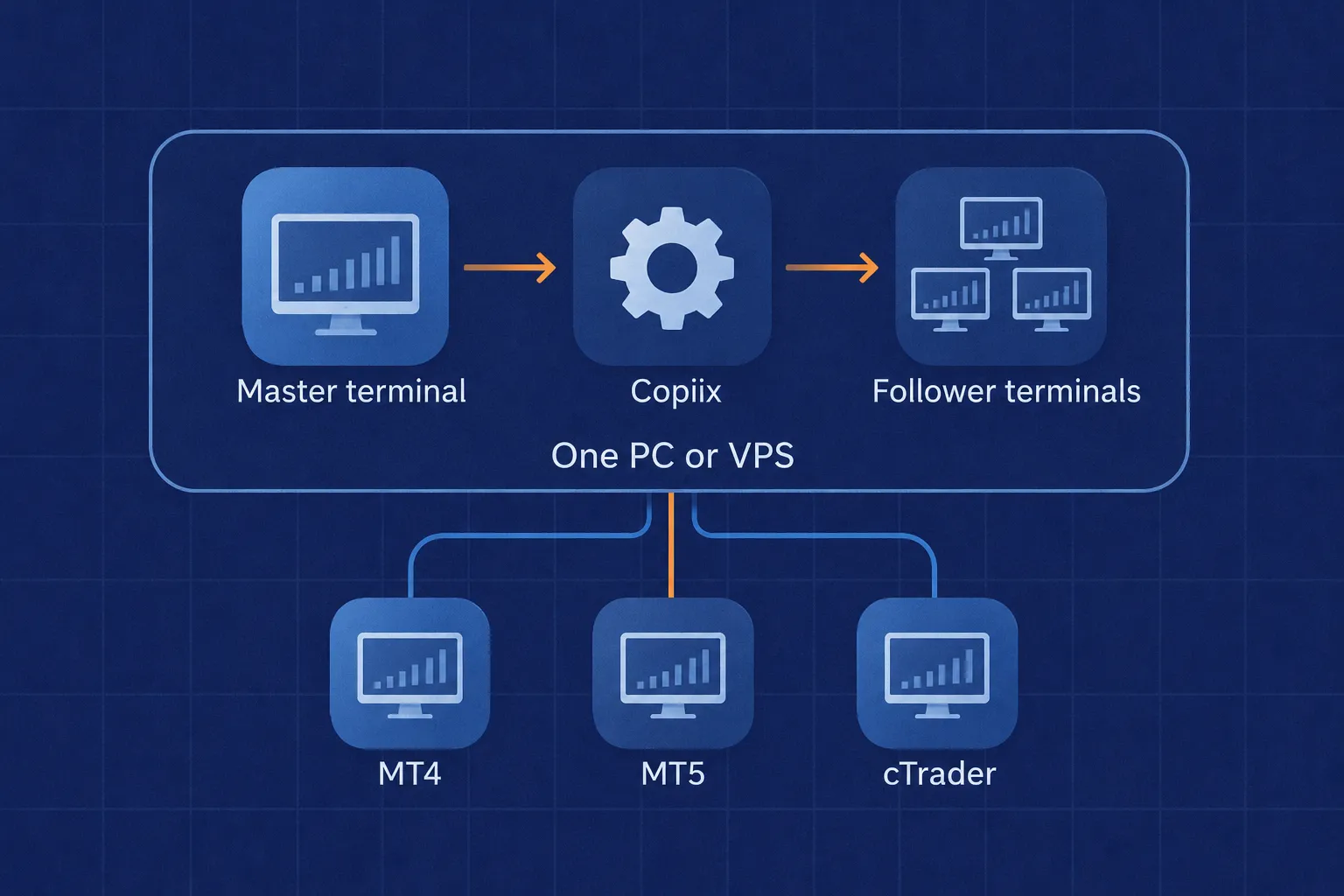
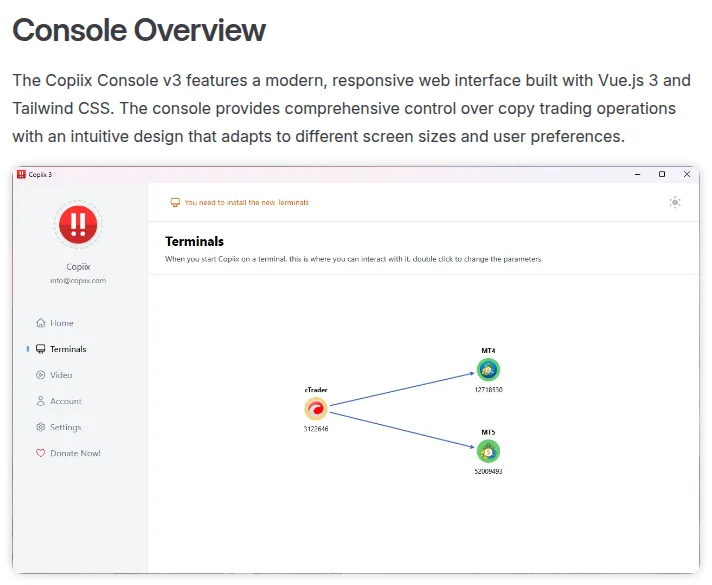
Copiix is a local copier: nothing passes through a vendor server when you copy between your own accounts. The download page describes the setup in three steps. You download the portable Console, which needs no installation, and run it. You click "Install Terminals", which copies the EA and cBot files into every MT4, MT5 and cTrader installation the Console finds. Then you attach the Copiix EA or cBot to one chart in each terminal and choose its role in the Console.
Each terminal can be a Provider, which sends its trades; a Copyer, which receives and places them; or both at once. The parameters guide says Copiix has built-in protection against signal loops when a terminal runs in both modes, though it still recommends testing such setups on demo accounts.
Behind the scenes, the terminals don't talk to each other directly. The terminals overview explains that MetaTrader's sandbox blocks direct communication between programs, so the Provider writes each signal as a small file into a shared folder, and the Copyer picks it up, validates it and places the trade. On Windows that folder is MetaTrader's common Files\Copiix directory. Because the files live on one disk, every terminal you copy between must run on the same computer or VPS, unless you use the paid remote feature described below. Copiix's homepage claims copies take under 1 ms because nothing leaves the machine; that is the vendor's figure, not one we have measured.
Once you've set the parameters, the Console can be closed and the terminals keep copying on their own. The exceptions are the premium services: remote providers, webhooks and the Telegram copier all need the Console running and online.
Copiix Pricing: Free, With Optional Donations
Copiix has no paid plan in the usual sense and no free trial, because the copier itself is free with no time limit. Its FAQ states there are no monthly fees or hidden charges and no credit card is needed, and that local copying works across unlimited accounts.
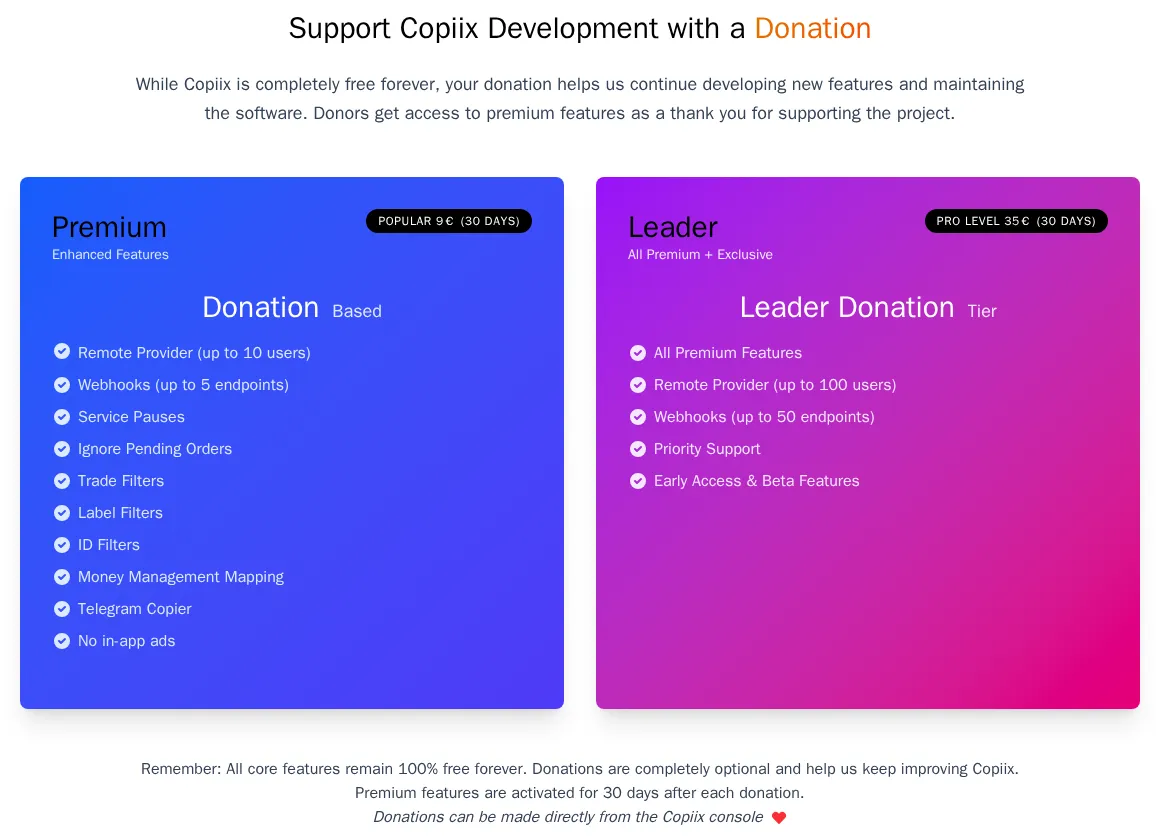
What Copiix sells instead is a donation that unlocks extra features for 30 days. The donations page lists two tiers:
| Tier | Donation | What it adds |
|---|---|---|
| Free | €0 | Unlimited local copying, all money management modes, symbol mapping, reverse trading, drawdown and target limits, Telegram notifications |
| Premium | €9 for 30 days | Remote Provider for up to 10 users, webhooks for up to 5 endpoints, service pauses, ignore pending orders, trade, label and ID filters, money management mapping, the Telegram copier, no in-app ads |
| Leader | €35 for 30 days | Everything in Premium, Remote Provider for up to 100 users, up to 50 webhook endpoints, priority support, early access to beta features |
Donations are made only from inside the Console. You create an account there, then donate with the same email address so the features activate. The documentation says there is no auto-renewal, so each donation covers 30 days and then lapses. One inconsistency is worth knowing: the account page of the docs still lists the Leader tier at €70 a month, while the donations page shows €35 for 30 days. The donations page is the one you pay through, so treat €35 as the current figure.
Supported Platforms and Systems
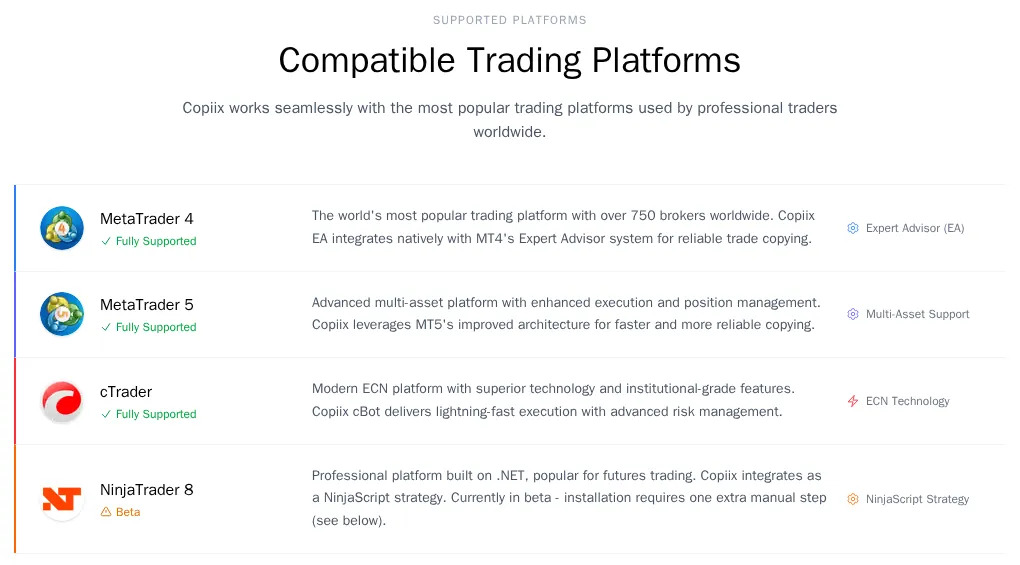
Copiix lists four trading platforms on its download page:
- MetaTrader 4, fully supported, through an Expert Advisor.
- MetaTrader 5, fully supported, through an Expert Advisor, on both hedging and netting accounts.
- cTrader, fully supported, through a cBot. The docs require cTrader desktop 4.0 or later.
- NinjaTrader 8, in beta since version 3.215 of October 2026, through a NinjaScript strategy. It needs one manual step, Tools → Import NinjaScript, because NinjaTrader doesn't let other programs import strategies.
Copying works across platforms and brokers. The FAQ says you can "copy trades between different brokers and different platforms simultaneously", so a cTrader account can feed MT4 and MT5 accounts at the same time. The November 2026 changelog adds that stop loss and take profit now copy between NinjaTrader and MetaTrader or cTrader in both directions.
The Console runs on Windows 10 and 11, Windows Server 2016 or later, Ubuntu 20.04+, Debian 11+, Fedora 38+ and macOS 11+, according to the download page. The documentation still labels macOS as beta and asks for macOS 12. The stated minimum is 2 GB of RAM with 4 GB recommended, although the getting-started guide recommends 8 GB or more when you run several terminals.
Key Features
For a free tool, Copiix covers most of what a paid local copier does. The details below come from the parameters guide.
Lot sizing and money management
Each Copyer can size trades in one of three ways. Equity to equity scales the lot by the ratio of the two accounts' equity and then by a multiplier, so a 1.0 lot trade on a €10,000 Provider becomes 0.05 lots on a €1,000 Copyer with a 0.5 multiplier. Percentage copies a share of the Provider's lot, such as 50% or 200%. Fixed lots places the same size every time. With a Premium donation, the money management map lets you set different rules per symbol, per group of symbols or per magic number, so a scalping robot and a swing robot on the same Provider can be sized differently.
Symbol mapping and filters
Prefix and suffix handling strips broker additions such as ecnEURUSD or EURUSDpro. Symbol translation maps names that differ between brokers, for example XAUUSD:GOLD or NAS100:US100, and symbol exclusion skips the pairs you list. Finer filters by trade, label or ID are Premium features.
Stop loss, take profit and reverse copying
You can copy the Provider's stop loss and take profit or ignore them. Reverse trading turns buys into sells and swaps the stop loss and take profit, for the whole account or for listed pairs.
Drawdown and target limits
When enabled, the drawdown and target feature closes all open trades, and optionally pending orders, once a global drawdown limit or profit target is reached. It is part of the free version, and it is the feature that matters most for prop firm accounts.
Notifications, webhooks and Telegram
Telegram notifications are free: the Console sends alerts to a Telegram chat you set up with a token and chat ID, as long as it is running. Premium adds webhook endpoints that accept JSON signals to open, modify, partially close or close trades, which is how you connect TradingView alerts. Since version 3.073 there is also an experimental Telegram copier for MT4, MT5 and cTrader that reads signals from Telegram channels, but the docs warn that its monitoring window must stay open and not minimised.
Remote copying
The Premium Remote Provider sends signals through Copiix's cloud to up to 10 copiers on other machines, or 100 with Leader. It is the only way to copy between two different computers or VPSs.
Copiix for MT4 and MT5: Setup and Copying Between Them
Setup is nearly the same on both MetaTrader versions, according to the MT4 and MT5 guides. After "Install Terminals", the Copiix EA appears in the Navigator under Expert Advisors. You drag it onto any chart, click OK and make sure the AutoTrading button in MT4, or Algo Trading in MT5, is on. A smiling face in the chart's top-right corner shows that the EA is connected. All settings then live in the Console rather than in the EA's inputs, and one EA per terminal is enough.
Copying between MT4 and MT5 needs nothing extra. Both versions write to the same MetaQuotes common folder, so an MT4 Provider and an MT5 Copyer on the same machine see each other's signals, and the Console shows them as linked terminals. Things to check when you mix the two:
- Netting accounts. MT5 supports hedging and netting accounts, and Copiix supports both, but a netting account merges positions in the same symbol, so several MT4 trades can end up as one MT5 position.
- Symbol names. Brokers often name the same instrument differently, so set prefixes, suffixes or translations before going live.
- Pending orders. The MT5 troubleshooting notes advise checking that the order types are compatible between Provider and Copyer.
- Brokers that change tickets. Several 2026 releases added safeguards for MT5 brokers that reassign a position's ticket after it opens, which could otherwise break the link between the original and copied trade.
If you also want to copy into cTrader, our guide to copying trades between MetaTrader and cTrader covers the general approach.
Copiix for Prop Firm Traders
Copiix's homepage lists prop firms among the account types it works with, and two of its features fit funded accounts well. Equity-to-equity sizing scales trades to each account's size, and the drawdown and target limit closes everything when an account reaches the loss or profit level you set, which you can align with a firm's maximum loss.
Two cautions apply. First, a local copier puts every account on one machine, and therefore on one IP address. Some firms look closely at several accounts trading from the same IP, so read our explainer on prop firm IP address rules before you connect funded accounts. Second, firms differ on whether copying between accounts is allowed at all, and on copying from someone else's signals, so check each firm's terms first. Our guide to managing multiple prop firm accounts covers how traders usually organise this.
Does Copiix Need a VPS?
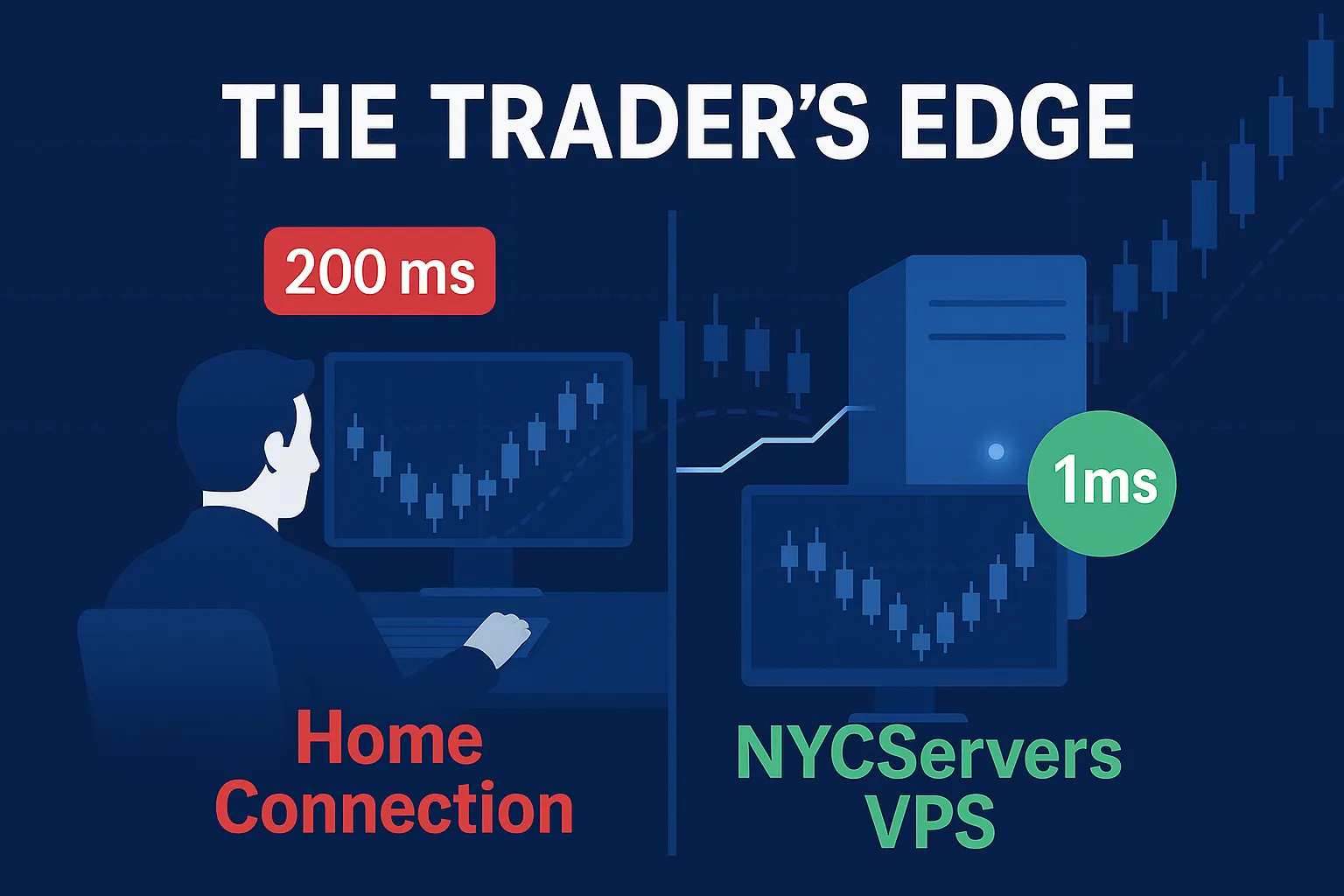
Copiix itself doesn't require a VPS, but a local copier only copies while the machine running it is on. A home PC that sleeps, restarts for updates or loses its connection stops the copying, which matters most when the Provider runs an Expert Advisor around the clock. A Windows VPS keeps every terminal online, and Copiix's own MT4 guide recommends "a reliable VPS service" for 24/7 operation.
Size the server for the terminals rather than for Copiix, since each MetaTrader or cTrader terminal uses its own memory, and pick a data centre close to your broker's servers. Our forex VPS plans are built for running several MT4, MT5 and cTrader terminals on one server.
Pros and Cons
Pros
- The copier is free with no time limit, no registration and no account limit.
- It copies between MT4, MT5 and cTrader in any combination, with NinjaTrader 8 in beta.
- It offers equity-based, percentage and fixed lot sizing, symbol translation and reverse copying at no cost.
- The free drawdown and profit target limit suits prop firm accounts.
- It runs on Windows, Linux and macOS, and updates arrive often.
Cons
- Free copying works only between terminals on the same computer or VPS. Copying to another machine needs a recurring donation.
- Premium features last 30 days per donation, so webhooks and remote copying effectively cost €9 a month.
- Antivirus tools may flag the unsigned download.
- Some documentation pages lag behind the website, as the €70 and €35 Leader prices show.
- Free users get best-effort support with a stated 48–72 hour response time.
Who Copiix Suits
Copiix suits traders who run several accounts on one machine and don't want to pay for copying, such as copying a personal account to a few funded accounts, mirroring an Expert Advisor across brokers, or copying an MT4 strategy to MT5 or cTrader. Its free drawdown limit and equity scaling make it a sensible first choice for prop firm traders on a budget.
It suits you less if your accounts are on different machines and you don't want a recurring donation, or if you need a vendor-run cloud that copies while your own server is off. Signal sellers with more than 100 followers will outgrow the Leader tier.
Copiix Alternatives
The closest free alternative is the FX Blue Personal Trade Copier. It is also free and local, and copies between MT4 and MT5 terminals on the same computer, but it doesn't support cTrader and its settings live in each EA's inputs rather than in one console. Our FX Blue copier review covers it in detail.
Local Trade Copier is the paid local option, covered in our Local Trade Copier review. It copies between MT4 and MT5 on one PC or VPS, with unlimited accounts, for €29 a month per machine. It doesn't cover cTrader, but it is a commercial product with paid support, which some traders prefer to a donation model.
If you need copying between machines without keeping a server online, a cloud copier such as Duplikium does the copying on the vendor's servers and charges per account. Our forex trade copier comparison lists these options side by side with prices and supported platforms.
Verdict: Is the Copiix Trade Copier Worth It?
For traders who copy between accounts on one computer or VPS, Copiix is one of the strongest free options available in 2026. It covers MT4, MT5 and cTrader in any direction, includes lot sizing, symbol mapping and a drawdown limit at no cost, and is updated frequently. The trade-offs are that it is local only unless you donate, that it relies on an unsigned download, and that its documentation doesn't always match its website. If you run your terminals on a VPS and copy only between your own accounts, you may never need to pay anything. If you need remote copying or webhooks, €9 for 30 days is still cheap compared with paid copiers.
FAQ
Is Copiix legit?
Copiix is made by High Frequency Trading Network Pte Ltd, a Singapore company that also runs the TradingFXVPS brand, according to its About page. It is distributed as a free download from copiix.com, with public documentation and a changelog showing regular releases. Local copying needs no account and no broker passwords, because it runs inside terminals you have already logged into, and the About page says your trading data never leaves your device. Only the optional premium features, which route signals through Copiix's cloud, need a Console account with an email address. The download isn't digitally signed by Microsoft, so antivirus tools may flag it; the vendor calls this a false positive, and its getting-started guide says to download only from copiix.com.
Is Copiix really free?
Yes. Local copying between unlimited accounts is free, with no registration and no time limit. A donation of €9 or €35 unlocks extra features, such as remote copying and webhooks, for 30 days, but it is optional.
Does Copiix work with MT4 and MT5, and copy between them?
Yes. Both are fully supported through an Expert Advisor, MT5 on hedging and netting accounts. Both EAs use the same MetaQuotes common folder, so an MT4 Provider can feed MT5 Copyers and the reverse. Set symbol translations if your brokers name instruments differently.
Can Copiix copy between two different computers or VPSs?
Not in the free version. Copying between machines uses the Remote Provider feature, which needs a Premium donation for up to 10 users or a Leader donation for up to 100.
Does Copiix have a free trial?
There is no trial because the copier is free. The paid extras are bought as 30-day donations, with no auto-renewal.
Does Copiix need a VPS?
It doesn't require one, but it only copies while the machine running your terminals is on, so Copiix's own MT4 guide recommends a VPS for 24/7 operation.
Matthew Hinkle
Lead Writer & Full Time Retail Trader
Matthew is NYCServers' lead writer. In addition to being passionate about forex trading, he is also an active trader himself. Matt has advanced knowledge of useful indicators, trading systems, and analysis.
- Forex Trading
- Technical Analysis
- Trading Systems
- Market Indicators
Written by Matthew on
View profile