
FXBlue Trade Copier Review 2026: Free MT4/MT5 Copier
FXBlue Personal Trade Copier review for 2026. Free MT4/MT5 copier with advanced lot sizing, risk management, and cross-platform support. Full feature breakdown.

What Is the FXBlue Personal Trade Copier?
The FXBlue Personal Trade Copier is a free EA that duplicates orders between two or more instances of MetaTrader running on the same computer. It works with both MT4 and MT5, supports cross-platform copying between the two, and comes with hundreds of configurable settings for lot sizing, risk management, and trade filtering.
FX Blue has been around for over a decade, primarily known for its trading analytics and publishing tools. The Personal Trade Copier is their most popular download, trusted by tens of thousands of traders and even used by some brokers to offset risk and liquidity between servers.
Unlike cloud-based copiers that route signals through external servers, FXBlue works entirely on your local machine. That means zero monthly fees, no third-party data exposure, and copy speeds limited only by your broker’s execution — not by internet routing.

Who Is It For?
FXBlue fits a specific niche. It works best for traders who need to copy trades between multiple MetaTrader accounts on the same machine. Typical use cases include:
- Multi-account managers running the same strategy across personal and client accounts
- Prop firm traders mirroring trades from a master account to funded accounts
- EA operators duplicating robot signals from one broker to another for diversification
- Risk hedgers using the invert direction feature to run opposing positions on separate accounts
If your accounts are spread across different machines or you need remote cloud-based copying, FXBlue is not the right tool. It requires all MetaTrader instances to be running on the same computer or VPS.

Key Features Breakdown
Cross-Platform MT4/MT5 Compatibility
One of the strongest features is native cross-platform support. You can copy trades from MT4 to MT5, MT5 to MT4, or any combination. This is particularly useful if your signal provider runs on MT4 but your broker only offers MT5, or vice versa.
The sender side only needs read-only “investor” password access. It does not need the ability to place trades. This is a meaningful security advantage if you are sharing access to a master account.
Lot Sizing Modes
FXBlue offers seven distinct lot sizing modes. Only one should be active at a time:
| Mode | How It Works | Best For |
|---|---|---|
| UseRiskFactor (Default) | Adjusts lot size based on relative account equity | Accounts with different balances |
| UseFixedLotSize | Trades the same volume regardless of sender size | Flat-lot strategies |
| UseLotSizeMultiplier | Trades a proportion of the sender’s lot size | Scaling up or down |
| EquityPerLot | Calculates lots based on receiver’s equity | Equity-proportional sizing |
| CashRiskFixed | Risks a fixed dollar amount per trade | Dollar-risk management |
| CashRiskEquityPercent | Risks a percentage of account equity per trade | Percentage-risk models |
| NotionalDepositVolume | Fixed deposit currency amount trading | Custom notional sizing |
The default UseRiskFactor mode is the smartest starting point. With a value of 1, it proportionally adjusts lot size between sender and receiver based on their relative equity. A sender with $10,000 equity trading 0.50 lots would result in a receiver with $5,000 equity trading 0.25 lots.
The CashRiskFixed and CashRiskEquityPercent modes are particularly useful for traders who want hard dollar or percentage risk limits. These require the sender to have a stop-loss set, or you can define a FixedSLPips value as a fallback.
Risk Management and Equity Protection
FXBlue includes several layers of risk protection that go beyond basic lot sizing:
- MaxOpenOrders_Total: Cap the maximum number of concurrent open orders
- MaxLots: Hard ceiling on lot size regardless of calculations
- StopTradingBelowEquity: Automatically halt trading and close all positions if equity drops below a threshold
- StopTradingAtDrawdownPercent: Freeze trading at a specified negative floating P&L percentage
- MaxTradesPerDay: Daily order limit to prevent runaway systems
- MaxLosingTradesPerDay: Stop copying after a set number of losing trades
- MaxSpreadPips: Block orders when spreads are too wide
- MaxCashRiskPerTrade: Reject individual trades that exceed your cash risk tolerance
These controls are essential for prop firm traders who need to protect drawdown limits. The StopTradingAtDrawdownPercent parameter, for example, can be set to -5 to freeze all activity once your account hits a 5% drawdown — matching common prop firm rules.
Trade Filtering
The copier does not force you into an all-or-nothing approach. You can filter copied trades by:
- Symbol: Only copy specific currency pairs or instruments
- Magic number: Copy only trades from specific EAs
- Order comments: Match trades containing specific text in their comments
- Direction: Copy only buy orders or only sell orders
- Size: Ignore orders smaller or larger than specified thresholds
- Trading hours: Restrict copying to specific time windows
This granularity is rare in free copiers. If you run multiple EAs on one account but only want to copy signals from a specific robot, the magic number filter handles that cleanly. For a broader look at available options, check our roundup of the best MT4 trade copier software.
Slippage Management
Price differences between broker accounts are inevitable. FXBlue handles this with several slippage controls:
- AllowSlippagePips: Maximum acceptable price deviation before rejecting a copy
- PlaceLimitOrderIfSlipped: When slippage exceeds tolerance, place a pending limit order at the sender’s entry price instead of rejecting outright
- ImmediateCloseOnSlippagePips: Auto-close trades if the actual fill deviates too far from expected price
- TradeAllOrdersAtMarket: Accept any price difference (useful for highly correlated but differently priced instruments)
The PlaceLimitOrderIfSlipped setting is particularly clever. Rather than missing a trade entirely due to momentary spread widening, it queues a pending order at the original price. If the market pulls back, you get filled. If it does not, the order expires after a configurable period.
Symbol Translation
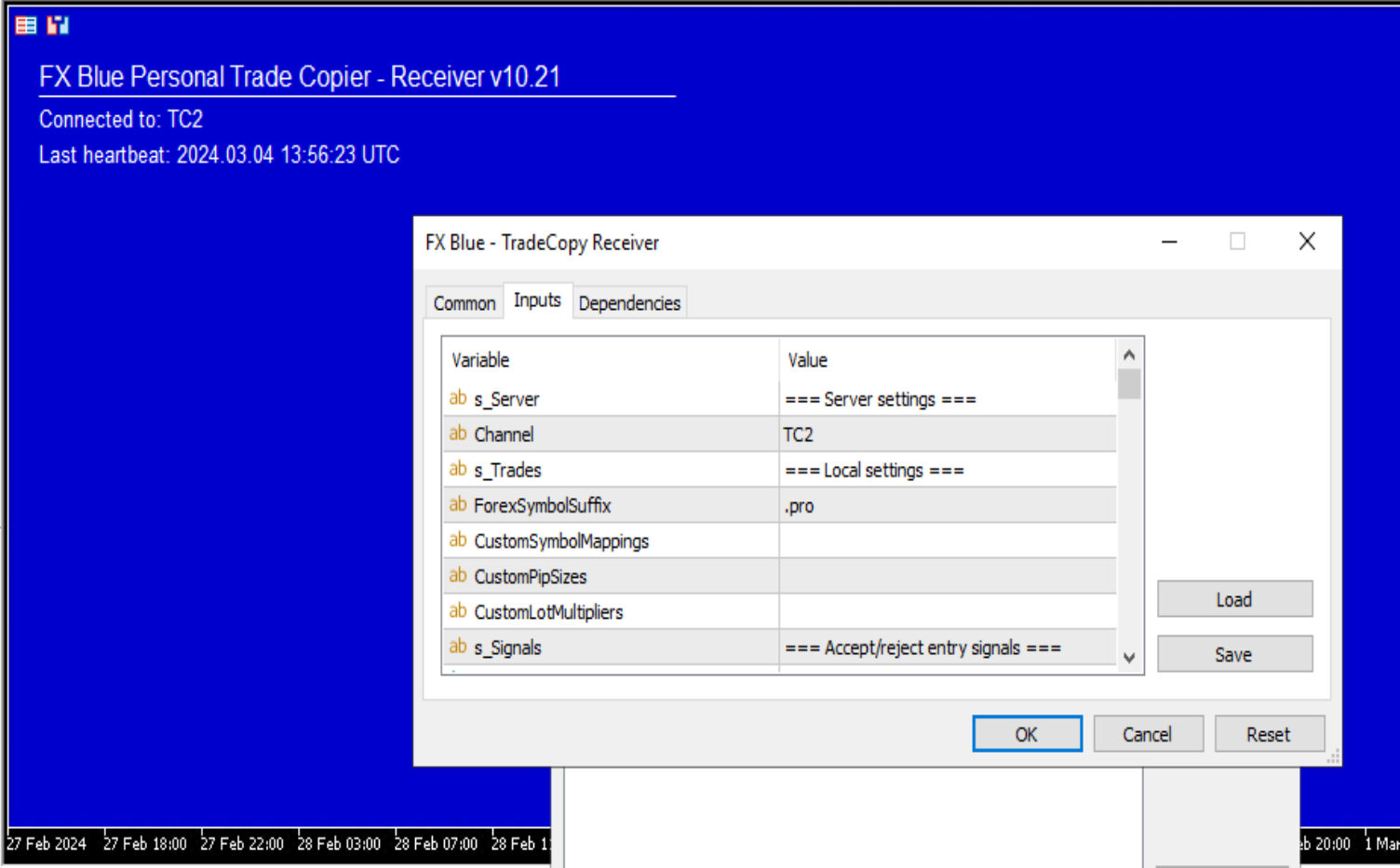
Different brokers use different naming conventions. EURUSD at one broker might be EURUSDcx at another. FXBlue handles this automatically for forex pairs through the ForexSymbolSuffix parameter, and supports custom mappings for non-forex instruments like gold, oil, and indices.
Example: If your sender trades “GOLD” but your receiver uses “XAUUSD”, set CustomSymbolMappings to “GOLD=XAUUSD” and the copier handles the translation seamlessly.
Stop-Loss and Take-Profit Controls
The receiver’s stop-loss and take-profit levels serve as safeguards in case the sender connection is lost. Normally, trades close when the sender closes them. But FXBlue gives you override options:
- FixedSLPips / FixedTPPips: Override sender’s levels with your own fixed distances
- MinSLPips / MaxSLPips: Enforce minimum and maximum stop-loss boundaries
- TrailingStopPips: Apply a trailing stop on the receiver that overrides the sender’s stop-loss
- MirrorSLandTPChanges: Copy any stop-loss or take-profit modifications the sender makes in real time
For prop firm accounts with strict drawdown rules, setting a MaxSLPips value adds a safety net even if the signal provider uses wide stops.
Notification and Monitoring
FXBlue includes built-in alert systems for new orders, closed orders, rejected orders, and connection problems. Alerts can appear on screen or send via email. A heartbeat monitoring system detects if the sender goes silent, triggering alerts after a configurable number of seconds.
Custom alert text supports variables like {SYMBOL}, {LOTS}, {PNL}, {EQUITY}, and {BALANCE}, letting you build informative notification messages.
Installation and Setup
Setting up FXBlue requires a few specific steps:
- Download the installer from the FX Blue website
- During installation, select all MT4/MT5 instances you want to use
- The installer copies the sender and receiver EAs into each platform’s Navigator
- Restart your MetaTrader instances or refresh the EA list
- Enable “Allow DLL imports” in each EA’s settings (required for the copier to function)
- Attach the sender EA to one chart on the master account
- Attach the receiver EA to one chart on each slave account
- Match the channel name between sender and receiver (default is “TradeCopy”)
The system requires Microsoft .NET Framework v4.8, which may need manual installation on some VPS environments. If you are running FXBlue on a MT4 VPS, .NET is typically pre-installed. Once configured, the sender can broadcast to multiple receivers on different channels using comma-separated channel names.
A critical setup note: each receiver EA must have a unique magic number. If you are running multiple receivers on the same account, each needs its own identifier to avoid conflicts.

Performance on a VPS
Since FXBlue requires all MetaTrader instances to run on the same machine, a VPS is the natural deployment environment. Running a copier setup on a home PC introduces risks from power outages, internet drops, and Windows updates interrupting your sessions.
On a trading VPS, FXBlue copies are nearly instantaneous since there is no network latency between instances — everything happens in local memory. The TradeWatchFrequencyMS parameter on MT4 controls how often the sender checks for new trades, with a default of 50 milliseconds and a minimum of 10ms. On MT5, trade detection is event-driven, making it even faster.
For optimal VPS performance with FXBlue:
- Use a dedicated chart for each sender and receiver EA (no indicators needed)
- Keep TradeWatchFrequencyMS between 25-100ms depending on your trade frequency
- If running many accounts, consider the optional Receiver-Worker EA which enables concurrent order placement (MT4 only)
- Allocate at least 2GB RAM for every 4-5 MetaTrader instances
Known Limitations and Real User Issues
No product review is complete without addressing the drawbacks. FXBlue has several limitations that prospective users should weigh carefully.
Local-Only Operation
The most significant limitation is the local-only requirement. All MetaTrader instances must run on the same computer. If you need to copy trades between a home PC and a remote server, or between two separate VPS machines, FXBlue cannot do it. You would need their separate Trade Mirror product or a cloud-based alternative.
Pending Order Risks
Copying pending orders is supported but comes with warnings directly from FX Blue themselves. The danger: a receiver’s pending order can fill even when the sender’s does not, creating an unmanaged position on the receiver account. The RequireSenderFillWithinMinutes parameter mitigates this, but does not eliminate the risk entirely.
Reported Lot Size Errors
Some users have reported instances where the copier sent incorrect lot sizes to receivers. One documented case involved a master account trading 0.23 lots, but the copier instructing four receiver accounts to trade 3 lots each — turning an $18 loss into $200+ per account. While these reports are not widespread, they highlight the importance of testing with small lot sizes before going live.
MT4 Single-Threaded Processing
On MT4, the receiver can only process one trade instruction at a time while waiting for broker confirmation. If the sender opens multiple positions simultaneously, the receiver queues them sequentially. The optional Receiver-Worker EA (supporting 2-8 workers) addresses this, but adds complexity to the setup.
MT5 Netting Account Complexity
If your MT5 broker uses netting accounts instead of hedging, the copier maintains “virtual tickets” to track positions. This tracking data is stored in the MQL5/Files directory, and if those files are lost during a VPS migration or system restore, the copier loses its position mapping. Always back up these files.
No Modern Platform Support
FXBlue only works with MT4 and MT5. If you trade on cTrader, DXTrade, TradeLocker, or any web-based prop firm platform, you will need a different solution entirely.
License Restrictions
The Personal Trade Copier is licensed for personal use only. You cannot use it to run a commercial trade-copying service. If you need to provide signals to paying subscribers, FX Blue offers their Trade Mirror product for that purpose.

FXBlue vs. Paid Alternatives
How does a free copier stack up against paid competitors? Here is a direct comparison:
| Feature | FXBlue (Free) | Social Trader Tools ($20/mo) | Duplikium ($4/seat/mo) | Traders Connect ($10/acct) |
|---|---|---|---|---|
| Price | Free | $20/month | $4/seat/month | $10/account |
| Platforms | MT4, MT5 | MT4, MT5 | MT4, MT5, cTrader, TradingView | MT4, MT5 |
| Copy Type | Local only | Cloud-based | Cloud-based | Cloud-based |
| Execution Speed | Near-instant (local) | ~50ms | 1-3ms | 20-30ms |
| Remote Copying | No | Yes | Yes | Yes |
| Risk Management | Extensive | Moderate | Moderate | Moderate |
| Custom Code | Yes (MQL) | No | No | No |
| Setup Complexity | Medium-High | Low | Low | Low |
FXBlue wins on price, risk management depth, and local execution speed. Paid alternatives win on ease of setup, remote capability, and modern platform support. If all your accounts are on MT4/MT5 and running from a single VPS, FXBlue is hard to beat. If you need cross-machine or cross-platform copying, a cloud solution makes more sense.
Verdict: Is FXBlue Worth Using in 2026?
Yes, with caveats. The FXBlue Personal Trade Copier remains one of the most powerful free trade copiers available. Its depth of configuration — seven lot sizing modes, multi-layered risk management, granular trade filtering, and MQL extensibility — surpasses many paid alternatives.
The catch is that it demands more technical knowledge to configure correctly. The sheer number of settings means there is more room for misconfiguration, and the local-only requirement limits its flexibility. If you are comfortable with MetaTrader, running a VPS, and willing to spend time on initial setup, FXBlue delivers genuine value at zero cost.
For traders who want a simpler setup or need to copy across different machines and platforms, paying for a cloud-based copier is the better path. But for MetaTrader-focused traders consolidating everything onto one trading VPS, FXBlue is still a top-tier choice.
Check our forex VPS plans to ensure your copier setup runs with maximum uptime and the lowest possible latency to your broker.
Frequently Asked Questions
Is FXBlue Personal Trade Copier really free?
Yes. The copier EA is completely free with no time limits, account restrictions, or hidden fees. The installer has an expiration date to ensure you download the latest version, but once the EA is installed, it runs indefinitely. FX Blue monetizes through their analytics and publishing tools, not the copier itself.
Can FXBlue copy trades between MT4 and MT5?
Yes. The MT4 and MT5 versions are fully compatible with each other. You can copy from MT4 to MT5, MT5 to MT4, or any combination. This cross-platform capability is one of FXBlue’s strongest features and is especially useful when your signal source runs on a different MetaTrader version than your trading account.
Does FXBlue work across different computers or VPS machines?
No. The Personal Trade Copier only works between MetaTrader instances running on the same machine. For copying between different computers or remote locations, you need FX Blue’s Trade Mirror product, which routes signals over the internet. Alternatively, cloud-based copiers like Duplikium or Social Trader Tools support remote copying natively.
How fast does FXBlue copy trades?
On the same machine, copying is nearly instantaneous since no network transmission is involved. The MT4 sender checks for new trades every 50 milliseconds by default (configurable down to 10ms). MT5 uses event-driven detection, which is even faster. The actual execution delay depends on your broker’s order processing speed, not the copier itself.
Can I use FXBlue for prop firm account management?
Yes, as long as the prop firm uses MT4 or MT5 and you run all accounts from the same machine. The risk management features like StopTradingAtDrawdownPercent and MaxLosingTradesPerDay are particularly useful for staying within prop firm drawdown rules. However, note the personal-use-only license — running a commercial signal service requires FX Blue’s Trade Mirror instead.
What happens if the sender connection drops?
Open trades on receiver accounts remain open but unmanaged until the connection is restored. This is why setting stop-loss and take-profit levels on the receiver is important — they act as safety nets if the sender goes offline. The heartbeat monitoring system alerts you when the sender stops communicating, giving you time to intervene manually.
Does FXBlue support cTrader or TradingView?
No. FXBlue only supports MetaTrader 4 and MetaTrader 5. If you need to copy trades involving cTrader, TradingView, DXTrade, or other platforms, you will need a multi-platform copier like Duplikium or a custom API bridge solution.

About the author
Thomas Vasilyev
Writer & Full Time EA Developer
Tom is our associate writer, and has advanced knowledge with the technical side of things, like VPS management. Additionally Tom is a coder, and develops EAs and algorithms.
Areas of Expertise