
TradingView vs MetaTrader 5 (2026): Best for Professional Traders?
TradingView vs MetaTrader 5 in 2026 — which is better for professional and active traders? Charting, execution, automation, and pricing compared.
TradingView vs MetaTrader: Two Different Philosophies
TradingView and MetaTrader dominate the retail trading world, but they solve very different problems. TradingView is a charting-first platform built for analysis, social interaction, and multi-asset coverage. MetaTrader (both MT4 and MT5) is an execution-first platform built for direct broker connectivity, automated trading, and forex-specific workflows.
Picking the right one depends on what you actually do at your desk every day. If you spend most of your time drawing trendlines and studying price action across stocks, crypto, and forex, TradingView will feel like home. If you run Expert Advisors around the clock on a VPS and need tight broker integration, MetaTrader is the obvious choice.
This comparison breaks down every major category so you can make an informed decision based on your trading style, not marketing hype.
Charting and Technical Analysis
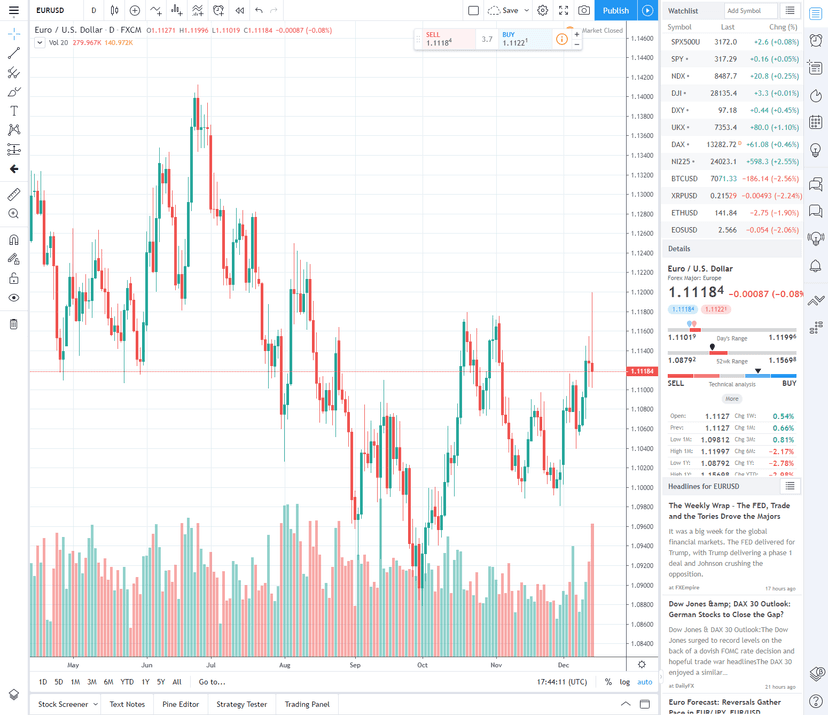
This is where TradingView pulls ahead decisively. The TradingView platform offers over 100 built-in indicators, 110+ drawing tools, and the ability to display up to 16 charts per tab on the Ultimate plan. Charts are clean, responsive, and highly customizable. Multi-timeframe analysis is seamless, and you can overlay data from different assets on the same chart without breaking a sweat.
TradingView’s Pine Script language lets you build custom indicators and strategies. The community has published over 100,000 free scripts, so there’s a good chance someone has already built what you need. Pine Script is beginner-friendly compared to MQL, and everything runs in the cloud. No software to install, no files to manage.
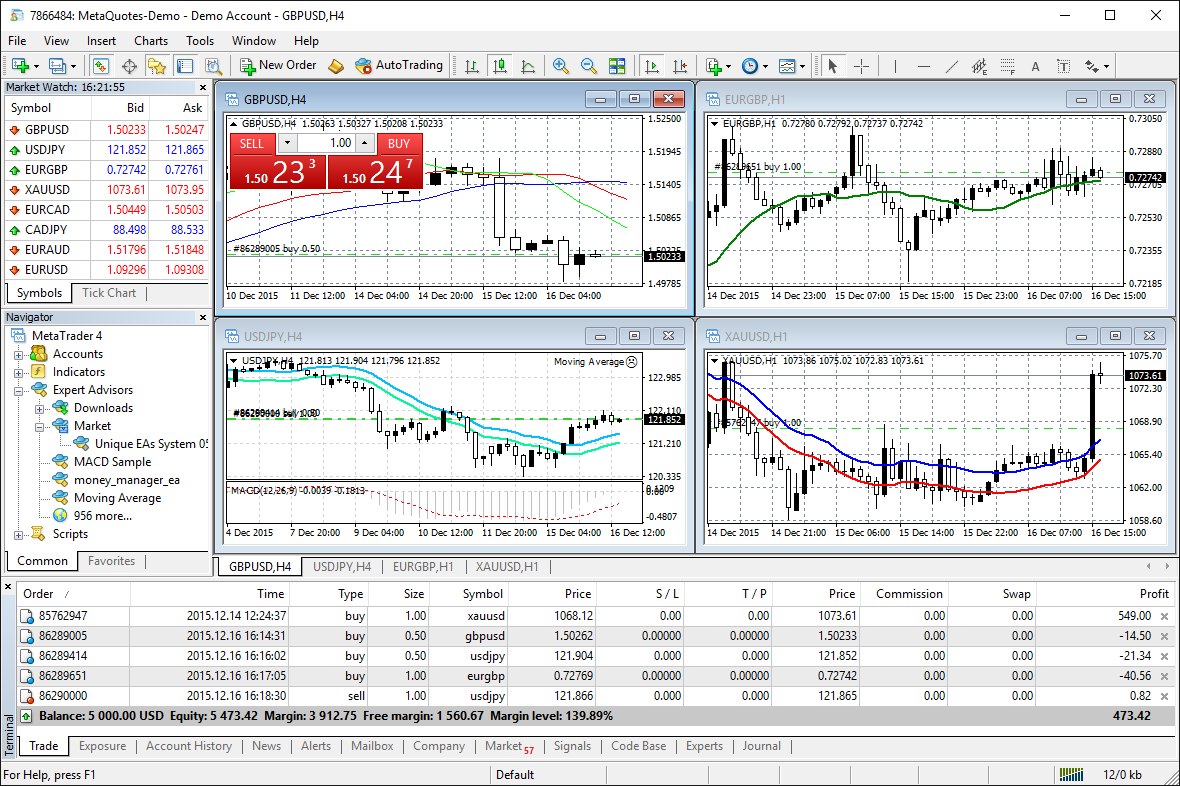
MetaTrader’s charting is functional but dated. MT4 offers 30 built-in indicators and 9 timeframes. MT5 improves on this with 38 indicators and 21 timeframes, plus a built-in economic calendar. Both support custom indicators through MQL4 and MQL5 respectively, but the learning curve is steeper since MQL resembles C++ syntax.
For pure chart analysis, TradingView wins. The gap is especially wide if you trade multiple asset classes or need to share annotated charts with a community.
Quick take: TradingView is the clear winner for charting. Its interface, indicator library, and multi-asset coverage are a generation ahead of MetaTrader.
Automated Trading and Expert Advisors
Automation is where MetaTrader dominates, and it’s not close. MT4 and MT5 support Expert Advisors (EAs) that execute trades automatically without any human intervention. You can build complex trading robots using MQL4 or MQL5 through MetaTrader’s development environment, backtest them against historical data, and deploy them to trade 24 hours a day. The development environment includes a full IDE (MetaEditor), a debugger, and comprehensive documentation.
The MQL5 marketplace has thousands of commercial EAs and indicators. Many professional algorithmic traders run multiple EAs simultaneously on dedicated servers or VPS instances, keeping their strategies active even when their personal computer is off. This is a battle-tested ecosystem that’s been powering automated forex trading for over a decade. You can also rent signals from successful traders through MetaTrader’s built-in Signals service, which copies trades automatically into your account.
TradingView’s automation story is much thinner. Pine Script can define strategy logic and generate alerts, but it cannot execute trades natively. To automate order execution from TradingView, you need third-party bridges like PineConnector or Pinetrader that forward webhook alerts to a MetaTrader terminal for execution. This adds latency, complexity, and another potential point of failure.
The webhook approach also introduces reliability concerns. If the bridge service goes down, your alerts won’t reach MetaTrader. If your webhook URL changes, all your alerts break. And debugging a failed trade across two platforms and a bridge service is significantly harder than troubleshooting a single EA running natively on MetaTrader.
If you’re building or running trading robots, MetaTrader is the only serious option between these two. The entire platform is built around execution, and running EAs on a low-latency VPS is the gold standard for automated forex trading.
Broker Integration and Order Execution
MetaTrader connects directly to your broker. When you place a trade in MT4 or MT5, the order goes straight to your broker’s server. Execution speed depends on your connection quality and broker infrastructure, which is why serious traders use VPS hosting for traders co-located near broker servers to minimize latency.
MT4 supports four order types (market, limit, stop, trailing stop). MT5 adds six pending order types including buy stop limit and sell stop limit. Both platforms show real-time bid/ask pricing, depth of market (DOM) on MT5, and one-click trading from the chart.
TradingView has expanded its broker integration significantly in recent years. You can now connect accounts from brokers like Interactive Brokers, OANDA, and several others directly within TradingView’s interface. However, the broker list is more limited compared to MetaTrader’s near-universal adoption across forex brokers.
One practical difference matters here. With MetaTrader, virtually every forex and CFD broker on the planet offers MT4 or MT5 connectivity. TradingView’s broker integration is growing but still selective. If your broker isn’t on TradingView’s supported list, you’re stuck using it for analysis only.

Execution Speed Comparison
| Factor | MetaTrader | TradingView |
|---|---|---|
| Direct broker connection | Yes (native) | Via supported brokers only |
| VPS support | Full (run EAs 24/7) | Not applicable (cloud-based) |
| Order types | MT4: 4 / MT5: 8 | Varies by connected broker |
| One-click trading | Yes | Yes (with connected broker) |
| Broker availability | Nearly universal | Growing but limited |
Pricing: Free vs Subscription
MetaTrader is completely free. Both MT4 and MT5 cost nothing to download and use. Your broker provides the platform at no charge, and all core features including charting, indicators, EA deployment, and backtesting come included. The MQL5 marketplace has paid add-ons, but the platform itself is zero cost.
TradingView operates on a freemium model. The free plan is functional but limited to one chart per tab, three indicators per chart, and includes ads. To unlock the platform’s real power, you need a paid subscription.
TradingView Pricing (2026)
| Plan | Monthly | Annual (per month) | Key Features |
|---|---|---|---|
| Essential | $14.95 | ~$12.95 | 2 charts/tab, 5 indicators, no ads |
| Plus | $29.95 | ~$24.95 | 4 charts/tab, 10 indicators, alerts |
| Premium | $59.95 | ~$49.95 | 8 charts/tab, 25 indicators, priority support |
| Ultimate | $99.95 | ~$83.29 | 16 charts/tab, 50 indicators, all features |
For most active traders, the Plus or Premium plan is the sweet spot. But that’s $300 to $600 per year just for your charting platform. MetaTrader gives you everything for free, though you’ll trade some charting polish for that savings.
If you’re running EAs on MetaTrader, factor in VPS costs. A quality trading VPS typically runs $25 to $60 per month depending on your needs, but that’s an infrastructure cost you’d pay regardless of your charting platform.
Mobile Apps
Both platforms offer solid mobile experiences, but they serve different purposes.
TradingView’s mobile app mirrors its desktop experience remarkably well. You get the same charts, indicators, watchlists, and social features on your phone. Layouts sync across devices automatically. It’s excellent for checking charts on the go, reviewing ideas from the community, and even placing trades through connected brokers.
MetaTrader’s mobile apps (available for both MT4 and MT5) focus on trade management and monitoring. You can place and modify orders, check open positions, view charts with basic indicators, and receive push notifications from your EAs running on a desktop or VPS. The charting is basic compared to TradingView’s mobile experience, but the execution and position management tools are more robust.
If you primarily need a mobile app for monitoring positions and managing trades, MetaTrader works fine. If you want to do serious chart analysis on your phone, TradingView is substantially better.
Community and Social Features
TradingView built its platform around community from day one. Over 60 million users share trade ideas, publish educational content, and discuss markets in real time. You can follow successful traders, view their published analyses, and learn from annotated charts. The Ideas section functions like a social media feed for traders, and the quality of community content is surprisingly high.
The platform also supports live streams, chat rooms, and a reputation system that rewards consistent, quality content. Top contributors earn visibility, creating an incentive for experienced traders to share genuine analysis rather than promotional fluff. You can filter ideas by asset class, timeframe, or strategy type to find analysis relevant to your trading.
MetaTrader’s community features are more fragmented. The MQL5 community forum exists for discussing indicators, EAs, and coding. MetaTrader also offers a built-in copy trading system (Signals) where you can subscribe to and automatically replicate trades from other traders. The Freelance section lets you hire MQL developers to build custom EAs and indicators. But there’s nothing comparable to TradingView’s social experience within the platform itself. For a deeper look at how MetaTrader stacks up against another popular alternative, see our cTrader vs MetaTrader algo trading comparison.
For newer traders especially, TradingView’s community is a significant draw. Being able to see how experienced traders analyze charts, read their reasoning, and discuss setups in real time is genuinely educational. It also helps with accountability and idea validation before you risk real capital.
Multi-Asset Coverage
TradingView covers nearly everything. Stocks, ETFs, bonds, forex, crypto, futures, indices, and economic data are all available on one platform with data from over 150 exchanges worldwide. You can chart the S&P 500 next to Bitcoin next to EUR/USD without switching tools.
MetaTrader is primarily a forex and CFD platform. While MT5 expanded to include stock and futures trading for some brokers, your available instruments depend entirely on what your broker offers. You won’t find comprehensive stock data or crypto coverage comparable to TradingView.
If you trade only forex or CFDs, MetaTrader’s coverage is sufficient. If you trade across multiple markets or want a single platform for all your analysis, TradingView is the better fit.
Platform Accessibility
TradingView runs entirely in your browser. No download, no installation, no compatibility issues. It works on Windows, Mac, Linux, Chromebooks, and tablets. Your settings, charts, and layouts sync automatically across every device you log into.
MetaTrader requires a desktop installation. MT4 and MT5 are native Windows applications. Mac users can run them through unofficial wrappers or Wine, but the experience is inconsistent. There’s no native Linux support either, which pushes some traders toward web-based alternatives.
MetaQuotes does offer a web terminal for MT5, but it’s a stripped-down version that lacks EA support and advanced features. For full functionality, you need the desktop client running on Windows. This is one reason traders pair MetaTrader with a Windows MT4 VPS, as it gives you reliable access to the full desktop platform from any device through remote desktop.
This accessibility difference matters more than it seems. If you switch between a Windows desktop, a MacBook, and a tablet throughout your day, TradingView handles that seamlessly. MetaTrader’s full feature set is locked to Windows, which can be a dealbreaker for traders who prefer Apple or Linux environments and don’t want to rely on workarounds.
Backtesting Capabilities
MetaTrader’s Strategy Tester has been the industry standard for EA backtesting for years. MT5’s tester is particularly powerful, supporting multi-currency testing, tick-based simulation, and visual backtesting where you can watch your strategy play out on historical data. You can also run optimization passes to find the best parameter combinations for your EA, testing thousands of variations automatically. For serious algorithmic traders, this is essential.
MT5’s cloud-based optimization through the MQL5 Cloud Network lets you distribute heavy computation across thousands of computers, reducing optimization time from days to hours. This level of infrastructure for strategy development is unmatched by any competing platform.
TradingView added backtesting through Pine Script strategies, and it works well for indicator-based strategies. You can test a strategy and see performance metrics, equity curves, and trade lists directly on the chart. The visual feedback is excellent for understanding when and why your strategy enters and exits trades. However, TradingView’s backtester doesn’t support tick-level precision, and you can’t backtest multi-pair strategies as easily as in MT5.
For algo traders who need granular backtesting with precise fill simulation, MetaTrader remains the stronger option. For discretionary traders who want to test a simple moving average crossover or RSI strategy, TradingView is more accessible and quicker to set up.

Which Platform Should You Choose?
The best platform depends entirely on your trading approach. Here’s a practical breakdown by trader type.
Choose MetaTrader If You:
- Run Expert Advisors or plan to automate your trading
- Trade exclusively forex or CFDs
- Need direct broker execution with minimum latency
- Use a VPS for 24/7 strategy deployment
- Want a completely free platform
- Trade with prop firms that require MT4 or MT5
Choose TradingView If You:
- Prioritize chart analysis and technical indicators
- Trade across multiple asset classes (stocks, crypto, forex)
- Want social features and community trade ideas
- Use Mac or Linux as your primary OS
- Prefer a browser-based platform with cross-device sync
- Are learning to trade and benefit from community education
Use Both If You:
- Want the best of both worlds: TradingView for analysis, MetaTrader for execution
- Run automated strategies on MetaTrader but prefer TradingView’s charts for discretionary analysis
- Need multi-asset charting but execute forex trades through a broker on MT4/MT5
Many professional traders use both platforms simultaneously. They analyze setups on TradingView’s superior charts, then place and manage trades through MetaTrader. Some even use PineConnector or similar bridges to forward TradingView alerts directly to MetaTrader for semi-automated execution.
How a VPS Fits Into the Equation
If you choose MetaTrader for automated trading, a trading VPS becomes essential infrastructure. Running EAs on your home computer means trades stop when your PC shuts down, your internet drops, or Windows decides it’s time for an update. That’s unacceptable when your strategy needs to catch every setup, including those that trigger at 3 AM or during high-volatility news events.
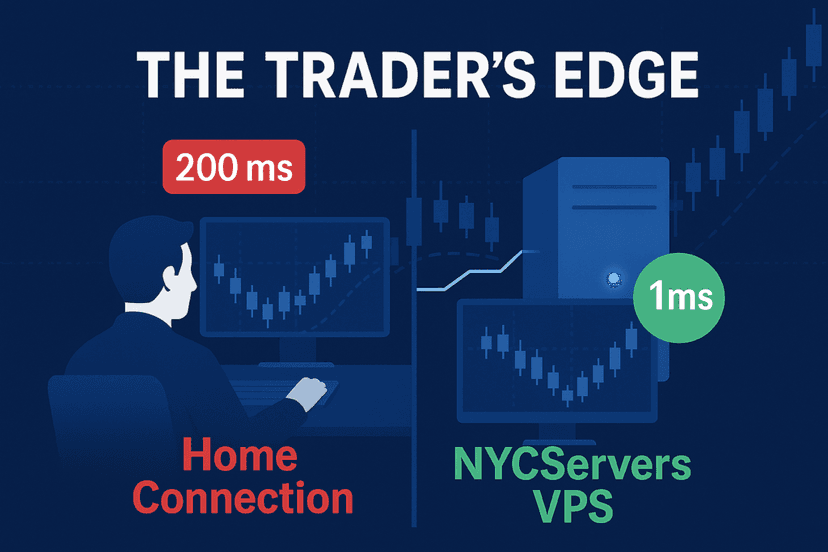
A trading VPS keeps your MetaTrader instance running 24/7 on enterprise-grade hardware with redundant internet connections. Co-located servers near major broker data centers in New York, London, or Tokyo can reduce execution latency to under 1ms. That speed difference matters when your EA needs to enter and exit positions quickly, especially for scalping strategies where every millisecond counts.
The typical setup involves installing MT4 or MT5 on your VPS, loading your EAs and configurations, and letting the server handle everything. You can monitor your trades remotely through MetaTrader’s mobile app or by connecting to your VPS via remote desktop from any device. Most quality VPS providers offer pre-installed MetaTrader terminals so you can start trading within minutes of signing up.
TradingView doesn’t require a VPS since it’s already cloud-based. But if you’re routing TradingView alerts to MetaTrader through a webhook bridge, you’ll still need that VPS running to receive and execute the signals.
Check our forex VPS plans to ensure your trading setup never misses a beat.
Frequently Asked Questions
Is TradingView better than MetaTrader for forex trading?
It depends on your priorities. TradingView offers superior charting and multi-asset analysis. MetaTrader provides direct broker execution, automated trading through Expert Advisors, and universal forex broker support. For pure chart analysis, TradingView wins. For trade execution and automation, MetaTrader is the stronger choice.
Can I use TradingView and MetaTrader together?
Yes, and many traders do exactly this. You can analyze markets on TradingView’s charts and execute trades through MetaTrader. Tools like PineConnector let you forward TradingView alerts to MetaTrader for semi-automated order execution, giving you the best of both platforms.
Is MetaTrader really free?
Yes. Both MT4 and MT5 are completely free to download and use. Your broker provides the platform at no charge. The only costs are optional add-ons from the MQL5 marketplace and any VPS hosting if you run automated strategies around the clock.
Do I need a VPS for TradingView?
No. TradingView is a cloud-based platform that runs in your browser, so there’s no need for a VPS. However, if you use TradingView alerts to trigger trades on MetaTrader through a webhook bridge, you’ll need a VPS running MetaTrader to receive and execute those signals 24/7.
Which platform is better for prop firm trading?
Most prop firms support MetaTrader 4 or MT5, making it the safer choice for funded accounts. Some prop firms like FTMO have added TradingView and cTrader support, but MetaTrader remains the most widely accepted platform. Check your prop firm’s requirements before committing to either platform.
Can I automate trading on TradingView?
TradingView’s Pine Script can define strategy logic and generate alerts, but it cannot execute trades natively. To achieve full automation, you need a third-party bridge like PineConnector that forwards TradingView webhook alerts to a MetaTrader terminal for order execution. This adds latency compared to running EAs directly on MetaTrader.
Which platform has better mobile apps?
TradingView’s mobile app is significantly better for chart analysis, with the same powerful charting tools and social features as the desktop version. MetaTrader’s mobile apps are more focused on trade management, order placement, and position monitoring. Choose based on whether you primarily need mobile analysis or mobile execution.

About the Author
Matthew Hinkle
Lead Writer & Full Time Retail Trader
Matthew is NYCServers' lead writer. In addition to being passionate about forex trading, he is also an active trader himself. Matt has advanced knowledge of useful indicators, trading systems, and analysis.