

WallStreet Forex Robot Review 2026: Scalper Still Worth It?
Honest WallStreet Forex Robot 3.0 review covering live results, strategy, pricing, VPS requirements, and whether this veteran scalper still delivers in 2026.

What Is WallStreet Forex Robot 3.0?
WallStreet Forex Robot is one of the longest-running commercial Expert Advisors in the retail forex space. Developed by FXautomater, it first appeared around 2011 and has gone through several iterations. The current version, WallStreet Forex Robot 3.0 Domination, trades as a tick scalper on M15 charts across major currency pairs.
The EA targets small, frequent profits of 5-8 pips per trade with an average trade duration of roughly 42 minutes. It runs on both MT4 and MT5, making it accessible to most retail traders. Unlike many EAs that rely on martingale or grid recovery systems, WallStreet Forex Robot uses a non-martingale approach by default, which keeps risk more predictable.
FXautomater packages the product in three tiers. The Starter Pack includes a single EA for $197. The Premium Pack bundles five EAs for $267, and the Ultimate Pack adds a crypto indicator for $367. That Premium Pack is where most buyers land, since you get five distinct trading systems for less than the cost of many single-EA products.
The Five EAs in the WallStreet Bundle
Rather than selling one robot, FXautomater now offers a suite of five specialized Expert Advisors. Each one targets different market conditions, and you can run them simultaneously on separate charts.
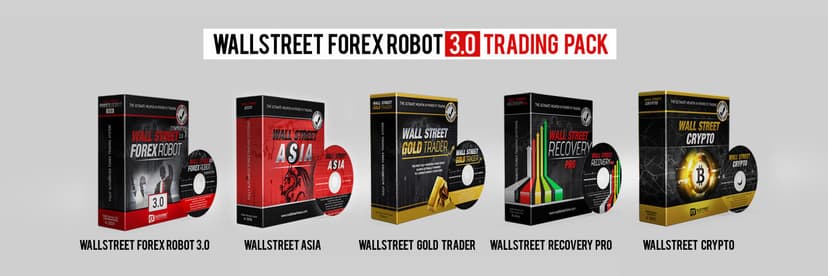
WallStreet Forex Robot 3.0
The flagship product. It scalps EUR/USD, GBP/USD, USD/JPY, USD/CHF, USD/CAD, NZD/USD, AUD/USD, and EUR/JPY on the M15 timeframe. It looks for short-term price movements following institutional order flow patterns. The built-in “Market Bias Algorithm” attempts to identify smart money direction before entering trades.
WallStreet ASIA
A session-specific scalper designed for the Asian trading session. It exploits the typically lower volatility and range-bound conditions that occur when European and American markets are closed. This EA pairs well with a VPS located in a Tokyo datacenter for the tightest execution during Asian hours. If you are new to running EAs on remote servers, our MT4 trading robot installation guide walks through the process step by step.
WallStreet Recovery PRO
This module focuses on recovering from drawdown periods using controlled position sizing. It does not use pure martingale, but it does increase lot sizes strategically after losses. This is the riskiest EA in the bundle and requires careful monitoring.
WallStreet GOLD Trader
A dedicated XAU/USD trading system. Gold has become increasingly popular among EA traders due to its high volatility and wide daily ranges. This EA applies the same core scalping logic but with parameters tuned specifically for gold’s unique price behavior.
WallStreet CRYPTO
The newest addition targets cryptocurrency pairs. Given crypto’s 24/7 market hours and extreme volatility, this EA uses wider stops and adjusted risk parameters compared to the forex-focused systems.
Trading Strategy Breakdown
WallStreet Forex Robot 3.0 is fundamentally a tick scalper. It monitors price action on M15 charts and enters trades when its algorithm detects a short-term directional bias. The EA aims for 5-8 pips of profit per trade, with stop losses typically set at 2-3 times the take profit distance.
That asymmetric risk-reward ratio is worth understanding. While the win rate hovers around 65-80% depending on the pair and market conditions, losing trades tend to be larger than winners. The system’s profitability depends on maintaining a high enough win rate to offset those larger stops.
The Broker Spy Module
One of WallStreet Robot’s standout features is the Broker Spy Module. This tool monitors your broker’s execution quality in real time, tracking spread widening, slippage, and requotes. If it detects unfavorable conditions, it pauses trading until execution quality improves.
For a scalper that targets small pip gains, this matters. A single pip of unexpected slippage can turn a winning trade into a loser. The Broker Spy Module adds a layer of protection that most competing EAs lack entirely.
News Filter
The EA includes a built-in high-impact news filter. It automatically stops trading before major economic releases like NFP, FOMC decisions, and GDP data. This prevents the EA from getting caught in the violent price swings that follow major announcements. You can customize the filter’s timing buffer in the settings.
Live Performance: What the Numbers Show
FXautomater maintains several Myfxbook-verified accounts. The flagship EUR/USD + GBP/USD account shows the following verified metrics over approximately 43 months of live trading:
Verified Myfxbook Stats (WallStreet 3.0):
Total Gain: ~185%
Average Monthly Return: ~2.5-6.5%
Maximum Drawdown: ~21%
Win Rate: ~80%
Profit Factor: 1.15
Average Trades Per Day: 2-3
These numbers tell an interesting story. The 185% total gain over 43 months works out to roughly 2.5% per month on average. That is modest compared to EAs that claim 10-20% monthly, but it comes with significantly lower risk. The maximum drawdown of 21% is manageable for most traders.
Independent testing from third-party review sites shows slightly different figures. One 12-month real-money test on an IC Markets RAW account with $1,500 starting capital reported +156% return with a 22.5% maximum drawdown. The win rate in that test came in around 64-68%, lower than the vendor’s figures but still profitable.
Pair-by-Pair Breakdown
Performance varies significantly across currency pairs. In backtesting data covering 22 years:
- GBP/USD: Strongest performer with an 81.76% win rate
- USD/JPY: Most consistent with an 87.68% win rate
- EUR/USD: Solid middle ground with reliable monthly returns
- AUD/USD and NZD/USD: Lower performance due to wider typical spreads
The pattern is clear: WallStreet Robot performs best on pairs with the tightest spreads and highest liquidity. Pairs with wider spreads eat into those 5-8 pip targets quickly.
Spread Sensitivity: The Critical Factor
This is where many WallStreet Forex Robot users run into trouble. Because the EA targets such small pip gains, spread quality makes or breaks performance. The EA requires spreads below 0.5 pips to work effectively. On standard accounts with 1.0+ pip spreads, the math simply does not work.
Think about it: if you are targeting 5 pips of profit and your spread is 1.2 pips, you have already lost 24% of your potential gain before the trade even moves in your favor. On a RAW/ECN account with 0.1-0.3 pip spreads, that same 5-pip target is almost entirely available as profit.
This makes broker selection and infrastructure setup critical. You need:
- An ECN/RAW spread account (not a standard account)
- A broker with consistently tight spreads on your chosen pairs
- A VPS with low latency to your broker’s trading server
- Minimum recommended leverage of 1:200
VPS Requirements for WallStreet Robot
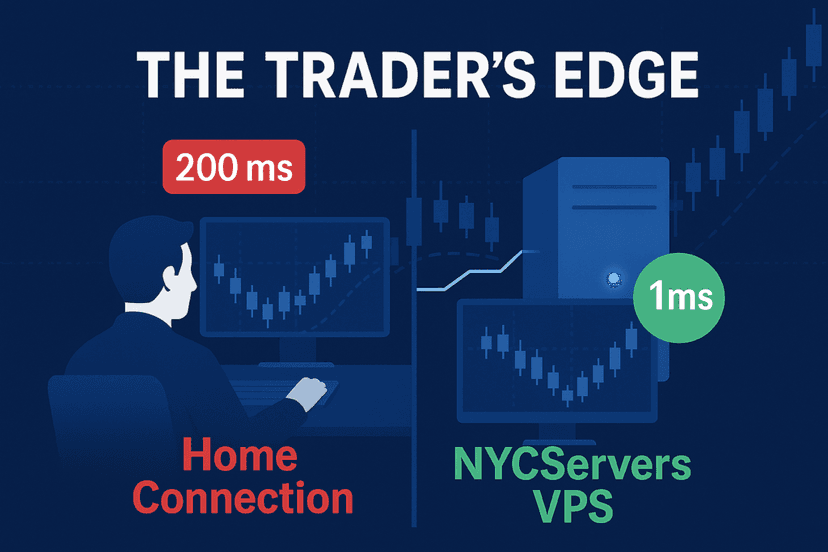
Running WallStreet Forex Robot without a VPS is possible but strongly discouraged. The EA needs to be connected to the market around the clock to catch its short-duration scalping opportunities. A home internet connection introduces risks: power outages, ISP drops, router resets, and Windows updates can all interrupt trading at the worst possible moment.
For a scalper like WallStreet Robot, latency matters more than with most EAs. A low-latency trading VPS with sub-5ms connections keeps fill quality tight. Every millisecond of delay between your platform and the broker’s server affects fill quality. With 5-8 pip targets, even 50ms of additional latency can meaningfully impact results over hundreds of trades.
Recommended VPS Specs
| Specification | Minimum | Recommended |
|---|---|---|
| CPU | 2 cores | 4 cores |
| RAM | 2 GB | 4 GB |
| Storage | 40 GB SSD | 60+ GB NVMe |
| Latency to Broker | <20ms | <5ms (ideally 1ms) |
| Uptime Guarantee | 99.9% | 100% during trading hours |
If you plan to run multiple instances across different pairs (which is the recommended setup), you will want at least 4 GB of RAM. Each MT4/MT5 terminal consumes 200-500 MB depending on chart history and indicators loaded.
Location matters too. If your broker’s servers sit in Equinix NY4 (as IC Markets and many other brokers do), your VPS should be in the same datacenter or cross-connected to it. Running from a London VPS when your broker is in New York adds 60-80ms of latency that directly impacts scalping performance.
Pricing and Value Analysis
WallStreet Forex Robot’s pricing has remained competitive since its early days. Here is how the current packages compare:
| Package | Price | What You Get |
|---|---|---|
| Starter | $197 | WallStreet 3.0 only (1 EA) |
| Premium | $267 | All 5 EAs (WallStreet 3.0 + ASIA + Recovery PRO + GOLD + CRYPTO) |
| Ultimate | $367 | All 5 EAs + WallStreet CRYPTO Indicator |
At $267 for the Premium Pack, you are paying roughly $53 per EA. That is significantly cheaper than most individual EAs on MQL5, where popular robots routinely cost $500-2,000+ each. You also get a one-time payment with no recurring subscription fees, unlike several newer EAs that charge monthly.
The 30-day money-back guarantee through the payment processor gives you time to test on demo before committing real capital. Use it. Do not go live without at least two weeks of demo testing on your specific broker and VPS setup.
Pros and Cons
What Works
- Track record: Verified Myfxbook results spanning 43+ months. Few EAs can match this longevity with consistently positive returns.
- Non-martingale core: The main WallStreet 3.0 EA does not use lot multiplication or grid tactics, keeping risk predictable.
- Broker Spy Module: Real-time execution quality monitoring is a genuine edge for scalping strategies.
- Bundle value: Five EAs covering forex, gold, and crypto for under $300 is strong pricing.
- Regular updates: FXautomater has consistently updated the software over 15+ years, adapting to changing market conditions.
- One-time payment: No monthly subscription fees, which is increasingly rare among commercial EAs.
What Needs Consideration
- Spread dependency: Unusable on standard accounts. You absolutely need an ECN/RAW account with sub-0.5 pip spreads.
- Risk-reward ratio: Stop losses are 2-3x larger than take profits. Extended losing streaks, while rare, hit harder than with symmetrical risk setups.
- VPS mandatory: Not optional for this EA. Without proper hosting and low latency, results degrade noticeably.
- Flat periods: During low-volatility stretches, the EA can go weeks with minimal activity and small drawdowns.
- Recovery PRO risk: The Recovery module uses increased position sizing. If you run it, set strict maximum lot limits and monitor closely.
WallStreet Forex Robot vs. Alternatives
How does WallStreet Robot stack up against comparable commercial EAs? Here is a quick comparison on key metrics:
| Feature | WallStreet 3.0 | Typical Grid EA | Typical News EA |
|---|---|---|---|
| Strategy | Tick scalping | Grid/Martingale | News momentum |
| Risk Level | Moderate | High | High |
| VPS Requirement | Critical | Recommended | Critical |
| Spread Sensitivity | Very High | Low | Very High |
| Win Rate | 65-80% | 70-90%+ | 40-55% |
| Drawdown Pattern | Gradual | Sudden blowup risk | Gradual |
| Track Record | 15+ years | Varies | Varies |
The main advantage WallStreet Robot has over grid-based systems is survivability. Grid EAs can show impressive returns until they hit an extended trend that blows the account. WallStreet’s non-martingale approach means drawdowns are painful but recoverable, not catastrophic.
Setup Guide: Getting Started
Setting up WallStreet Forex Robot is straightforward, but getting the environment right takes some planning. Here is the process:
- Purchase and download from the official wallstreet-forex.com website
- Set up your VPS with a provider that offers low-latency connections to your broker
- Install MT4 or MT5 on your VPS using a pre-configured MT4 VPS and log in to your ECN/RAW account
- Copy the EA files to the Experts folder in your MetaTrader data directory
- Attach to M15 charts for each currency pair you want to trade
- Configure settings: Enable the Broker Spy Module and news filter, set your risk percentage (1-2% recommended), and adjust lot sizes based on your account balance
- Run on demo first for at least two weeks before going live
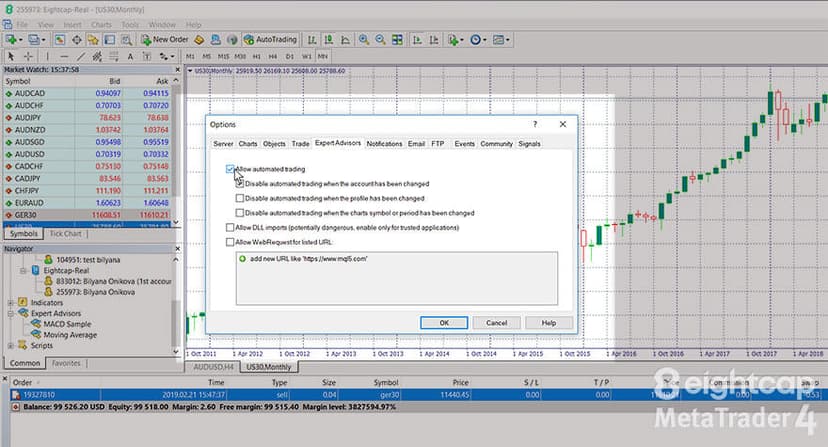
The initial setup takes about 15-20 minutes once your VPS and broker account are ready. FXautomater provides a detailed installation guide and video tutorials with every purchase.
Who Should (and Should Not) Use This EA
Good Fit
- Traders with ECN/RAW broker accounts and tight spreads
- Anyone running a dedicated trading VPS with sub-5ms latency
- Traders who prefer moderate, steady growth over aggressive returns
- Those comfortable with an asymmetric risk-reward profile (high win rate, larger individual losses)
- Experienced EA users who understand the importance of proper infrastructure
Not a Good Fit
- Beginners without VPS experience or ECN accounts
- Traders on standard accounts with 1+ pip spreads
- Anyone seeking 10%+ monthly returns (this is a 2-5% monthly EA)
- Traders who cannot commit to proper monitoring and parameter adjustments
Frequently Asked Questions
Is WallStreet Forex Robot a scam?
No. WallStreet Forex Robot has been operating since 2011 with verified Myfxbook accounts showing real trading results over multiple years. FXautomater is one of the longest-standing EA vendors in the industry. You can check community feedback on Forex Peace Army. While results will vary by broker and market conditions, the product itself is legitimate with a verifiable track record.
What broker works best with WallStreet Forex Robot?
You need a broker offering ECN/RAW accounts with spreads under 0.5 pips on major pairs. IC Markets, Fusion Markets, and similar ECN brokers are popular choices among WallStreet Robot users. Avoid standard accounts or brokers with consistently wide spreads.
Do I really need a VPS to run WallStreet Robot?
Yes. As a scalper targeting 5-8 pip profits, WallStreet Robot’s performance degrades significantly with high latency or unreliable connections. A VPS with sub-5ms latency to your broker’s server is essential for consistent results. Running the EA from a home computer introduces execution risk you cannot afford with such tight profit targets.
How much money do I need to start?
The vendor suggests $500 as a minimum, but $1,000-1,500 is more realistic for surviving drawdown periods comfortably. With the recommended 1-2% risk per trade, a $500 account leaves very thin margins during losing streaks. Higher starting capital gives the EA more room to operate through normal drawdown cycles.
Can I run all five EAs on one VPS?
Yes, but you will need adequate resources. Running five MT4 terminals simultaneously requires at least 4 GB of RAM and a multi-core processor. A basic VPS plan with 2 GB RAM may struggle. Look for a professional plan with 4+ cores and 4-8 GB RAM to run the full suite smoothly.
Is WallStreet Forex Robot profitable in 2026?
Based on verified Myfxbook data through early 2026, the EA continues to produce positive results on major pairs, particularly EUR/USD and GBP/USD. However, profitability depends heavily on your broker’s execution quality and your VPS latency. With proper infrastructure, the EA remains a viable scalping system. Without it, results will disappoint.
What is the difference between WallStreet 3.0 and the Recovery PRO?
WallStreet 3.0 is a non-martingale scalper with fixed lot sizing. Recovery PRO uses controlled position sizing increases after losses to recover drawdowns faster. Recovery PRO carries more risk due to the larger position sizes during recovery phases. Most traders should start with the standard 3.0 version and only add Recovery PRO once they understand the risk implications.

Final Verdict
WallStreet Forex Robot 3.0 is a classic scalping EA that has earned its reputation over 15+ years in the market. It is not flashy, it will not double your account in a month, and it demands proper infrastructure to deliver results. But for traders who set it up correctly with an ECN account, tight spreads, and a low-latency VPS, it remains one of the more reliable automated trading tools available.
The Premium Pack at $267 for five EAs represents genuine value, especially compared to single EAs that cost $500-2,000+. The 30-day refund policy gives you a safety net to test before committing.
The bottom line: WallStreet Forex Robot works, but only if you build the right foundation. An ECN broker with sub-0.5 pip spreads and a VPS with single-digit millisecond latency are not optional. They are requirements. Get those in place, and this veteran scalper still delivers consistent results. Skip them, and you will wonder why the EA underperforms.
Check our forex VPS plans to ensure your trading setup never misses a beat.

About the author
Thomas Vasilyev
Writer & Full Time EA Developer
Tom is our associate writer, and has advanced knowledge with the technical side of things, like VPS management. Additionally Tom is a coder, and develops EAs and algorithms.
Areas of Expertise