
EA Builder Review 2026: Features, Pricing & 24/7 Setup
Complete EA Builder review covering free vs paid plans, features, pros and cons, plus the critical step most traders miss when deploying custom EAs.
What is EA Builder?
EA Builder is a no-code platform that lets traders create Expert Advisors for MetaTrader 4 and MetaTrader 5 without writing a single line of MQL code. Founded in 2007, the software has carved out a niche for traders who have solid strategy ideas but lack programming skills.
The premise is straightforward. You define your trading rules using a visual interface, and EA Builder generates the code for you. The result is a fully functional .ex4 or .ex5 file ready to run on your trading platform.
But here’s what most reviews won’t tell you: building an EA is only half the equation. The real question is what happens after you hit the export button. We’ll cover that critical gap in this review.

Who Should Consider EA Builder?
EA Builder targets a specific audience. If you fall into one of these categories, it might be worth your attention:
- Discretionary traders who want to automate a manual strategy without learning MQL
- Strategy testers who need to quickly prototype and backtest ideas
- Beginners looking to understand how automated trading works
- Experienced traders who want to validate concepts before paying for custom development
If you’re already comfortable with MQL4 or MQL5, you probably don’t need EA Builder. The software excels at bridging the gap between strategy idea and working prototype, not at replacing professional coding skills. To understand what Expert Advisors can do for your trading, read our guide on what forex Expert Advisors are and how they automate trade execution.
Key Features of EA Builder
Let’s break down what you actually get with the platform.
Visual Strategy Builder
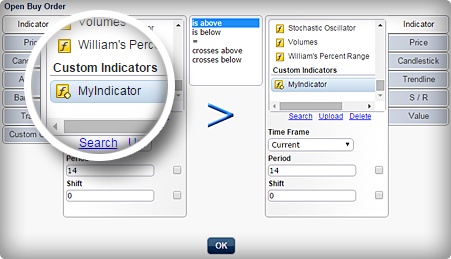
The core of EA Builder is its drag-and-drop interface. You build trading logic by combining conditions and actions without touching code. Want to enter long when RSI crosses above 30 and price is above the 200 EMA? You click, select, and connect the pieces.
The visual approach eliminates syntax errors that plague new coders. It also speeds up the iteration process. You can modify conditions and regenerate your EA in minutes rather than debugging code for hours.
Indicator Support
EA Builder supports most standard MetaTrader indicators out of the box:
- Moving averages (SMA, EMA, WMA, and more)
- RSI, MACD, Stochastic, CCI
- Bollinger Bands, ATR, ADX
- Custom indicators (with limitations)
The custom indicator support is worth noting. While you can reference external indicators, the implementation isn’t always seamless. Complex custom indicators may require workarounds or not work at all.
Risk Management Tools
Every EA needs proper money management, and EA Builder includes the essentials. You can set stop loss and take profit levels in pips, use trailing stops, and define position sizing rules based on account balance or fixed lots.
The risk management options are functional but basic. If you need sophisticated features like dynamic position sizing based on volatility or multiple exit strategies, you’ll hit limitations.
Multi-Platform Export
EA Builder generates code for both MT4 and MT5. This flexibility matters if you’re working with multiple brokers or planning to migrate platforms in the future. Build once, export twice.
The MT5 support was added later in the software’s lifecycle, and it shows. MT4 compatibility is more robust, while MT5 exports occasionally need manual tweaking.
Backtesting Ready
Exported EAs work directly with MetaTrader’s built-in strategy tester. No additional steps required. You can immediately run historical backtests to evaluate your strategy’s potential.
Keep in mind that backtesting results are only as good as your data quality and testing methodology. EA Builder creates the EA, but it doesn’t make your strategy profitable. That part is still on you.

EA Builder Free vs Paid: What’s the Difference?
EA Builder offers both free and paid versions. Understanding the distinction helps you decide which makes sense for your situation.
| Feature | Free Version | Paid Version |
|---|---|---|
| Strategy Building | Full access | Full access |
| MT4 Export | Yes | Yes |
| MT5 Export | Yes | Yes |
| Source Code Access | No | Yes |
| EA Branding | EA Builder watermark | Your custom name |
| Sell/Distribute EAs | No | Yes |
| Premium Support | Limited | Priority access |
| Price | $0 | One-time $97 |
Is the Free Version Enough?
For personal use and strategy testing, the free version covers most needs. You can build unlimited EAs, export to both platforms, and run them on live accounts. The main limitation is the lack of source code access.
Without source code, you can’t modify the generated MQL directly. You’re locked into EA Builder’s interface for any changes. For many traders, this isn’t a dealbreaker. For others, it’s a significant constraint.
When the Paid Version Makes Sense
Consider the $97 upgrade if you plan to sell EAs or need to modify generated code. The one-time fee also makes sense if you want clean EA naming without the watermark or anticipate needing support beyond basic documentation.
At $97 for lifetime access, the pricing is reasonable compared to hiring a developer for a single EA, which typically runs $200-500 or more for anything beyond basic functionality.
EA Builder Pros and Cons
Every tool has trade-offs. Here’s an honest assessment based on real-world usage.
Pros
- Zero coding required: The visual interface genuinely works. You can go from idea to working EA in an afternoon.
- Affordable: Free for personal use, reasonable one-time fee for full features. No subscription drain.
- Fast iteration: Modify and re-export in minutes. Ideal for testing multiple strategy variations quickly.
- Both platforms supported: MT4 and MT5 compatibility from a single strategy file.
- Established software: Been around since 2007. Bugs have been worked out, documentation exists, community support available.
Cons
- Limited complexity: Advanced strategies with multiple timeframes, correlated pairs, or sophisticated logic may not be possible.
- Custom indicator challenges: Working with non-standard indicators can be frustrating or impossible.
- No mobile version: Desktop software only. You need a Windows PC to use it.
- Learning curve exists: While easier than coding, you still need to understand trading logic and indicator mechanics.
- Generated code quality: The MQL output works but isn’t optimized. Professional coders could write tighter, faster code.
Bottom line: EA Builder is excellent for prototyping and testing strategy ideas. It’s not a replacement for custom development if you need professional-grade EAs for serious capital deployment.
How to Use EA Builder: A Quick Workflow
Let’s walk through the basic process of creating an EA. This overview gives you a realistic sense of what’s involved.
Step 1: Define Your Entry Conditions
Start with your long entry rules. What conditions must be true for your EA to open a buy position? Select indicators from the dropdown, set your parameters, and combine them with AND/OR logic.
For example: Enter long when RSI(14) crosses above 30 AND price closes above EMA(50).
Step 2: Define Your Exit Conditions
Next, specify when to close positions. You can use indicator-based exits, fixed take profit and stop loss levels, or a combination. Trailing stops are also available if your strategy calls for them.
Step 3: Set Risk Parameters
Configure your position sizing and risk management. Choose between fixed lot sizes or percentage-based sizing. Set maximum positions allowed and define any additional filters like trading hours or day-of-week restrictions.
Step 4: Generate and Export
Click generate to create your EA code. Review the summary to confirm your logic is correctly captured. Then export as .ex4 or .ex5 depending on your platform. Copy the file to your MetaTrader’s Experts folder.
Step 5: Backtest Thoroughly
Before risking real money, run extensive backtests. Use quality historical data, test across multiple time periods, and be skeptical of overly good results. Curve-fitting is a real danger when strategy building is this easy.
Step 6: Forward Test
After backtesting, run your EA on a demo account for at least a few weeks. Live market conditions differ from historical data. Slippage, spread variations, and execution timing all impact real performance.
Running Your EA 24/7: The Step Most Traders Miss
Here’s where most EA Builder tutorials end, and where the real challenges begin. You’ve built your EA, backtested it, and you’re ready to go live. But how do you keep it running?
The Home Computer Problem
Your EA needs MetaTrader running to execute trades. Close the platform, and your EA stops working. This creates several problems:
- Power outages: Your EA misses trades during downtime
- Internet interruptions: Disconnections mean missed signals
- Computer crashes: System updates, hardware failures, unexpected restarts
- Sleep mode: Even a laptop lid closure can pause execution
Running MT4 or MT5 on your home computer 24/7 is technically possible but practically problematic. Electricity costs add up. Wear on hardware accelerates. And you’re always one Windows update away from disruption.
The VPS Solution
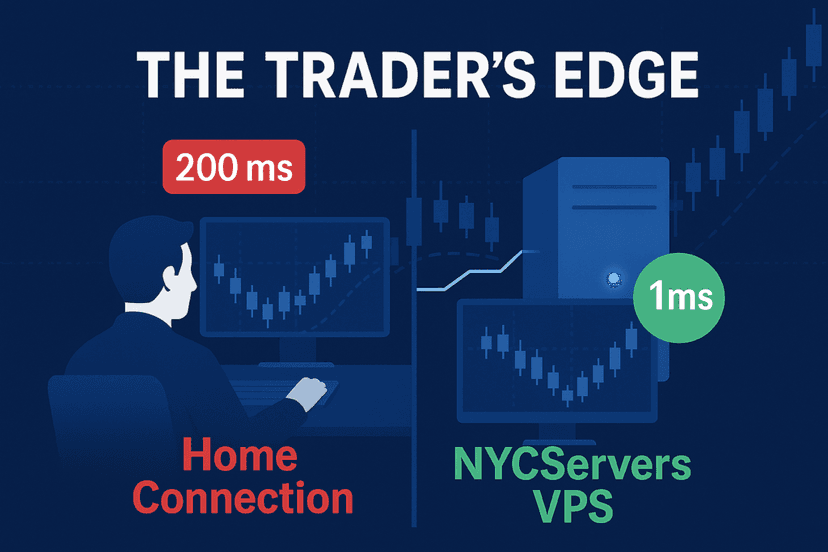
A forex VPS solves these reliability issues. Your EA runs on a remote server designed for continuous uptime, not on hardware sitting under your desk. The forex market operates around the clock, and your trading infrastructure should too.
The practical benefits extend beyond just uptime:
- Reduced latency: Servers located near broker data centers execute faster than home connections
- Consistent performance: Dedicated resources, no competition from other applications
- Access anywhere: Monitor and manage your EA from any device with internet
- Multiple EAs: Run several Expert Advisors simultaneously without stressing your local hardware
Matching VPS Specs to Your Needs
Not all VPS plans are created equal, and you don’t necessarily need the most expensive option. Consider your actual requirements.
For a single EA running one strategy, a basic plan with 2GB RAM handles the job comfortably. MT4 and MT5 are relatively lightweight applications. The platform itself needs about 500MB, and each EA adds minimal overhead.
Running multiple EAs or monitoring several currency pairs? Step up to 4GB RAM for breathing room. If you’re operating a portfolio of strategies across multiple accounts, 8GB or more makes sense.
Latency matters too. A server in New York provides sub-millisecond execution to major brokers with data centers in the financial district. That speed advantage compounds over hundreds or thousands of trades.
Deployment Workflow
Getting your EA Builder creation onto a VPS is straightforward. For a detailed walkthrough, see our MT4 trading robot installation guide:
- Export your EA from EA Builder to your local machine
- Connect to your VPS via Remote Desktop
- Copy the .ex4 or .ex5 file to the Experts folder
- Open MetaTrader, attach the EA to your chart
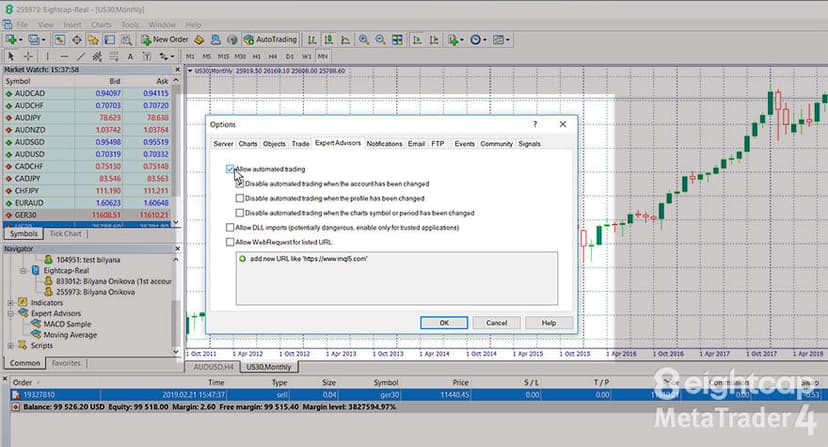
- Configure settings and enable auto-trading
Once set up, your EA runs independently. You can disconnect from the VPS, close your laptop, even travel internationally. The server keeps executing your strategy without interruption.
EA Builder Alternatives Worth Considering
EA Builder isn’t the only no-code option. Here’s how it compares to other approaches.

Forex Strategy Builder Professional
A more feature-rich alternative with advanced backtesting capabilities. It offers Monte Carlo simulation, multi-timeframe strategies, and optimization tools that EA Builder lacks. The trade-off is complexity and a higher price point at $235.
Best for traders who want deeper strategy analysis tools alongside the builder functionality.

StrategyQuant X
Takes a different approach by generating strategies automatically based on parameters you define. It can produce hundreds of strategy variations and rank them by performance metrics. Pricing starts at $1,990, positioning it firmly in the professional category.
Best for traders with capital to invest in tools and time to evaluate generated strategies critically.
MQL5 Wizard
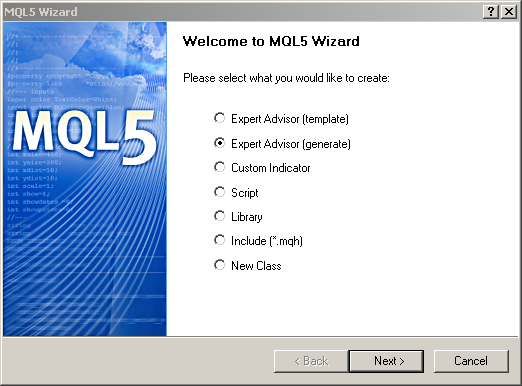
Built directly into MetaTrader 5, this free tool creates EAs from predefined modules. More limited than EA Builder in customization but completely free and integrated into the platform. No external software required.
Best for simple strategies and traders already comfortable in the MT5 environment.
Custom Development
Hiring a programmer through MQL5’s freelance service or similar platforms remains an option. Costs typically range from $200 for basic EAs to $1,000+ for complex systems. You get exactly what you specify, optimized code, and professional support.
Best for traders with proven strategies and budget for professional implementation.
| Solution | Price | Complexity | Best For |
|---|---|---|---|
| EA Builder | Free / $97 | Low | Prototyping and simple strategies |
| Forex Strategy Builder Pro | $235 | Medium | Advanced backtesting needs |
| StrategyQuant X | $1,990+ | High | Professional strategy generation |
| MQL5 Wizard | Free | Low | Basic MT5 automation |
| Custom Development | $200-1,000+ | Variable | Production-grade EAs |
Practical Tips for EA Builder Success
Before wrapping up, here are some practical recommendations from traders who’ve used the platform successfully.
Start Simple
Your first EA should be basic. Two or three conditions, clear entry and exit rules, straightforward risk management. Complex strategies are harder to debug and more likely to fail in unexpected ways. Build complexity gradually after proving simple concepts work.
Document Your Logic
Write down what your EA is supposed to do before building it. This reference helps when troubleshooting unexpected behavior. “Why did it take that trade?” is easier to answer when you have clear documentation.
Use Realistic Backtest Settings
Set spread and slippage values that reflect real trading conditions, not ideal scenarios. A strategy that works with 0.5 pip spread might fail at 1.5 pips. Test conservatively.
Monitor Initially
Even after forward testing, watch your EA closely during the first week of live trading. Unexpected market conditions reveal bugs that backtesting missed. Don’t set and completely forget.
Keep Records
Track which version of your EA is running, what settings you’re using, and any modifications you make. Version control matters when you need to roll back changes or understand performance shifts.

Final Verdict on EA Builder
EA Builder delivers on its core promise. It lets traders create functional Expert Advisors without coding knowledge. The free version offers genuine value for strategy testing and personal use. The paid upgrade is reasonably priced for what you get.
The software works best for traders who want to automate simple to moderately complex strategies. If your trading logic fits within the platform’s constraints, you can go from concept to running EA faster than any other method.
Limitations exist. Complex strategies hit walls. Custom indicator support frustrates some users. Generated code isn’t optimal. These are real constraints, but they’re reasonable trade-offs for the accessibility EA Builder provides.
The bigger picture matters too. Building an EA is step one. Running it reliably on infrastructure designed for 24/7 operation is step two. Many traders nail the first step with EA Builder and stumble on the second.
Frequently Asked Questions
Is EA Builder free to use?
Yes, EA Builder offers a free version that includes full strategy building and export capabilities for both MT4 and MT5. The free version lacks source code access and includes a watermark on your EAs. The paid version costs a one-time fee of $97 and removes these limitations.
Can EA Builder create profitable trading strategies?
EA Builder creates the code that executes your strategy. It does not make strategies profitable. Profitability depends entirely on the logic you design, your risk management, market conditions, and execution quality. The tool is only as good as the trader using it.
Does EA Builder work with MT5?
Yes, EA Builder supports both MetaTrader 4 and MetaTrader 5 platforms. You can export to either format from the same strategy file. MT4 compatibility is slightly more robust, as MT5 support was added later in the software’s development.
Do I need a VPS to run EAs created with EA Builder?
You don’t strictly need a VPS, but it’s strongly recommended for live trading. Running your EA on a home computer means trades only execute when that computer is on and connected. A VPS provides 24/7 uptime, lower latency to brokers, and independence from your local hardware.
How does EA Builder compare to hiring a programmer?
EA Builder is faster and cheaper for simple strategies. You can build and test ideas in hours rather than days or weeks waiting for a developer. However, custom development produces optimized code and handles complex logic that EA Builder cannot. For production trading with significant capital, professional development often makes more sense.
Can I sell EAs created with EA Builder?
Only with the paid version. The free version prohibits commercial distribution and includes EA Builder branding. The $97 paid version allows you to sell or distribute your EAs with custom naming and no watermarks.
What are the system requirements for EA Builder?
EA Builder runs on Windows operating systems. You need a computer that can run MetaTrader to test your exports. The software itself is lightweight and runs on most Windows machines from the past decade. Mac users need Windows virtualization or Boot Camp.

About the author
Thomas Vasilyev
Writer & Full Time EA Developer
Tom is our associate writer, and has advanced knowledge with the technical side of things, like VPS management. Additionally Tom is a coder, and develops EAs and algorithms.
Areas of Expertise