

What Are Forex Expert Advisors? Guide to EA Trading In 2026
Learn what forex expert advisors are and how EAs automate your trading. Covers EA types, advantages, risks, and how to run EAs on MT4/MT5 for 24/5 execution.

What Are Forex Expert Advisors?
Forex Expert Advisors (EAs) are automated trading programs that execute trades on your behalf within the MetaTrader platform. They follow pre-programmed rules to analyze markets, identify opportunities, and place orders—all without requiring you to sit at your screen.
Think of an EA as a trading assistant that never sleeps. It monitors price movements, calculates indicators, and executes your strategy 24 hours a day, 5 days a week. Whether you’re using a simple moving average crossover or a complex multi-indicator system, an EA can implement it consistently without emotional interference.
EAs operate exclusively on the MetaTrader 4 (MT4) and MetaTrader 5 (MT5) platforms. They’re written in MQL4 or MQL5—programming languages developed by MetaQuotes specifically for trading automation. You can build your own EA, hire a developer, or purchase ready-made solutions from the MQL5 Market.
How Expert Advisors Work
When you attach an EA to a chart in MetaTrader, it begins analyzing incoming price data (called “ticks”). Each time a new tick arrives, the EA runs through its programmed logic to determine whether conditions for a trade exist.
The Execution Process
Here’s what happens behind the scenes:
- Data analysis: The EA reads current and historical price data, calculates technical indicators, and evaluates market conditions
- Signal generation: If conditions match the strategy’s entry rules, the EA generates a buy or sell signal
- Order placement: The EA sends an order request to your broker’s server with specified lot size, stop loss, and take profit levels
- Trade management: Once in a position, the EA monitors the trade and executes exit rules when triggered
This entire process happens in milliseconds. A well-coded EA on a properly configured system can execute trades faster than any human could manually.
What EAs Can and Cannot Do
EAs excel at tasks that require speed, consistency, and discipline. They can:
- Monitor multiple currency pairs simultaneously
- Execute trades at any hour without fatigue
- Apply risk management rules consistently
- Backtest strategies against historical data
- Eliminate emotional trading decisions
However, EAs have limitations. They cannot adapt to unexpected market events, interpret news sentiment, or adjust to fundamental shifts in market structure. An EA will execute its programmed rules regardless of context—which can be both a strength and a weakness.
Types of Expert Advisors
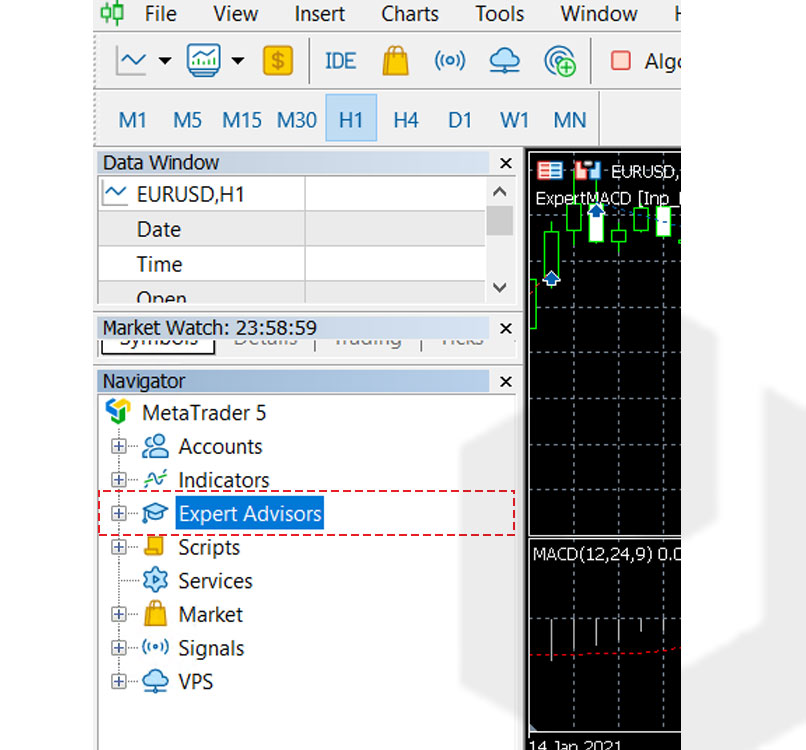
Expert Advisors come in various forms, each designed around a specific trading approach. Understanding these categories helps you choose an EA that matches your risk tolerance and market expectations.
Trend-Following EAs
These EAs identify and ride sustained market movements using indicators like moving averages, ADX, or breakout patterns. They enter trades in the direction of the prevailing trend and hold positions until momentum reverses.
Best for: Trending markets with clear directional moves
Weakness: Underperform in ranging or choppy conditions
Scalping EAs
Scalping EAs target small, frequent profits by entering and exiting trades within minutes or even seconds. They typically aim for 5-15 pips per trade and may execute dozens of trades daily.
Best for: Highly liquid pairs like EUR/USD during active sessions
Weakness: Extremely sensitive to spread and execution speed—requires low-latency infrastructure
Grid EAs
Grid systems place multiple buy and sell orders at fixed intervals above and below the current price. As price oscillates, the EA profits from the natural back-and-forth movement of the market.
Best for: Ranging markets with predictable oscillation
Weakness: Can accumulate large drawdowns during strong trending moves
Martingale EAs
Martingale EAs double position size after each losing trade, attempting to recover losses with a single winning trade. While this approach can produce consistent small gains, a losing streak can quickly deplete an account.
Best for: Traders who understand and accept the high-risk nature
Weakness: Catastrophic loss potential—many traders have blown accounts using martingale systems
Breakout EAs
These EAs monitor key price levels—support, resistance, previous highs/lows—and enter trades when price breaks through. They aim to capture large moves that follow consolidation periods.
Best for: Markets emerging from tight ranges
Weakness: False breakouts can trigger multiple losing trades
News Trading EAs
News EAs place trades around scheduled economic releases like NFP, interest rate decisions, or GDP data. They attempt to profit from the volatility spike that follows major announcements.
Best for: High-impact news events with predictable timing
Weakness: Spreads widen dramatically during news—execution can be problematic
Neural Network and AI EAs
Advanced EAs use machine learning algorithms to identify patterns and adapt to changing market conditions. They analyze vast datasets and can theoretically improve over time.
Best for: Traders with technical expertise to configure and monitor
Weakness: Require significant computing power and can overfit to historical data
Advantages of Using Expert Advisors
Automated trading offers several compelling benefits over manual execution:
Emotion-Free Execution
Fear and greed destroy more trading accounts than bad strategies. An EA follows its rules without hesitation, doubt, or temptation to deviate. It won’t close a winning trade too early out of fear, and it won’t hold a loser hoping it recovers.
24/5 Market Coverage
The forex market operates continuously from Sunday evening to Friday afternoon. No human can monitor charts for 120 hours straight, but an EA can. It catches opportunities during the Asian session while you sleep and executes during London open while you commute.
Consistent Strategy Application
Manual traders often bend their own rules—taking trades that don’t quite meet criteria or skipping valid signals. EAs execute the same logic every time, providing consistent strategy application that’s essential for evaluating performance.
Speed and Precision
EAs can analyze multiple currency pairs, calculate indicators, and execute orders in milliseconds. This speed advantage matters for scalping strategies and during fast-moving markets where delays cost pips.
Backtesting Capability
MetaTrader’s Strategy Tester allows you to run EAs against historical data to evaluate performance before risking real money. You can test years of data in minutes and optimize parameters for different market conditions.
Risks and Limitations
Expert Advisors aren’t a guaranteed path to profits. Understanding the risks helps you use them responsibly.
Over-Optimization
It’s easy to tweak an EA’s parameters until it shows perfect results on historical data. This “curve fitting” creates an illusion of profitability that rarely survives contact with live markets. A strategy that made 1000% in backtesting might lose money in real trading.
Market Condition Changes
Markets evolve. A trend-following EA that dominated in 2023 might struggle in the ranging conditions of 2024. EAs don’t adapt to structural changes—they execute the same logic regardless of whether it’s still effective.
Technical Failures
EAs require continuous operation to function correctly. Power outages, internet disconnections, platform crashes, and broker server issues can all disrupt execution at critical moments. A missed exit signal during a market crash can be devastating.
Broker Dependency
EA performance depends heavily on your broker’s execution quality. Slippage, requotes, and spread widening can transform a profitable strategy into a losing one. What works on one broker may fail on another.
Scams and Low-Quality EAs
The EA market is flooded with overhyped products backed by manipulated backtests and fake reviews. Many commercially available EAs use dangerous martingale or grid strategies that eventually blow accounts. Due diligence is essential before purchasing any EA.
MT4 vs MT5 for Expert Advisors
Both MetaTrader versions support Expert Advisors, but they’re not interchangeable. An EA built for MT4 won’t work on MT5, and vice versa.
| Feature | MetaTrader 4 | MetaTrader 5 |
|---|---|---|
| Programming Language | MQL4 | MQL5 |
| Execution Speed | Fast | Up to 20x faster |
| Strategy Tester | Single-threaded | Multi-threaded (faster backtesting) |
| Order Types | 4 pending order types | 6 pending order types |
| Hedging | Yes | Yes (since build 1325) |
| EA Marketplace | Large library | Growing library |
MT4 remains popular due to its massive EA ecosystem and broker support. MT5 offers superior performance and features but has a smaller selection of pre-built EAs. Your choice may depend on which platform your broker supports and what EAs you want to run.
For detailed platform information, see the official MetaTrader 4 Expert Advisors documentation.
How to Choose an Expert Advisor
Selecting the right EA requires careful evaluation. Here’s what to look for:
Verified Track Record
Demand proof of live trading results, not just backtests. Services like Myfxbook and FXBlue provide verified account monitoring that can’t be easily faked. Be skeptical of EAs showing only vendor-provided screenshots.
Transparent Strategy Logic
Understand how the EA makes decisions. If the vendor won’t explain the strategy type (trend, scalping, grid, etc.) or risk approach, that’s a red flag. You need to know what you’re running on your account.
Reasonable Expectations
Claims of 100%+ monthly returns are almost certainly false or involve unsustainable risk. Professional traders target 20-50% annually. EAs promising guaranteed profits are likely scams.
Drawdown History
Every strategy experiences losing periods. Check the maximum drawdown in verified results. If an EA shows 50%+ drawdown, it could easily wipe your account during a bad stretch.
Developer Support
Good EA developers provide updates, respond to questions, and maintain their products. Check reviews for comments about support quality. Abandoned EAs won’t receive fixes when broker conditions change.
Running Expert Advisors on a VPS
For reliable EA operation, most serious traders use a Virtual Private Server (VPS) rather than their home computer. Here’s why:
Continuous Uptime
A forex VPS runs 24/7 without interruption. Your EA keeps working during power outages, internet disruptions, or when you shut down your laptop. This continuity is essential for strategies that need to manage open positions around the clock.
Reduced Latency
VPS servers located in financial data centers like Equinix NY4 connect to broker servers with latency under 1ms. Compare this to 50-200ms from a typical home connection. For scalping EAs, this speed difference directly impacts profitability.
Stable Environment
Home computers run antivirus scans, Windows updates, and background applications that can freeze MetaTrader at critical moments. A dedicated VPS runs only your trading platform, eliminating interference.
Remote Access
You can monitor and adjust your EA from any device, anywhere. Check positions from your phone, modify settings from a coffee shop, or troubleshoot from vacation—the VPS keeps running regardless of where you are.
NYCServers offers MT4 VPS and MT5 VPS hosting with pre-installed platforms and 1ms latency to major brokers. For more on why VPS matters for automated trading, see our guide on VPS benefits for Expert Advisors.
Getting Started with Expert Advisors
Ready to try automated trading? Here’s how to begin:
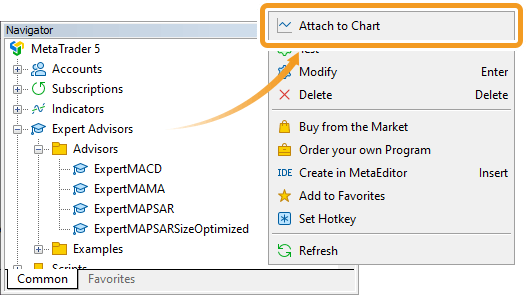
Step 1: Choose Your Platform
Download MetaTrader 4 or MT5 from your broker. Both support EAs, but check which version your preferred EA requires.
Step 2: Find or Build an EA
Options include purchasing from the MQL5 Market, finding free EAs on trading forums, hiring a developer on freelance platforms, or learning MQL programming yourself. Start with a simple strategy you understand before trying complex systems.
Step 3: Backtest Thoroughly
Use MetaTrader’s Strategy Tester to evaluate the EA on historical data. Test across different time periods and market conditions. Be wary of results that seem too good—they often are.
Step 4: Demo Trade
Run the EA on a demo account for at least 1-3 months. This reveals real-world behavior including how it handles spreads, slippage, and execution delays that backtesting doesn’t capture.
Step 5: Start Small Live
When transitioning to live trading, use minimal position sizes. Increase exposure only after the EA proves consistent in real market conditions.
For detailed installation instructions, see our MT4 EA installation guide.
Frequently Asked Questions
Are forex Expert Advisors profitable?
Some EAs are profitable, but most are not. Success depends on the underlying strategy, market conditions, and proper risk management. No EA guarantees profits, and many commercially available EAs lose money over time.
Can I use Expert Advisors on mobile?
No. EAs only run on the desktop versions of MetaTrader 4 and MT5. They don’t function on mobile apps or web platforms. To run an EA while mobile, you need a VPS that keeps your desktop terminal running.
How much does a good Expert Advisor cost?
Prices range from free to several thousand dollars. Free EAs can be effective if you understand their logic. Expensive doesn’t mean better—many pricey EAs underperform free alternatives. Focus on verified results, not price.
Do Expert Advisors work with all brokers?
EAs work with any broker that supports MetaTrader. However, performance varies significantly between brokers due to differences in spreads, execution speed, and slippage. Test your EA with your specific broker before live trading.
Can I build my own Expert Advisor?
Yes. MetaTrader includes a built-in editor for creating EAs using MQL4 or MQL5. Learning the basics takes weeks to months depending on programming experience. Tools like EA Builder offer no-code alternatives for simple strategies.
What’s the difference between an EA and a forex robot?
They’re the same thing. “Expert Advisor” is MetaQuotes’ official term, while “forex robot” is a marketing term. Both refer to automated trading programs for MetaTrader.
Do I need a VPS to run an Expert Advisor?
Not required, but highly recommended. Without a VPS, your EA stops when your computer shuts down or loses internet. For serious automated trading, a VPS provides the reliability and speed that home setups can’t match.
Can Expert Advisors trade multiple currency pairs?
Yes. You can attach the same EA to multiple charts, or use an EA specifically designed to monitor and trade multiple pairs from a single chart. Multi-pair trading requires careful position sizing to manage overall account risk.
Conclusion
Forex Expert Advisors offer a powerful way to automate your trading strategy, eliminate emotional decisions, and capture opportunities around the clock. They’re not magic profit machines—successful EA trading requires a sound strategy, proper risk management, and realistic expectations.
Start by understanding the different EA types and their risk profiles. Test thoroughly on demo before committing real capital. And when you’re ready to trade live, consider running your EA on a VPS to ensure reliable, low-latency execution that maximizes your strategy’s potential.

About the author
Thomas Vasilyev
Writer & Full Time EA Developer
Tom is our associate writer, and has advanced knowledge with the technical side of things, like VPS management. Additionally Tom is a coder, and develops EAs and algorithms.
Areas of Expertise