
Tradesyncer Review 2026: Pricing, Features and Prop Firm Fit
Our Tradesyncer review covers what the cloud futures copier costs, which platforms and prop firms it works with, how setup works, and how it compares with Tradecopia.

Published
What Tradesyncer Is
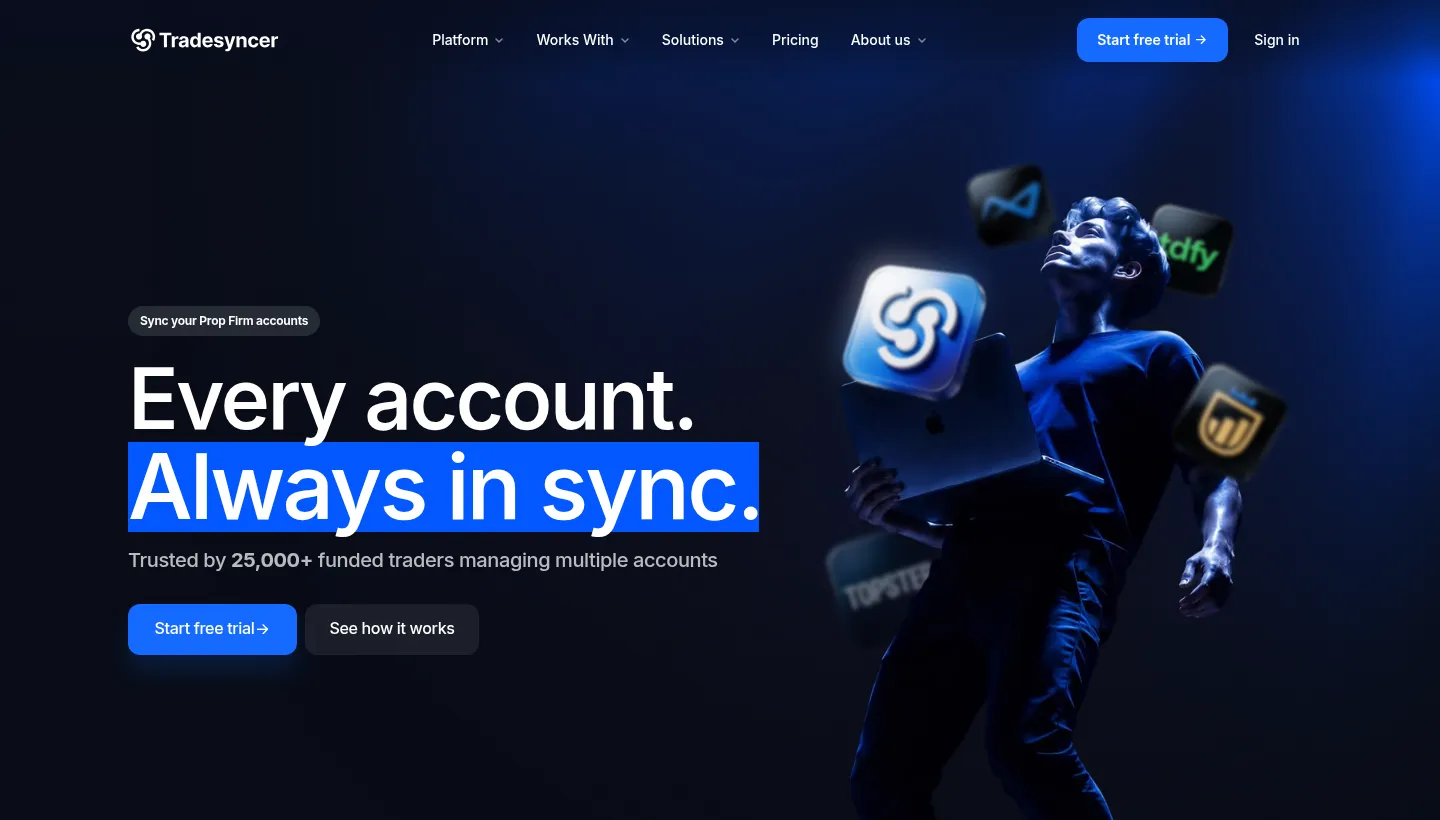
Tradesyncer is a cloud trade copier for futures prop firm traders. You connect your Tradovate, Rithmic, ProjectX and dxFeed accounts once, pick one account as the leader, and every order you place on it is copied to your follower accounts from Tradesyncer's servers, so nothing has to be installed and your computer can be off. It costs $49 a month and up after a 7-day free trial that needs a card, and it adds daily loss limits, account lockouts, a trading journal and a prop firm cost tracker to the copier.
It is the top pick on our futures trade copier comparison. The catches are that the Basic and Pro plans cap how many accounts you connect, a few advanced order types aren't copied, and Topstep's rules make TopstepX a platform to clear with the firm first.
This review is based on Tradesyncer's website and help centre and the prop firms' published rules, all checked on November 20, 2026. We haven't run the copier ourselves, so any speed figure below is the vendor's claim.
How Tradesyncer Works
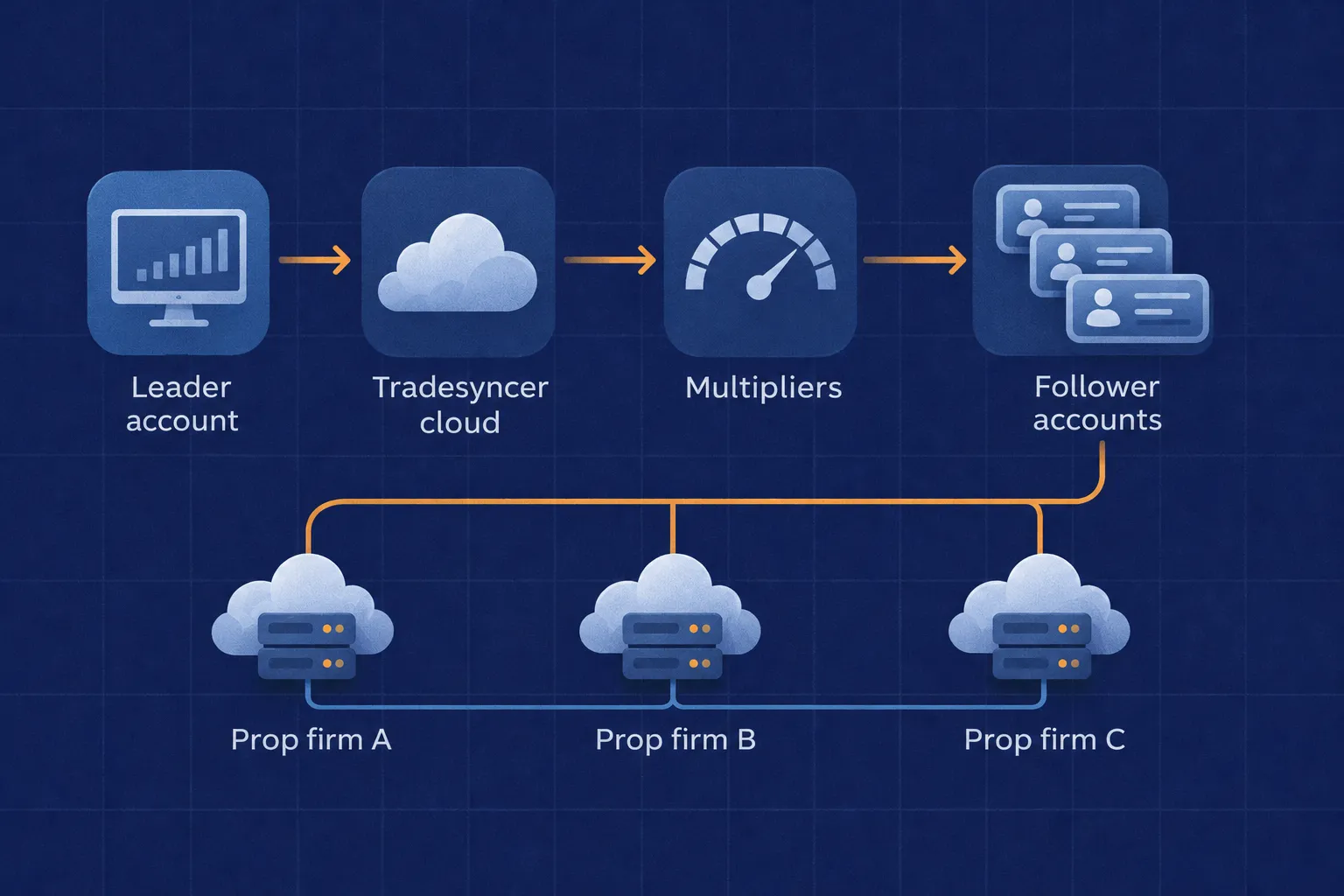
Tradesyncer works at the account level rather than inside a trading platform. It connects to each broker login through its API, watches the leader account, and places the same orders on each follower at the size you set. Its help centre says market, stop, limit and bracket (OCO) orders are copied. Because it sits behind your platform, you keep trading in NinjaTrader, TradingView, Quantower, ATAS or Sierra Chart, and a trade on a Tradovate leader can be copied to a Rithmic follower at another firm.
On speed, Tradesyncer's help article on how fast trades are copied claims an average of 20 to 40 ms, while its ProjectX page says executions average under 100 ms and that actual timing may vary.
How to use Tradesyncer: setup step by step
Setting up Tradesyncer comes down to four steps, all described in its help centre:
- Add your connections. On the Connections page you click + Connection and choose a provider. Tradovate logs in through its own OAuth page, Rithmic and dxFeed take your username and password, and ProjectX needs an API key from TopstepX or another ProjectX platform, which requires a ProjectX API subscription (how to add a connection).
- Choose a leader and followers. Your first connection creates a default copy group in the Cockpit. Each group has one leader and one or more followers, and a follower can belong to only one group at a time (copy trading groups).
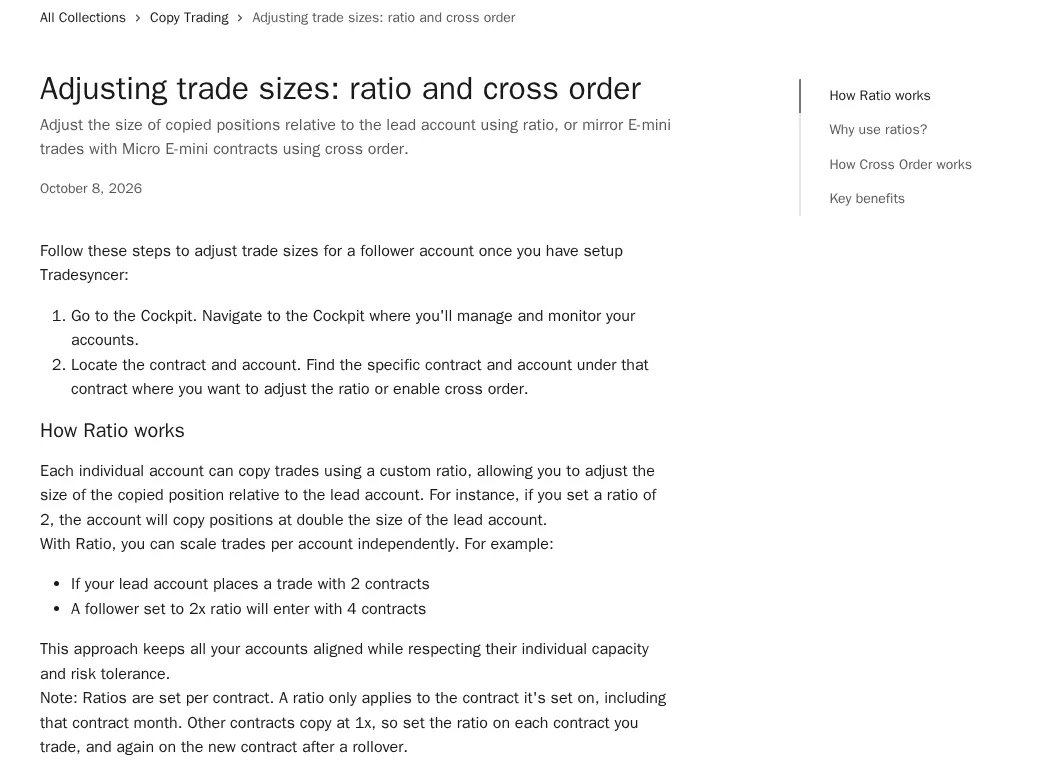
- Set the size for each follower. A ratio scales each follower against the leader, so a follower at 2x opens 4 contracts when the leader opens 2. Cross Order maps E-mini to Micro contracts (ES to MES, NQ to MNQ and YM to MYM), so a smaller account can follow a larger one (ratio and cross order).
- Turn following on and trade. Once each follower's Follow toggle is on, you trade the leader as usual and Tradesyncer copies each order.
Ratios are set per contract and contract month, so set them again after a rollover; any contract without one copies at 1x. Extra copy groups keep strategies or evaluation and funded accounts apart, and a Flatten Group button closes every position in a group at once.
Tradesyncer Pricing and Plans
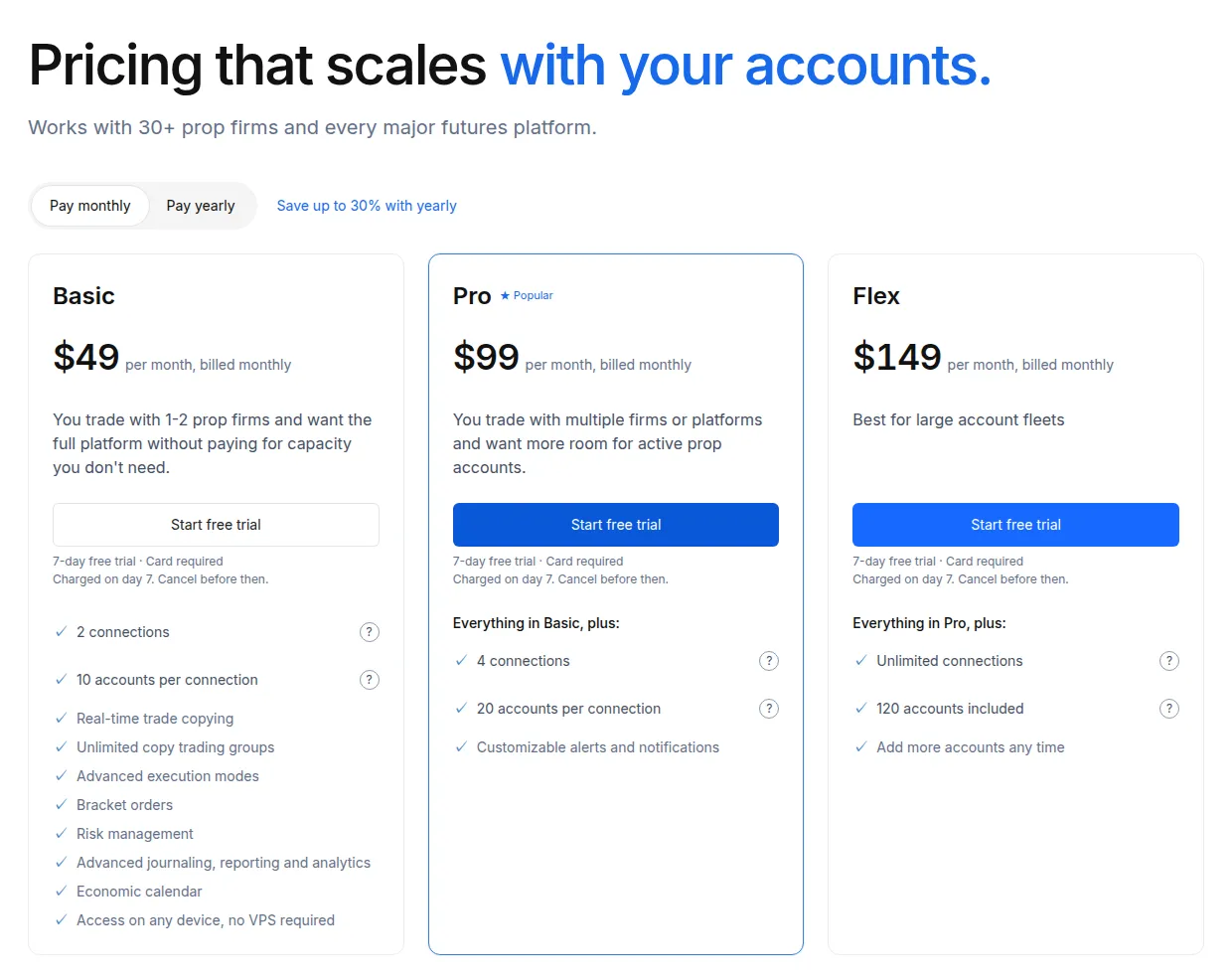
Tradesyncer has three plans, and each includes the copier, unlimited copy groups, risk management and the journal. They differ in how many connections (broker logins, such as one Tradovate login) and accounts you can add. These are the prices on Tradesyncer's pricing page, checked on November 20, 2026:
| Plan | Monthly | Yearly (per month) | Connections | Accounts | Adds |
|---|---|---|---|---|---|
| Basic | $49 | $34 | 2 | 10 per connection | The full copier, risk tools and journal |
| Pro | $99 | $69 | 4 | 20 per connection | Custom alerts and notifications |
| Flex | $149 | $104 | Unlimited | 120 included, more can be added | Room for large account fleets |
Basic suits accounts at one or two prop firms, Pro several firms or platforms, and Flex dozens of accounts. Upgrades take effect at once and are charged pro rata, and cancelling stops renewal at the end of the paid term.
Is Tradesyncer free?
Tradesyncer has no free plan, but every plan starts with a 7-day free trial of the full copier. A card is required and is charged on day 7 unless you cancel first, according to its free trial page.
Tradesyncer discounts and promo codes
The discount Tradesyncer publishes is yearly billing, which saves up to 30%: Basic works out at $34 a month, Pro at $69 and Flex at $104, paid once a year. Tradesyncer doesn't publish promo codes on its own pages, so we don't list any. If you connect TopstepX, also budget for the ProjectX API subscription, which Topstep's API access page lists at $29 a month.
Supported Platforms: TradingView, Topstep and More
Tradesyncer connects directly to four kinds of accounts: Tradovate, Rithmic, ProjectX and Volumetrica/dxFeed. On top of those, its brokers and platforms page lists NinjaTrader, TradingView, Quantower, ATAS, Sierra Chart, Tradesea, DeepChart, CQG and Hyperprop, the platform MyFundedFutures uses. Its pricing page says it works with more than 30 prop firms.
Tradesyncer and TradingView
Tradesyncer copies trades you place by hand in TradingView, as long as the account selected in TradingView's trading panel is your Tradesyncer leader. Its help article Is TradingView supported? describes the setup, and its homepage lists it as TradingView via Tradovate, so plan on a Tradovate leader. Tradesyncer doesn't describe turning TradingView strategy alerts into orders, so if you want to automate a Pine Script strategy, look at a webhook tool such as PickMyTrade instead.
Tradesyncer and Topstep
Tradesyncer supports TopstepX through ProjectX, the platform behind it. Its help centre asks you to switch off TopstepX's own trade copier before you add the accounts, and its known limitations page says ProjectX Live accounts aren't supported in the copier.
Whether Topstep allows it is a separate question. Topstep's API access page says all trading must come from your personal device, prohibits VPS, VPNs and remote servers, and doesn't allow a server to route orders on your behalf. Since a cloud copier places orders from the vendor's servers, ask Topstep before connecting, or use the copier built into TopstepX for Trading Combine and Express Funded accounts.
Key Features
Trade copier
Beyond ratios and Cross Order, the trade copier page lists Follower Account Protection to keep followers aligned with the leader, brackets and OCO orders that copy and update automatically, a Market Execution Mode that copies only leader orders that fill, and real-time error alerts.
The known limitations page says trailing stops, stop-limit orders, multi-bracket ATM strategies and auto-breakeven or auto-trail settings aren't copied, though moving a stop by hand is. Your platform's reverse button isn't supported while Follower Protection is on.
Risk management
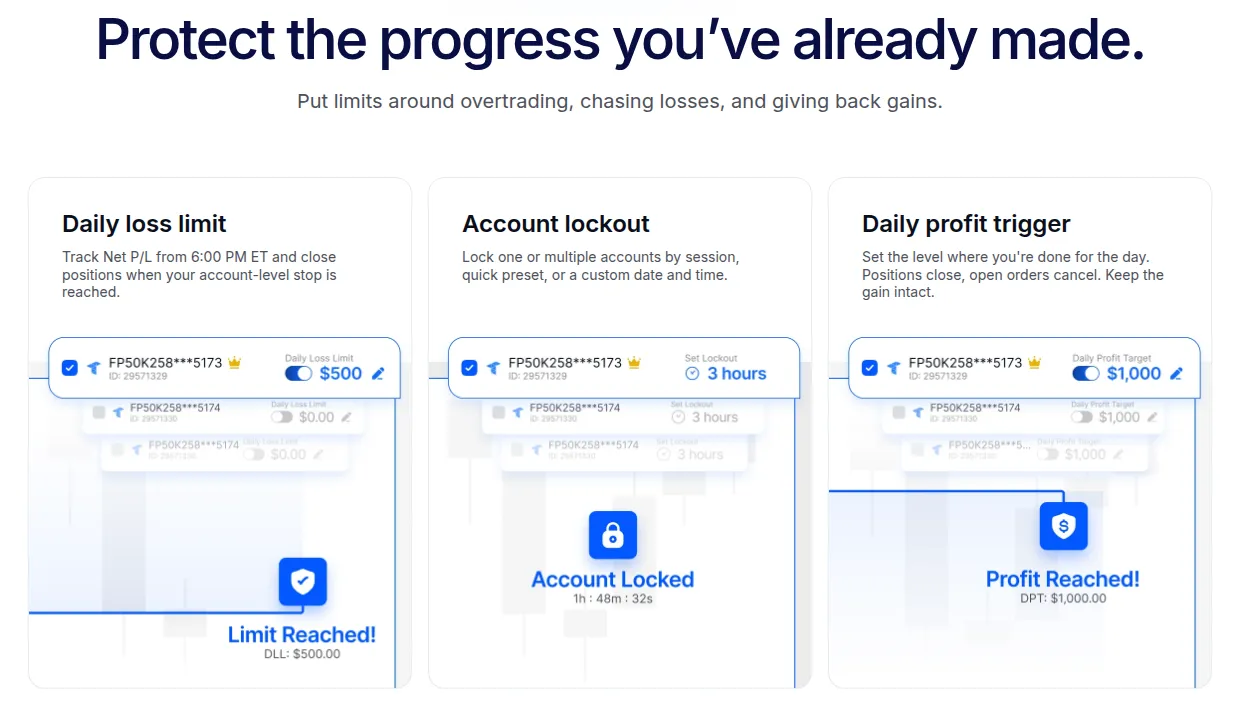
The risk management page describes three rules you set for each account, enforced in the cloud. A daily loss limit tracks net P&L from 6:00 PM ET and closes positions when it is reached, a daily profit trigger closes positions and cancels orders at your target, and lockouts stop new trades from copying for a session or until a time you choose. They work alongside your firm's own limits, not instead of them.
Trading journal and prop firm tracker
The trading journal syncs fills from your accounts automatically, with a P&L calendar, strategy tags, R-multiples and filters by strategy, session or account. The prop firm tracker sets evaluation, reset and activation fees against your payouts, so you see your real net profit by account and by firm. Both come with every plan.
The Tradesyncer app
There is no Tradesyncer app to download yet. Its mobile app page says native iOS and Android apps are coming, with no release date, and that today you use Tradesyncer in your phone's browser on any plan. On mobile you monitor accounts and use risk actions, while orders are placed in your trading platform, and copying continues in the cloud when the browser is closed.
Tradesyncer for Prop Firms
Tradesyncer is built for prop firm accounts, and MyFundedFutures' copy trading page names it as the firm's preferred copier partner. Tradesyncer's pricing FAQ says it is allowed by all major firms, but that is the vendor's claim, and each firm's own rules decide what you can do.
Apex Trader Funding, Topstep, MyFundedFutures and Tradeify all allow copying between accounts you own, and all ban copying another trader's trades. Apex, Topstep and MyFundedFutures also prohibit hedging across your accounts, so every follower has to trade in the same direction as the leader. Topstep restricts orders sent from servers, as above, and Apex forbids automated or algorithmic trading. Our hub summarises each firm's current rules in its trade copiers for prop firms section, and our guide to managing multiple prop firm accounts covers the rest of the setup.
Does Tradesyncer Need a VPS?
Tradesyncer itself doesn't need a VPS: the copying runs on its servers, so followers keep copying with your computer off.
A VPS can still matter for the leader. If your leader trades from a NinjaTrader strategy or another automated system on a desktop platform, that platform has to stay running for the leader to place orders at all, and an NYCServers NinjaTrader VPS or a Tradovate VPS keeps it online around the clock. Check your firm first: Topstep prohibits a VPS for TopstepX trading, and Apex forbids automated trading, so at those firms the leader is usually traded by hand from your own computer.

Tradesyncer vs Tradecopia
Tradecopia is our pick for traders with many accounts, and the main differences are where it copies and how accounts are counted. Both vendors' pricing pages were checked on November 20, 2026:
| Tradesyncer | Tradecopia | |
|---|---|---|
| Where copying runs | Tradesyncer's cloud, on every plan | A desktop app on Pro; a hosted server on Pro+ Lite and Pro+ |
| Accounts it connects | Tradovate, Rithmic, ProjectX, Volumetrica/dxFeed, Hyperprop as a leader | Tradovate, NinjaTrader, Rithmic, ProjectX, Volumetrica, Hyperprop |
| TradingView | Manual trades on a Tradovate leader | As the leader; TradingView strategies on Pro+ Lite and Pro+ |
| Starting price | $49 a month (2 connections, 10 accounts each) | $49.99 a month for unlimited accounts, from the desktop app |
| Cloud copying from | $49 a month | $79.99 a month (Pro+ Lite) |
| Free trial | 7 days on every plan, card required | 7 days on Pro and Pro+ Lite, monthly or quarterly billing, payment method required |
| Prop firm tools | Daily loss limit, profit trigger, lockouts, journal, prop firm tracker | Daily loss, daily profit and trade-count limits, journal, prop firm tracker |
Pick Tradesyncer if you want cloud copying for less than Tradecopia's server plans and your accounts fit a plan's limits, or if you trade at MyFundedFutures. Pick Tradecopia, whose prices are on its pricing page and in our Tradecopia review, if you run many accounts and want one flat price, want TradingView strategies to drive your leader, or prefer copying from your own computer.
Pros and Cons
Pros
- Copying runs in the cloud on every plan, so nothing has to be installed and your computer can be off.
- It connects Tradovate, Rithmic, ProjectX and dxFeed accounts and copies across them, which suits accounts spread over several firms.
- Ratios per follower and E-mini to Micro mapping make it easy to mix account sizes.
- Daily loss limits, profit triggers and lockouts are enforced for each account in the cloud.
- The journal and prop firm tracker come in every plan, and MyFundedFutures names it as its preferred copier.
Cons
- Basic and Pro cap both connections and accounts per connection, unlike Tradecopia's unlimited accounts.
- Trailing stops, stop-limit orders and multi-bracket ATM strategies aren't copied.
- Topstep's rules restrict server-placed orders on TopstepX, and ProjectX Live accounts aren't supported.
- There is no native mobile app yet, only the mobile browser.
- The trial needs a card and is charged on day 7 unless you cancel.
Who Tradesyncer Suits
Tradesyncer suits futures traders with evaluation or funded accounts at more than one prop firm who want copying and per-account risk limits without keeping a computer running for the copier. It suits you less if all your accounts sit in one NinjaTrader 8, where an add-on can do the job, if you trade mostly on TopstepX, where Topstep's own copier avoids the server question, or if your strategy relies on trailing stops or multi-target ATM templates.
Tradesyncer Alternatives
- Tradecopia charges one flat price for unlimited accounts, as compared above.
- Replikanto is a NinjaTrader 8 add-on from FlowBots, from $249 a year or $299 for life, for accounts that all connect to one NinjaTrader. See our Replikanto review.
- PickMyTrade copies trades from TradingView's Tradovate panel and turns TradingView alerts into orders, from $50 a month per broker login. See our PickMyTrade review.
- TradersConnect and Heron Copier are cloud copiers for both futures and forex platforms, including Tradovate, Rithmic and TopstepX (TradersConnect review, Heron Copier review).
- Duplikium is a cloud copier mainly for MetaTrader and cTrader that also connects Tradovate, priced per account (Duplikium review).
Our futures trade copier comparison ranks them all on platforms, price, trials and prop firm tools.
Verdict
Tradesyncer is the strongest all-round choice for futures prop firm traders who want a cloud copier. It connects the platforms most firms use, copies between firms with nothing running on your side, and adds risk limits, a journal and a cost tracker that earn their place once you run several accounts.
Before you subscribe, count your connections and accounts against the plan limits, check your order types against the known limitations, and read your prop firm's rules, especially on TopstepX. Then try it on an evaluation account during the 7-day trial, and cancel before day 7 if it doesn't fit.
FAQ
How much does Tradesyncer cost?
Tradesyncer costs $49 a month for Basic (2 connections, 10 accounts each), $99 for Pro (4 connections, 20 accounts each) and $149 for Flex (unlimited connections, 120 accounts included), as of November 20, 2026. Paying yearly brings them to $34, $69 and $104 a month.
How does Tradesyncer work?
Tradesyncer connects to your futures accounts from its cloud, and you choose one account as the leader and others as followers. When you trade the leader in your usual platform, it places the same order on each follower at the ratio you set, and it can map E-mini contracts to Micros.
Is Tradesyncer free to use?
No. Tradesyncer has no free plan, but every plan starts with a 7-day free trial with full access. A card is required and is charged on day 7 unless you cancel.
Which copy trading app is the best?
For futures prop firm traders, Tradesyncer is our overall pick because it copies in the cloud across Tradovate, Rithmic, ProjectX and dxFeed with risk limits for each account. Tradecopia is better if you want unlimited accounts for one price, and Replikanto if all your accounts run in NinjaTrader 8. For MetaTrader and cTrader accounts, see our forex trade copier comparison instead.
Does Tradesyncer have a mobile app?
Not a native one yet. Tradesyncer says iOS and Android apps are coming, and today you use it in your phone's browser to monitor accounts and use risk actions.
Can I use Tradesyncer with Topstep?
Tradesyncer connects to TopstepX through ProjectX, which needs a ProjectX API subscription. Topstep's rules say TopstepX trading must come from your own device and don't allow a server to route orders for you, so ask Topstep before connecting, or use TopstepX's built-in copier.
What do Tradesyncer reviews on Trustpilot say?
Tradesyncer's own website displays a Trustpilot score of 4.4 out of 5 from 763 reviews, as shown on November 20, 2026. That figure comes from the vendor, so check Tradesyncer's Trustpilot page for the current score and read the low ratings too.
Is there a Tradesyncer promo code?
Tradesyncer doesn't publish promo codes on its own site. Its published discount is yearly billing, which saves up to 30%.
Matthew Hinkle
Lead Writer & Full Time Retail Trader
Matthew is NYCServers' lead writer. In addition to being passionate about forex trading, he is also an active trader himself. Matt has advanced knowledge of useful indicators, trading systems, and analysis.
- Forex Trading
- Technical Analysis
- Trading Systems
- Market Indicators
Written by Matthew on
View profile