
MetaCopier Review 2026: Cloud Trade Copier Pricing and Features
Our MetaCopier review covers the daily per-account pricing, the $20 trial credit, the supported platforms, the prop firm controls and the best alternatives.

Published
MetaCopier is a good fit if you want a cloud trade copier that charges by the account and by the day, copies between MetaTrader, cTrader, DXtrade, TradeLocker and several other platforms, and gives you detailed controls for prop firm rules. A shared project costs $0.27 per account per day, which works out to about $8.10 for an account over a 30-day month, and new users get $20 of credit for their first project if they verify their phone number by SMS first. It is less suited to traders who want one flat monthly price or who only copy between two MetaTrader terminals on the same machine.
This MetaCopier review is based on the vendor's own website and documentation, which we checked on 20 November 2026. We have not run the copier on our own accounts, so every price, platform and speed figure below is the vendor's, linked to the page it comes from.
What is MetaCopier?
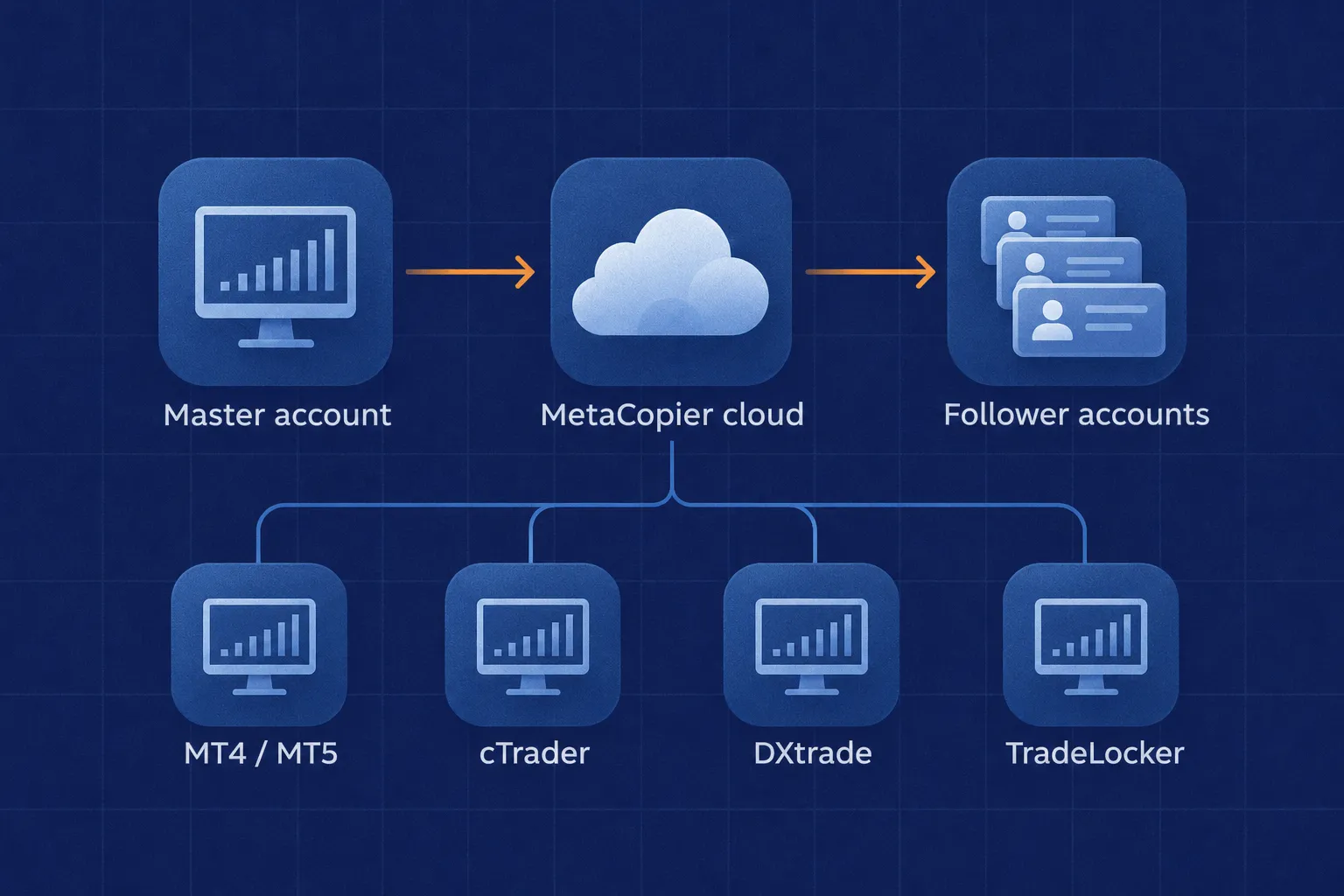
MetaCopier is a cloud-based trade copier made by Mirala GmbH, a registered company in Brusio, Switzerland. You connect your trading accounts in a web dashboard, pick which account is the master and which ones follow it, and MetaCopier's servers copy every trade from the master to the followers. Nothing runs on your own computer, so the copier keeps working when your PC is off.
The company says on its homepage that the platform has more than 70,000 connected accounts, handles over 5.5 million trades a week, has been in business for more than six years and keeps uptime above 99.95%. Those are the vendor's own figures. It sells the product both to individual traders and to businesses such as brokers, prop firms and signal providers, which explains the white label option, the REST and socket APIs and the multi-user projects.
How MetaCopier works
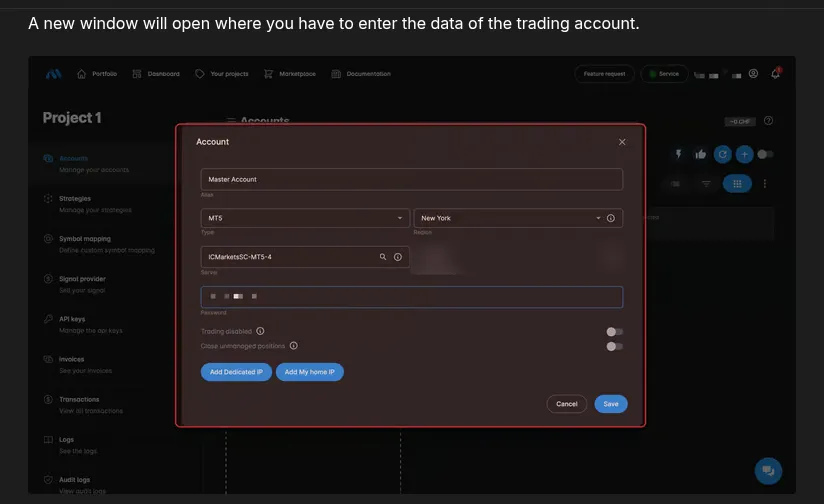
Everything in MetaCopier lives inside a project, which is a group of trading accounts with its own billing and its own team members. You add each trading account to the project with its login details and choose the region it runs in, and then you create copiers between the accounts. According to the quick start guide, a copier is always created on the follower (slave) account, and inside it you select the master the trades come from.
When the master opens, modifies or closes a trade, MetaCopier reads it, applies the settings of each copier, such as the lot multiplier, symbol mapping and risk limits, and sends the copy to each follower's broker. The specifications page lists four regions: New York, London, Berlin and Singapore. The vendor recommends the region closest to your broker's trade server, not to you, and an account's region can't be changed after you add it.
A project is either shared, running on servers shared with other customers, or dedicated, with capacity reserved for you and priority support. Switching from shared to dedicated later costs a migration fee.
Connecting an account
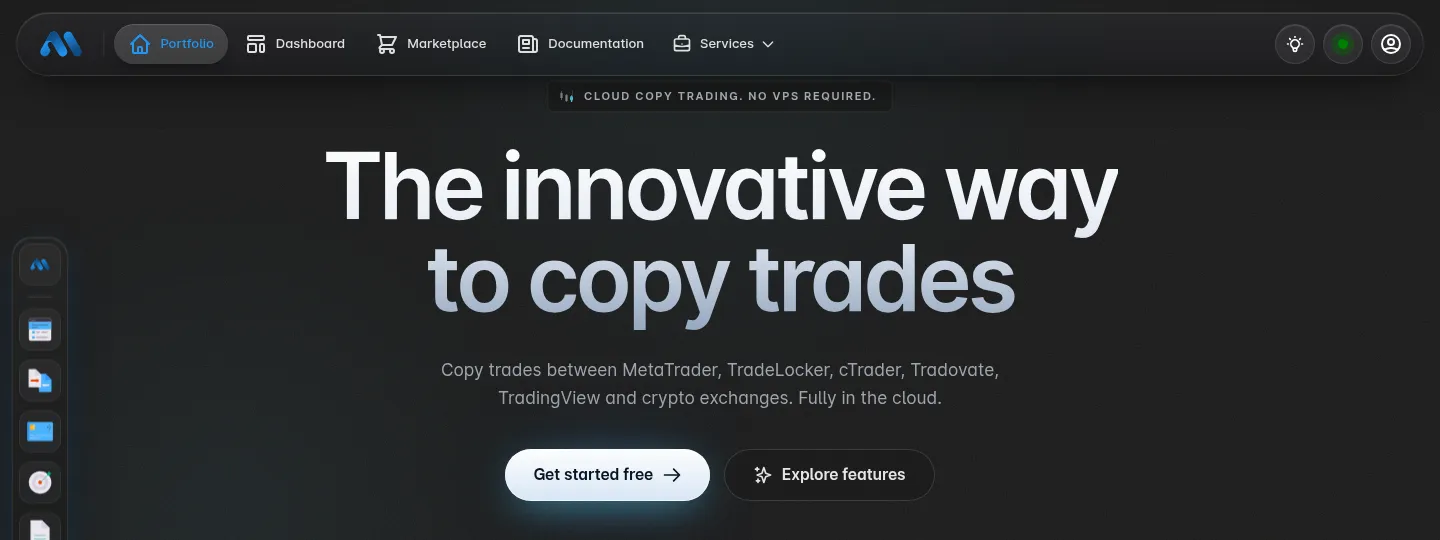
You register, add a payment method, create a project and connect your accounts. A credit card is required, and the quick start guide says it is only charged after the trial credit runs out or if you start a dedicated project. For a MetaTrader account you enter the account number, password and broker server and choose a region, while other platforms connect through their own logins or API keys.
MetaCopier pricing and free trial
MetaCopier charges per account per day, and every account counts, whether it is a master or a follower. The billing page explains that billing starts the day an account is added and continues until it is removed, even if the account is disconnected or has no active copier. Charges add up over the month and are invoiced on the 2nd of the following month, in USD, EUR or CHF, with VAT included in the price.
Shared projects
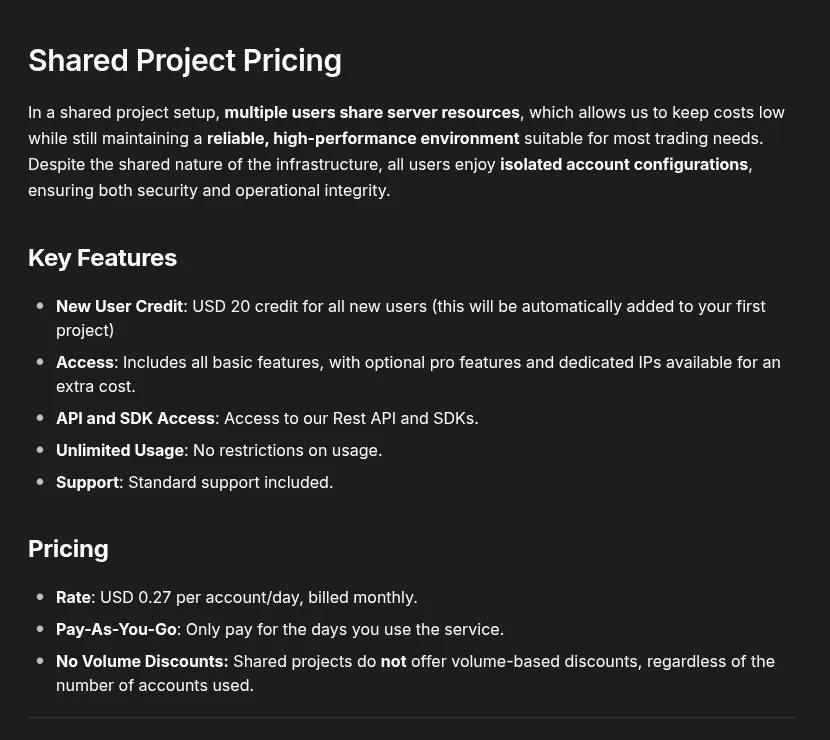
A shared project costs $0.27 per account per day, with no volume discount however many accounts you add. One master and two followers running for a 30-day month come to $24.30, and five accounts come to $40.50.
Dedicated projects
A dedicated project is billed for reserved capacity in blocks of 25 accounts per project and region. If you run four accounts in New York you pay for 25, and if you run 15 accounts in New York and 4 in London you pay for two blocks. The rate falls with size, from $0.32 per account per day for up to 25 accounts to $0.22 from 251 accounts. The smallest dedicated project therefore costs $240 for 30 days, which only makes sense for large setups or for businesses that need reserved resources.
Pro features and add-ons
Pro features add $0.10 a day for each account that uses at least one of them, so a shared account with Pro costs $0.37 a day. The Pro list includes the Telegram and TradingView signal connectors, HFT mode, trailing stops, break-even, risk per trade and the margin cap. In a dedicated project you only pay the fee for the accounts that use Pro features.
A few extras are priced separately. Hosting your own MT4 or MT5 expert advisor costs $0.23 a day per hosted EA, and a dedicated IP or the My Home IP option costs a flat $6 a month per IP, which is not prorated.
The $20 free trial credit
MetaCopier has no free plan, but new users get $20 of credit for their first shared project. To claim it you have to verify your mobile number by SMS before you create your first project, because the credit can't be claimed once a project exists, and each phone number can only be used once. At $0.27 per account per day, the credit covers about 74 account-days, which is roughly two accounts for five weeks.
Supported platforms
MetaCopier copies in any direction between the forex and CFD platforms it supports, so an MT5 master can feed cTrader, TradeLocker or DXtrade followers and the other way round. The platforms on its compatibility table that matter for forex traders are these:
| Platform | Status |
|---|---|
| MetaTrader 4 | Supported |
| MetaTrader 5 | Supported, hedging and netting accounts |
| cTrader | Supported |
| DXtrade | Supported; the broker has to enable market data for some features |
| TradeLocker | Supported |
| Match-Trader | Beta |
| Tradovate | Beta, futures only |
| NinjaTrader | Through the Tradovate connector |
| TradingView | Signal source only, through the Pro TradingView webhook |
| Telegram | Signal source only, through the Pro Telegram connector |
Beyond these, the specifications page lists TradeStation and Alpaca, both in beta, and crypto exchanges including Binance, where only USDT perpetual futures are supported. TradingView and Telegram can only act as masters, because they send signals rather than hold positions.
Key features
MetaCopier splits its tools into basic features, which come with the account price, and Pro features, which cost the extra $0.10 a day. The basic features page covers what most copying needs: a lot multiplier per symbol, symbol mapping between brokers, filters by comment, magic number or lot size, symbol whitelists and blacklists, maximum lot sizes, a maximum number of open positions, drawdown-based risk limits and daily, weekly or monthly profit targets.
The Pro features go further. Risk per trade sizes each copy from its stop loss, TP/SL management changes or adds take profit and stop loss levels, and trading windows limit when copies can open. Delayed execution adds a random delay, and the approval feature makes you confirm each trade before it is copied. The Telegram connector uses AI parsing to read free-text signals from groups, channels and private chats, and the TradingView webhook places trades from your alerts.
For businesses and developers there is a REST API with SDKs, a socket API, an MCP server for AI assistants such as ChatGPT or Claude, and a signal marketplace where providers can charge a subscription or a high-watermark profit share. Notifications go to Slack, Microsoft Teams, Discord or Telegram.
MetaCopier speed and HFT mode
MetaCopier documents its own processing time as 5 ms per copied trade by default and 1 ms with the Pro HFT mode, according to its HFT mode page. That figure covers only the part MetaCopier controls. The network time to and from your brokers and the follower broker's execution time come on top, and the vendor puts broker execution at typically 50 to 500 ms, which makes it the largest part of the total.
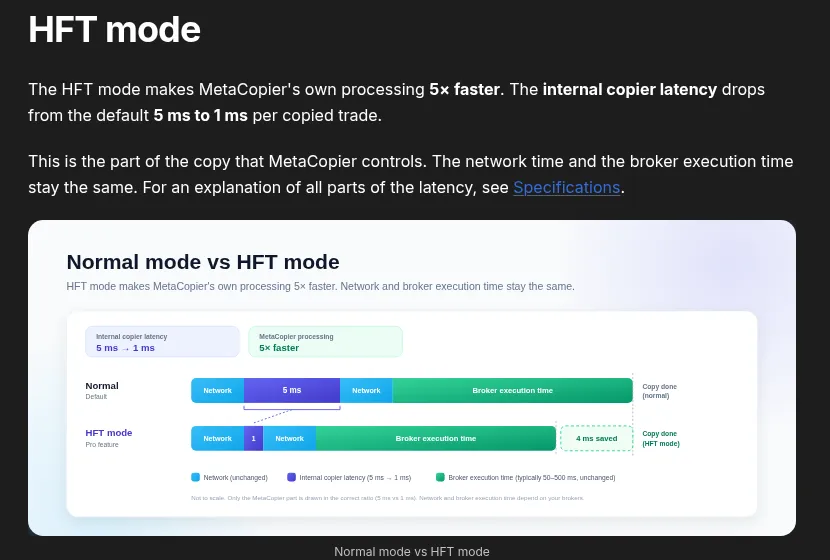
In the vendor's own example, with the master broker, MetaCopier and the follower broker all in London, a copy takes about 65 to 515 ms from end to end. HFT mode has to be added to both the master and the follower, so both accounts pay the Pro fee. The HFT support page also warns that platforms connected through REST APIs aren't suited to high-frequency trading, and it recommends a dedicated project for the best performance. We haven't measured any of these figures ourselves.
MetaCopier for prop firms
Prop firm traders are an obvious audience for MetaCopier, and the vendor publishes a prop firms guide with recommended settings. The guide stresses that you should read your firm's rules first and that the settings help you stay within them, not get around them.
The relevant controls are these:
- Drawdown and target limits: risk limits stop copying when an account's drawdown threshold is hit, and the overall target measures profit and loss against a fixed starting balance, the way challenges are scored.
- Margin cap: a Pro feature that caps the share of the balance used as margin and shrinks or skips trades to stay inside it.
- Trade cooldown: blocks a new trade on a symbol for a set time after a previous trade on the same or a correlated symbol, built for rules such as FTMO's one-hour trade idea rule.
- Block hedging, maximum lot size and minimum holding time, for firms that ban hedging, cap position size or forbid very short trades.
- Dedicated IP or My Home IP with "No Fallback": if a firm checks IP addresses, the guide recommends a fixed IP and turning off fallback, because fallback moves an account to other servers, and therefore to another IP, during an outage.
The guide also suggests disabling trade comments and varying the copies with delayed execution or extra TP and SL points, so check whether your firm allows that.
Does MetaCopier need a VPS?
The copier itself doesn't need a VPS, because it runs on MetaCopier's servers and you manage it from a browser. A VPS still matters if your master account is traded by an expert advisor. The copier can only copy trades that are actually placed, so the EA has to run around the clock, and a home PC that restarts or loses its connection stops the signals at the source.

You have two options. MetaCopier's own EA hosting runs one expert at $0.23 a day, while a forex VPS gives you a full Windows server where you can run several terminals, indicators and other tools side by side. A VPS is also one of the setups MetaCopier suggests for its My Home IP feature, which routes your accounts through the IP address of a machine you control, a useful option for prop firms that check where connections come from.
MetaCopier pros and cons
Pros
- You only pay for the days each account is connected, with no plan tiers to outgrow.
- It copies in any direction between MT4, MT5, cTrader, DXtrade, TradeLocker and Match-Trader, with futures and crypto accounts on the same dashboard.
- The prop firm controls are detailed, including the overall target, margin cap, trade cooldown and fixed IP options.
- It is run by a registered Swiss company and publishes its billing rules in full, including what happens to unpaid invoices.
Cons
- There's no free plan, and the trial credit is lost if you create a project before verifying your phone number.
- Accounts are billed until you remove them, even if they are disconnected or idle.
- Telegram and TradingView signals, HFT mode and several risk tools cost $0.10 a day extra for each account.
- Match-Trader and Tradovate are still in beta, and NinjaTrader only connects through Tradovate.
- The number of settings takes time to learn compared with simpler copiers.
- An unpaid invoice leads to paused copiers after about 22 days and a deleted project after about 30.
Who MetaCopier suits
MetaCopier suits traders who copy across different platforms, such as an MT5 master feeding cTrader or TradeLocker prop firm accounts, and who want those accounts managed in the cloud without a terminal running for each one. It also suits prop firm traders who need precise rule controls, signal providers who want to sell access, and businesses that need an API, team access or white labelling.
It suits you less if you copy between a few MetaTrader accounts on one VPS and would rather pay per machine, or if you want a free tool.
MetaCopier alternatives
Our forex trade copier comparison ranks MetaCopier against the other copiers we track. These are the closest alternatives:
- Duplikium is also a Swiss cloud copier priced per account, from €9 per account per month, with €20 of free credit after SMS verification. It covers MT4, MT5, cTrader, DXtrade and TradingView, with Tradovate and NinjaTrader in beta, and the vendor quotes 1 to 3 ms of internal latency.
- Heron Copier costs $19 a month or $179 a year for two cloud accounts, plus $8 a month for each extra account, and adds Rithmic and TopstepX for futures traders.
- TradersConnect charges from $10 per account per month, or $15 for Premium, and covers the same forex platforms as MetaCopier plus Rithmic and TopstepX.
- Local Trade Copier runs inside your own MetaTrader terminals rather than in the cloud and costs from €29 a month per PC or VPS with unlimited accounts, which suits large MT4 and MT5 setups on one machine.
For a wider look at the alternatives, see our comparison of the best trade copiers for MT4 and MT5.
Verdict
MetaCopier is one of the broadest cloud trade copiers available to forex traders. It combines broad platform coverage with prop firm controls that go further than most rivals, and its pricing is easy to predict once you understand the per-account, per-day model. For a handful of accounts on a shared project, it costs about the same as other per-account cloud copiers, and the $20 credit lets you try it before you pay.
The things to watch are mostly about billing. Verify your phone number before creating a project, remove accounts you no longer use, and add Pro features only to the accounts that need them. If your strategy runs on an expert advisor, keep the master on a reliable VPS or on MetaCopier's EA hosting so there is always something to copy.
Frequently Asked Questions
Is MetaCopier free?
No. MetaCopier has no free plan, but new users get $20 of credit for their first shared project if they verify their mobile number by SMS before creating it.
How much does MetaCopier cost?
A shared project costs $0.27 per account per day, or about $8.10 per account over 30 days. Dedicated projects cost $0.32 down to $0.22 per account per day and are billed in blocks of 25 accounts per project and region. Pro features add $0.10 a day per account.
Is MetaCopier legit?
MetaCopier is a product of Mirala GmbH, a registered company in Switzerland that lists its address and LEI number on its website. It is a copy service, not a broker, so it never holds your funds, and your trades are placed in your own broker accounts.
Can I use MetaCopier with prop firm accounts?
Yes. It has drawdown limits, an overall target, a margin cap, a trade cooldown and fixed IP options aimed at prop firm rules. Check your firm's rules on copiers before you connect a funded account.
Does MetaCopier work with NinjaTrader and Tradovate?
Tradovate is supported in beta, for futures only, and NinjaTrader accounts connect through the same Tradovate connector. If the connection fails with an API access error, you need Tradovate's API Access add-on, although many brokers and prop firms on Tradovate enable API access for free.
Can MetaCopier copy Telegram signals and TradingView alerts?
Yes, both are Pro features. The Telegram connector reads free-text signals from groups, channels and private chats, and the TradingView webhook places trades from your alerts on your connected accounts.
Do I need a VPS for MetaCopier?
Not for the copier, which runs in the cloud. You need an always-on machine if your master account is traded by an expert advisor, either a forex VPS or MetaCopier's own EA hosting.
Matthew Hinkle
Lead Writer & Full Time Retail Trader
Matthew is NYCServers' lead writer. In addition to being passionate about forex trading, he is also an active trader himself. Matt has advanced knowledge of useful indicators, trading systems, and analysis.
- Forex Trading
- Technical Analysis
- Trading Systems
- Market Indicators
Written by Matthew on
View profile