
Tradecopia Review 2026: Pricing, Features and Tradesyncer Comparison
Our Tradecopia review covers its four plans and trial, what the desktop app and the hosted plans do differently, the platforms and prop firms it connects, and when Tradesyncer fits better.

Published
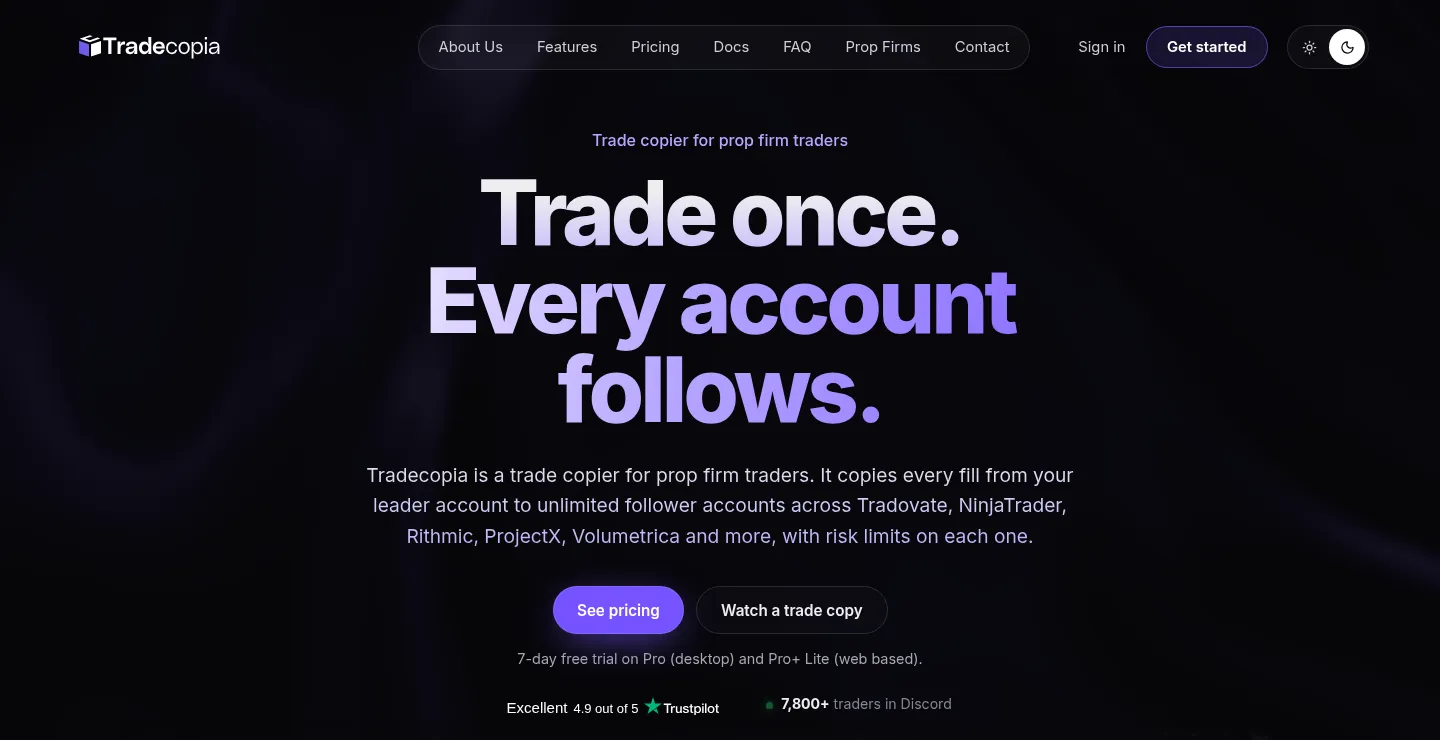
Tradecopia is a futures trade copier for prop firm traders that copies one leader account to unlimited followers on Tradovate, NinjaTrader, Rithmic, ProjectX (including TopstepX) and Volumetrica for one flat monthly price. Its $49.99 Pro plan copies from a desktop app on your own Windows or Mac computer, while Pro+ Lite ($79.99) and Pro+ ($149.99) copy from a server and keep running with your computer off. It suits traders with many accounts who would otherwise pay per connection or per account elsewhere.
This review draws on Tradecopia's website, pricing page and help center, checked on November 20, 2026, and any speed claim below is the vendor's own. Tradecopia is one of the copiers on our futures trade copier hub.
What Is Tradecopia?
Tradecopia describes itself as a trade copier and risk platform for futures traders who run several accounts. You trade one account, the leader, and Tradecopia sends the same order to every follower in the group, each sized by its own multiplier. Followers can sit at different prop firms and on different platforms, so a Tradovate account at one firm can lead TopstepX and Rithmic accounts at others.
The app also sets daily loss, profit and trade-count limits on each account and includes a journal, reports and a prop firm tracker. It is built by Tradecopia Solutions Inc. of North Vancouver, Canada, according to its about page.
How Tradecopia Works
Tradecopia watches your leader account at its broker and, when you trade it, sends a matching order to every follower in parallel rather than one after another. Each follower's broker fills its own order, so small fill price differences between accounts are normal. Tradecopia's trade journey article says this internal copying happens "in a matter of milliseconds" and that the same engine runs on every plan.
Each follower can copy on submit, the moment the leader places the order, or on fill, as one market order once the leader is filled. The FAQ lists market, limit and stop orders as copied, along with a bracket with one take profit and one stop loss, cancels and moved legs. Stop-limit orders are not copied, a trailing stop is copied at its fill, and brackets with several take profit or stop loss legs are still in development.
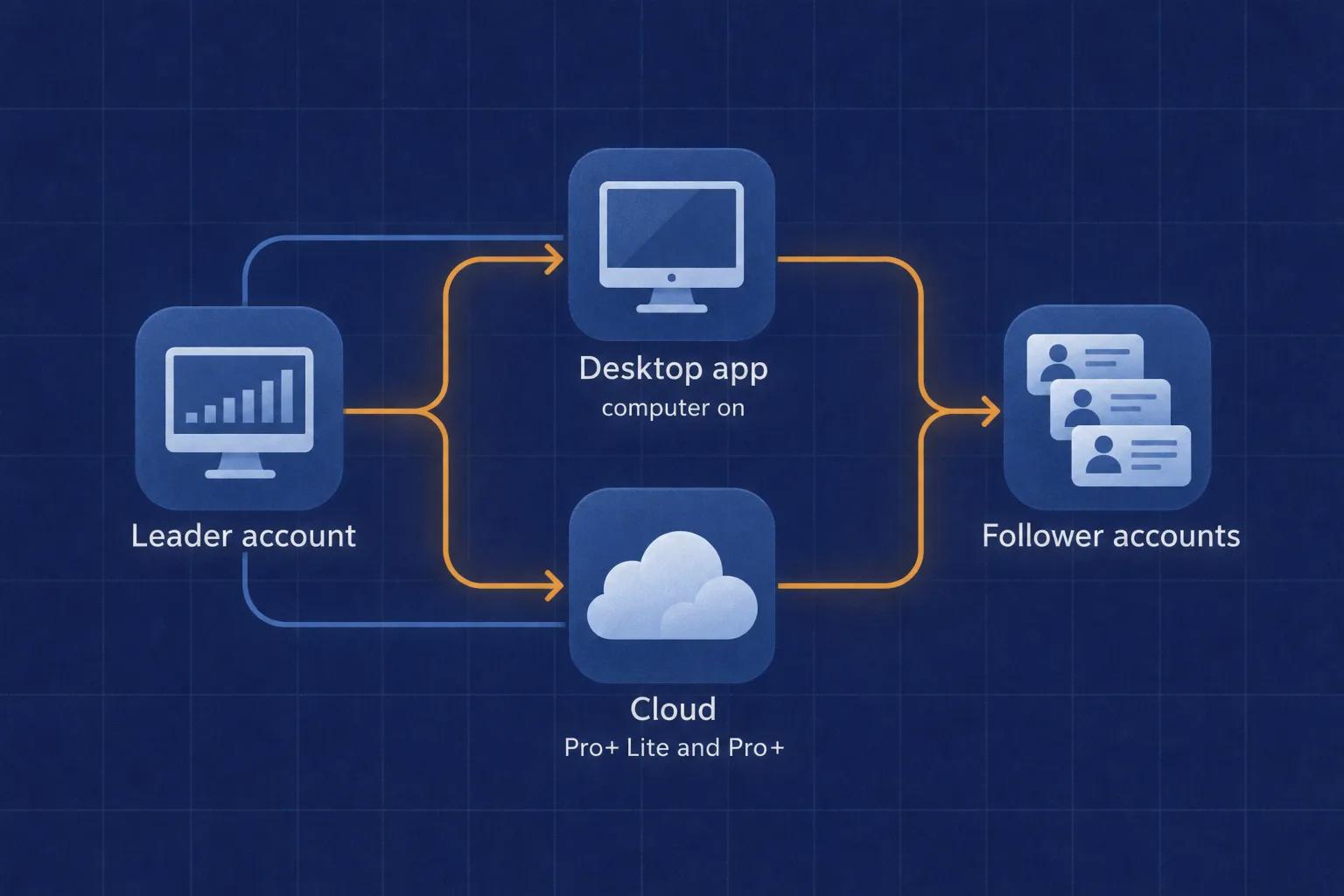
What differs between plans is only where the engine runs: your own computer on Pro, or hosting that Tradecopia manages on Pro+ Lite and Pro+, which the vendor says gives a shorter route to the brokers.
Tradecopia Pricing and Free Trial
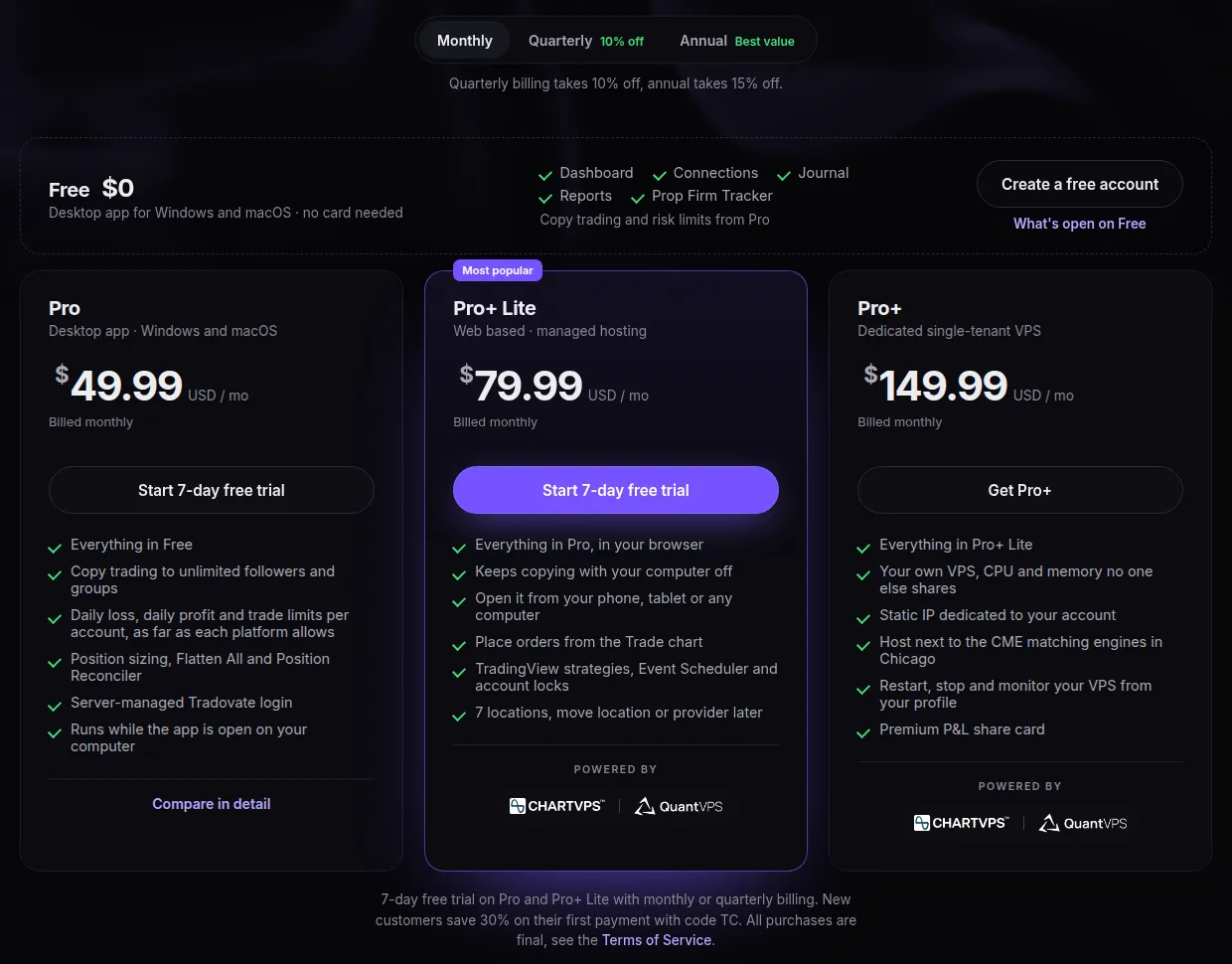
Tradecopia charges one flat price for unlimited leaders, followers and copy groups, with no fee per account or per connection. The pricing page lists four plans:
| Plan | Runs on | Monthly | Quarterly (per month) | Annual (per month) | Free trial |
|---|---|---|---|---|---|
| Free | Desktop app | $0 | $0 | $0 | Not needed |
| Pro | Desktop app on your computer | $49.99 | $44.99 | $42.49 | 7 days, monthly or quarterly |
| Pro+ Lite | Managed hosting, in your browser | $79.99 | $71.99 | $67.99 | 7 days, monthly or quarterly |
| Pro+ | Dedicated VPS with a static IP | $149.99 | $134.99 | $127.49 | None |
Quarterly billing takes 10% off the monthly price and annual billing takes 15% off. Over twelve months on Pro that is $599.88 paid monthly, $539.88 paid quarterly or $509.90 paid once a year, according to the cost calculator on the same page.
Is Tradecopia free?
There is a Free plan, but it doesn't copy trades. It runs the desktop app for $0 with no payment method and opens the dashboard, connections, reports, journal and prop firm tracker. You can build copy groups and look through the risk limits, but switching them on needs Pro or above.
How the free trial works
Pro and Pro+ Lite come with a 7-day free trial on monthly or quarterly billing. You add a payment method to start, and you aren't charged if you cancel before day 7. There is one trial per trader and per payment method. Annual plans have no trial, and Pro+ has none either because each subscription sets up a dedicated VPS from day one.
Tradecopia discount code and refunds
Tradecopia publishes its own new-customer code on the pricing page: TC takes 30% off the first payment on Pro, Pro+ Lite or Pro+. It doesn't stack with the quarterly or annual discount, so renewals bill at the normal quarterly or annual price. The COPIA codes on its homepage are discounts on partner prop firms' evaluations, not on Tradecopia itself. You can cancel yourself from your account or the Stripe billing portal, but payments are non-refundable apart from a one-time courtesy refund that support may grant, so the trial is the time to decide.
Tradecopia Download: Desktop App, Web App and Mobile
The Tradecopia download is a native desktop app for Windows 10 and 11 (x86 and ARM) and for macOS 12 Monterey or newer on Apple Silicon and Intel Macs, per its Windows page and install guide. The Free and Pro plans run only in this app. For large groups, Tradecopia recommends 16 GB of RAM, a modern multi-core processor, an SSD and a wired Ethernet connection.
On Pro, copying runs only while the app is open. If it closes or your computer sleeps, copying pauses and trades placed in that gap are not copied afterwards, as the desktop vs web article explains. Limits pushed to Tradovate keep working because Tradovate holds them, but Rithmic limits stop with the app.
Pro+ Lite and Pro+ need no install. They run on ChartVPS or QuantVPS hosting in Chicago, New York, Dallas, London, Frankfurt, Singapore or Tokyo, and you open them in any browser. There is no native Tradecopia mobile app. On the two hosted plans you can open the web app from a phone or tablet browser, while Free and Pro are desktop only.
Supported Platforms
Tradecopia connects directly to Tradovate, NinjaTrader, Rithmic, ProjectX (including TopstepX) and Volumetrica. Hyperprop and Propr, a perpetual futures prop firm, are connected in beta. Tradesea and Quantower accounts copy when they run on a Rithmic data feed. Compatibility comes from the platform rather than the prop firm, so any firm that offers accounts on one of these platforms can be connected, and one group can mix platforms and firms in any combination.
NinjaTrader accounts connect through a direct broker API rather than a NinjaTrader add-on, which is why they also work in the Mac app.
Tradecopia and TradingView
TradingView works as the leader, never as a follower, according to the TradingView page. On every paid plan, orders you place from TradingView charts go to your connected broker and Tradecopia copies them from there. On Pro+ Lite and Pro+, Strategies gives each strategy a webhook URL, so a TradingView alert places the order on your leader, which must be a Rithmic, Tradovate or ProjectX account at a supported prop firm. Webhook alerts need a paid TradingView plan.
Key Features
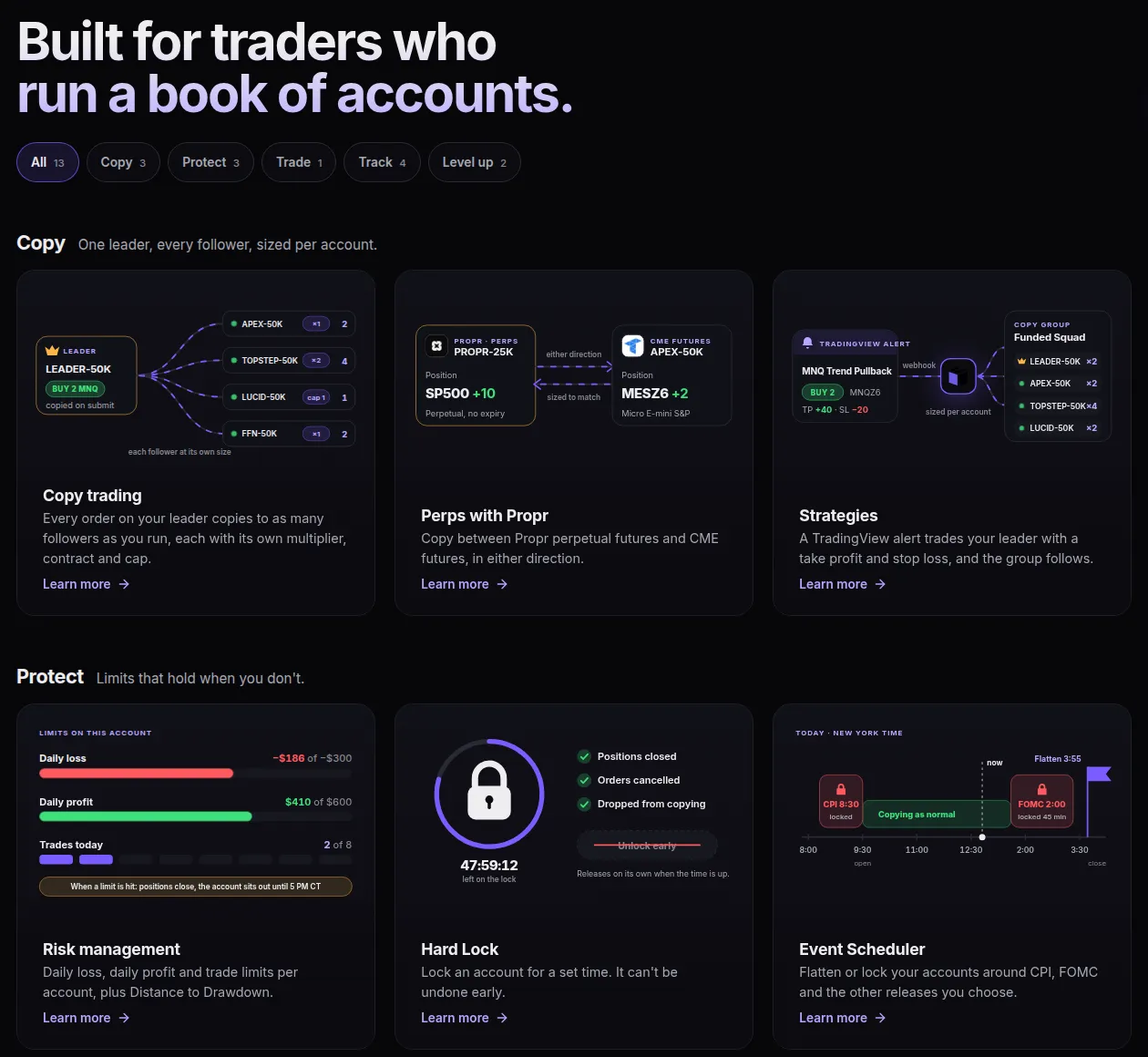
- Sizing per follower. Each follower has a multiplier from 0.01x to 100x and its own contract setting, so a mini leader can copy to micro followers or the other way round.
- Risk limits per account. Daily loss, daily profit and trades-per-day limits, plus weekly limits on Tradovate and NinjaTrader. When one is hit, Tradecopia flattens that account and keeps it closed until 5 PM CT while the others keep trading. ProjectX accounts take only the trades-per-day limit.
- Position Reconciler. If a follower holds a position the leader doesn't, or the opposite side, Tradecopia cancels its working orders in that symbol and closes the position.
- Flatten All and Test Copy Trading. Flatten All closes every position in a group. The test places one limit order away from the market so you can see each follower receive it and cancel it.
- Hosted-only tools. Pro+ Lite and Pro+ add Hard Lock, an account lock that can't be undone early, the Event Scheduler for news such as CPI and FOMC, and order entry from the Trade tab.
- Tracking. Reports, a journal, Distance to Drawdown, a progress tracker and a prop firm tracker for fees and payouts come with every plan, Free included.
How to Set Up Tradecopia
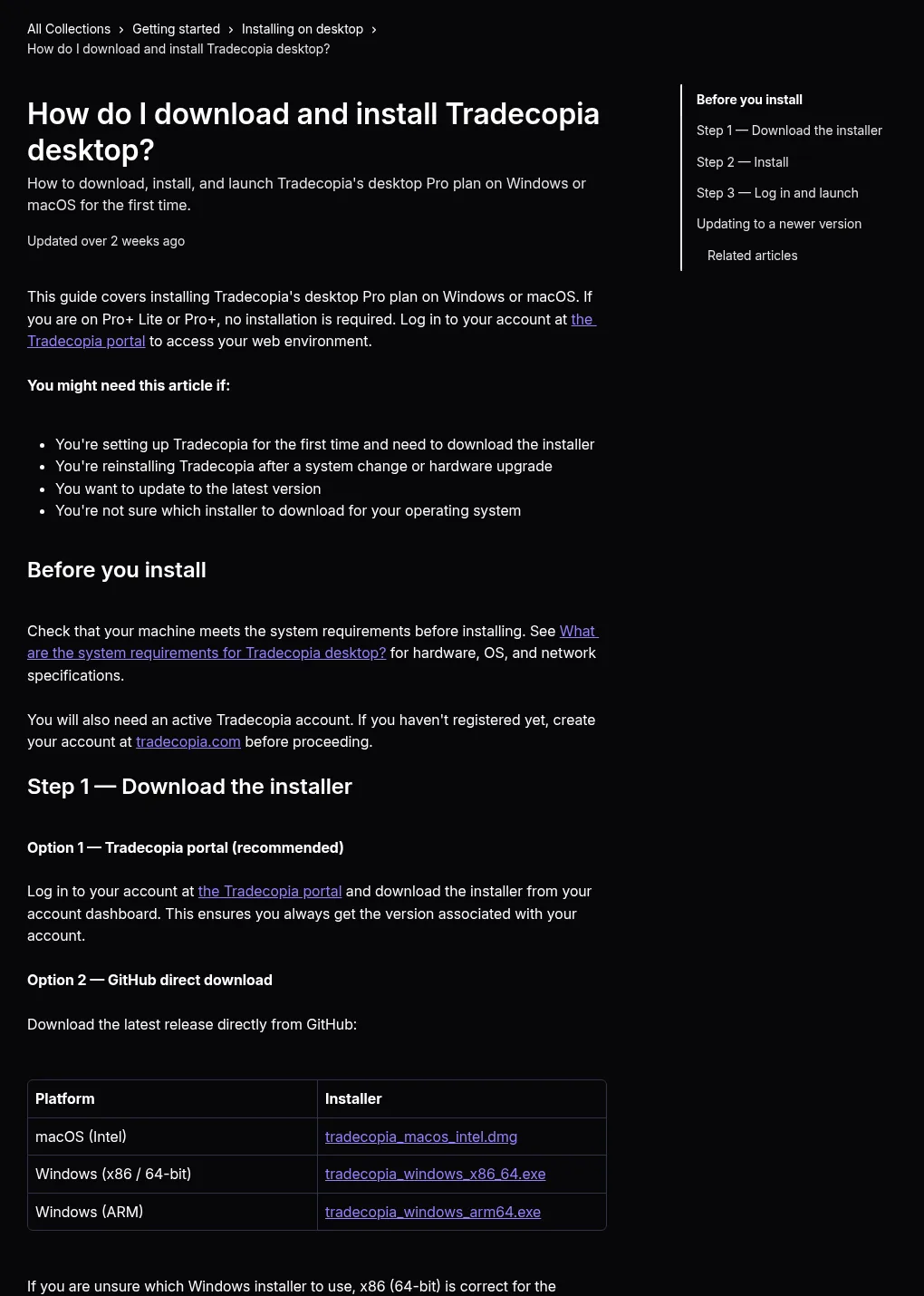
Setting up Tradecopia takes the same five steps on Windows, macOS or a VPS, based on the vendor's install guide and FAQ.
- Create an account on tradecopia.com, on the Free plan or with a Pro or Pro+ Lite trial.
- Download the desktop app from your portal, install it and sign in. On Pro+ Lite and Pro+ you skip this and open your hosted instance in a browser.
- Connect each account under Connections. Tradovate signs in through its own window, Rithmic takes your login and system name, and TopstepX takes an API key. Select Demo for prop firm accounts, evaluation and funded alike.
- Build a copy group. Pick the leader, add the followers and set each one's multiplier and contract setting.
- Run Test Copy Trading, then set and switch on each account's risk limits before you trade the leader.
If you are moving from another copier, remove your accounts from it first and turn off Tradovate Group Trade, because two copiers on one account send duplicate orders.
Tradecopia vs Tradesyncer
Tradecopia and Tradesyncer are the two copiers most often compared for futures prop firm accounts, and both connect the same core platforms. The difference is in how they charge and where they run. Tradesyncer's facts below come from its pricing, platforms and mobile pages, checked on November 20, 2026.
| Tradecopia | Tradesyncer | |
|---|---|---|
| Where it copies | Your computer on Pro; managed hosting on Pro+ Lite and Pro+ | Cloud on every plan |
| Starting price | $49.99 a month (Pro) | $49 a month (Basic) |
| Accounts on the entry plan | Unlimited | 2 connections with up to 10 accounts each |
| Larger plans | Pro+ Lite $79.99, Pro+ $149.99, still unlimited | Pro $99 (4 connections), Flex $149 (120 accounts) |
| Free trial | 7 days on Pro and Pro+ Lite, payment method needed | 7 days, card required |
| Free plan | Yes, without copying | No |
| Platforms | Tradovate, NinjaTrader, Rithmic, ProjectX, Volumetrica | Tradovate, NinjaTrader, Rithmic, ProjectX |
| TradingView | Leader from charts; alert webhooks on Pro+ Lite and Pro+ | Trades placed from TradingView on Tradovate accounts |
| Risk limits | Daily loss, profit and trade limits per account | Daily loss limits and lockouts per account |
| Mobile | Browser on Pro+ Lite and Pro+ | Browser; native apps announced |
Choose Tradecopia if you run more accounts than Tradesyncer's Basic plan covers, if you are happy to keep a computer or your own VPS running during the session, or if you want TradingView alerts to place orders on your leader, which Tradesyncer's pricing and platform pages don't list. At $49.99 for unlimited accounts on Pro, it costs less than Tradesyncer once you need more than two connections or twenty accounts.
Choose Tradesyncer, covered in our Tradesyncer review, if you want copying in the cloud at the entry price, with nothing to keep running on your side, and you trade at one or two firms. Tradecopia's cloud copying starts at $79.99 on Pro+ Lite, while Tradesyncer's cloud plan starts at $49.
Tradecopia for Prop Firms and Topstep
Prop firm accounts are Tradecopia's main market, and its homepage lists partner firms including Apex Trader Funding, My Funded Futures, Take Profit Trader, Tradeify and Lucid Trading. The FAQ says Tradecopia doesn't know or check each firm's rules and enforces only the limits you set, so match them to your firm's drawdown and read its copy trading rules first. Our guide to managing multiple prop firm accounts covers the wider setup.
Topstep accounts connect through ProjectX. The TopstepX page says you need Topstep's paid API access add-on, an API key, Auto OCO Bracket on and Auto Position Bracket off on each follower, and TopstepX's own trade replication switched off. Evaluation and funded accounts are supported, but Live Funded accounts are not, because they can't trade through the TopstepX API. Topstep's API rules also say all trading must come from your personal device and prohibit VPS, VPN and remote servers, so ask Topstep before you copy TopstepX accounts from Tradecopia's hosted plans or a VPS.
Running Tradecopia on a VPS
Because Pro copies only while the desktop app is open, Tradecopia's own Windows page suggests installing Pro on a Windows 10 or 11 VPS you rent, so it keeps copying with your own computer off. That can cost less than Pro+ Lite, but you look after the server, its updates and its restarts.
A Tradovate VPS or NinjaTrader VPS keeps the Pro app running through the whole session, and the same server can run NinjaTrader itself if you trade from it. The vendor's caveat applies here as well: some prop firms limit VPS use or where they accept connections from, and Topstep prohibits it for TopstepX, so check your firm's rules first.

Pros and Cons
Pros
- Unlimited leaders, followers and groups on every paid plan, with no fee per account or connection.
- Copies across Tradovate, NinjaTrader, Rithmic, ProjectX and Volumetrica in one group, at different firms.
- Daily loss, profit and trade limits on each account, with a lockout until the daily reset.
- A native desktop app for Windows and Mac, plus hosted plans in seven locations.
- A Free plan and a 7-day trial on Pro and Pro+ Lite.
Cons
- The $49.99 Pro plan copies only while the app is open on your computer or VPS.
- Hard Lock, the Event Scheduler and TradingView strategies need Pro+ Lite at $79.99 or more.
- Payments are non-refundable outside a one-time courtesy refund.
- TopstepX accounts take only the trades-per-day limit, and Live Funded accounts aren't supported.
- Stop-limit orders and multi-leg brackets are not copied yet.
- No native mobile app.
Who Tradecopia Suits
Tradecopia fits prop firm traders who run many evaluation and funded accounts across several firms and platforms and want one flat bill. It also fits Mac users, since the app runs natively on macOS, and traders who already run a Windows VPS for their platform and can add the Pro app to it.
It fits less well if you trade one or two accounts at a single firm, where a built-in tool such as Tradovate Group Trade may be enough, or if you want cloud copying at the lowest entry price. It also isn't for forex or MetaTrader accounts.
Tradecopia Alternatives
- Tradesyncer copies from the cloud on every plan, from $49 a month for two connections, as compared above.
- TradersConnect has a cloud Futures Copier for NinjaTrader, Tradovate, Rithmic and ProjectX at $30 a month for 20 accounts after a 10-day trial. Read our TradersConnect review.
- Duplikium is a cloud copier that charges per account and lists Tradovate and NinjaTrader in beta next to MT4, MT5 and cTrader. Read our Duplikium review.
- PickMyTrade copies Tradovate accounts and turns TradingView alerts into orders from the cloud. Read our PickMyTrade review.
- Social Trader Tools is a cloud copier for MT4 and MT5 accounts, so it suits forex prop firm traders rather than futures.
Verdict
Tradecopia is a strong choice for futures prop firm traders with many accounts. One flat price covers unlimited followers across the main futures platforms, every account gets its own limits, and the trial and Free plan let you set everything up before you pay. The trade-off is that the cheapest plan depends on a computer that stays on, so budget for a VPS or for Pro+ Lite if your accounts must keep copying while you are away, and check your prop firm's rules first.
FAQ
Is Tradecopia legit?
Tradecopia is run by Tradecopia Solutions Inc., a company in North Vancouver, British Columbia, Canada, named in its terms of service. The tradecopia.com domain was registered in December 2024, and the earliest customer posts quoted on its homepage date from August 2025. Billing runs through Stripe, you can cancel yourself at any time, and the terms say payments are non-refundable apart from a one-time courtesy refund.
Does my computer need to stay on?
On Pro, yes, or on a VPS running the app, because copying stops when the desktop app closes. Pro+ Lite and Pro+ keep copying with your computer off.
Is there a Tradecopia mobile app?
No native app is listed. On Pro+ Lite and Pro+ you open the hosted web app in your phone's browser, while Free and Pro run only in the Windows and macOS desktop app.
Does Tradecopia work with Topstep?
Yes, for TopstepX evaluation and funded accounts through the ProjectX connection and Topstep's paid API add-on. Live Funded accounts aren't supported, and Topstep's API rules prohibit trading from a VPS or remote server.
Tradecopia or Tradesyncer: which is better?
Tradecopia is better value for many accounts, because every paid plan covers unlimited followers. Tradesyncer is better if you want cloud copying at the entry price and trade only a few accounts.
Matthew Hinkle
Lead Writer & Full Time Retail Trader
Matthew is NYCServers' lead writer. In addition to being passionate about forex trading, he is also an active trader himself. Matt has advanced knowledge of useful indicators, trading systems, and analysis.
- Forex Trading
- Technical Analysis
- Trading Systems
- Market Indicators
Written by Matthew on
View profile