
Social Trader Tools Review 2026: Cloud Trade Copier Worth It?
In-depth Social Trader Tools review covering features, pricing, trade copier speed, pros and cons. Find out if this cloud-based MT4/MT5 copier fits your setup.

What Is Social Trader Tools?
Social Trader Tools is a cloud-based trade management platform built for MetaTrader 4 and MetaTrader 5 users. It lets you connect multiple trading accounts from different brokers into a single web dashboard, then copy trades between them automatically.
The platform launched as an alternative to locally installed trade copiers that require a VPS or always-on desktop. Everything runs on Social Trader Tools’ own servers, so you log in through a browser, connect your MT4 or MT5 accounts, and set up copiers without downloading software.
The core pitch is simple: manage unlimited MT4 and MT5 accounts from any broker, all from one platform, with no VPS required. For traders running multiple funded accounts, signal services, or prop firm challenges across brokers, that promise is appealing. But does the reality hold up in 2026?
This review breaks down every feature, walks through the pricing tiers, examines real user feedback, and gives an honest verdict on where Social Trader Tools fits in the current trade copier landscape.

Core Features
Trade Copier
The trade copier is the central feature. Social Trader Tools claims an average replication speed of 50ms, which puts it in the mid-range for cloud-based copiers. For context, TradersConnect advertises 20-30ms, and Duplikium claims 1-3ms latency.
You designate one account as the “lead” (master) and connect one or more “follower” accounts. When the lead opens, modifies, or closes a trade, the copier replicates that action on all connected followers.
The copier offers four risk calculation methods:
- Balance-based proportional sizing — lot sizes adjust based on the ratio of follower-to-lead account balances
- Equity-based proportional sizing — same concept but uses equity instead of balance, accounting for open positions
- Lot multiplier — applies a fixed multiplier to the lead’s lot size (e.g., 2x copies double the lots)
- Fixed lot — every copied trade uses the same lot size regardless of what the lead trades
You also get three operational modes you can switch between at any time:
- Active — copies new trades, modifications, and closures
- Management only — manages existing copied positions but doesn’t open new ones
- Disabled — ignores all lead activity
Additional copier settings include stop/limit customization (copy them exactly, apply fixed levels, or skip them entirely), symbol filtering to exclude specific pairs, and reverse copying to mirror trades in the opposite direction.
Account Manager
The account manager dashboard consolidates all your connected MT4 and MT5 accounts into one view. You can see open positions, account balances, equity, and margin usage across every account without logging into each broker separately.
This is genuinely useful if you’re running five or more accounts. Jumping between MT4 terminals or broker portals wastes time. Having everything on one screen lets you spot problems faster — an account approaching margin call, a copier that missed a trade, or an equity drawdown that needs attention. For a broader look at how Social Trader Tools stacks up, see our guide to the best MT4 trade copier software.
Equity Monitor
The equity monitor acts as an automated safety net. You set a threshold — either a percentage drawdown or a specific dollar amount — and the system triggers protective actions when equity drops below it.
Available actions include:
- Sending email alerts
- Disabling active copiers
- Closing all open trades on the account
For prop firm traders managing multiple funded accounts, this feature is particularly valuable. If one account hits a drawdown limit, the monitor can close everything before you breach the firm’s rules. Without automation, a single missed alert during sleep hours could cost you a funded account.
Signal Provider
Social Trader Tools lets you publish a signal page that displays your trading results. Other users can subscribe to follow your trades, either for free or for a fee you set.
The signal page shows metrics like win rate, drawdown, and total return. It’s a basic but functional way to monetize a consistent strategy. You don’t need to build a website or set up payment processing — the platform handles the subscriber management.
For traders looking to build a following or offer trade copying as a paid service, this removes a lot of the technical setup. However, the signal marketplace isn’t as established or as heavily trafficked as platforms like Myfxbook’s AutoTrade or MetaTrader’s built-in signals marketplace.

Whitelabel Solution
If you’re running a signal service business or managing funds for multiple clients, the whitelabel feature lets you rebrand Social Trader Tools under your own name. At the time of writing, this option is free, though the company indicates pricing changes may come in the future.
The whitelabel removes Social Trader Tools branding and lets you present the platform as your own. This is useful for introducing brokers, fund managers, or trading educators who want a professional-looking copy trading portal without building one from scratch.

Pricing Breakdown
Social Trader Tools uses a straightforward monthly subscription model. All plans include the same features — account manager, trade copier, and signal provider. The only variable is how many trading accounts you can connect.
Key point: “Accounts” means connected MT4/MT5 login credentials, not the number of copiers. A lead account plus three followers counts as four accounts.
| Plan | Monthly Price | Max Accounts | Price Per Account |
|---|---|---|---|
| Standard | $20 | 2 | $10.00 |
| Plus | $60 | 5 | $12.00 |
| Pro | $120 | 10 | $12.00 |
| Premium | $220 | 20 | $11.00 |
| Rolling 40 | $400 | 40 | $10.00 |
| Rolling 60 | $600 | 60 | $10.00 |
| Rolling 80 | $800 | 80 | $10.00 |
| Rolling 100 | $1,000 | 100 | $10.00 |
The Standard plan at $20/month for two accounts works for a simple one-lead-one-follower setup. But most serious copier users need at least five accounts, which jumps to $60/month on the Plus plan.
Compare that to Duplikium, which offers a free basic plan and charges $4/month per seat for full features. For five accounts, that’s $20/month versus Social Trader Tools’ $60. The price gap widens as you scale up.
Payment is accepted via major credit cards and PayPal. Notably, Social Trader Tools does not accept cryptocurrency payments.

Platform Support and Limitations
Social Trader Tools supports MetaTrader 4 and MetaTrader 5 exclusively. If you’re running MT5 on a dedicated VPS, the copier connects to those accounts seamlessly. But there’s no cTrader, TradingView, DXTrade, MatchTrader, or NinjaTrader integration.
This is a significant limitation in 2026, where many prop firms have moved to platforms like DXTrade and MatchTrader. Competitors like Duplikium support MT4, MT5, cTrader, TradingView, FXCM, and LMAX. TradersConnect covers MT4, MT5, cTrader, DXTrade, MatchTrader, TradeLocker, and NinjaTrader.
If all your accounts are on MT4 or MT5, this limitation doesn’t matter. But if you need cross-platform copying — say, from an MT5 signal account to a cTrader prop firm — Social Trader Tools can’t help you.
Trade Copier Speed: Does 50ms Matter?
Social Trader Tools advertises 50ms average replication speed. That’s the time between the lead account executing a trade and the follower account receiving the copy instruction.
For swing traders and position traders, 50ms is irrelevant. Your entries and exits span minutes or hours. A 50ms delay won’t move the needle.
For scalpers and high-frequency strategies, it’s a different story. A 50ms cloud copier delay sits on top of the normal execution latency between your broker and their liquidity provider. If you’re running a scalping EA that targets 3-5 pip moves, that additional latency can eat into your edge significantly.
Here’s how the major cloud copiers stack up on advertised speed:
| Platform | Advertised Replication Speed |
|---|---|
| Duplikium | 1-3ms |
| TradersConnect | 20-30ms |
| Social Trader Tools | 50ms |
Real-world results vary based on broker server locations, network conditions, and account load. But if copy speed is a priority for your strategy, the advertised numbers suggest Social Trader Tools sits behind its main competitors.
When VPS Still Matters for Trade Copying
Social Trader Tools markets itself as eliminating the need for a VPS. That’s true in the sense that you don’t need a VPS to run the copier software — it’s cloud-hosted. But there’s a subtlety here.
If your lead account is running an EA (Expert Advisor) that generates signals, that EA still needs to run somewhere 24/7. You have three options:
- Your home PC — unreliable. Power outages, internet drops, and Windows updates will interrupt your EA.
- Social Trader Tools’ cloud — the copier runs here, but your EA doesn’t. The platform copies trades, it doesn’t execute EAs.
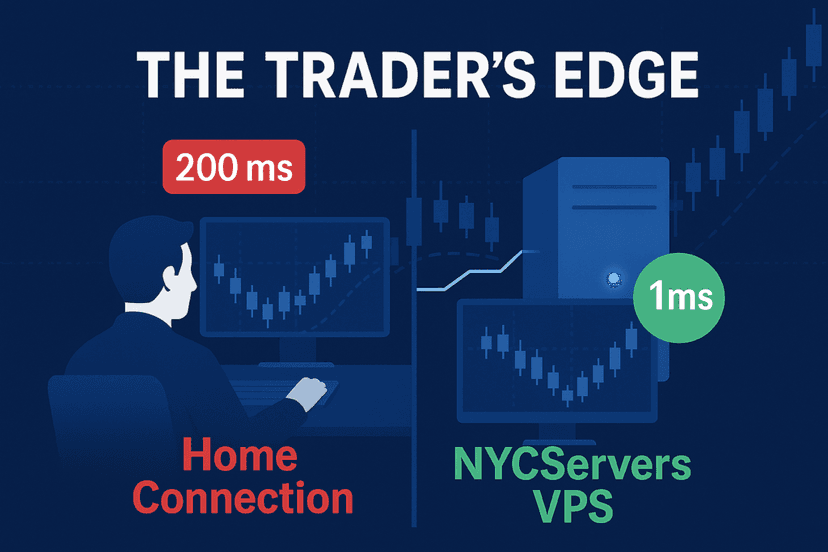
- A trading VPS — runs your EA with 99.99% uptime and sub-millisecond latency to your broker.
So the realistic setup for most automated traders is: EA runs on a VPS, trades execute on your lead account, and Social Trader Tools copies those trades to your followers. The VPS isn’t eliminated — it’s just not needed for the copier itself.
For traders who generate signals manually (discretionary trading), the cloud-only setup genuinely works. You trade on your broker’s platform, and Social Trader Tools detects and copies those trades without any additional infrastructure.
Real User Feedback
Social Trader Tools holds a 2.9 out of 5 rating on Trustpilot based on 42 reviews as of early 2026. That’s notably lower than competitors: Duplikium sits at 4.7/5 with 116 reviews, and TradersConnect at 4.7/5 with 333 reviews.
What Users Like
- Easy setup: Multiple reviewers note that connecting accounts and creating copiers takes minutes, not hours
- Clean interface: The web dashboard is described as logical and intuitive
- Responsive support: When support does engage, users report step-by-step guidance and quick resolution
What Users Complain About
- Missed trades: Several users report the copier failing to replicate trades, with one claiming a 1,300 EUR loss from uncopied positions
- Symbol mismatches: Trades copied with wrong symbols, leading to unintended exposure
- Latency slippage: Some users report copied trades arriving 10-15 pips late, making scalping strategies unviable
- Connection drops: Reports of accounts losing connection to the platform without warning
The mixed reviews suggest that Social Trader Tools works well for straightforward copy setups but may struggle under demanding conditions — high-frequency copying, many follower accounts, or strategies sensitive to execution speed.
Pros and Cons Summary
Pros
- No software installation required — everything runs in your browser
- Connects MT4 and MT5 accounts from any broker
- Four flexible risk management modes for the copier
- Built-in equity monitor for automated drawdown protection
- Signal provider feature lets you monetize your strategy
- Free whitelabel option for businesses
- Reverse copying available for hedging strategies
Cons
- Only supports MT4 and MT5 — no cTrader, DXTrade, or TradingView
- 50ms replication speed is slower than Duplikium (1-3ms) and TradersConnect (20-30ms)
- Pricing is higher per account than alternatives, especially at smaller tiers
- 2.9/5 Trustpilot score with reports of missed trades and symbol errors
- No cryptocurrency payment option
- Does not run EAs — you still need a VPS for automated strategy execution
Who Should Use Social Trader Tools?
Social Trader Tools makes the most sense for a specific type of trader:
- Discretionary traders copying their manual trades to 2-5 follower accounts across MT4/MT5 brokers
- Signal providers who want a simple way to offer copy trading without building custom infrastructure
- Fund managers running multiple client accounts on MetaTrader platforms
It’s less suitable for:
- Scalpers and HFT traders where 50ms latency compounds into slippage problems
- Multi-platform traders who need cTrader, DXTrade, or TradingView support
- Large-scale operations where per-account pricing makes alternatives like Duplikium significantly cheaper

Social Trader Tools vs. Alternatives
| Feature | Social Trader Tools | Duplikium | TradersConnect |
|---|---|---|---|
| Copy Speed | 50ms | 1-3ms | 20-30ms |
| Platforms | MT4, MT5 | MT4, MT5, cTrader, TradingView, more | MT4, MT5, cTrader, DXTrade, more |
| Starting Price | $20/mo (2 accounts) | Free (basic) / $4/seat | Varies by plan |
| Trustpilot | 2.9/5 (42 reviews) | 4.7/5 (116 reviews) | 4.7/5 (333 reviews) |
| Signal Pages | Yes | No | Yes |
| Whitelabel | Free | No | Yes (paid) |
| Equity Monitor | Yes | Yes | Yes |
Duplikium wins on speed and pricing. TradersConnect wins on platform support and user satisfaction. Social Trader Tools differentiates with its free whitelabel and signal provider features, but trails on the metrics that matter most to active traders: speed, reliability, and cost.
How to Optimize Your Trade Copier Setup
Regardless of which cloud copier you choose, your copying performance depends heavily on where your lead account’s trades originate. If your lead account runs an EA on a home computer with 80ms latency to your broker, adding 50ms of copier delay on top means followers see trades nearly 130ms after the market signal.
Running your lead EA on a trading VPS located near your broker’s server reduces that first leg to under 1ms. The total latency for followers drops from 130ms to around 51ms — a meaningful improvement for any time-sensitive strategy.
A well-configured setup looks like this:
- Step 1: Run your EA or manual trading platform on a VPS with sub-millisecond broker latency
- Step 2: Connect that lead account to your cloud copier
- Step 3: Link follower accounts from different brokers
- Step 4: Set appropriate risk modes and equity monitors
This hybrid approach gives you the reliability of VPS-hosted execution with the convenience of cloud-based trade distribution.
Check our forex VPS plans to ensure your lead account runs with maximum uptime and minimum latency to your broker.
Frequently Asked Questions
Is Social Trader Tools free?
No. Social Trader Tools requires a paid subscription starting at $20/month for two connected trading accounts. There’s no free tier or trial period publicly advertised. All plans include the same features — the pricing difference is based on how many accounts you can connect.
Does Social Trader Tools work with cTrader?
No. As of 2026, Social Trader Tools only supports MetaTrader 4 and MetaTrader 5. If you need cTrader compatibility, alternatives like Duplikium and TradersConnect offer cross-platform copying that includes cTrader support.
How fast is the Social Trader Tools trade copier?
Social Trader Tools advertises an average replication speed of 50 milliseconds. This is the time between a trade executing on the lead account and the copy instruction reaching follower accounts. Real-world speeds can vary depending on broker servers, network conditions, and the number of active copiers.
Can I run Expert Advisors on Social Trader Tools?
No. Social Trader Tools is a trade copier, not an EA hosting platform. It detects trades that appear on your connected accounts and copies them to followers. If you need to run an EA 24/7, you still need a VPS or dedicated server to host the MetaTrader terminal where the EA executes.
Is Social Trader Tools better than a local trade copier?
It depends on your needs. Cloud copiers like Social Trader Tools are easier to set up and don’t require running extra software on your machine. Local copiers installed on a VPS can offer faster execution since everything runs on the same server. For multi-broker copying across different accounts, cloud copiers are more convenient. For maximum speed on a single broker, a local copier on a VPS is typically faster.
What happens if Social Trader Tools goes down?
If the platform experiences downtime, your copiers stop replicating trades. Open positions on follower accounts remain open but won’t receive modification or close signals from the lead. Your lead account continues trading normally since it runs independently. This is a risk inherent to any cloud-based copier — your copy infrastructure depends on a third-party service staying online.
Can I use Social Trader Tools with prop firm accounts?
Yes, as long as the prop firm provides MT4 or MT5 access. Many traders use Social Trader Tools to copy trades from a personal account to multiple prop firm challenges or funded accounts. The equity monitor feature helps protect against breaching prop firm drawdown rules. Just verify that your prop firm permits trade copier use — some have restrictions in their terms of service.
Final Verdict
Social Trader Tools is a functional cloud-based trade copier with a clean interface and useful features like equity monitoring and signal pages. For discretionary traders copying manual trades to a handful of MT4/MT5 accounts, it gets the job done without requiring technical setup.
But the platform shows its age in 2026. The MT4/MT5-only restriction, 50ms copy speed, higher per-account pricing, and a 2.9 Trustpilot score place it behind Duplikium and TradersConnect on most objective measures. If you’re choosing a cloud copier today, those alternatives deserve serious consideration first.
For automated traders running EAs, remember that no cloud copier replaces a proper trading VPS. Your EA still needs a reliable, low-latency server to execute trades. The copier handles distribution — not execution.
Explore our trading VPS options to build a solid foundation for your multi-account setup, whether you’re using Social Trader Tools or any other trade copier.

About the author
Matthew Hinkle
Lead Writer & Full Time Retail Trader
Matthew is NYCServers' lead writer. In addition to being passionate about forex trading, he is also an active trader himself. Matt has advanced knowledge of useful indicators, trading systems, and analysis.
Areas of Expertise