
MQL5 VPS vs Windows VPS: Which Should You Use?
MQL5 VPS vs Windows VPS compared: latency, DLL support, multi-platform use, and price. See which forex hosting best fits your EAs and signals.
Quick Verdict
MQL5 VPS vs Windows VPS is a simple choice once you check your trading setup. Use MQL5 virtual hosting for one MT4 or MT5 environment running an EA or signal without DLLs; use a Windows forex VPS if you need DLL-based EAs, several terminals, another trading platform, or full desktop access.
MQL5 VPS wins on convenience. You rent it inside MetaTrader, select a server close to your broker, migrate the trading environment, and let it run without managing Windows. Its simplicity comes from strict limits: there is no remote desktop, DLL calls are forbidden, and not every MetaTrader component migrates.
A Windows VPS takes more setup because you install and maintain the platforms yourself. In return, you control the desktop and can run multiple MetaTrader terminals, cTrader, NinjaTrader, browsers, utilities, scripts, and software that depends on DLLs. For a trader whose setup may expand, that flexibility usually outweighs the extra administration.

What Each Hosting Option Actually Is
MQL5 Virtual Hosting
MQL5 VPS, also called MetaTrader virtual hosting, is a MetaQuotes-managed virtual platform for MT4 and MT5. You rent it from inside the terminal through the “Register a Virtual Server” workflow, pay through your MQL5.community account, and migrate selected charts, EAs, indicators, settings, or signals from your local terminal.
- How it runs: MetaQuotes operates a headless copy of the migrated MetaTrader environment near the broker server. There is no Windows desktop to open.
- How you manage it: You review logs and monitoring data from your local terminal, change the local setup, and synchronize it again. Migration goes from local to virtual only, never from the virtual platform back to your computer.
The migration menu offers All, Experts, and Signal modes. That model is efficient when your entire live workflow fits inside a standard MetaTrader environment, but it is not the same as receiving a conventional server that you can configure freely.
Windows Forex VPS
A Windows forex VPS is a remote Windows desktop hosted in a data center. You connect with a Remote Desktop client, then use the machine much as you would a Windows PC: install trading terminals, configure EAs, open utilities, organize files, and monitor every application directly.
- How it runs: The server remains online independently of your home computer and internet connection. Platform and EA capacity depends on the resources included in the chosen plan.
- How you manage it: You control software installation, terminal updates, files, Windows settings, and restarts through the full desktop. That control also makes you responsible for maintaining a clean, stable setup.
“Forex VPS” describes how the Windows server is positioned and configured for trading; it does not restrict the machine to MetaTrader. The practical advantage is that your hosting can follow your workflow rather than forcing the workflow into a fixed migration model.
The Criteria That Matter
Do not choose only by the lowest monthly figure. First confirm whether the hosting can run every component your strategy needs. An incompatible EA at a low price is still unusable.
- Latency and location: How close can the hosted platform run to the broker’s trading server?
- Platform support: Do you need only MT4 or MT5, or other trading and desktop applications?
- DLLs, scripts, and custom data: Does the strategy rely on external libraries, scripts, custom symbols, or non-standard timeframes?
- Terminals and accounts: Are you hosting one trading environment or coordinating several?
- Setup and access: Do you want a one-click migration or a desktop you can inspect and configure?
- Price and licensing: How does the rental term compare, and what happens to paid product activations?
These criteria are connected. For example, a trader may prefer MQL5 VPS pricing and migration speed but still require Windows because a single EA imports a DLL. Start with hard compatibility requirements, then compare convenience, latency, and cost among the options that remain.
Audit the live configuration rather than the EA name alone. List every terminal, account, chart, EA, indicator, script, symbol, timeframe, external library, copier, and monitoring tool that must remain active. One unsupported dependency can settle the comparison before price enters it, while a self-contained setup may reveal that a full desktop would add complexity without practical benefit.
MQL5 VPS vs Windows VPS Comparison Table
| Criterion | MQL5 VPS | Windows Forex VPS |
|---|---|---|
| Platforms | MT4 and MT5 only | MT4, MT5, cTrader, NinjaTrader, browsers, and other Windows software |
| DLL-based EAs | Forbidden | Supported |
| Scripts and custom data | Scripts, custom symbols, and non-standard timeframes are not migrated | Supported within the installed platform and software |
| Terminals and accounts | One migrated environment per rental | Multiple terminals, limited by plan resources |
| Access | No desktop; management through logs, monitoring, and re-synchronization | Full Windows desktop through Remote Desktop |
| Setup | Rent and migrate from inside MetaTrader | Install and configure each platform manually |
| Latency approach | MetaQuotes automatically suggests a server close to the broker; 0–5 ms claimed | You choose a data center close to the broker’s infrastructure |
| Market activations | Migrated Market products do not consume activations on the virtual platform | Standard product and broker licensing terms apply |
| Price model | About $10–$15 per month depending on term, as of July 2026 | Provider- and resource-dependent |
The decisive row is often DLL support, not price or headline latency. If an EA makes an external DLL call, MQL5 virtual hosting cannot run it. If your EA is self-contained and you need only one MetaTrader environment, the simpler option remains viable.
Detailed Comparison by Criterion
Latency and Server Location
MQL5 VPS automates location selection. During registration, the system measures available hosting points against the broker and selects or recommends the closest server. MetaQuotes lists more than 30 hosting points worldwide and says 96% of broker servers are reachable in under 10 milliseconds, with 84% reachable in under 3 milliseconds.
The official service page also claims 0–5 ms latency and 99.99% uptime. Treat those figures as network and service claims, not a guarantee that every order will execute within the same time. Broker processing, market conditions, strategy code, and the route from broker server to liquidity still sit outside the hosting comparison.
With a Windows VPS, location selection is manual. You choose a data center near the broker’s infrastructure, such as a New York or London financial hub, and then test the route from the server. That takes more effort but gives you control when you use multiple brokers or need a particular location.
Compare measured routes for the broker accounts you actually trade. MQL5’s automatic choice is attractive when one broker connection dominates the setup. Manual Windows-VPS placement becomes more useful when several terminals connect to brokers in different locations, because you can pick the best overall compromise instead of accepting a location selected for one migrated environment.
Platform, DLL, Script, and Data Support
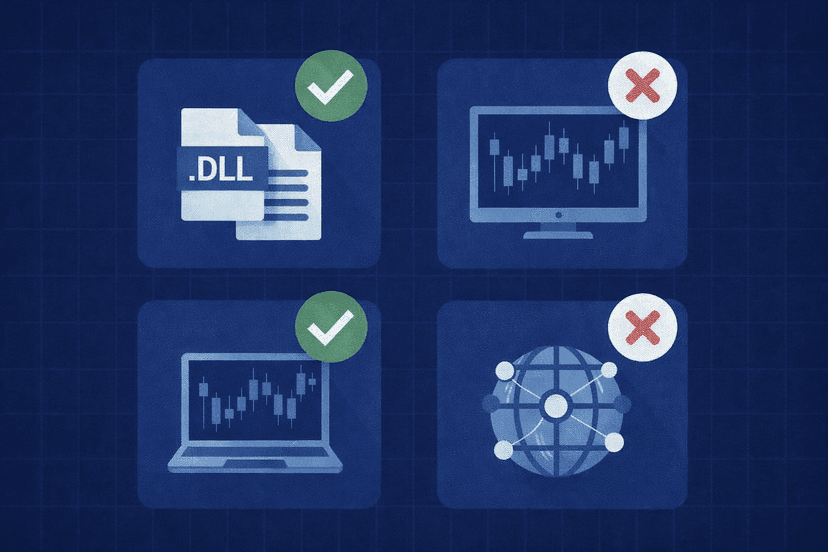
MQL5 VPS runs MT4 or MT5, but its virtual platform is deliberately restricted. DLL calls are completely forbidden. An EA that imports an external DLL is therefore disqualified, even if every other part of the strategy works normally on your local terminal.
Migration has other boundaries. Scripts are not transferred or run, including scripts designed to stay active in an endless loop. Custom symbols and non-standard timeframes are not transferred either. Charts without an attached EA are ignored, so an indicator-only chart needs a blank or template EA attached if you want that chart included in synchronization.
A Windows forex VPS runs the normal desktop versions of your platforms. That allows DLL-based EAs, scripts, custom indicators, chart tools, browsers, and utilities, subject to the application’s own compatibility and licensing. It also lets you leave MetaTrader entirely and operate platforms such as cTrader or NinjaTrader on the same remote machine.
Check the EA documentation and its live chart messages before assuming it is self-contained. A product can appear to be a standard MQL EA while calling a library for licensing, news filters, trade copying, or another supporting function. If you cannot establish that every required component migrates, the full Windows environment is the safer choice.
Multiple Terminals and Account Capacity
MQL5 virtual hosting is built around a migrated environment rather than a shared desktop full of applications. That makes it clean for one account and strategy set, but it is not a workspace for opening a fleet of terminals side by side. More accounts require separate hosted environments rather than simply launching another executable in Windows.
MetaQuotes states that each virtual platform can receive up to 3 GB of RAM and 16 GB of disk, with several CPUs allocated on demand through smart allocation. Those resources support the managed environment, but they do not change the platform restrictions or turn it into a general-purpose server.
A Windows VPS can host multiple terminal installations and trading accounts in one desktop. The practical ceiling depends on the VPS resources and the load created by each EA, chart set, symbol count, indicator, and companion tool. This model is better suited to trade copying, multi-broker setups, or a workflow that combines several platforms, provided you size the plan for the actual load.
Do not treat “multiple terminals” as unlimited capacity. A quiet terminal with one chart is not equivalent to a terminal calculating many indicators and EAs across many symbols. Build the intended configuration, watch its behavior during active market periods, and leave enough capacity for platform updates, logging, and temporary load rather than choosing a plan from terminal count alone.
Setup, Monitoring, and Control
MQL5 VPS has the shorter initial workflow: register the virtual server, choose a plan, prepare your local charts and settings, select a migration type, and synchronize. After migration, you rely on the hosting logs and monitoring rather than watching a remote terminal window. When you need a change, make it locally and migrate again.
This one-way process demands discipline. You cannot use the hosted environment as the authoritative copy and pull changes back later. You also cannot connect by Remote Desktop, install a diagnostic utility, or inspect Windows processes because there is no user-facing operating-system interface.
A Windows VPS reverses that trade-off. Installing terminals, setting startup behavior, arranging files, and handling updates takes longer, but you can see and control the whole environment over RDP. That visibility is valuable when troubleshooting an EA, checking a copier, editing configuration files, or coordinating several applications.
The operational question is whether control helps or distracts you. MQL5 hosting reduces the number of settings you can change, which can make a stable, compatible EA easier to leave alone. Windows exposes more moving parts, but it also gives you the tools to diagnose interactions that a log-only environment cannot show directly.
Pricing, Trials, and Product Activations
As of July 2026, the official MQL5 VPS page listed a one-month Mini term at $15 per month, a three-month Optimal term at $13 per month, a six-month Long term at $10.83 per month, and a 12-month Max term at $10 per month. The longest term represented a discount of up to 33%, and a 24-hour free trial was available. Prices can change, so check the current term before renting.
Broker arrangements can also affect availability. Sponsored plans paid by a broker and Free plans based on unused credited time may appear in some cases. However, an account that uses one-time-password authentication cannot be used on the virtual hosting service, so verify account compatibility before treating a sponsored offer as the answer.
MQL5 hosting has a specific advantage for paid Market products: products migrated to the virtual platform remain functional without consuming an additional activation. Automatic licensing applies on that virtual platform. On a Windows VPS, normal product and broker licensing terms apply, so check activation limits before moving or rebuilding the setup.
Windows VPS pricing varies with provider, location, Windows licensing, and allocated resources. A direct price comparison is therefore incomplete without checking how many terminals the server must carry. One Windows server that consolidates several accounts may be better value than several restricted environments, while MQL5 VPS can be more economical and less work for a single compatible setup.
Compare the total hosting layout over the term you are comfortable buying. The lowest MQL5 monthly rate requires the longest listed commitment, while a shorter rental costs more per month. Do not choose a long term until the EA, account authentication, migration behavior, and broker route have all passed your compatibility checks.

Which VPS Should You Choose?
Choose MQL5 VPS for One Compatible MT4 or MT5 Setup
Choose MQL5 VPS when you run one MT4 or MT5 environment, the EA does not call DLLs, and you do not depend on scripts, custom symbols, or non-standard timeframes. It is especially practical for a straightforward EA or MetaTrader Signals setup where you want quick migration and do not need to manage Windows.
Before paying, reproduce the intended live layout locally and inspect every dependency. Attach EAs to the required charts, confirm indicator-only charts have a template EA where needed, and check that the account does not use one-time-password authentication. Then use the logs after migration to verify that the virtual platform loaded the expected charts and tools.
Choose Windows VPS for DLLs, Multiple Accounts, or Other Platforms
Choose a Windows forex VPS if any required EA uses a DLL. The same recommendation applies if your workflow includes persistent scripts, custom symbols, non-standard timeframes, multiple terminals, trade-copying tools, browser-based utilities, or desktop monitoring software. These are compatibility requirements, not optional conveniences.
Windows is also the clear answer for cTrader, NinjaTrader, or a mixed-platform workflow. You can install the required applications on one remote desktop and choose resources according to their combined load. The additional setup buys room to add accounts, brokers, and tools without migrating to a different hosting model later.
- One self-contained MT5 EA: MQL5 VPS is the simpler fit.
- One MetaTrader Signals subscription: MQL5 VPS fits if the account and migrated charts meet the service restrictions.
- EA with an external DLL: Windows VPS is required.
- Several MT4 or MT5 accounts: Windows VPS gives you one desktop for multiple terminals, subject to resources.
- MetaTrader plus cTrader or NinjaTrader: Windows VPS is the only option of the two that supports the mixed setup.
- Desktop copier or monitoring utility: Windows VPS provides the required installation and remote access.
Choose Based on the Setup You Will Run Next
If both options can run your setup, decide between minimum administration and future flexibility. MQL5 VPS keeps the environment narrow and removes most server management. Windows VPS asks you to manage more but gives you a reusable desktop rather than a single-purpose sandbox.
Plan for the next realistic version of your trading operation, not an imagined enterprise build. A trader who expects to remain on one self-contained MT5 EA can choose MQL5 VPS without paying for control that will go unused. A trader who is already testing a second account or companion utility should usually start with Windows and avoid rebuilding the workflow later.
The final rule is direct: choose MQL5 VPS for the narrowest compatible case and Windows forex VPS for everything broader. Neither hosting model improves a strategy’s edge; the right one simply keeps the strategy’s required software online without blocking a dependency.
Frequently Asked Questions
Can MQL5 VPS run an EA that uses DLL files?
No. DLL calls are completely forbidden on the MQL5 virtual platform. If an EA or one of its dependencies imports a DLL, use a Windows VPS where the normal desktop platform can access supported external libraries.
Can I use cTrader or NinjaTrader on MQL5 VPS?
No. MQL5 virtual hosting is only for MT4 and MT5 and does not provide a desktop for installing other software. A Windows forex VPS is the appropriate option for cTrader, NinjaTrader, or a combination of trading platforms.
Can I log in to MQL5 VPS with Remote Desktop?
No. The virtual platform has no user interface and cannot be opened through RDP. You manage it from the local MetaTrader terminal through migration, synchronization, logs, and monitoring; use a Windows VPS if you need an interactive remote desktop.
Does migrating an MQL5 Market EA use another activation?
No. MetaQuotes states that Market products migrated to its virtual platform remain fully functional without consuming activations because automatic licensing applies there. A standard Windows VPS follows the product’s normal activation terms, so confirm the license before moving an EA.
Is MQL5 VPS always cheaper than a Windows VPS?
Not necessarily. MQL5 VPS cost about $10–$15 per month depending on rental term as of July 2026, while Windows VPS pricing depends on provider and resources. MQL5 can be economical for one compatible environment, but a Windows VPS may deliver better value when one server replaces several hosted environments or runs multiple applications.

About the author
Thomas Vasilyev
Writer & Full Time EA Developer
Tom is our associate writer, and has advanced knowledge with the technical side of things, like VPS management. Additionally Tom is a coder, and develops EAs and algorithms.
Areas of Expertise