
Margin Call and Stop Out in Forex: What Happens?
Margin call and stop out in forex explained: how margin level triggers a broker warning, when positions get auto-closed, and how to avoid it.
Margin Call and Stop Out: The Difference
Margin call and stop out are two different stages of the same account problem. A margin call is a warning that your equity is too low relative to the margin supporting your open trades; a stop out is the broker automatically closing one or more positions because that relationship has reached a critical threshold.
The number connecting them is your margin level. As floating losses reduce equity, margin level falls toward the broker’s margin-call and stop-out thresholds. You may receive an email or platform alert at the warning stage, but you should never assume you will have time to react before automatic liquidation begins.
Balance, Equity, Used Margin, and Free Margin
You need four account numbers to understand why a healthy-looking balance can still end in a forex margin call. They describe different parts of your account, and only one of them reflects open losses in real time.
Balance
Balance is the account value after closed trades, deposits, withdrawals, and booked charges or credits. An open trade’s floating profit or loss does not change balance until that trade closes.
Equity
Equity is your balance adjusted for current floating profit or loss. In plain terms, equity = balance + floating profits – floating losses. If overnight swaps or other account charges are applied, they can also reduce the value available to support positions.
Initial and Used Margin
Initial margin is the collateral required to open a leveraged position. Once the position is open, that collateral becomes used margin: the portion of your account currently tied up supporting open exposure. Maintenance margin is the minimum support the broker requires to keep that exposure open.
Free Margin
Free margin is the equity not committed as used margin. It is available to absorb losses or support new positions. If equity falls while used margin stays broadly similar, free margin shrinks first and your margin level follows it downward.
- Balance records completed account activity, not the live result of open trades.
- Equity is the live account value after floating profit and loss.
- Used margin is collateral locked against current positions.
- Free margin is the remaining cushion, while margin level shows that cushion relative to used margin.
Margin Level: Formula and Worked Example
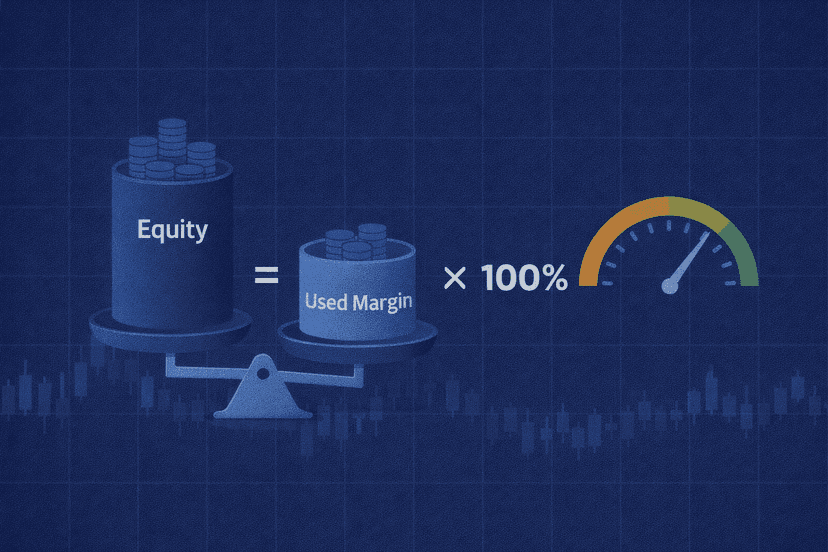
Margin level is the gauge that triggers everything. MT4- and MT5-style platforms generally calculate it with this formula:
Margin Level = (Equity ÷ Used Margin) × 100%
Suppose you have a $10,000 balance and open positions that require $2,000 of used margin. With no floating profit or loss, equity is $10,000 and the margin level is 500%: ($10,000 ÷ $2,000) × 100.
If those trades develop a $6,000 floating loss, equity falls to $4,000. Used margin remains $2,000 in this simplified example, so margin level drops to 200%. At an $8,000 floating loss, equity is $2,000 and margin level reaches 100%.
If the account’s stop-out level were 50%, liquidation could begin when equity reached $1,000 against the same $2,000 used margin. The exact trigger depends on the broker, account type, and legal entity, but the mechanism is the same: losses reduce equity, which lowers margin level.
When no positions are open, used margin is zero, so the formula has no finite result. Platforms may show no margin level or treat it as effectively infinite. Higher leverage can let you control more exposure with less initial margin, but that larger exposure also makes a given market move produce a larger account-level gain or loss.
Margin level can also fall without an additional floating loss if you open another position and increase used margin. For example, $4,000 of equity against $2,000 of used margin equals 200%; the same equity against $3,000 of used margin equals about 133%. Adding to a losing trade can therefore move the account closer to a call even before price changes again.
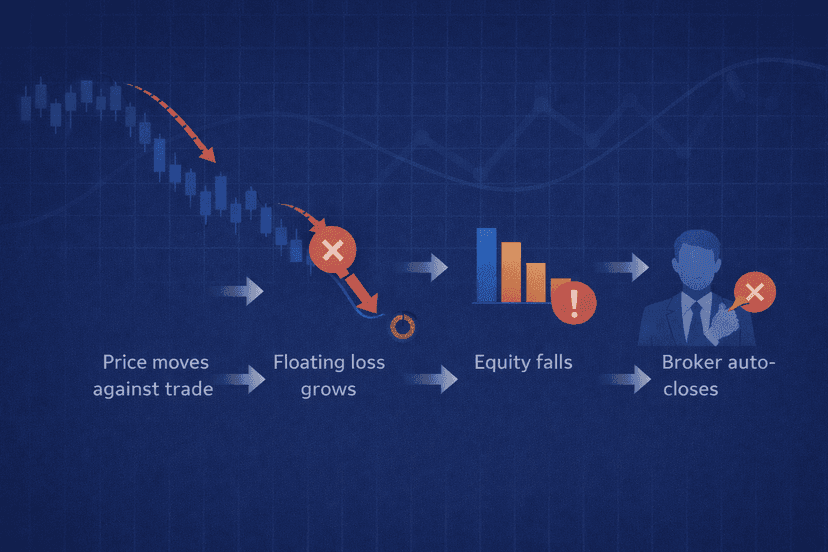
How Margin Calls and Stop Outs Unfold
What Is a Margin Call?
A margin call is the warning stage. It means the capital supporting your open positions has fallen below the broker’s maintenance requirement or warning threshold. The practical choices are to reduce exposure, add funds if appropriate, or accept that further losses may push the account into forced liquidation.
The word “call” is historical; a forex margin call may be an email, a platform notification, or simply a change in account status. In IG’s tiered example reviewed in July 2026, an account goes on margin call below 100% of maintenance margin, receives another alert at 75%, and begins having positions closed below 50% of required margin. That is an illustration, not a universal schedule.
What Is a Stop Out?
A stop out is the action stage. When margin level touches the broker’s stop-out level, the broker’s system closes positions without waiting for your approval. Many platforms start with the largest losing position and continue closing trades until margin level recovers, although the sequence and calculation method vary.
Closing a position turns its floating loss into a realized loss, but it also releases the margin assigned to that trade. The broker recalculates the account after each closure. Liquidation may stop once the ratio recovers, or it may continue through several positions if equity is still insufficient.
A margin call therefore does not close a trade by itself, while a stop out does. Fast markets can compress the gap between the two stages, so the warning should be treated as an emergency signal rather than a comfortable grace period.
| Account Context | Margin-Call Stage | Stop-Out or Close-Out Stage | What to Verify |
|---|---|---|---|
| Typical retail forex account | Often around 100% margin level | Commonly around 20-50% | Broker and account thresholds |
| EU/UK retail CFD account | Warning method is provider-defined | Regulatory close-out at 50% of minimum required margin | How the provider applies the account-level rule |
| Professional, US, or offshore account | Contract-specific | Contract-specific | Liquidation policy and balance liability |
The 20-50% range is a broad retail-market pattern, not a promise. Check the margin section of your own broker’s terms because thresholds can differ by account, instrument, and regulated entity.
Regulation and Negative Balance Protection
For EU retail CFD accounts, ESMA standardized margin close-out at 50% of the minimum required margin at account level. The FCA carried the same core protection into the UK retail CFD framework. This rule requires providers to close one or more positions; it does not guarantee an orderly exit price during a sharp gap.
EU and UK retail clients also receive negative balance protection, which caps losses at the money in the trading account. That protection is tied to retail status and jurisdiction. It is not safe to assume a US, professional, or offshore account has the same protection, and broker terms should state whether you can owe more than your deposited balance.
ESMA also capped retail leverage from 30:1 for major currency pairs down to 2:1 for more volatile underlyings. The reason for taking leverage limits seriously is visible in the regulator’s research: ESMA and national authorities found that 74-89% of retail CFD accounts typically lost money, with average losses ranging from €1,600 to €29,000 per client.

How to Avoid Margin Calls and Stop Outs
The best defense is to control exposure before entering a trade. A broker’s maximum leverage is a limit, not a target. Your position size, stop-loss distance, and combined exposure across correlated positions should leave enough room for normal volatility without pushing margin level toward the warning line.
- Calculate margin before entry. Estimate the used margin for the full position and recalculate it for every trade you add.
- Size positions from acceptable loss. Decide how much equity the setup may lose, place the stop where the trade idea is invalidated, and derive lot size from those two inputs.
- Use stop-loss orders. They can limit ordinary market losses, although gaps and slippage mean the requested stop price is not guaranteed.
- Use less effective leverage. Smaller total exposure slows the damage to equity when price moves against you.
- Watch equity and margin level, not balance alone. Set a personal warning well above the broker’s margin-call threshold and reduce risk when that buffer shrinks.
- Account for every open trade. Several positions tied to the same currency can behave like one large bet, while overnight charges can gradually reduce equity.
- Stress-test the account. Calculate what margin level would be after a larger-than-usual adverse move rather than planning around normal conditions only.
Keep EAs and Trade Management Running
If an EA manages stops, scales exposure, or closes trades at predefined limits, it must remain connected to the trading platform. A home power failure, computer restart, or internet outage can prevent that logic from running even though the broker continues calculating equity and margin.
A properly configured forex VPS can keep MetaTrader and its EAs online while your local computer is off. It does not prevent losses, change the broker’s stop-out rules, or guarantee execution prices; it only removes avoidable local downtime from the risk-management chain. Add account-level equity and margin guards to the EA so it cannot immediately rebuild dangerous exposure after positions are closed.
Margin Level Is the Gauge to Watch
A margin call warns that equity no longer provides enough support for used margin. A stop out is the broker acting on that shortage by closing positions. Know your broker’s exact percentages, monitor margin level instead of balance alone, and keep your exposure small enough that a routine losing move never becomes an account-level emergency.
Margin Call and Stop Out FAQ
Does a Stop Out Close All Positions at Once?
Not necessarily. A broker may close one position, recalculate margin level, and continue only if the account remains below the required threshold. Many systems close the largest losing position first, but the order and whether several trades close together depend on the broker’s liquidation policy and market conditions.
Can I Go Negative or Owe the Broker Money?
It depends on your regulatory status and account agreement. EU and UK retail CFD accounts include negative balance protection, so losses are capped at the funds in the account. That protection is not universal for professional, US, or offshore accounts, particularly when a market gap prevents liquidation near the expected level.
What Margin Level Is Safe?
There is no universal safe percentage because position volatility, leverage, and broker thresholds differ. A practical margin level is one that remains comfortably above the margin-call line even after your stress-tested adverse move. Treat the broker’s threshold as the last boundary, not as an operating target.
Is a Margin Call the Same as a Stop Out?
No. A margin call is a warning or account status telling you that equity has fallen too close to the maintenance requirement. A stop out is forced liquidation after margin level reaches the broker’s close-out threshold. The warning can lead to the action, but they are not interchangeable terms.
What Happens to a Running EA During a Stop Out?
The broker closes positions regardless of what the EA intended. The EA then reacts according to its code: it may stay flat, manage remaining trades, or open new positions if its entry conditions still apply. Use equity, free-margin, and margin-level safeguards so an EA pauses instead of immediately recreating the exposure that caused the stop out.

About the author
Thomas Vasilyev
Writer & Full Time EA Developer
Tom is our associate writer, and has advanced knowledge with the technical side of things, like VPS management. Additionally Tom is a coder, and develops EAs and algorithms.
Areas of Expertise