

Best Free Forex Trading Tools in 2026 (Complete List)
Discover the best free forex trading tools in 2026 for charting, economic calendars, calculators, sentiment, backtesting, and automation. All genuinely free.
Why Free Forex Trading Tools Are More Powerful Than Ever
There’s a persistent myth in forex that you need expensive software and premium subscriptions to trade profitably. In 2026, that couldn’t be further from the truth. The free forex trading tools available today rival what institutional traders paid thousands for just a decade ago.
Between free charting platforms, real-time economic calendars, position size calculators, sentiment trackers, and even strategy backtesting suites, you can build a complete trading workflow without spending a cent on software. The gap between free and paid tiers has narrowed dramatically.
This guide covers every category of tool you need, all with genuinely usable free tiers. No bait-and-switch “free trials” or crippled versions. Every tool listed here lets you trade, analyze, and manage risk without pulling out a credit card. We’ve also included tool-combination workflows so you can see how these free resources work together as a cohesive system.

Best Free Forex Charting Tools
Charts are where every trade starts. You need clean price data, customizable timeframes, and enough indicators to execute your strategy. Here are the best free options in 2026.

TradingView Free Tier
TradingView remains the gold standard for browser-based charting, and its free tier is surprisingly capable. You get access to real-time forex data from multiple providers, over 100 built-in technical indicators, and the ability to create custom indicator scripts using Pine Script.
The free plan limits you to a single chart layout with up to three indicators per chart. That’s enough for most strategies. You also get access to the community scripts library, where thousands of traders share custom indicators and strategies at no cost. The social features, including trade ideas and published analysis, add genuine educational value.
Free tier highlights: Real-time forex data, 100+ indicators, Pine Script access, community scripts library, basic alerting (1 active alert), public chart sharing.

MetaTrader 4 and MetaTrader 5 Built-In Charts
MT4 and MT5 ship with powerful charting capabilities that many traders overlook. The built-in charting engine supports 30+ technical indicators on MT4 and 38+ on MT5, with unlimited chart windows. You get nine timeframes on MT4 and 21 on MT5, plus the ability to install thousands of free custom indicators from the MQL5 community.
Where MetaTrader charting really shines is in its integration with trading. Your charts connect directly to your broker’s execution engine. Drawing tools, templates, and indicator profiles can be saved and loaded instantly. For traders who run EAs or manual strategies from the platform, having analysis and execution in a single window eliminates friction.
MT5 also includes a built-in economic calendar, depth of market display, and multi-asset support. For a deeper look at how these platforms fit into a broader trading setup, see our guide to building an algorithmic trading tech stack. If you’re already trading on MetaTrader, you might not need an external charting tool at all.

Best Free Forex Economic Calendars
Knowing when high-impact news drops is non-negotiable. A missed NFP release or surprise rate decision can wreck an otherwise solid trade. These calendars keep you informed for free.

Forex Factory Calendar
Forex Factory’s economic calendar has been the industry default for years, and it’s still one of the most complete free options available. Every event is categorized by impact level (low, medium, high), filterable by currency, and includes previous, forecast, and actual values with real-time updates.
The interface is clean and fast. You can customize your timezone, filter by specific currencies you trade, and set up the calendar to only show high-impact events. The community discussion threads attached to each event provide real-time trader reactions and analysis, which you won’t find on most other calendars.

FXStreet Economic Calendar
FXStreet offers a polished economic calendar with real-time updates and volatility expectations for each event. Their “Surprise Index” feature tracks how often certain data releases deviate from forecasts, giving you a statistical edge when planning around news events.
The calendar integrates well with their broader news coverage. After each data release, FXStreet analysts publish quick-take reactions, connecting the data point to potential market moves. For fundamental traders, this saves significant research time.

Investing.com Economic Calendar
Investing.com’s calendar covers more than just forex-relevant events. You get data releases across equities, commodities, bonds, and crypto, all in a single view. This cross-asset perspective matters if you trade correlated pairs or monitor the DXY alongside your forex positions.
The filtering options are extensive. Sort by country, category, importance level, or specific time ranges. Historical data for each event is easily accessible, letting you review how previous releases have moved the market.
TradingView Economic Calendar
TradingView added a full economic calendar to its platform, and it’s integrated directly into the charting interface. You can overlay event markers on your price charts, visually linking data releases to price action. For technical traders who also monitor fundamentals, this integration is hard to beat.
| Calendar | Best For | Standout Feature |
|---|---|---|
| Forex Factory | Overall daily planning | Community discussion threads |
| FXStreet | Fundamental analysis | Surprise Index + analyst reactions |
| Investing.com | Multi-asset traders | Cross-asset data coverage |
| TradingView | Chart-based analysis | On-chart event overlay |

Best Free Risk Management Calculators
Proper position sizing separates consistent traders from blown accounts. These free calculators handle the math so you can focus on the trade.
NYCServers Pip Calculator, Margin Calculator, and Compounding Calculator
We built a suite of free trading calculators specifically for forex traders. Our pip calculator instantly shows you the pip value for any currency pair across different lot sizes. The margin calculator tells you exactly how much margin your broker will require for a given position. And the compounding calculator lets you model realistic account growth scenarios based on your win rate, risk per trade, and average return.
These tools are designed for speed. No sign-ups, no email gates, no friction. Enter your values and get instant results. They’re especially useful when you need to quickly verify position sizing before entering a trade.
BabyPips Position Size Calculator
BabyPips offers one of the simplest position size calculators on the web. Enter your account size, risk percentage, stop loss in pips, and the currency pair. It returns your position size in lots. That’s it. No clutter, no unnecessary features. For newer traders still building the habit of consistent position sizing, this simplicity is a feature, not a limitation.
Myfxbook Position Size Calculator
Myfxbook’s calculator adds a few more fields, including account currency conversion and margin requirements. If you trade exotic pairs or your account is denominated in a non-USD currency, Myfxbook handles the math cleanly. Their calculator also shows margin required alongside position size, combining two calculations into one.
EarnForex Position Size Calculator
EarnForex provides both a web-based calculator and a downloadable MT4/MT5 indicator version. The indicator version is particularly useful. It sits directly on your chart, calculates position size based on your stop loss placement, and updates in real time as you move your stop. This removes the need to tab between your charting platform and a browser.
Workflow tip: Use the EarnForex on-chart indicator for your primary position sizing, and cross-reference against the NYCServers pip calculator when trading less common pairs where pip values aren’t intuitive.
Best Free Sentiment and Market Analysis Tools
Understanding what other traders are doing gives you a contrarian or confirmation signal depending on your strategy. These free tools reveal market positioning.
FXSSI Sentiment Indicators
FXSSI aggregates trader positioning data from multiple brokers and displays it as a percentage of longs versus shorts for major currency pairs. The free version gives you access to their current ratio indicator and open interest data. When retail sentiment is heavily skewed in one direction, contrarian traders use this as a fade signal.
Their profit ratio indicator is also worth monitoring. It shows the percentage of profitable versus unprofitable traders for each pair, revealing whether the crowd is on the right or wrong side of the market.
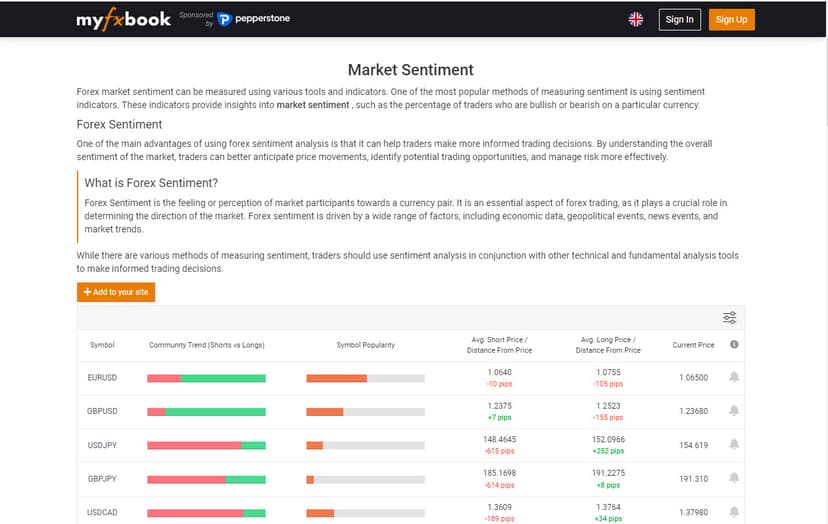
Myfxbook Community Outlook
Myfxbook’s Community Outlook tool pulls positioning data from thousands of verified trading accounts connected to their platform. Because these are real accounts with real money, the data is arguably more meaningful than survey-based sentiment tools. You can see the percentage of traders long or short, average entry prices, and how positions have shifted over time.
CFTC Commitment of Traders (COT) Data
The COT report is the gold standard for institutional positioning data, and it’s completely free. Published every Friday by the CFTC, it shows how commercial hedgers, large speculators, and small speculators are positioned in currency futures. While the data has a slight delay (reported Tuesday, published Friday), it’s invaluable for understanding longer-term sentiment shifts.
Several free websites format the raw COT data into readable charts, including Barchart and TradingView’s COT indicators. Focus on the net positioning of non-commercial (speculative) traders for the most actionable forex signals.
Currency Strength Meters
Free currency strength meters like those available through Forex Factory’s tools section and various MT4/MT5 indicators rank individual currencies by relative strength. Instead of analyzing pairs, you analyze currencies. When you see the USD strengthening across the board while the JPY weakens, you know where to focus your attention.
Several free MT4/MT5 custom indicators calculate currency strength using different methodologies (RSI-based, momentum-based, or price-change-based). Experiment with a few to find one that aligns with your timeframe and trading style.
| Sentiment Tool | Data Source | Best Timeframe | Update Frequency |
|---|---|---|---|
| FXSSI | Multi-broker retail data | Intraday/Swing | Real-time |
| Myfxbook Outlook | Verified live accounts | Intraday/Swing | Real-time |
| COT Report | CFTC futures data | Swing/Position | Weekly (Friday) |
| Currency Strength Meters | Price calculations | Any | Real-time |
:max_bytes(150000):strip_icc()/GettyImages-1191984095-08a76f953500483880fcb39fcd89f92c.jpg)
Best Free Forex News and Market Intelligence
Timely, accurate news is essential for both fundamental traders and technical traders who need to know when to step aside. These sources deliver institutional-grade coverage without a subscription fee.
DailyFX
DailyFX provides free real-time forex news, market analysis, and trading education. Their team of analysts publishes daily and weekly forecasts for all major pairs, backed by technical and fundamental analysis. The education section covers everything from beginner concepts to advanced strategy breakdowns.
Their quarterly forecasts and webinar schedule are particularly useful for swing traders who need a longer-term directional bias. The IG Client Sentiment data published on DailyFX also adds a free sentiment layer to your analysis.
ForexLive (now Investing.com)
ForexLive, now operating under the Investing.com umbrella, remains one of the fastest free forex news feeds available. Their commentary-style coverage during major sessions (London and New York) gives you real-time context on price moves. The team focuses on what’s driving markets right now, not just what happened overnight.
Their “Orders” section is especially valuable. It publishes known option expiries, barrier levels, and large order clusters reported by interbank sources. This information, freely available, used to cost institutional desks real money.
Best Free Forex Backtesting Tools
Testing your strategy on historical data before risking real money is one of the most important steps traders skip. These free tools make backtesting accessible.
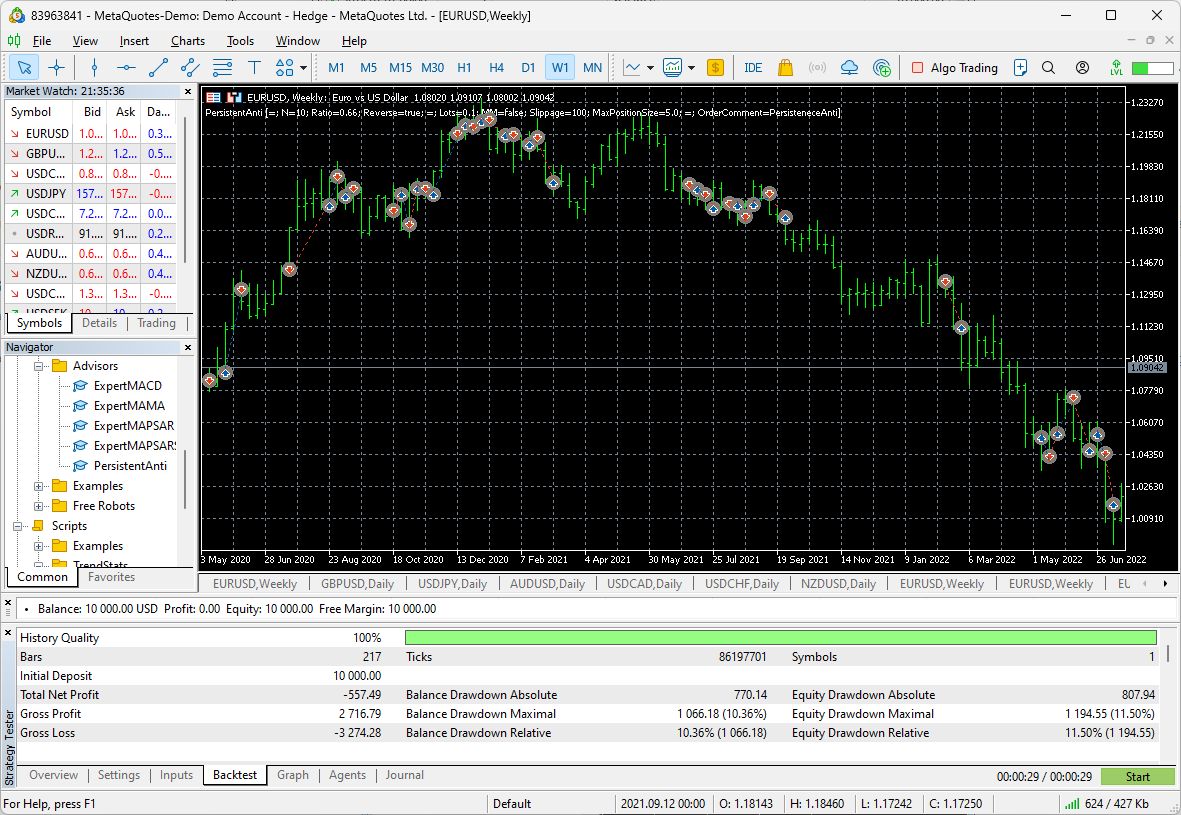
MT4 and MT5 Strategy Tester
Both MetaTrader platforms include a built-in Strategy Tester that lets you backtest EAs against historical data. MT4’s tester is straightforward: select an EA, choose a date range and symbol, set your parameters, and run the test. You get a detailed report with profit factor, drawdown, win rate, and trade-by-trade results.
MT5’s Strategy Tester is significantly more powerful. It supports multi-currency and multi-timeframe testing, forward testing alongside backtesting, and visual mode where you can watch trades execute on historical charts. The optimization feature lets you test thousands of parameter combinations to find optimal settings. All of this is free with any MT5 installation.
Performance note: Strategy Tester optimization runs can take hours on a home PC, especially with tick data. Running MT5 on VPS hosting for traders with dedicated CPU resources can cut optimization time significantly. More on this in the VPS section below.
FX Replay Free Tier
FX Replay caters to manual traders who want to practice their strategy on historical data. The free tier gives you access to a replay tool that plays back historical price action at adjustable speeds. You place trades as if you were trading live, and the platform tracks your results.
This is especially valuable for newer traders developing pattern recognition. You can compress months of screen time into hours. The free tier limits you in the number of sessions and available data, but it’s enough to test a strategy concept before committing to a paid plan or live trading.

Best Free Trade Journaling and Analytics Tools
A trade journal turns random trades into a data-driven feedback loop. These free tools automate the process so you actually stick with it.
Myfxbook
Myfxbook is the most widely used free trade analytics platform in forex. Connect your trading account (read-only access), and Myfxbook automatically imports every trade, calculates your statistics, and generates detailed performance reports. You get metrics like profit factor, average win/loss, Sharpe ratio, drawdown analysis, and monthly/daily breakdowns.
The platform also generates equity curves, allows you to tag trades by strategy, and benchmarks your performance against other connected accounts. For traders who struggle to maintain a manual journal, this automated approach removes the friction entirely.
FX Blue
FX Blue offers a free trade analytics service with a slightly different angle. Their MT4/MT5 plugin publishes your trades to an online dashboard where you can analyze performance by day of week, time of day, pair, trade direction, and dozens of other dimensions. The heat map feature shows exactly when you trade best and worst.
One standout feature is the ability to share your verified track record publicly. If you’re building credibility as a signal provider or applying to prop firms, a verified FX Blue track record carries weight. The platform also offers free trade copier functionality for traders managing multiple accounts.
| Analytics Tool | Connection Method | Best Feature | Limitation (Free) |
|---|---|---|---|
| Myfxbook | Account connection | Automated import + community | Delayed stats refresh |
| FX Blue | MT4/MT5 plugin | Time-based performance heatmaps | Limited historical depth |
Best Free Automation and Alert Tools
Automation doesn’t mean you need to go full algo. Even manual traders benefit from alerts that watch the market when they can’t. These free tools keep you connected to price action around the clock.
TradingView Alerts
TradingView’s free tier includes one active alert at a time. That sounds limiting, but used strategically, it’s powerful. Set an alert on the single highest-probability setup on your watchlist, and let the platform notify you via email, push notification, or on-screen popup when conditions are met.
TradingView alerts can be based on price levels, indicator crossovers, or custom Pine Script conditions. The flexibility is remarkable even on the free plan. If you rotate your single alert as setups complete, you maintain coverage of the opportunities that matter most.
MT4 and MT5 Alerts and Expert Advisors
MetaTrader platforms offer unlimited free alerts. Set price alerts, indicator-based alerts, or write custom alert logic using MQL4/MQL5. Alerts can trigger sound notifications, email alerts, or push notifications to the MetaTrader mobile app.
The real power comes from Expert Advisors (EAs). Thousands of free EAs are available through the MQL5 community marketplace and forums. These range from simple alert bots that notify you of specific conditions to fully automated trading systems. Even if you prefer manual trading, a free EA that monitors your open positions for trailing stop adjustments or break-even moves can dramatically improve your risk management.
The catch with MetaTrader alerts and EAs is that they require the platform to be running. Close your laptop or lose your internet connection, and your alerts go silent. This is where infrastructure matters, and it’s the perfect segue into why serious traders pair these free tools with reliable hosting.
How a Forex VPS Supercharges Your Free Trading Tools
Every tool listed above works great on your home computer. But several of them become dramatically more powerful when they run 24/7 on a dedicated server. Here’s how a forex VPS transforms free tools from useful to indispensable.
Always-On Alerts That Never Sleep
MetaTrader alerts and EAs only work when MT4 or MT5 is running. On a home PC, that means leaving your machine on overnight, dealing with Windows updates that force restarts, and hoping your internet doesn’t drop during the Asian session. A forex VPS solves this permanently. Your MT4 or MT5 instance runs 24/7 on dedicated hardware with 100% uptime during trading hours. Alerts fire when they should. EAs execute when they should. No gaps.
Faster EA Execution With Lower Latency
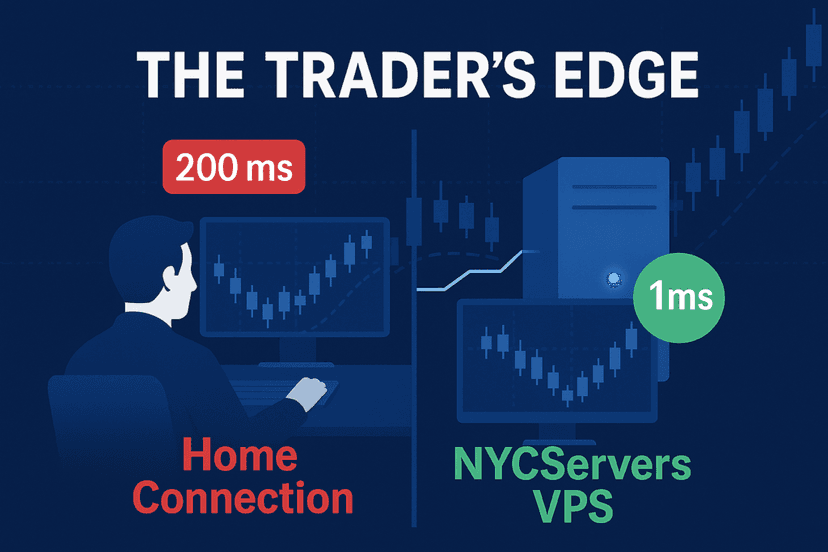
Free EAs are powerful, but their edge depends on execution speed. An EA running on a VPS located in the same data center as your broker’s servers can execute trades in under 1ms. You can verify this yourself using our broker latency checker. That same EA running on your home Wi-Fi might take 50-200ms. For scalping EAs or news-trading robots, that difference is the margin between profit and loss.
At NYCServers, our VPS infrastructure sits in Equinix NY4, LD4, and TY3 data centers, the same facilities where major brokers host their matching engines. Your free EA gets the same latency advantage that institutional traders pay a premium for.
Faster Backtesting and Optimization
MT5 Strategy Tester optimization runs are CPU-intensive. Testing thousands of parameter combinations on a home laptop can take all day and chew through your battery. On a VPS with dedicated CPU cores and guaranteed resources, the same optimization finishes faster and doesn’t interfere with your regular computer use.
You can kick off an optimization run on your VPS, disconnect, and check the results hours later from your phone or tablet via remote desktop. The VPS keeps crunching numbers whether you’re connected or not.
Tool-Combination Workflow: The Free Stack on a VPS
Here’s a practical example of how free tools combine with a VPS for a complete trading system:
- Morning: Check Forex Factory’s calendar for high-impact events. Cross-reference with FXStreet’s Surprise Index for context.
- Analysis: Use TradingView free tier for multi-pair scanning and chart analysis. Check FXSSI and Myfxbook sentiment for positioning data.
- Sizing: Calculate position size using the NYCServers pip calculator or EarnForex on-chart indicator.
- Execution: Place the trade in MT4/MT5 running on your VPS. Set your EA-based trailing stop or break-even script.
- Monitoring: Your VPS keeps MT4/MT5 running 24/7. Alerts fire to your phone if conditions change. Your Myfxbook account logs the trade automatically.
- Review: End of week, review your FX Blue dashboard and Myfxbook stats to identify patterns and improve.
The entire workflow costs nothing in software. The only infrastructure investment is the VPS itself, which starts at $25/month and eliminates the biggest weakness of free tools: the need to keep your own machine running around the clock.

Building Your Free Forex Tool Stack: Category Checklist
Here’s a quick reference for assembling your complete free toolkit. Pick one or two from each category based on your trading style.
| Category | Recommended Free Tools | Priority |
|---|---|---|
| Charting | TradingView (web), MT4/MT5 (desktop) | Essential |
| Economic Calendar | Forex Factory, TradingView overlay | Essential |
| Position Sizing | NYCServers calculators, EarnForex indicator | Essential |
| Sentiment | Myfxbook Outlook, COT data | Recommended |
| News | ForexLive, DailyFX | Recommended |
| Backtesting | MT5 Strategy Tester, FX Replay | Recommended |
| Journaling | Myfxbook (automated), FX Blue (detailed) | Essential |
| Automation/Alerts | MT4/MT5 EAs + alerts on a VPS | High value |
Frequently Asked Questions
Are free forex trading tools good enough for profitable trading?
Yes. The free tools available in 2026 cover every essential function: charting, news, risk management, sentiment analysis, backtesting, and trade journaling. Many professional traders use TradingView’s free tier for analysis and MT4/MT5 for execution. Paid upgrades add convenience features (more alerts, faster data), but they don’t unlock any capability that’s strictly necessary for consistent profitability. Your strategy, risk management, and discipline matter far more than your software budget.
What’s the best free forex charting tool for beginners?
TradingView’s free tier is the best starting point for beginners. The interface is intuitive, the community provides educational content, and you can access real-time data without downloading any software. Once you’re comfortable with technical analysis, adding MT4 or MT5 gives you a desktop platform where you can eventually automate strategies. Start with TradingView for learning, then expand to MetaTrader when you’re ready to trade live.
How do free forex tools compare to paid alternatives?
The core functionality is often identical. Paid tiers typically add more alerts, faster data updates, additional chart layouts, and priority support. For example, TradingView’s paid plans increase your alert count from 1 to 20 or more and add features like multiple chart layouts. But the charting engine, indicators, and data quality are the same. Most traders can operate effectively on free tiers for months or even years before needing an upgrade.
Do I need a VPS to use free forex trading tools effectively?
You don’t need a VPS for browser-based tools like TradingView, Forex Factory, or web calculators. However, if you run MetaTrader EAs, custom alert scripts, or automated trading strategies, a VPS is practically essential. These tools require MT4 or MT5 to be running continuously, which isn’t reliable on a home computer. A forex VPS ensures your EAs and alerts operate 24/7 without interruption, and the low-latency connection to your broker improves execution quality.
Can I backtest a forex strategy for free?
Absolutely. MT4 and MT5 both include built-in Strategy Testers that are completely free. MT5’s tester is particularly robust, supporting multi-currency testing, optimization, and visual replay. For manual strategy testing, FX Replay offers a free tier that lets you practice on historical data. Between these two options, you can validate any strategy concept, whether automated or discretionary, without spending anything.
What free tools help with forex risk management?
Position size calculators are the foundation of free risk management. NYCServers offers free pip, margin, and compounding calculators. BabyPips and Myfxbook provide straightforward position size tools. EarnForex goes further with an MT4/MT5 indicator that calculates position size directly on your chart based on your stop loss placement. Combine these with Myfxbook’s automated trade tracking to monitor your actual risk metrics over time.
What’s the best free forex sentiment tool?
For retail sentiment, Myfxbook’s Community Outlook provides the most reliable data since it pulls from verified live trading accounts. For institutional positioning, the CFTC’s Commitment of Traders (COT) report is unmatched and completely free. Use Myfxbook for intraday and swing trading sentiment, and the COT report for longer-term positioning analysis. FXSSI is a solid third option that aggregates data from multiple brokers.
Start Trading Smarter With the Right Tools
You don’t need an expensive software stack to trade forex effectively. The free tools covered in this guide handle charting, fundamental analysis, risk management, sentiment tracking, backtesting, journaling, and automation. Combined, they form a workflow that rivals any paid setup.
The one piece of infrastructure that ties it all together is reliable hosting. When your EAs, alerts, and automated scripts need to run around the clock with sub-millisecond execution, a dedicated forex VPS makes the difference.

About the author
Matthew Hinkle
Lead Writer & Full Time Retail Trader
Matthew is NYCServers' lead writer. In addition to being passionate about forex trading, he is also an active trader himself. Matt has advanced knowledge of useful indicators, trading systems, and analysis.
Areas of Expertise