
TradeLocker Review 2026: Features, Brokers & Honest Verdict
Honest TradeLocker review covering TradingView integration, Studio bots, supported brokers, prop firms, and how it compares to MT4/MT5 and cTrader in 2026.

What Is TradeLocker?
TradeLocker is a next-generation trading platform built around feedback from over two million active traders. Unlike legacy platforms that bolt on new features over decades-old architecture, TradeLocker was designed from scratch with modern web technologies, native TradingView chart integration, and a focus on clean user experience.
The platform supports forex, metals, indices, stocks, and crypto CFDs. It runs on desktop, web browser, and mobile apps for iOS and Android. You don’t install clunky terminal software. You open a browser tab or tap an app, and you’re trading.
TradeLocker positions itself as the alternative to MetaTrader and cTrader for traders who want a faster, simpler interface without sacrificing the tools that matter. Whether that promise holds up is what this review breaks down.

TradeLocker Key Features
TradingView Chart Integration
The standout feature is full TradingView charting baked directly into the platform. You get access to TradingView’s indicator library, drawing tools, and multi-timeframe analysis without leaving TradeLocker or paying for a separate TradingView subscription. For traders already comfortable with TradingView, this eliminates the need to toggle between chart analysis and order execution.
On-chart trading is supported. You can place, modify, and close orders directly from the chart with drag-and-drop functionality. Limit orders, stop losses, and take profits are all visible and adjustable on the chart itself.
Risk Management Tools
TradeLocker includes a built-in risk calculator that automatically sizes your lots based on your account balance and the percentage you want to risk per trade. This is a genuine time saver, especially for traders running strict risk management rules across multiple pairs on a trading VPS.
The platform also supports one-click execution, microlots (0.01), pending orders, and partial closures. The order panel is streamlined compared to MetaTrader’s cluttered interface, and the position management window groups open trades with clear P&L displays.

TradeLocker Studio: Algorithmic Trading
TradeLocker Studio is the platform’s algorithmic trading module. It lets you build, backtest, and deploy trading bots. The headline feature is AI-assisted bot creation. You describe your strategy in plain English, and the platform generates code for it. No MQL, no C#, no Python required.
For traders who do code, you still get full access to review and edit the generated scripts. Studio also includes a marketplace where traders share and import bots, each with performance stats and strategy descriptions.
Backtesting supports over 500 instruments with configurable parameters including margin, resolution, date ranges, and risk metrics. Results display ROI, win percentage, max drawdown, and trade-by-trade breakdown. It’s not as mature as MetaTrader’s Strategy Tester or cTrader’s cAlgo environment, but for a newer platform, it’s functional and improving.
Cross-Device Sync
TradeLocker syncs your layouts, watchlists, and chart templates across desktop and mobile. In theory. In practice, some users report that custom templates reset when switching devices. This is a known issue the team has acknowledged and is working to fix. For now, expect some friction if you trade on both desktop and phone frequently.
Demo Trading Accounts
TradeLocker offers free demo accounts through its broker partners, which is the best way to test the platform before committing real capital. Demo accounts replicate live market conditions with virtual funds, so you can evaluate execution speed, charting tools, and the Studio bot builder without any financial risk. This is especially useful for traders considering a switch from MetaTrader or cTrader who want to verify that TradeLocker’s workflow fits their trading style before moving live funds.
The Trading Hub
TradeLocker’s Hub is a built-in marketplace that connects you with brokers, prop firms, trading bots, and copy trading features. Instead of shopping around different websites, you can compare brokers and prop firms directly inside the platform. It’s a convenience layer, though you should still do independent due diligence on any broker or firm before depositing real money.
Supported Brokers in 2026
This is where TradeLocker’s story gets complicated. The broker list has actually shrunk in 2026. After peaking at over 20 partners in 2025, the current list sits under 10 active brokers.
The most notable addition is Eightcap, which joined in January 2026. Eightcap is the first major multi-jurisdictional regulated broker to offer TradeLocker, and their involvement adds credibility the platform previously lacked from the regulatory side.
Other active brokers include Plexytrade, HeroFX, KOT4X, and SageFX. Most are smaller or less regulated compared to the major players you’d find on MetaTrader or cTrader. If you trade with a tier-1 regulated broker, your options on TradeLocker remain limited.
Important: TradeLocker provides the interface and tools. Your broker handles execution, spreads, leverage, and funds. Always verify your broker’s regulation independently.
TradeLocker for Prop Firm Traders
Prop firm support is one area where TradeLocker is gaining real traction. Several funded trading programs now offer TradeLocker as a platform option alongside MetaTrader and cTrader.
Notable prop firms supporting TradeLocker in 2026 include:
- FunderPro — One-phase evaluation with no time limit, 80% profit split, payouts starting 7 days after the first trade
- Blue Guardian — Full TradeLocker support across all account types, actively encourages modern platform use
- DNA Funded — Performance-based funding with sharp risk controls
- FundingPips — Supports TradeLocker alongside MT5 and cTrader for challenge accounts
- AquaFunded — Offers instant funding plans on TradeLocker without traditional challenges
- Funding Traders — Supports larger account sizes up to 500K on TradeLocker
If you’re a prop trader looking for a clean interface with built-in risk tools, TradeLocker is worth testing on a demo account before committing to a challenge.

Execution Speed and Performance
TradeLocker’s execution performance is decent for most trading styles but shows weaknesses under pressure. During regular market conditions, order execution averages around 0.4 seconds. That’s acceptable for swing traders and most intraday strategies.
During high-volatility events like NFP releases or central bank announcements, execution times spike to around 2.4 seconds in independent testing. That’s a significant gap that scalpers and news traders should take seriously.
| Condition | Avg Execution Time | Verdict |
|---|---|---|
| Normal market hours | ~0.4 seconds | Acceptable |
| High volatility events | ~2.4 seconds | Poor for scalping |
| Sub-1-minute scalping | Occasional lag reported | Not ideal |
For automated strategies and EAs, execution reliability matters even more. Running your bots on a dedicated VPS close to your broker’s servers can help reduce the network latency portion of the equation, even if platform-side execution delays remain. Traders using Studio bots should be especially aware of these execution windows and avoid strategies that depend on millisecond-level precision during news events.
TradeLocker vs MetaTrader (MT4/MT5)
MetaTrader dominates the retail forex space for a reason. It has the largest ecosystem of Expert Advisors, custom indicators, and community support. For a deeper dive into how these platforms compare for automated trading, see our cTrader vs MetaTrader algo trading comparison. MT5 adds multi-asset trading, a built-in economic calendar, and improved backtesting over MT4.
TradeLocker competes on user experience. The interface is cleaner, the charting is better (thanks to TradingView), and the learning curve is lower for new traders. But MetaTrader wins on ecosystem depth, broker availability, and automation maturity.
| Feature | TradeLocker | MetaTrader 4/5 |
|---|---|---|
| Charting | TradingView (excellent) | Built-in (adequate) |
| User interface | Modern, clean | Dated but functional |
| Broker support | Under 10 brokers | Hundreds of brokers |
| Automation | Studio (AI-assisted, newer) | MQL4/MQL5 (mature, vast library) |
| Mobile app | Modern, responsive | Functional but dated |
| Community/ecosystem | Growing | Massive, established |
| Copy trading | Via Hub | Via Signals |
If you’re running existing EAs or rely on specific MT4/MT5 indicators, switching to TradeLocker means rebuilding your toolkit from scratch. There is no migration path or compatibility layer between MQL and TradeLocker’s bot framework. For new traders starting fresh who don’t have an existing library of custom tools, TradeLocker’s modern approach has genuine appeal and a lower learning curve.
TradeLocker vs cTrader
cTrader is the more direct competitor. Both platforms target traders who want something more modern than MetaTrader. cTrader offers transparent Level II pricing, advanced order types, cAlgo for C# automation, and a polished interface.
TradeLocker’s advantage is accessibility. TradingView integration is more intuitive than cTrader’s charting. The AI-assisted bot builder lowers the barrier for automation compared to writing C# in cAlgo. And the mobile app experience is arguably smoother.
Where cTrader pulls ahead is in broker adoption. Major brokers like IC Markets, FP Markets, and many others support cTrader. TradeLocker’s broker roster is a fraction of that. cTrader’s algorithmic trading tools are also more battle-tested and capable for complex strategies.
The bottom line: if your broker supports both, try each on demo. If you’re choosing a broker specifically to use TradeLocker, make sure the broker’s regulation, spreads, and execution standards meet your requirements first. The platform should follow the broker decision, not drive it.
Running TradeLocker on a VPS
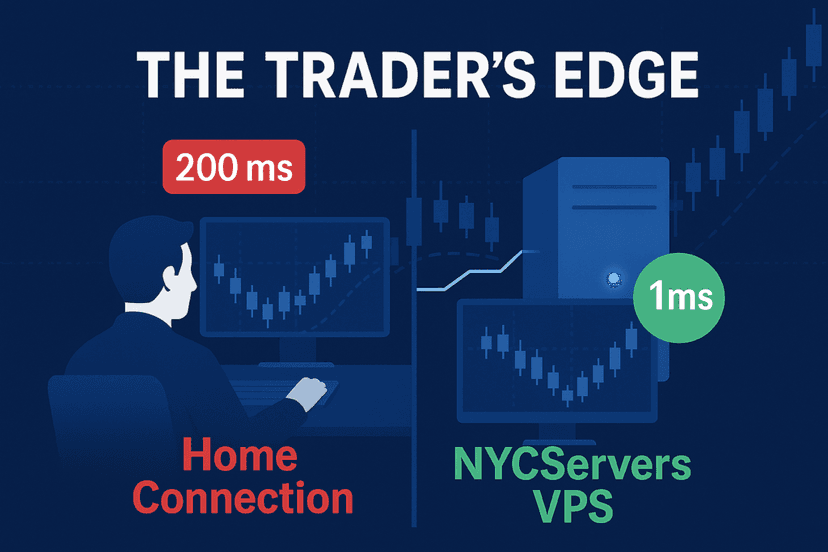
TradeLocker is a web-based platform, which means you can access it from any browser without installing software. But if you’re running automated strategies through TradeLocker Studio, you need consistent uptime and low-latency connectivity to your broker’s servers.
A TradeLocker VPS solves this. Running TradeLocker on a VPS in a datacenter close to your broker’s infrastructure reduces connection latency and ensures your bots stay online even when your home internet drops or your computer goes to sleep.
When choosing a VPS for TradeLocker, prioritize:
- Location — Pick a datacenter near your broker’s servers (New York, London, or Tokyo for most forex brokers)
- Uptime guarantee — Look for 100% uptime during trading hours
- RAM and CPU — 2GB RAM minimum for a single TradeLocker instance, 4GB+ if running Studio bots alongside manual trading
- Pre-installed software — Some providers ship VPS with trading platforms already configured
Check our forex VPS plans to ensure your trading setup never misses a beat.
Pros and Cons Summary
What TradeLocker Gets Right
- Native TradingView charting with on-chart trading
- Clean, modern interface that’s easy to learn
- AI-assisted bot creation through Studio (no coding needed)
- Built-in risk calculator and position sizing tools
- Strong mobile app experience
- Growing prop firm support
- Free to use (broker handles costs)
Where TradeLocker Falls Short
- Limited broker availability (under 10 in 2026)
- Execution speed degrades during high volatility
- Cross-device sync issues with templates
- Automation tools less mature than MQL or cAlgo
- Smaller community and fewer third-party resources
- No support from most tier-1 regulated brokers yet

Who Is TradeLocker Best For?
TradeLocker makes the most sense for:
- TradingView users who want integrated charting and execution in one platform
- Prop firm traders using firms that support TradeLocker
- New traders who find MetaTrader’s interface overwhelming
- Mobile-first traders who need a clean, fast app experience
- Non-coders who want to experiment with automated strategies through Studio’s AI tools
TradeLocker is not ideal for:
- Scalpers who need sub-second execution during volatility
- EA traders with existing MQL4/MQL5 libraries
- Traders who need tier-1 regulated broker options
- Advanced algo traders who need mature backtesting and optimization tools
Frequently Asked Questions
Is TradeLocker free to use?
Yes. TradeLocker itself is free. You trade through a broker that supports the platform, and the broker sets the spreads, commissions, and leverage. There’s no subscription fee for the TradeLocker platform or Studio features.
Which brokers support TradeLocker in 2026?
The current broker list includes Eightcap, Plexytrade, HeroFX, KOT4X, and SageFX among others. Eightcap is the most well-regulated option, having joined in January 2026. The total number of active brokers has decreased from over 20 in 2025 to under 10 in 2026.
Can I use Expert Advisors (EAs) on TradeLocker?
TradeLocker does not support MetaTrader EAs. Instead, it offers TradeLocker Studio, which lets you build automated bots using AI assistance or by coding directly. Existing MQL4/MQL5 EAs would need to be rebuilt for the TradeLocker environment.
How does TradeLocker compare to MetaTrader 5?
TradeLocker offers a more modern interface, better charting through TradingView, and a lower learning curve. MT5 has vastly more broker support, a mature automation ecosystem with MQL5, and a larger community. For most traders, MT5 remains the safer choice due to broker availability alone.
Is TradeLocker good for scalping?
During normal market conditions, TradeLocker’s execution speed is acceptable at around 0.4 seconds. However, during high-volatility events, execution can slow to 2.4 seconds. Dedicated scalpers, especially those trading sub-1-minute timeframes, may experience lag that affects performance.
Does TradeLocker work on mobile?
Yes. TradeLocker has native apps for iOS and Android with a responsive design that most users rate positively. The mobile experience is one of the platform’s genuine strengths, offering full trading functionality including chart analysis and order management.
Can I run TradeLocker on a VPS?
Absolutely. Since TradeLocker is web-based, you can run it on any VPS with a browser. For automated trading with Studio bots, a VPS is recommended to ensure consistent uptime and low-latency connections to your broker’s servers.
Final Verdict
TradeLocker is a promising platform with genuine strengths in charting, user experience, and accessibility. The TradingView integration alone makes it worth trying if you’re already a TradingView user. Studio’s AI-assisted bot building is a clever differentiator that lowers the automation barrier for non-technical traders.
But the platform has real limitations in 2026. The shrinking broker list is concerning. Execution speed under volatility needs improvement. And the automation tools, while innovative in approach, don’t match the depth of MetaTrader or cTrader’s established ecosystems.
For prop firm traders using a supported firm, TradeLocker is a solid pick. For everyone else, it’s worth testing on a demo account while keeping your primary setup on a more established platform. The trajectory is positive, but TradeLocker hasn’t earned “daily driver” status for most traders yet.
Check our forex VPS plans to ensure your trading setup never misses a beat.

About the author
Matthew Hinkle
Lead Writer & Full Time Retail Trader
Matthew is NYCServers' lead writer. In addition to being passionate about forex trading, he is also an active trader himself. Matt has advanced knowledge of useful indicators, trading systems, and analysis.
Areas of Expertise