
Top 12 Sources to Download Forex Historical Data (Free & Paid)
Our deep dive overview for the best places to download forex historical data for back testing – including free and paid sources.

Quality historical data is the foundation of every successful backtest. Without accurate price data, your backtesting results are meaningless. You could have the best strategy in the world, but if you’re testing it against incomplete or low-quality data, you’ll never know its true performance.
The problem? Finding reliable forex historical data isn’t straightforward. Some sources have gaps. Others lack tick-level granularity. Many charge hundreds of dollars per year. And if you’re downloading data from your MetaTrader History Center, you’re probably working with data that gives you less than 50% modeling quality.
We’ve compiled this guide to help you find the best sources for downloading forex historical data in 2025. Whether you need free M1 data for basic backtesting or premium tick data for scalping strategies, you’ll find what you need below.

Why You Need Forex Historical Data
Before risking real capital, you need to validate your trading strategy. Historical data lets you do exactly that. Here’s why it matters:
Strategy Validation
Backtesting allows you to gauge the success rate of trading strategies based on historical data. You can see exactly how your strategy would have performed across different market conditions—trending markets, ranging markets, high volatility periods, and news events. This method provides valuable insights into how your strategy might react before you put real money on the line.
Risk-Free Testing Environment
Testing strategies with historical data is like getting a sneak peek at years of market moves without risking your capital. You can refine entry and exit rules, optimize parameters, and identify weaknesses—all without losing a dollar.
Finding Strategy Weaknesses
Historical testing helps you identify weak points in your strategy. You can assess a system’s viability in various scenarios: flash crashes, low liquidity periods, unexpected gaps, and more. If your strategy falls apart during the 2015 SNB event or COVID crash, you’ll want to know before deploying it live.
Building Confidence
When you’ve tested a strategy across 10+ years of data and seen consistent results, you trade with conviction. Backtesting helps you build confidence in your trading system before risking capital in the live market.
Here’s the catch: your backtest is only as good as your data. Test with low-quality data, and you’ll get unreliable results. That’s why sourcing high-quality historical data is critical.
Types of Forex Data Explained
Not all historical data is created equal. The type of data you need depends on your trading style and strategy.
Tick Data
Tick data captures every single price change in the market. Unlike traditional data that groups trades into bars, tick data records each individual quote. This is the highest resolution data available and is essential for:
- Scalping strategies with tight stop losses
- High-frequency trading systems
- Strategies that rely on precise entry and exit timing
- Simulating realistic slippage and spread conditions
With tick data, you can achieve 99% modeling quality in MetaTrader backtests. Without it, MT4 interpolates price movements artificially, which can significantly skew your results.
M1 (1-Minute) Data
M1 data provides OHLC (Open, High, Low, Close) prices for each minute. This is the most common format for backtesting and offers a good balance between accuracy and file size. M1 data is suitable for:
- Intraday trading strategies
- Swing trading systems
- Most Expert Advisors
- General strategy validation
Most free data sources provide M1 data, which is adequate for strategies that don’t rely on sub-minute price movements.
Higher Timeframe Data (M5, M15, H1, D1)
Higher timeframe data is compiled from M1 or tick data. If you’re trading on daily charts or weekly swings, you don’t need tick-level granularity. However, even for higher timeframe strategies, having accurate M1 data ensures your platform can properly render all timeframes without gaps.
Bid vs. Ask Data
Professional-grade data includes both bid and ask prices, allowing you to accurately simulate spread costs. Many free sources only provide bid prices, which means your backtests may underestimate transaction costs—especially for strategies that trade frequently.
What to Look for in a Data Source
Before downloading historical data from any source, evaluate it against these criteria:
Data Completeness
Missing bars and gaps are the most common quality issues. A backtest is only trustworthy when you simulate trading on long data series without gaps. Check if the provider publishes gap statistics or offers tools to verify data integrity.
Historical Depth
How far back does the data go? For robust strategy testing, you want at least 10 years of data to cover multiple market cycles, including major events like the 2008 financial crisis, 2015 SNB floor removal, and COVID-19 volatility.
Update Frequency
Is the data updated daily, weekly, or monthly? For forward testing and ongoing strategy development, you need recent data. Some free sources only update monthly, which creates a lag in your testing.
File Format Compatibility
Common formats include:
- CSV: Universal format, works with Excel and most platforms
- HST: MetaTrader 4 native format for bar data
- FXT: MetaTrader 4 format for tick data backtesting
- JSON: Used by some modern trading platforms
Make sure your chosen source provides data in a format compatible with your platform, or that conversion tools are available.
Timezone Consistency
It’s critical that your historical data uses the same timezone as your MetaTrader account. Mismatched timezones can cause indicators to calculate incorrectly and trades to execute at wrong times during backtests.
Instrument Coverage
Do you need only major pairs, or do you trade exotics, commodities, and indices? Check that your required instruments are available before committing to a data source.
Top 12 Sources for Forex Historical Data
We’ve tested and evaluated the most popular sources for downloading forex historical data. Here’s our ranked list:
1. Dukascopy Historical Data Feed
Best for: High-quality tick data with deep historical coverage
Overview
Dukascopy Bank provides one of the most respected historical data feeds in the industry. Their data is sourced from their ECN liquidity pool and includes tick-by-tick quotes going back many years. The service is completely free and popular among traders and analysts who need detailed data for backtesting.
Data Available
- Tick data, M1 through monthly timeframes
- Forex, commodities, indices, and CFDs
- Bid and ask prices included
- Data extends back 15+ years for major pairs
Pricing
Free — No account required for web downloads
How to Download
- Visit Dukascopy Historical Data Feed
- Select your instrument and date range
- Choose timeframe (tick to monthly)
- Download in CSV or HST format
Pros
- Institutional-quality tick data
- Includes bid/ask spreads
- Extensive historical depth
- Multiple export formats
- Completely free
Cons
- Web interface can be slow for large downloads
- May require third-party tools for MT4 conversion

2. HistData.com
Best for: Quick, hassle-free M1 and tick data downloads
Overview
HistData.com is one of the longest-running free forex data providers. They offer historical data ready to be imported into MetaTrader, NinjaTrader, MetaStock, or any trading platform that accepts CSV files. Data is organized by pair, year, and month for easy navigation.
Data Available
- 66 forex pairs including majors, minors, and some exotics
- Tick and M1 (1-minute) data
- Some commodities and indices (WTI/USD, SPX/USD, DAX, NIKKEI)
- Data updated regularly (last update noted on each file)
Pricing
- Free: Direct web downloads
- $27 one-time: FTP/SFTP access for faster downloads
- $7/month: Automatic monthly updates via Google Drive
How to Download
- Visit HistData Download Page
- Select your platform format (MetaTrader, NinjaTrader, ASCII, etc.)
- Choose currency pair and time period
- Download individual monthly files or use their merge tool
Pros
- No registration required
- Multiple export formats including native MT4
- File quality statistics provided (gap measurements)
- Clean, organized interface
Cons
- Must download month-by-month for free tier
- Some pairs have limited history

3. Tickstory
Best for: Automated tick data download with MT4/MT5 integration
Overview
Tickstory is a desktop application that downloads tick data from Dukascopy and converts it directly into MT4/MT5 compatible formats. It’s the easiest way to get 99% modeling quality backtests without manually converting files.
Data Available
- 60+ forex pairs
- Commodities (Gold, Silver, Oil)
- Indices (Dow Jones, S&P 500, NASDAQ, DAX, etc.)
- Cryptocurrencies (Bitcoin, Ethereum)
- 400+ instruments in premium version
Pricing
- Tickstory Lite: Free — Basic tick data downloads
- Tickstory Standard: $99/year — Full MT4/MT5 support, variable spread simulation
How to Download
- Download Tickstory and install
- Select instruments and date range
- Click download — software handles conversion automatically
- Data exports directly to MT4/MT5 format (HST/FXT)
Pros
- Automated download and conversion
- Direct MT4/MT5 integration
- Variable spread and slippage simulation (premium)
- Data quality verification built-in
Cons
- Windows only
- Full features require paid subscription

4. ForexSB (Forex Software)
Best for: Pre-compiled data ready for immediate export
Overview
ForexSB collects real tick data from Dukascopy and compiles it into clean bar data. They eliminate gaps and provide pre-compiled files that can be exported instantly. The service is particularly useful for users of Forex Strategy Builder and Expert Advisor Studio.
Data Available
- 20 forex pairs including majors and popular crosses
- Commodities: Gold (XAUUSD), Silver (XAGUSD), Brent Oil
- Indices: DAX 30, FTSE 100, Dow Jones, S&P 500
- Cryptocurrencies: Bitcoin, Ethereum
- M1, M5, M15, M30, H1, H4, D1 timeframes
- Up to 200,000 bars per instrument
Pricing
Free — No registration required
How to Download
- Visit ForexSB Historical Data
- Select instrument and export format
- Click “Load data” and download
- Adjust timezone settings if needed (default GMT)
Pros
- Pre-compiled with gaps eliminated
- Multiple export formats (MT4, JSON, CSV, Excel)
- Fast download speeds
- Completely free
Cons
- Limited to 20 forex pairs
- No raw tick data (only bar data)
5. TrueFX
Best for: Dense tick data with millisecond precision
Overview
TrueFX provides tick-by-tick historical rates aggregated from multiple liquidity sources including major banks and market makers. The data includes fractional pip spreads with millisecond timestamps, making it suitable for high-precision backtesting.
Data Available
- 16+ major currency pairs
- Tick-by-tick bid/offer quotes
- Millisecond timestamp precision
- Data from May 2009 to present
- GMT timezone
Pricing
Free — Registration required
How to Download
- Register for free at TrueFX.com
- Access the Historical Downloads section
- Download monthly tick data files
- Use conversion tools for MT4 compatibility
Pros
- High-density tick data
- Aggregated from multiple liquidity sources
- Millisecond precision
- Free access
Cons
- Registration required
- Some missing days reported by users
- Limited to major pairs only

6. MetaTrader History Center
Best for: Quick data access directly within your platform
Overview
MetaTrader 4 and MT5 include built-in History Centers that allow you to download historical data directly. While convenient, this data comes from MetaQuotes servers (not your broker) and typically provides lower modeling quality for backtests.
Data Available
- All instruments available on your broker
- MT4: 9 timeframes (M1 to Monthly)
- MT5: 21 timeframes plus tick data
- Limited historical depth depending on broker
Pricing
Free — Built into MetaTrader
How to Download
MT4:
- Go to Tools > Options > Charts
- Set Max bars in history to maximum (2,147,483,647)
- Press F2 to open History Center
- Select currency pair and timeframe
- Click Download
MT5:
- Go to View > Symbols (Ctrl+U)
- Select your instrument
- Navigate to Bars or Ticks tab
- Set date range and click Request
Pros
- Built into platform — no external tools needed
- Instant access
- MT5 supports real tick data from broker
Cons
- MT4 data from MetaQuotes often has gaps
- Typically 25-50% modeling quality in MT4
- Limited historical depth
- Data may not match broker prices

7. Forexite
Best for: Long-term M1 data going back to 2001
Overview
Forexite provides intraday 1-minute data for forex pairs, metals, and cryptocurrencies. The data goes back to 2001 for major pairs, making it useful for testing strategies across multiple market cycles.
Data Available
- 57 forex pairs, cross rates, and metals
- Cryptocurrencies (Bitcoin, Litecoin, Ethereum)
- 1-minute (M1) data only
- Historical data from 2001-2002 for majors
- Central European Time (GMT+1)
Pricing
Free — Available through Forex Tester and other platforms
How to Download
Forexite data is typically accessed through:
- Forex Tester software (built-in data source)
- Third-party data aggregators
- Direct download from partner sites
Pros
- Deep historical coverage (20+ years)
- Good instrument variety
- Established, reliable source
Cons
- M1 only — no tick data
- Medium quality according to Forex Tester
- No direct download interface
8. OANDA Historical Rates
Best for: Traders who use OANDA as their broker
Overview
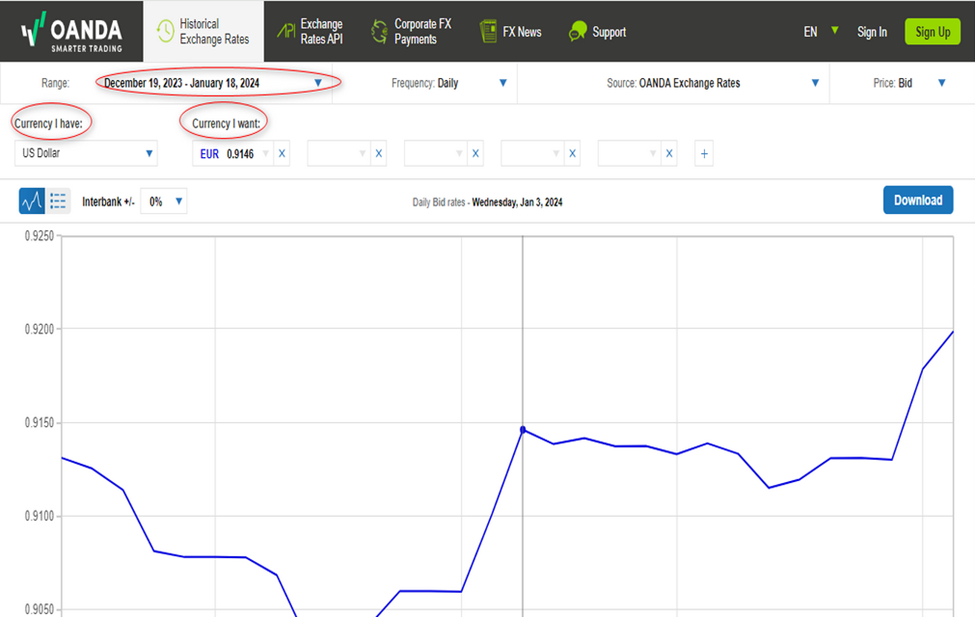
OANDA provides historical currency data through multiple channels: a free v20 REST API for account holders, a Historical Currency Converter tool, and an enterprise Exchange Rates API. The data spans 32+ years for some pairs.
Data Available
- 200+ currencies, commodities, and precious metals
- 38,000+ FX currency pairs
- Granularity from 5 seconds to monthly
- OHLC data from 2005 for major pairs
- 32+ years for some currency rates
Pricing
- Free: v20 API with demo account — limited to your account’s instruments
- Free trial: 7 days of Historical Currency Converter
- Enterprise API: From $4,850/year for full access
How to Download
- Register for an OANDA demo account
- Access fxTrade Practice account
- Generate API key via Manage API Access
- Use REST API to download historical candles
Pros
- Extensive historical depth
- High data quality from regulated broker
- API access for automated downloads
- Free with demo account
Cons
- Requires technical knowledge for API
- Full access requires expensive subscription
- Demo account access may be limited

9. TraderMade
Best for: Quick CSV downloads with API access
Overview
TraderMade offers historical forex data aggregated from real-time feeds for improved accuracy. They provide both web downloads and API access with various pricing tiers.
Data Available
- Major and minor forex pairs
- Tick, minute, hourly, and daily data
- CSV format for easy import
Pricing
- Free plan: Daily data (5 years), Hourly (2 months), Minute (2 days)
- Paid plans: Extended history and higher rate limits
How to Download
- Visit TraderMade Download Page
- Select currency pair and timeframe
- Download CSV file
Pros
- Clean, simple interface
- Aggregated from real-time feeds
- API available for automation
Cons
- Free tier has significant limitations
- Limited minute data on free plan

10. Myfxbook Historical Data
Best for: Quick data access for registered Myfxbook users
Overview
Myfxbook provides historical forex data to registered members. The data is available in multiple timeframes and currencies, though access requires a free account.
Data Available
- Major and minor forex pairs
- Multiple timeframes
- Available to registered users
Pricing
Free — Registration required
How to Download
- Register at Myfxbook
- Navigate to Forex Market > Historical Data
- Select instrument and timeframe
- Download data
Pros
- Free access with registration
- Integrated with Myfxbook’s trading tools
Cons
- Requires account registration
- Limited documentation on data quality

11. Forex Tester Data Service
Best for: Forex Tester software users
Overview
Forex Tester provides both free and premium historical data for use with their backtesting software. Premium data includes 23 years of tick data with variable spreads.
Data Available
- Free (Forexite): M1 data, medium quality
- Premium: Tick data, 23 years history, 860+ symbols
- Variable spreads in premium tier
- 5-digit precision
Pricing
- Free: Basic Forexite data (18 symbols, 24 years M1)
- Premium: Included with Forex Tester license or sold separately
How to Download
- Download from Forex Tester Data Sources
- Access through Forex Tester software Data Center
- Select quality level and instruments
Pros
- Excellent for Forex Tester users
- Premium tier is high quality
- Variable spread simulation
Cons
- Primarily for Forex Tester software
- Premium data requires purchase

12. First Rate Data
Best for: Professional traders and institutions needing research-grade data
Overview
First Rate Data is a premium provider offering institutional-quality historical data sourced directly from major exchanges. Their datasets are rigorously tested for accuracy and used by traders, hedge funds, and academic institutions.
Data Available
- Forex, stocks, futures, options, ETFs
- 1-minute to daily intraday data (15+ years)
- Tick data (10+ years from 2010)
- Fully adjusted for splits and dividends
Pricing
Premium — Contact for pricing
How to Download
- Visit FirstRateData.com
- Purchase required dataset
- Download zipped CSV files
Pros
- Exchange-sourced data
- Rigorous quality testing
- Immediate download after purchase
- Professional-grade accuracy
Cons
- Paid only — no free tier
- Primarily focused on stocks/futures
Data Source Comparison Table
| Source | Data Type | Forex Pairs | Historical Depth | Price | MT4/MT5 Compatible |
|---|---|---|---|---|---|
| Dukascopy | Tick + Bar | 60+ | 15+ years | Free | Yes (conversion needed) |
| HistData | Tick + M1 | 66 | 10+ years | Free / $27 FTP | Yes (native format) |
| Tickstory | Tick | 60 (400+ premium) | 15+ years | Free / $99/year | Yes (automatic) |
| ForexSB | Bar (M1-D1) | 20 | 200K bars | Free | Yes (CSV export) |
| TrueFX | Tick | 16 | 2009-present | Free (registration) | Conversion needed |
| MT4/MT5 History Center | Bar / Tick (MT5) | Broker dependent | Limited | Free | Native |
| Forexite | M1 | 57 | 2001-present | Free | Yes |
| OANDA | Bar (5s-Monthly) | 200+ currencies | 32+ years | Free API / $4,850/yr | API export |
| TraderMade | Tick + Bar | 20+ | 5 years (free) | Free / Paid | CSV export |
| Myfxbook | Bar | Major pairs | Varies | Free (registration) | CSV export |
| Forex Tester | Tick + M1 | 18 (free) / 860+ | 23 years | Free / Premium | Forex Tester only |
| First Rate Data | Tick + Bar | Limited FX | 10-15 years | Premium only | CSV export |
How to Import Data into MT4/MT5
Once you’ve downloaded historical data, you need to import it into your trading platform. Here’s how to do it properly.
Importing CSV Data into MetaTrader 4
- Increase maximum bars: Go to Tools > Options > Charts. Set “Max bars in history” and “Max bars in chart” to 2147483647 (maximum value). Restart MT4.
- Open History Center: Press F2 or go to Tools > History Center.
- Navigate to the instrument: Expand Forex Majors (or relevant category) > Select your pair (e.g., EURUSD) > Select timeframe (1 Minute for M1 data).
- Import the data: Click “Import” at the bottom of the window. Browse to your CSV file. Configure separators if needed (usually comma or semicolon). Click OK.
- Verify import: The data should appear in the History Center. Scroll through to check for gaps.
Importing Data into MetaTrader 5
MT5 handles data differently. You cannot overwrite existing data, so you’ll need to create custom symbols for imported data:
- Remove bar limitations: Go to Tools > Options > Charts. Set “Max bars in chart” to Unlimited. Restart MT5.
- Create a custom symbol (optional): Go to View > Symbols > Create custom symbol if you want to preserve original data.
- Import bars or ticks: Select your symbol in the Symbols window. Click “Import Bars” or “Import Ticks.” Browse to your data file and import.
Using Tickstory for Automated Import
The easiest method is using Tickstory, which handles everything automatically:
- Download and install Tickstory
- Select your instruments and date range
- Click download — Tickstory creates HST and FXT files automatically
- Files are placed directly in your MT4/MT5 data folder
- Restart MetaTrader to use the new data
File Locations in MetaTrader
- HST files (bar data): \history\\
- FXT files (tick data): \tester\history\
To find your data folder, open MT4/MT5 and go to File > Open Data Folder.
Running backtests with quality historical data requires your VPS or trading computer to have sufficient storage and processing power. If you’re running multiple backtests or using tick data, consider a dedicated MT4 VPS or MT5 VPS with adequate resources.

Tips for Working with Historical Data
1. Always Verify Data Quality
Before running backtests, check your data for gaps. Use tools like the sqShowHistoryGaps.mq4 indicator or manually scroll through your data in History Center. Missing bars can severely distort backtest results.
2. Match Timezones
Ensure your historical data uses the same timezone as your broker’s MT4/MT5 server. Mismatched timezones cause indicators to calculate incorrectly and can invalidate your entire backtest.
3. Use Tick Data for Scalping Strategies
If your strategy trades with tight stop losses (under 15 pips) or holds positions for less than an hour, M1 data isn’t enough. The sub-minute price movements matter, and only tick data captures them accurately.
4. Account for Spread Variations
Many free data sources don’t include spread information. Real spreads widen during news events, low liquidity periods, and market opens. If your data doesn’t account for this, your backtest will overestimate performance.
5. Test Across Multiple Market Conditions
Don’t just test on recent data. Include periods of high volatility (2008, 2020 COVID crash), flash crashes (2015 SNB, 2016 GBP), and ranging markets. A strategy that works in trending markets may fail in ranging conditions.
6. Keep Data Updated
If you’re using historical data for ongoing strategy development, update it regularly. Stale data means you’re not testing against recent market conditions.
7. Don’t Overtfit to Historical Data
Tweaking rules to fit the past perfectly makes the strategy collapse when conditions change. Use out-of-sample testing and walk-forward analysis to validate that your strategy generalizes.
8. Use a Dedicated Trading Server
Large historical datasets require significant storage and processing power. Running intensive backtests on your home computer can take hours or days. A Forex VPS with dedicated resources can run backtests faster and more reliably, especially when testing multiple strategies or parameter combinations.
Video Resources
For visual learners, these tutorials explain the process of downloading and using historical forex data:
Importing Historical Data into MetaTrader 4
Using Tickstory for 99% Modeling Quality
Frequently Asked Questions
What is the best free source for forex historical data?
Dukascopy is widely considered the best free source for forex historical data. It provides institutional-quality tick data going back 15+ years, includes bid/ask spreads, and covers 60+ instruments. HistData is an excellent alternative if you need quick M1 downloads in MT4-native formats.
Why does my MT4 backtest show only 25% or 50% modeling quality?
Low modeling quality occurs because MT4’s default data from the History Center (MetaQuotes servers) often has gaps and missing bars. To achieve 90%+ modeling quality, you need to import complete M1 data from external sources. For 99% quality, you need tick data, which requires tools like Tickstory or the Tick Data Suite.
Do I need tick data for backtesting?
Tick data is essential for scalping strategies, high-frequency systems, and strategies with tight stop losses (under 15 pips). For swing trading and strategies that hold positions for hours or days, quality M1 data is usually sufficient. The key is matching your data granularity to your strategy’s requirements.
How far back does forex historical data go?
Most quality sources provide data going back 15-20 years for major pairs. Dukascopy data extends to 2003-2007 for most pairs. Forexite M1 data goes back to 2001. OANDA has daily exchange rate data spanning 32+ years. For robust strategy testing, 10+ years is recommended to cover multiple market cycles.
Why doesn’t MT4 historical data match my broker’s prices?
Forex is a decentralized market, so each broker has slightly different prices based on their liquidity providers. MT4’s History Center downloads data from MetaQuotes servers, not your broker. This data is for general backtesting purposes and won’t match your broker’s exact prices. For the most accurate results, use data from your actual broker or a reputable source like Dukascopy.
What file format should I download for MT4?
For MT4 bar data, the native HST format is ideal but CSV works with the History Center import. For tick data backtesting, you need FXT files. Tools like Tickstory and QuantDataManager can convert CSV tick data to FXT format. If downloading from HistData, select the MetaTrader format for easiest import.
How do I fix gaps in my historical data?
First, delete the corrupted HST files from your MT4 history folder. Then re-import complete data from a quality source like Dukascopy or HistData. Use gap detection indicators to verify data integrity after import. For ongoing maintenance, avoid closing MT4 during market hours and periodically re-download complete datasets.
Conclusion
Quality historical data is non-negotiable for serious strategy development. The difference between 25% and 99% modeling quality can mean the difference between a strategy that looks profitable in backtests but fails live, and one that accurately predicts real-world performance.
For most traders, we recommend starting with Dukascopy data (free, high-quality tick data) combined with Tickstory for automated MT4/MT5 integration. This combination gives you institutional-grade data with minimal setup effort.
If you need quick M1 downloads without installing software, HistData provides excellent coverage with MT4-native formats. For those already using Forex Tester, their premium data service offers the best integration.
Remember: your backtest results are only as good as your data. Invest the time to source quality historical data, and you’ll have a much clearer picture of how your strategies will perform when real money is on the line.

About the author
Matthew Hinkle
Lead Writer & Full Time Retail Trader
Matthew is NYCServers' lead writer. In addition to being passionate about forex trading, he is also an active trader himself. Matt has advanced knowledge of useful indicators, trading systems, and analysis.
Areas of Expertise