
StrategyQuant X Review 2026: Full Feature Analysis
In-depth StrategyQuant review covering features, pricing, system requirements, and the critical infrastructure needed to run generated strategies profitably.

What is StrategyQuant X?
StrategyQuant X (often called SQX) is algorithmic strategy development software that generates, tests, and exports trading strategies automatically. Unlike manual EA development where you code specific rules, SQX uses genetic programming to evolve thousands of potential strategies based on your criteria and historical data.
The software has been around since 2012, with StrategyQuant X representing the latest major iteration. It targets a specific audience: traders who want to build systematic trading strategies without writing code themselves.
Here’s the fundamental promise. You define what you’re looking for (instrument, timeframe, profit targets, drawdown limits), feed it historical data, and let the genetic algorithm churn through millions of combinations to find strategies that match your criteria.
Sounds straightforward. The reality is more nuanced.

How StrategyQuant X Actually Works
Understanding the engine under the hood helps you evaluate whether SQX fits your workflow. The software combines several algorithmic approaches to generate and filter strategies.
Genetic Programming Engine
At its core, SQX uses genetic programming. This means it doesn’t just test random combinations. It evolves strategies over generations, keeping characteristics from profitable “parent” strategies and combining them into new “offspring” strategies.
The process works like this:
- Initial population of random strategies is generated
- Each strategy is backtested against your historical data
- Strategies meeting your fitness criteria survive
- Surviving strategies are combined and mutated
- Process repeats for hundreds or thousands of generations
The genetic approach is computationally intensive. A typical strategy generation session can run for hours or days, depending on your hardware, data length, and complexity settings. Once strategies are validated, traders deploy them on a low-latency VPS for reliable 24/5 execution.
Building Blocks System
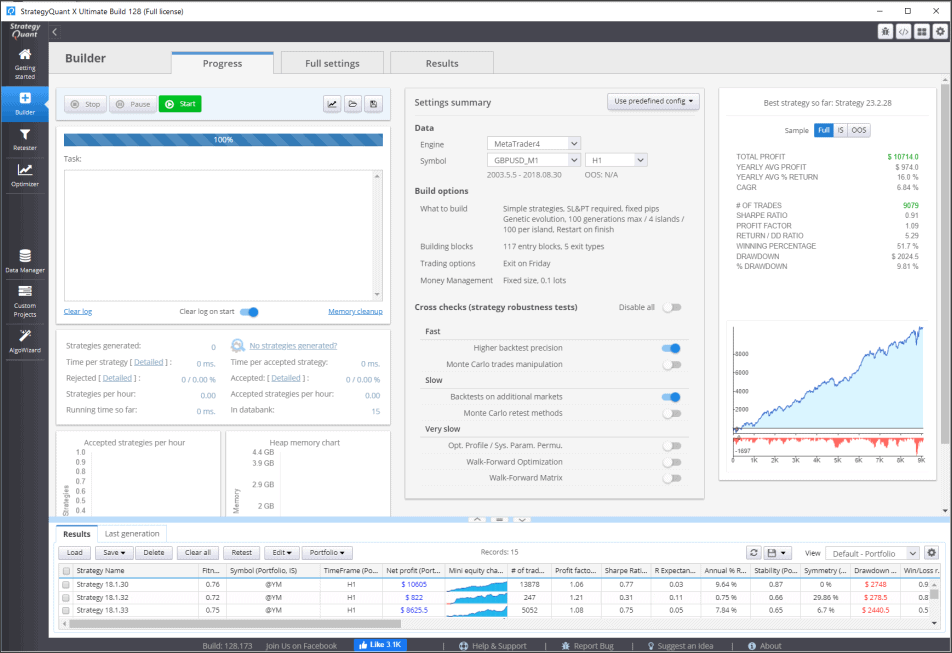
SQX doesn’t generate strategies from pure randomness. It uses predefined building blocks: indicators, price patterns, candle conditions, time filters, and entry/exit rules. You can customize which blocks are available for the genetic algorithm to use.
This matters for practical reasons. Limiting building blocks to concepts you understand and trust makes the resulting strategies more interpretable. Throwing in every exotic indicator often produces strategies that perform well in backtests but make no logical sense.
The building block approach also affects strategy maintenance over time. When you restrict the algorithm to indicators and logic you genuinely understand, you can diagnose problems when strategies stop performing. A strategy built from fifteen obscure indicators becomes a black box that you cannot debug or improve. Experienced SQX users typically start with minimal building blocks and only expand the available set after gaining confidence in the core workflow.
Common building block categories include trend indicators like moving averages and ADX, momentum oscillators like RSI and stochastics, volatility measures like ATR and Bollinger Bands, and price action patterns like support/resistance levels and candlestick formations. Each category adds complexity to the search space, so thoughtful selection matters more than maximum variety.
Multi-Market and Multi-Timeframe Testing
SQX can test strategies across multiple instruments and timeframes simultaneously. This is useful for finding strategies with broader applicability rather than those that only work on one specific market during one specific period.
Key Features Deep Dive
StrategyQuant X packs a significant feature set. Some of these features are genuinely useful. Others are more marketing checkboxes. Let’s separate what matters from what sounds impressive but rarely gets used.
Walk-Forward Optimization
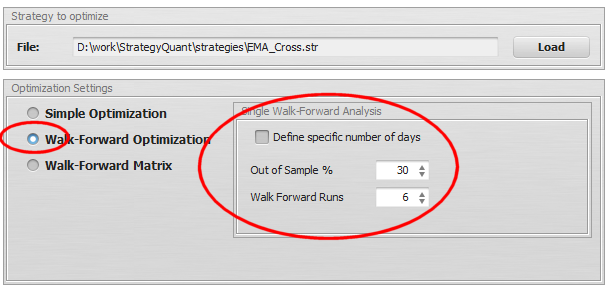
Walk-forward analysis (WFA) is arguably SQX’s most important robustness feature. Instead of optimizing on all your historical data and hoping it works in the future, WFA divides your data into segments.
Walk-forward optimization tests whether a strategy can be re-optimized periodically and still perform on unseen data. It’s the closest thing to simulating real-world forward performance without actually trading live.
The software optimizes on one segment, tests on the next unseen segment, then moves forward and repeats. Strategies that pass walk-forward testing have demonstrated they can adapt to different market conditions without being overfit to one specific period.
This feature alone makes SQX worth considering. Most retail strategy builders either don’t include walk-forward testing or implement it poorly.
Monte Carlo Simulation
Monte Carlo analysis stress-tests your strategy by randomizing various parameters: trade order, slippage, spread variations, starting bar. The goal is understanding how sensitive your strategy is to small changes.
A robust strategy should show relatively consistent performance across Monte Carlo runs. If randomizing trade order dramatically changes results, you’ve got a fragile system that probably won’t hold up in live trading. Tools like Myfxbook can help verify real-world performance once strategies go live.
SQX offers several Monte Carlo methods:
- Randomize trade order
- Skip random trades
- Randomize entry/exit prices (simulating slippage)
- Vary historical data (add noise)
- Randomize strategy parameters within ranges
Robustness Testing Suite
Beyond walk-forward and Monte Carlo, SQX includes additional robustness tests that help filter curve-fitted strategies:
| Test Type | What It Checks | Why It Matters |
|---|---|---|
| Parameter Stability | Performance with slightly different parameters | Filters strategies dependent on exact values |
| Multi-Market | Performance on correlated instruments | Tests underlying logic validity |
| Profit Distribution | Where profits come from | Identifies dependency on few lucky trades |
| Equity Curve Analysis | Drawdown patterns and consistency | Spots strategies with hidden risk |
Running strategies through this full suite significantly reduces the number that make it to live testing. That’s the point. You want aggressive filtering at this stage, not after you’ve lost money.

Code Export
SQX exports strategies to multiple formats: MetaTrader 4, MetaTrader 5, TradeStation, MultiCharts, cTrader, and generic C# or Java. The exported code is readable (not obfuscated), which means you can review exactly what the strategy does.
Export quality varies by platform. MT4 and MT5 exports are the most tested and reliable. For optimal execution, consider deploying exported EAs on MT4 VPS hosting optimized for automated trading. Some less common platforms may require manual adjustment after export.
StrategyQuant X Pricing Breakdown
SQX isn’t cheap. Understanding the pricing tiers helps you avoid overspending on features you won’t use.
License Tiers
| Edition | Price (One-Time) | Key Limitations |
|---|---|---|
| Starter | ~$1,290 | Fewer building blocks, limited robustness tests |
| Professional | ~$2,490 | Full features, standard support |
| Ultimate | ~$4,900 | Priority support, additional add-ons |
These prices are one-time purchases, not subscriptions. Updates are typically included for one year, with optional renewal for continued updates.
True Cost of Ownership
The license is just the beginning. Honest cost assessment needs to include:
- Historical data: Quality tick data costs money. Free data often has gaps and inaccuracies that produce unreliable backtests.
- Hardware: Strategy generation is CPU-intensive. Running on a basic laptop means waiting days for results that a proper workstation produces in hours.
- Learning curve: Budget significant time to understand what the software does and, more importantly, what can go wrong.
- Execution infrastructure: Generated strategies need somewhere to run 24/7. Your home computer isn’t that place.
For a realistic setup, expect total first-year costs between $2,000 and $6,000 depending on your existing infrastructure and the license tier you choose.
Is There a Free Trial?
StrategyQuant offers a limited free trial that lets you explore the interface and basic features. The trial restricts strategy generation and export capabilities, but it’s enough to evaluate whether the workflow suits you before committing significant money.
System Requirements and Infrastructure Considerations
This is where most StrategyQuant reviews fall short. They list minimum specs without addressing what you actually need for productive use or how to deploy strategies once you’ve built them.
Strategy Generation Requirements
StrategyQuant X is a resource hog. The genetic algorithm benefits directly from more CPU cores and RAM. Here’s a realistic breakdown:
| Component | Minimum | Recommended | Ideal |
|---|---|---|---|
| CPU | 4 cores | 8+ cores | 16+ cores |
| RAM | 8GB | 16GB | 32GB+ |
| Storage | SSD 256GB | SSD 512GB | NVMe 1TB+ |
| OS | Windows 10 | Windows 10/11 | Windows Server |
More cores directly translate to faster strategy generation. SQX parallelizes backtesting across available threads. Doubling your cores roughly halves generation time.
Generation vs. Execution: The Critical Distinction
Here’s what many traders miss: where you generate strategies and where you run them should be different machines.
Strategy generation is batch work. It’s computationally intensive but not time-sensitive. You can run it overnight, over weekends, whenever convenient. It doesn’t need internet connectivity or low-latency broker access.
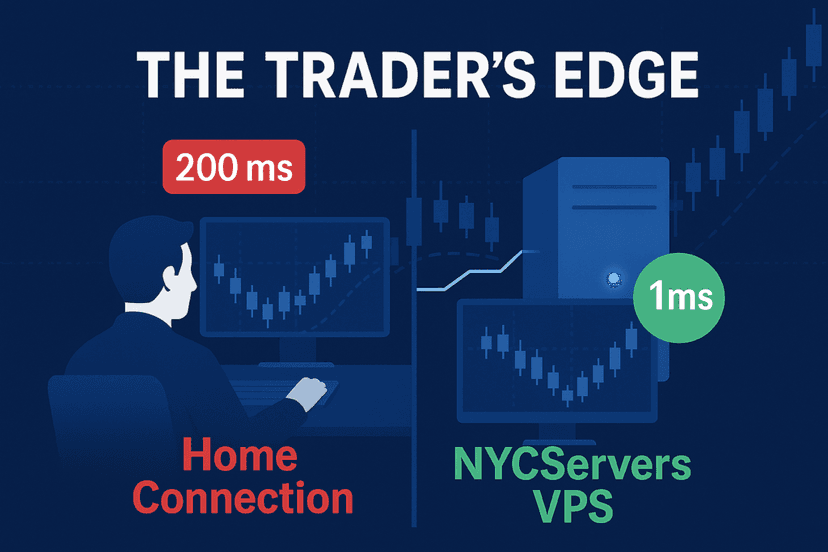
Strategy execution is the opposite. It needs to run 24/5 during market hours with reliable connectivity, minimal latency to your broker, and zero tolerance for hardware failures or restarts.
Running StrategyQuant on the same machine executing your live strategies is a mistake. Generation tasks can spike CPU to 100% for hours, causing missed trades and slippage on your live systems.
The professional approach separates these concerns. Use a powerful local workstation or dedicated generation server for SQX. Export finished strategies to a trading VPS optimized for execution.
VPS Requirements for Strategy Deployment
Once you’ve generated and validated strategies, they need a stable home. The exported EA runs on standard MT4/MT5/cTrader installations, so VPS requirements depend on how many strategies you’re running and what timeframes they trade.
For most SQX users running 5-15 strategies:
- 2-4 CPU cores: Sufficient for multiple MT4/MT5 instances
- 4-8GB RAM: Each terminal uses 500MB-1GB
- Low-latency location: Match your broker’s server location
- SSD storage: Faster terminal loading and logging
The strategy generation machine can be a beast in your home office. The execution environment should be professional infrastructure in a data center near your broker.

Honest Pros and Cons
Every software review that’s 100% positive or 100% negative is useless. Here’s an honest assessment based on what SQX does well and where it falls short.
What StrategyQuant X Does Well
Robust testing suite. Walk-forward optimization, Monte Carlo simulation, and multi-market testing are implemented properly. These aren’t gimmicks. They’re essential tools that genuinely help filter overfit strategies.
Code transparency. Exported code is readable. You can see exactly what logic the strategy uses, modify it if needed, and understand why it makes specific trades.
Workflow efficiency. Once you understand the software, you can test more strategy concepts in a week than you could manually code in a year. The speed advantage is real. For a deeper dive into systematic approaches, see our guide on forex algorithmic trading strategies.
Active development. The team releases regular updates with new features and bug fixes. Support is responsive for license holders.
No ongoing subscription. One-time purchase means you’re not locked into monthly payments forever. Updates require renewal, but the software continues working without it.
Where StrategyQuant X Falls Short
Overfitting is still the primary enemy. Despite robust testing tools, the genetic algorithm inherently searches for patterns that worked in the past. Inexperienced users can easily generate thousands of strategies that look amazing in backtests and fail immediately in live trading.
Learning curve is steep. The interface is complex. Understanding what settings matter and why takes significant study. Expect to spend weeks learning before producing anything useful.
Garbage in, garbage out. SQX is only as good as your data and criteria. Feed it poor data or unrealistic fitness functions, and it will happily generate strategies that exploit those flaws.
Hardware requirements are substantial. Running on underpowered machines makes the software frustrating to use. This isn’t a tool for basic laptops.
No guarantee of profitability. This should be obvious, but buying SQX doesn’t mean you’ll make money trading. It’s a tool that, used correctly, can help find edges. Used incorrectly, it helps you lose money faster and with more confidence.
What Real Users Say
User feedback tends to cluster into predictable patterns. Understanding these helps calibrate expectations.
Positive Experiences
Users who report success typically share these characteristics:
- Prior trading or programming experience
- Realistic expectations about what automation can achieve
- Willingness to spend months learning before expecting results
- Focus on robustness testing rather than maximum backtest profit
- Adequate hardware for meaningful generation sessions
The common thread is treating SQX as a tool in a broader trading process, not a magic box that prints money.
Negative Experiences
Users who struggle often share different characteristics:
- Expectation that software alone produces profits
- Skipping robustness testing to get strategies live faster
- Using default settings without understanding implications
- Running on inadequate hardware with poor data
- No understanding of overfitting and curve fitting
The software doesn’t prevent you from shooting yourself in the foot. It hands you a more powerful weapon.
StrategyQuant vs. Alternatives
SQX isn’t the only strategy builder on the market. Understanding alternatives helps you choose the right tool for your situation.
EA Studio
EA Studio is browser-based and simpler than SQX. It generates MT4/MT5 strategies without local software installation. The interface is more approachable for beginners.
However, EA Studio offers fewer robustness tests, less customization, and runs on subscription pricing. For serious systematic development, SQX offers more depth. For casual exploration or limited budgets, EA Studio may be more appropriate.
Adaptrade Builder
Adaptrade targets similar functionality with genetic programming and walk-forward testing. It’s been around longer than SQX and has a loyal user base.
The main differences are interface design (Adaptrade feels older), platform support (stronger TradeStation focus), and price point (similar to SQX Professional). Both are legitimate options for systematic strategy development.
Forex Strategy Builder Pro
FSB Pro is more affordable and easier to learn than SQX. It generates strategies using exhaustive search rather than genetic programming, which has different strengths and weaknesses.
For traders wanting to enter algorithmic development without the complexity and cost of SQX, FSB Pro is a reasonable starting point. Those who outgrow it often move to SQX or similar tools.
Quick Comparison
| Feature | StrategyQuant X | EA Studio | Adaptrade | FSB Pro |
|---|---|---|---|---|
| Price Model | One-time | Subscription | One-time | One-time |
| Learning Curve | Steep | Moderate | Steep | Gentle |
| Walk-Forward | Yes | Limited | Yes | Yes |
| Monte Carlo | Comprehensive | Basic | Yes | Limited |
| MT4/MT5 Export | Yes | Yes | Yes | Yes |
Who Should Buy StrategyQuant X
SQX is powerful but not for everyone. Being honest about target audience saves time and money.
Good Fit
Systematic traders who want to test more strategy concepts than manual coding allows. If you already trade systematically and understand what makes strategies work or fail, SQX accelerates your process.
Developers who want generated starting points to refine manually. SQX can produce strategy skeletons that you then improve with custom code and logic.
Portfolio builders looking to diversify across multiple uncorrelated strategies. Generating many strategies quickly helps build diversified systematic portfolios.
Traders with adequate capital to absorb the software cost, infrastructure requirements, and inevitable learning period losses.
Poor Fit
Complete beginners with no trading experience. SQX amplifies existing knowledge. If you don’t understand markets, the software won’t teach you.
Get-rich-quick seekers expecting the software to generate instant profits. Doesn’t work that way. Never has. Never will.
Traders without adequate capital. If the software cost represents a significant portion of your trading capital, you’re probably not ready for this tool.
Discretionary traders who prefer chart reading and manual execution. Nothing wrong with that approach, but SQX won’t help it.
Practical Deployment Workflow
For those who do purchase SQX, here’s a workflow that separates generation from execution and reduces common failure modes.
Phase 1: Generation (Local Workstation)
Run StrategyQuant X on a powerful local machine. Generate strategies in batches, typically overnight or over weekends. Apply aggressive filtering criteria during generation. Most strategies should fail your filters. That’s correct behavior.
Phase 2: Validation (Same Machine)
Run full robustness testing on strategies that pass initial filtering. Walk-forward analysis, Monte Carlo simulation, parameter stability. Be harsh. If a strategy fails any test, reject it.
Phase 3: Demo Testing (Trading VPS)
Export validated strategies to your trading VPS. Run them on demo accounts for meaningful periods (weeks to months, not days). Compare demo results to backtest expectations.
Phase 4: Live Deployment (Trading VPS)
Strategies that perform on demo within expected parameters can move to live trading with small position sizes. Scale up only after consistent live performance.
This workflow keeps resource-intensive generation separate from execution infrastructure. Your trading VPS stays stable and responsive while heavy computation happens elsewhere.
Frequently Asked Questions
Is StrategyQuant X worth it for beginners?
Generally no. SQX is a powerful tool that amplifies existing trading knowledge. If you don’t understand what makes strategies profitable or how to evaluate backtest results critically, the software will help you generate impressive-looking backtests that fail in live trading. Build foundational knowledge first, then consider SQX.
Can StrategyQuant X run on Mac?
StrategyQuant X is Windows-only software. Mac users can run it through Boot Camp, Parallels, or a Windows VPS. Performance through virtualization may be reduced compared to native Windows installation. For serious generation work, a dedicated Windows machine is recommended.
How long does it take to generate a profitable strategy?
There’s no guaranteed timeline. A single generation session can run from hours to days depending on settings and hardware. More importantly, most generated strategies won’t be profitable in live trading regardless of backtest results. Budget months of learning and testing before expecting any strategy to trade live profitably.
Does StrategyQuant X work with any broker?
SQX generates strategy code for common platforms (MT4, MT5, cTrader, etc.). The exported EA or cBot then runs on your chosen broker’s platform. The software itself doesn’t connect to brokers. It generates code you deploy separately.
What’s the difference between Starter, Professional, and Ultimate editions?
Starter includes core functionality but limits building blocks and some robustness tests. Professional unlocks the full feature set most serious users need. Ultimate adds priority support and some additional tools. For most users, Professional offers the best value. Starter may be too limiting, and Ultimate’s extras rarely justify the price jump.
How do I avoid overfitting with StrategyQuant?
Use all available robustness tests, especially walk-forward optimization. Limit building blocks to logical concepts. Test on multiple markets and timeframes. Be skeptical of strategies with extremely high backtest returns. Accept that most generated strategies will and should fail validation. The goal is finding rare robust strategies, not generating many impressive backtests.
Can I run StrategyQuant X on a VPS?
Technically yes, but it’s not recommended for generation work. VPS resources are typically limited compared to dedicated hardware, and strategy generation benefits significantly from maximum available CPU power. Use a VPS for executing finished strategies, not for running SQX itself.
Final Verdict
StrategyQuant X is a legitimate, powerful tool for systematic strategy development. It’s not a money printer, not a shortcut to trading profits, and not appropriate for beginners.
For traders who understand systematic trading, have realistic expectations, and are willing to invest time learning the software, SQX can dramatically accelerate strategy research. The robustness testing suite alone justifies the price for serious systematic traders.
For everyone else, the software will likely produce a lot of impressive backtests and a lot of live trading losses. That’s not a flaw in the software. It’s a feature. SQX gives you exactly what you ask for. Ask for the wrong things, and you’ll get the wrong results.
The honest recommendation: if you’re considering StrategyQuant X, start with the free trial. Spend significant time understanding what the software does and how curve fitting works. Only purchase if you have adequate capital, realistic expectations, and the infrastructure to deploy strategies properly.
And remember: the software that generates your strategies and the infrastructure that runs them should be separate. Generation is a research task. Execution is a production task. Treat them accordingly.

About the author
Thomas Vasilyev
Writer & Full Time EA Developer
Tom is our associate writer, and has advanced knowledge with the technical side of things, like VPS management. Additionally Tom is a coder, and develops EAs and algorithms.
Areas of Expertise