
How to Trade Forex With a Full-Time Job (2026 Guide)
Learn how to trade forex with a full-time job using swing trading, EAs on a VPS, and smart scheduling. Practical routines for part-time forex traders.

Can You Really Trade Forex While Working Full Time?
Short answer: yes. Thousands of traders do it every single day. The forex market runs 24 hours, five days a week, which means there’s always a session open somewhere, no matter when your shift ends. You don’t need to quit your job to become a profitable trader.
But here’s what nobody tells you: the traders who succeed with a day job aren’t the ones glued to 5-minute charts under their desk. They’re the ones who picked a strategy that fits their schedule, automated what they could, and stopped fighting the clock.
The real challenge isn’t market access. It’s time management, strategy selection, and discipline. You have maybe 1-3 hours per day to dedicate to trading. That’s enough, but only if you use those hours correctly.
This guide breaks down exactly how to trade forex with a full-time job in 2026. We’ll cover which sessions to target based on your time zone, which strategies actually work for part-time traders, how to automate your setups with Expert Advisors on a VPS, and how to build a weekly routine that doesn’t burn you out.
Map Your Trading Windows to Your Work Schedule
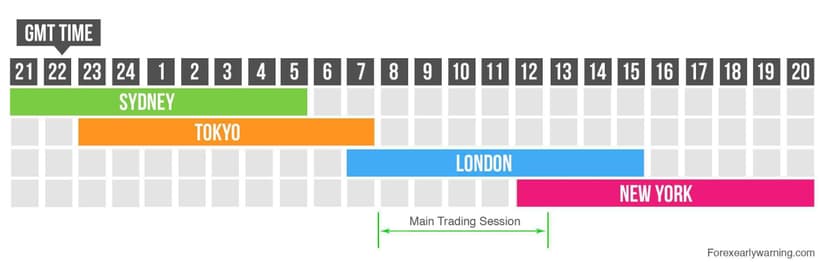
The forex market isn’t a single entity. It’s three major sessions that overlap at different times: Tokyo, London, and New York. Each session has different volatility profiles and different currency pairs that move. The key to part-time forex trading is matching your free time to the right session.
If you work a standard 9-to-5, your best trading windows are early morning (before work), the lunch hour, or evening. Here’s how each session maps to US time zones.
Forex Session Schedule for Working Traders
| Forex Session | Eastern (EST) | Central (CST) | Pacific (PST) | Best For |
|---|---|---|---|---|
| Tokyo Open | 7:00 PM | 6:00 PM | 4:00 PM | Evening traders, JPY/AUD pairs |
| Tokyo Close | 4:00 AM | 3:00 AM | 1:00 AM | Early risers on East Coast |
| London Open | 3:00 AM | 2:00 AM | 12:00 AM | Pre-work session (East Coast early birds) |
| London-New York Overlap | 8:00 AM – 12:00 PM | 7:00 AM – 11:00 AM | 5:00 AM – 9:00 AM | Highest volatility, most opportunity |
| New York Session | 8:00 AM – 5:00 PM | 7:00 AM – 4:00 PM | 5:00 AM – 2:00 PM | USD pairs, news events |
| New York Close | 5:00 PM | 4:00 PM | 2:00 PM | End-of-day strategy setups |
How to Use This Table
If you’re on the East Coast (EST): The Tokyo session opens at 7 PM, right after dinner. This is a solid window for scanning charts and setting pending orders on JPY and AUD pairs. Alternatively, wake up 30 minutes early and catch the tail end of the London session before your commute.
If you’re in the Central time zone (CST): You get a useful window from 6-8 PM during Tokyo’s open. For morning traders, the London-New York overlap starts at 7 AM, giving you time to set trades before a 9 AM start.
If you’re on the West Coast (PST): You have a major advantage. Tokyo opens at 4 PM, right when you leave the office. You also get the London-New York overlap from 5-9 AM if you’re an early riser.
Pro tip: Don’t try to trade every session. Pick one window that aligns with your schedule and master it. Consistency with one session beats scattered attempts across three.
The Best Trading Strategies for Part-Time Traders
Not every strategy works when you have limited screen time. Scalping on 1-minute charts? Forget it. You need approaches that require minimal monitoring and still deliver consistent results. Here are the three strategies that actually work for forex trading while working full time.
Swing Trading (The Gold Standard for Busy Traders)
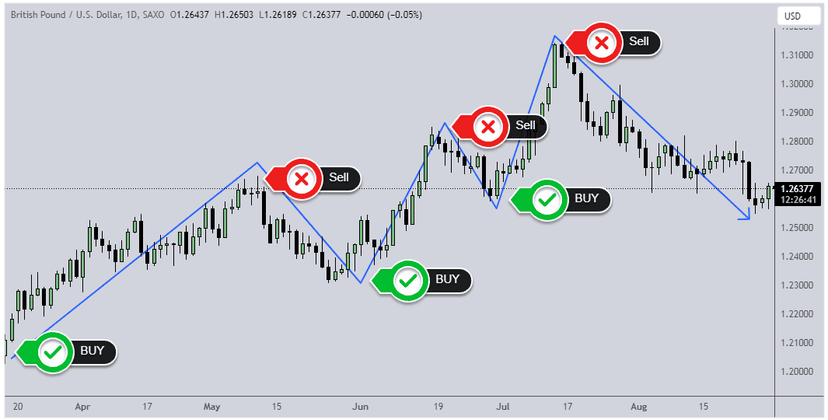
Swing trading is the most popular strategy for part-time forex traders, and for good reason. You’re holding trades for days to weeks, targeting 100-300 pip moves on the 4-hour and daily timeframes. This means you only need to check charts once or twice per day.
Here’s why it works with a full-time job:
- Setups form slowly on H4 and D1 charts, so you won’t miss entries
- You can scan for setups in 15-20 minutes during your evening session
- Stop losses are wider, so intraday noise won’t stop you out while you’re at work
- You can set pending orders and walk away
Focus on clean support/resistance levels, trendlines, and key Fibonacci retracements. Pairs like EUR/USD, GBP/USD, and AUD/USD give you the cleanest swing setups.
End-of-Day Trading (The 20-Minute Strategy)
End-of-day (EOD) trading is even more time-efficient. You analyze charts once per day after the New York close (5 PM EST) and place your orders for the next 24 hours. The entire process takes 15-20 minutes.
EOD strategies typically use daily candle patterns: pin bars, engulfing candles, and inside bars at key levels. You set your entry, stop loss, and take profit, then close the platform. No checking during the workday. No distractions.
This approach is perfect if you want to keep trading completely separate from your job.
Position Trading (The Set-and-Forget Approach)
Position trading is the longest timeframe, holding trades for weeks to months. You’re looking at weekly and monthly charts, trading major trends and macroeconomic shifts. You might only place 2-4 trades per month.
It requires the least screen time of any manual approach. The downside is larger capital requirements due to wider stops, and you need patience to wait for setups. But if you have a solid grasp of fundamentals and monetary policy, position trading can be very rewarding alongside a career.

How a VPS and Expert Advisors Let You Trade While You Work
Here’s where part-time trading gets interesting. What if your trading strategy could run 24/5 without you being at the screen? That’s exactly what happens when you combine an Expert Advisor with a forex VPS.
What Is an Expert Advisor (EA)?
An Expert Advisor is an automated trading program that runs inside MetaTrader 4 or MetaTrader 5. You define the rules, entry conditions, exit conditions, position sizing, and risk parameters. The EA executes trades automatically based on those rules. No emotion, no hesitation, no missed setups because you were in a meeting.
For part-time traders, EAs solve the biggest problem: you can’t watch the market during work hours. An EA can.
Why You Need a VPS to Run EAs
Running an EA on your home computer has serious limitations. Your PC needs to stay on 24/7. A Windows update, power outage, or internet hiccup can shut down your EA mid-trade. If your ISP throttles during peak hours, execution slows. Your home setup isn’t built for this.
A forex VPS changes the equation entirely. Your EA runs on a dedicated virtual server in a professional data center with redundant power, enterprise-grade networking, and 100% uptime guarantees during trading hours. It doesn’t matter if you turn off your home computer, lose power, or go on vacation. Your EA keeps running.
At NYCServers, our VPS plans come with your trading platform pre-installed. Select your broker at checkout, and your VPS arrives ready to trade. With servers in Equinix NY4 (New York), London, and Tokyo, you get 1ms or less latency to most major brokers. That means your EA’s orders execute almost instantly, even while you’re sitting at your desk job.
Best EA Types for Part-Time Traders
Not all EAs are created equal. Here are the types that work best for traders with full-time jobs:
- Trend-following EAs: These ride momentum on H1 or H4 charts. They place fewer trades but target larger moves. Low maintenance, solid risk-reward.
- Grid EAs: Place buy and sell orders at fixed intervals. Work well in ranging markets but need careful risk settings. Monitor weekly.
- News-avoidance EAs: Built-in filters that pause trading during high-impact news events. Critical when you can’t manually close positions.
- Multi-pair EAs: Trade several pairs simultaneously to diversify. One VPS can run multiple instances across different pairs.
Important: Always forward-test an EA on a demo account for at least 4-6 weeks before running it live. Backtesting alone doesn’t tell you how an EA handles live spreads, slippage, and real market conditions.
The Part-Time Trader’s VPS Setup
Here’s a practical setup for automated forex trading while at work:
- Choose a VPS plan that fits your needs. For 1-3 EAs on a single platform, a Basic plan (2 CPU, 2GB RAM) is sufficient. Running multiple platforms or more than 5 EAs? Go with Standard or Professional.
- Connect to your VPS via Remote Desktop from any device, including your phone.
- Install your EA, configure your risk parameters, and let it run.
- Check in for 10 minutes each evening to review trades and adjust settings if needed.
That’s it. Your EA handles execution during the day. You handle oversight in the evening. It’s the closest thing to passive forex income you’ll find.
Passing Prop Firm Challenges With a Day Job
Prop firm challenges are increasingly popular in 2026, and working traders might actually have an advantage. Here’s why: most challenge failures come from overtrading and emotional decisions. When you have limited screen time, you’re forced to be selective. That discipline is exactly what prop firms reward.
Choosing the Right Challenge
When you’re trading part-time, the challenge parameters matter even more:
- Time limits: Choose challenges with 30-day or unlimited timeframes. Avoid 14-day challenges unless you’re using an EA.
- Profit targets: 8-10% targets are more realistic for swing traders than 15%+ targets that favor aggressive scalpers.
- Daily drawdown rules: Look for firms with 5% daily drawdown limits rather than tighter restrictions. Wider stops on swing trades need breathing room.
- Trading day requirements: Some firms require a minimum number of trading days. Make sure you can meet this with your schedule.
Strategies That Pass Challenges on Part-Time Hours
Swing trading on the H4 timeframe is the most reliable approach. Place 1-2 high-probability trades per week with a 1:2 or 1:3 risk-reward ratio. Risk 0.5-1% per trade. This conservative approach might feel slow, but it protects your account from the daily drawdown limits that eliminate most challenge participants.
Alternatively, run an EA on a VPS to trade the challenge account around the clock. Many prop firms allow automated trading. Just verify their EA policy before purchasing the challenge. Some firms restrict certain strategies like martingale or high-frequency approaches.
A Weekly Routine for the Working Forex Trader
Structure separates profitable part-time traders from everyone else. Here’s a concrete weekly routine that fits around a standard work schedule. Total time commitment: roughly 5-7 hours per week.
Weekend Prep (Sunday: 1-2 Hours)
- Review the economic calendar for the coming week (focus on central bank decisions, NFP, CPI)
- Mark key support/resistance levels on D1 charts for your watch list (5-8 pairs max)
- Identify 2-3 potential setups forming on H4 or D1 timeframes
- Set price alerts at key levels so you’re notified when price approaches a setup
- Review the previous week’s trades: what worked, what didn’t, and why
Weekday Evenings (Monday-Friday: 30-45 Minutes)
- First 10 minutes: Check if any price alerts triggered during the day
- Next 15 minutes: Scan your watch list pairs on H4/D1 for new setups
- Next 10 minutes: Set pending orders with stop loss and take profit for any valid setups
- Final 5 minutes: Review any open positions and adjust trailing stops if needed
Morning Check (Optional: 5-10 Minutes)
If you’re an early riser, a quick morning scan before work can catch overnight developments. Check open positions, review any filled orders, and make minor adjustments. Don’t open new trades during this window unless a setup is textbook-perfect.
Friday Close (15 Minutes)
Decide whether to hold trades over the weekend. If you’re uncomfortable with weekend gap risk, close positions Friday afternoon. Document your weekly results in a simple spreadsheet: trades taken, win/loss, pips gained, and lessons learned.
| Day | Activity | Time Required |
|---|---|---|
| Sunday | Weekly prep, chart markup, calendar review | 1-2 hours |
| Monday | Evening chart scan, set pending orders | 30-45 min |
| Tuesday | Evening chart scan, manage open trades | 30-45 min |
| Wednesday | Evening chart scan, midweek review | 30-45 min |
| Thursday | Evening chart scan, manage open trades | 30-45 min |
| Friday | Evening chart scan, weekly close review | 30-45 min |
Risk Management When You Cannot Watch the Screen
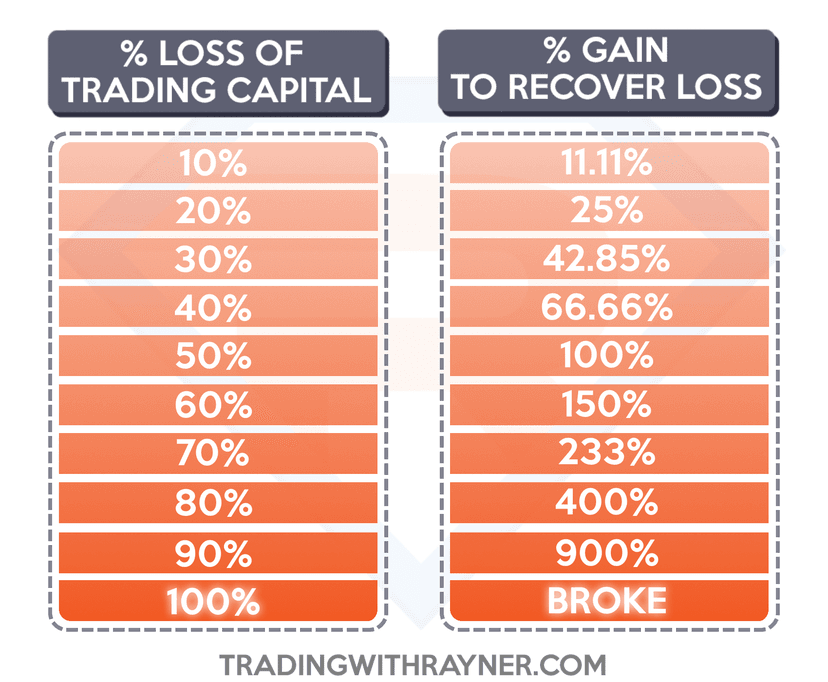
This is where part-time trading gets dangerous if you’re not disciplined. When you can’t monitor positions during the day, your risk management has to be bulletproof before you walk away from the screen.
Non-Negotiable Rules for Unmonitored Trades
- Always use a stop loss. No exceptions. Every trade you place before leaving for work must have a hard stop. Never rely on “I’ll check at lunch.”
- Risk 1-2% per trade maximum. Since you can’t exit manually during volatile moves, keep position sizes conservative.
- Set take-profit levels. Don’t rely on manually closing trades at target. Let the broker’s server handle it.
- Avoid trading major news events. If NFP or a rate decision is scheduled during your work hours, either close positions beforehand or widen your stops to account for the volatility.
- Use guaranteed stop losses when available. Some brokers offer this feature for a small premium. Worth it if you’re holding through uncertain events.
Position Sizing for Part-Time Traders
A simple position sizing formula: risk no more than 1% of your account per trade when you can’t actively monitor. If your account is $10,000, your maximum risk per trade is $100. With a 50-pip stop loss, that’s 0.2 lots on a standard pair. With a 100-pip stop on a swing trade, that’s 0.1 lots.
Keep it mechanical. Calculate before placing the trade, not after. This removes emotion from the process entirely.
The VPS Safety Net
When your EA runs on a VPS, risk management becomes even tighter. A well-configured EA enforces your stop loss, take profit, and position sizing rules automatically. It doesn’t move stops “just this once” or double down after a loss. The rules are the rules.
If you’re running an EA unattended during work hours, make sure your VPS has 100% uptime during trading hours. A VPS going offline while your EA has open positions is a risk you can eliminate by choosing a reliable provider.
Remember: The goal isn’t to maximize every trade. The goal is to protect your capital so you can keep trading. Your day job covers your bills. Your trading account needs to survive long enough to grow.
Common Mistakes Part-Time Forex Traders Make
After years of working with traders who balance forex with careers, certain patterns stand out. Avoid these and you’re already ahead of most part-time traders.
Trying to Scalp During Lunch Breaks
Scalping requires full attention, fast execution, and immediate reactions. Trying to scalp on a phone app during a 30-minute lunch break is a recipe for losses. Stick to higher timeframes where 10 minutes of analysis is enough.
Checking Trades Obsessively During Work
If you’ve set your stop loss and take profit, there’s nothing to do. Checking your P&L every 15 minutes doesn’t change the outcome. It just distracts you from your job and tempts you to close trades early. Set it and forget it until your evening session.
Overcomplicating the Strategy
You don’t need 12 indicators and 3 confirmations. Part-time traders do best with simple, repeatable setups. Price action at key levels on the daily chart. That’s it. Complexity is the enemy of consistency when your time is limited.
Ignoring the Economic Calendar
Walking into the office with open trades and no idea that FOMC is at 2 PM is reckless. Always check the economic calendar during your Sunday prep and before placing any trade. High-impact events during your work hours require either no positions or wider risk parameters.
Getting Started: Your First Week as a Part-Time Trader
If you’re new to forex trading with a full-time job, here’s a practical first-week plan:
- Sunday: Open a demo account. Pick 3 pairs to watch. Mark key levels on the daily chart.
- Monday-Wednesday: Spend 30 minutes each evening scanning those 3 pairs. Don’t trade yet. Just observe how price reacts to your levels.
- Thursday-Friday: If a clear setup forms, place a demo trade with proper stop loss and take profit. Walk away.
- Weekend: Review what happened. Did price respect your levels? Did your setup play out? Journal everything.
After 4-6 weeks of demo trading in the evening, you’ll have a feel for which setups work with your schedule. That’s when you consider going live with small position sizes.
For traders ready to automate, set up a forex VPS with your preferred platform pre-installed. Install a demo EA, let it run for a few weeks, and monitor the results during your evening sessions. This hands-off approach lets you evaluate automated strategies without risking real capital while you learn.
Frequently Asked Questions
Can you trade forex while working full time?
Absolutely. The forex market operates 24 hours a day, five days a week. With strategies like swing trading and end-of-day trading, you only need 30-60 minutes per day outside of work hours. Many profitable traders maintain full-time careers and trade during evening sessions or early mornings. The key is choosing a strategy that matches your available time rather than forcing a strategy that demands constant screen time.
What is the best forex strategy for someone with a 9-to-5 job?
Swing trading on the 4-hour and daily timeframes is the most effective strategy for working traders. You analyze charts once or twice per day, set pending orders with defined stop losses and take profits, and let the market come to you. End-of-day trading is another strong option, requiring just 15-20 minutes after the New York close. Both strategies are proven to work with limited screen time.
How do I automate my forex trading while I’m at work?
The most common approach is running an Expert Advisor (EA) on a forex VPS. The EA executes your trading strategy automatically 24/5, and the VPS ensures it never goes offline due to power cuts or internet issues. You configure the EA’s rules, risk parameters, and pairs once, then monitor results for 10-15 minutes each evening. This setup lets you trade every session without being at the screen.
Do I need a VPS for forex trading, or can I use my home computer?
If you’re running EAs or automated strategies, a VPS is strongly recommended. Read about the top benefits of using a forex VPS for trading. Home computers face power outages, internet disruptions, forced updates, and hardware failures, any of which can interrupt your EA mid-trade. A forex VPS runs in a professional data center with redundant power and connectivity, guaranteeing your trading platform stays online during market hours. If you only trade manually in the evenings, a VPS isn’t strictly necessary, but it still provides faster execution due to lower latency.
Can I pass a prop firm challenge while working a full-time job?
Yes, and having a day job can actually help. The limited screen time forces you to be selective with trades, which reduces overtrading, the number-one reason traders fail prop firm challenges. Choose challenges with 30-day or unlimited timeframes, use swing trading with 1-2 trades per week, and risk 0.5-1% per trade. Many prop firms also allow EAs, so you can run automated strategies on a VPS to trade the challenge account around the clock.
How many hours per week do I need to trade forex part time?
Most successful part-time traders spend 5-7 hours per week total. This breaks down to about 1-2 hours of weekend preparation (chart markup, economic calendar review) and 30-45 minutes per weekday evening for chart scanning and trade management. If you’re running an EA on a VPS, the active time drops to about 3-4 hours per week since the EA handles execution during market hours.
Which forex sessions should I trade if I work during the day in the US?
For US-based workers, the Tokyo session (opens at 7 PM EST / 4 PM PST) is the most accessible evening session. It’s ideal for JPY and AUD pairs. If you’re an early riser, you can catch the tail end of the London session or the London-New York overlap before work. West Coast traders have a significant advantage since the Tokyo open aligns with the end of the typical workday. Pick one session and specialize rather than trying to trade multiple sessions.

About the author
Matthew Hinkle
Lead Writer & Full Time Retail Trader
Matthew is NYCServers' lead writer. In addition to being passionate about forex trading, he is also an active trader himself. Matt has advanced knowledge of useful indicators, trading systems, and analysis.
Areas of Expertise