
FxPro Review 2026: cTrader, MT5 and EA Trading
This FxPro review covers its regulated entities, account types and costs, platforms, minimum deposit, VPS terms and what it offers traders who run EAs and cBots.

Published
FxPro is a forex and CFD broker that has been running since 1999 and offers MetaTrader 4, MetaTrader 5, cTrader, TradingView and its own platform. It has a UK entity regulated by the FCA and international entities regulated in the Bahamas and Seychelles. Its raw-pricing accounts, Raw+ on MetaTrader and a separate cTrader account, charge a commission of $35 per million US dollars traded on each side, which is $3.50 per side on $100,000 of USD notional, with forex spreads published from 0 pips on Raw+. Expert advisors and cTrader bots are supported, most accounts allow hedging, and FxPro says it executes trades in the Equinix LD4 data centre in London. Its VPS costs $30 a month, with free access only for VIP and Elite clients who apply. FxPro does not offer CFDs to residents of the United States, Iran or Canada.
The short verdict: FxPro suits EA and cBot traders outside the US who want cTrader and MetaTrader at one broker, a UK-regulated option and a published London execution venue. Traders who want a free VPS without a large account should read its terms first.
This review is based on FxPro's own public pages, read on 26 November 2026 and linked below. FxPro's website blocked our browser that day, so we read its pages through a public page-reading service, and this review has no screenshots of them. We haven't opened an account, deposited, traded or withdrawn with FxPro, and we didn't measure its spreads or execution. We have no affiliate or introducing-broker deal with FxPro.
FxPro at a Glance
| FxPro | |
|---|---|
| Entities and regulators | FxPro UK Limited (FCA, registration number 509956); FxPro Global Markets Limited (Securities Commission of The Bahamas, licence SIA-F184); Invemonde Trading Ltd (Seychelles FSA, licence SD120) |
| Not served | The United States, Iran and Canada, among others |
| Platforms | MetaTrader 4, MetaTrader 5, cTrader, TradingView (through a cTrader account), FxPro platform |
| EAs and hedging | EAs on MT4 and MT5, cBots on cTrader; hedging on most accounts |
| Raw accounts | Raw+ (MT4/MT5): forex from 0 pips; cTrader: from 0 or 0.2 pips (FxPro's pages differ); both $35 per $1 million USD traded, per side |
| Minimum deposit | Standard account: no fixed minimum, $1,000 recommended; not stated for Raw+, Elite or cTrader |
| VPS | BeeksFX at $30 a month; VIP and Elite clients can apply for it free |
| Servers | Equinix LD4, London |
Regulation and Safety
FxPro's licences page names three regulated entities, and the one you open an account with depends on where you live.
- FxPro UK Limited "is authorised and regulated by the Financial Conduct Authority (registration number 509956)". The page adds that it is a member of the Financial Services Compensation Scheme.
- FxPro Global Markets Limited "is authorised and regulated by the Securities Commission of The Bahamas (license no. SIA-F184)".
- Invemonde Trading Ltd "in partnership with FxPro Global Markets Ltd is authorised and regulated as an Investment Dealer by the Seychelles Financial Services Authority (Licence no. SD120)".
FxPro doesn't publish a country-by-country list of which entity serves whom on the pages we read. Its help centre says that "the jurisdiction under which your FxPro account will be opened depends on the country of residence", and that "the trading conditions for each account differ based on the jurisdiction". The help centre also says cryptocurrencies "are not available to retail clients under FxPro UK Ltd". The Bahamas and Seychelles regulators are offshore, and the FCA applies stricter rules to retail clients, so the same account can come with different leverage and protections depending on the entity.
On client money, the licences page says client funds "are fully segregated from the company's own funds" and held in banks "such as Barclays Bank PLC, Julius Baer and Royal Bank of Scotland". It also offers negative balance protection: "FxPro offers Negative Balance Protection to all clients as part of the Client Agreement, given that it is not manipulated and is accepted in good faith."
FxPro's global site doesn't publish a percentage of retail accounts that lose money. Its footer carries a general risk warning: "CFDs are complex instruments and come with a high risk of losing money rapidly due to leverage. Please ensure you fully understand how CFDs work and whether you can afford to take the high risk of losing your money."
Account Types and Trading Costs
FxPro lists four accounts on its comparison page: Standard, Raw+ and Elite on MetaTrader 4 and 5, and a cTrader account. Every figure below is FxPro's published "from" spread or commission, not a spread we observed.
| Account | Platforms | Forex majors | Gold | Commission per side | Extras |
|---|---|---|---|---|---|
| Standard | MT4, MT5, FxPro platform | All-inclusive spread from 1.2 pips | From 25 cents | None | – |
| Raw+ | MT4, MT5, FxPro platform | From 0 pips | From 10 cents | Listed as $3.5 (see below) | – |
| Elite | MT4, MT5, FxPro platform | From 0 pips | From 10 cents | Listed as $3.5 (see below) | Rebates "starting from $1.50 per lot" |
| cTrader | cTrader, TradingView | From 0 or 0.2 pips (see below) | From 0 (see below) | $35 per $1 million USD traded | – |
FxPro Spreads and Commission
The comparison table lists Raw+ and Elite at "$3.5/side" on forex and gold, but FxPro's commission calculator gives the actual rule: "On the cTrader and Raw+ accounts, FxPro charges a commission fee of $35 per million USD traded." So $3.50 per side applies to $100,000 of USD notional, and the commission grows with the dollar value of the trade. FxPro's commission schedule works through 100,000 GBP at a GBP/USD rate of 1.3110, which is 131,100 USD and $4.59 per side. FxPro's pages disagree on when it is collected: the execution page says it "is charged round-turn when you open a position", while the calculator says it "will be charged when you open and when you close the trade". The rate covers forex and metals; the execution page says other instruments on these accounts have floating spreads and zero commission, though the comparison table lists bitcoin at $5 per side.
The cTrader account uses the same rule, which the homepage lists as "a competitive commission of $35 per $1million traded". Its published spread floor differs between pages: the execution page says cTrader spreads on forex and metals "start from 0", while the homepage advertises "ultra-low spreads from 0.2" and the help centre says they "start from as low as 0.2 on majors".
The Standard account has no commission and builds the cost into a spread from 1.2 pips on forex majors. Which account costs less depends on the spreads you actually get on each. Elite has Raw+ pricing with volume rebates, and FxPro's VIP page says of VIP membership: "Not everyone qualifies".
Swap-free accounts are available "upon request due to religious reasons", and the help centre says "live accounts are disabled after 3 months of inactivity". Leverage depends on the entity, as FxPro's leverage page shows.
Platforms
FxPro offers five platforms, and its comparison page marks EA trading as available on three of them: MetaTrader 4, MetaTrader 5 and cTrader. The FxPro platform and TradingView don't support EA trading.
- MetaTrader 4 and 5 run on the Standard, Raw+ and Elite accounts. EAs are written in MQL4 and MQL5, and the MT5 page mentions its strategy tester for backtesting. The execution page adds that "On MT5 account types, you can also choose netting" instead of hedging.
- cTrader runs on the cTrader account. FxPro's cTrader page lists "Add custom cBots & indicators", Level 2 depth of market and "No restrictions on stop / limit levels", and the comparison table gives C# as its coding language. The web version of cTrader excludes cTrader Automate, so bots run on the desktop platform.
- TradingView connects through the cTrader account: FxPro's TradingView page tells you to "Ensure you've opened an FxPro cTrader account" before connecting. Its coding language is Pine Script.
- The FxPro platform is FxPro's own web and mobile platform.
FxPro cTrader
The cTrader account suits traders who want cBots, depth of market and TradingView on one account. It pays the same $35 per million USD commission as Raw+, though FxPro publishes its forex spread floor as 0.2 pips in two places, and it has no minimum distance for stops and limits, where FxPro's MetaTrader accounts list a minimum of "1 pip from current/entry price for most majors" on the comparison page as saved on 25 November 2026. If you're choosing between the two automation platforms, our cTrader vs MetaTrader comparison explains how EAs and cBots differ.
FxPro for EA Traders
FxPro's help centre says: "Expert Advisors are fully compatible with our FxPro MT4 and FxPro MT5 platforms, and cTrader Algos can be used on our FxPro cTrader platform." Its VPS page is headed "Run your MT4/MT5 Expert Advisors and cTrader Robots 24 hours a day".
Scalping and Hedging Rules
On hedging, the execution page says: "Most FxPro account types allow hedging, meaning you can hold long and short positions on the same instrument at the same time as separate trades. A locked position does not require extra margin, provided your Margin Level is above 100%." On MT5 you can choose netting instead.
FxPro's public pages that we read don't state a scalping policy either way. What they do publish matters to scalpers: cTrader has no restrictions on stop and limit levels, while MetaTrader accounts keep a 1-pip minimum on most majors. If your EA scalps or trades news, ask the EA support address in FxPro's help centre before going live.
Raw Account Costs for EAs
On Raw+, Elite and cTrader, an EA trading forex or metals pays the commission on both sides of each trade, so model it in the Strategy Tester as $35 per million USD of notional per side, not as a fixed amount per lot: a one-lot trade on a pair whose base currency is worth more than a dollar costs more than $3.50 a side. For other instruments, check FxPro's specifications. Test with variable spreads too, because "from 0 pips" is the floor, not the typical spread.
FxPro VPS and Free VPS Terms
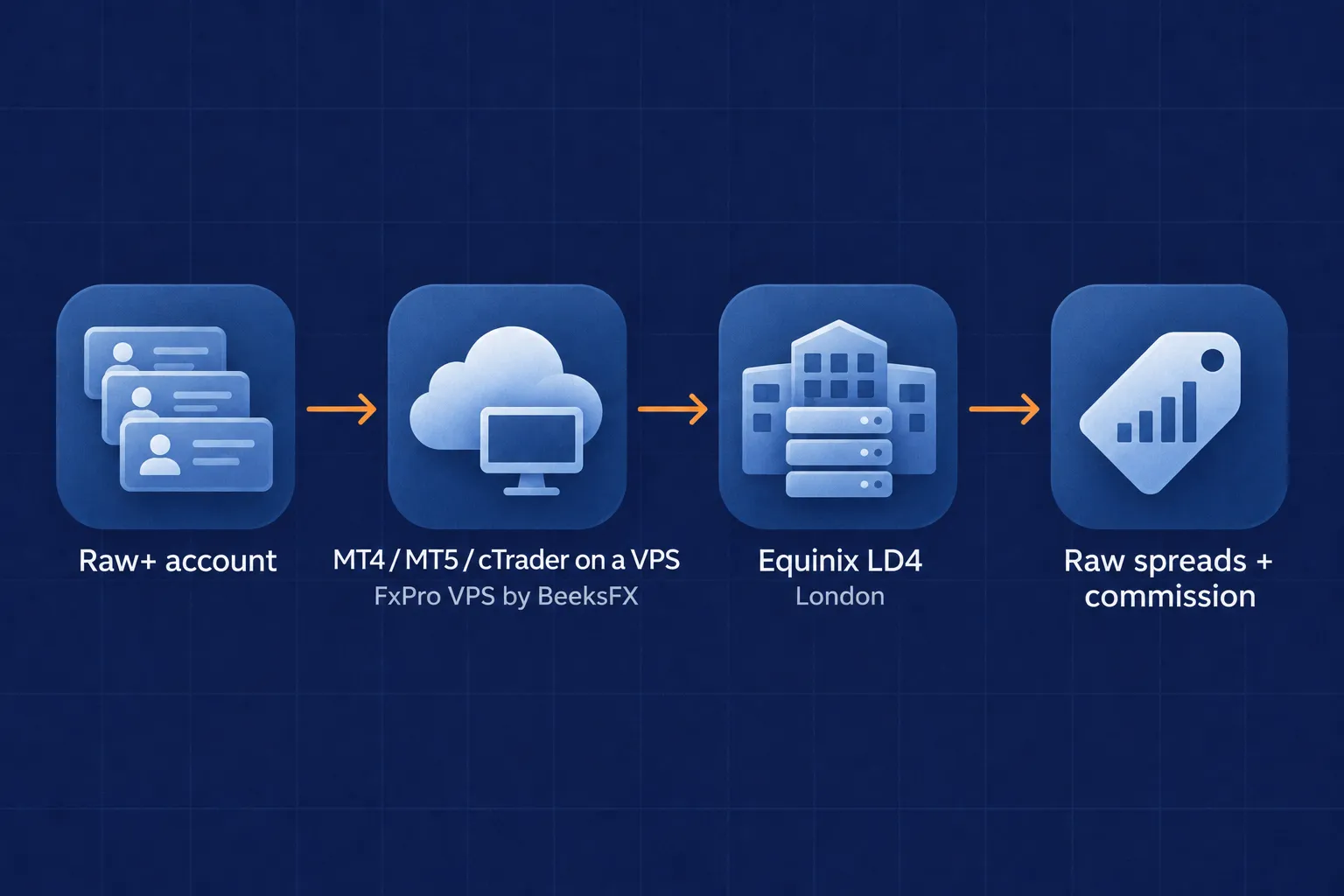
FxPro's VPS isn't free by default. Its VPS page lists a plan at "$30 Per Month", "Based In Equinix Data Centre", with 2,560 MB of RAM, 1 vCPU, 30 GB of disk space and Windows Server 2022, and says the service "is provided by BeeksFX". Under "Want the VPS for free?" it says: "VIP & Elite account holders can apply. Simply email support@fxpro.com and you could get VPS access for free!"
The help centre explains: "VIP Premium Accounts are offered to selected individuals with high deposits (typically $50k or equivalent) and those actively trading large volumes. VIP clients benefit from free VPS service and the possibility of decreased spreads/commissions." So the free VPS goes to large or high-volume accounts on application, not to every Raw+ client.
Where FxPro's Servers Are
The VPS page says: "Your Trades are executed at our Equinix Data centres in LD4 London." The execution page lists the execution venue as "Equinix LD4 London". For an EA, that means a VPS in or near London.
If you run your own VPS rather than FxPro's, our FxPro VPS page lets you check the latency from our locations to FxPro's servers before you choose a plan. For brokers chosen mainly on execution infrastructure, see our guide to HFT brokers.
Deposits, Withdrawals and Minimum Deposit
FxPro's Standard account has no fixed minimum deposit. Its help centre says: "FxPro's standard account has no fixed minimum deposit requirement, allowing flexibility for traders to start at their own pace. However, we recommend an initial deposit of 1,000 USD for a smoother trading experience." It adds that "certain payment methods may have specific minimum deposit amounts". The pages we read don't state a minimum deposit for Raw+, Elite or cTrader.
The funding page says deposits and withdrawals carry "0 fees from FxPro", and the help centre lists "Bank Wire transfers, Credit/Debit cards, PayPal, Neteller, Skrill, and many more local options tailored to your country and jurisdiction". Banks in the chain may still charge, and "for e-wallets, there may be a fee for withdrawals but only if you have not traded". International bank wire deposits take 3–5 business days.
The help centre says withdrawal requests are processed "within 1 working day". After that, it lists 3–5 working days for international bank wires, up to 2 for SEPA, crypto and e-wallets, up to 5 for local bank transfers, and 3–7 for cards, which "may take up to 15 working days".
Withdrawals go back to the deposit method first: cards, then PayPal and Skrill, before bank wire.
Who Can Open an Account
FxPro doesn't offer CFDs to US residents. Its footer says: "FxPro does not offer Contracts for Difference to residents of certain jurisdictions, including the United States, Iran and Canada. Additional restrictions may apply depending on local regulations."
Everyone else registers through FxPro Direct or the FxPro app. UK residents can also open spread betting accounts with FxPro UK Limited. The help centre says you verify your profile with an ID document and a "proof of residence - a Utility bill or bank statement issued in the last 6 months" before you can trade.
Pros and Cons
Pros
- An FCA-regulated UK entity alongside the Bahamas and Seychelles entities.
- MT4, MT5 and cTrader for automated trading, with TradingView through the cTrader account.
- A raw commission of $35 per million USD traded per side on Raw+ and cTrader, with Raw+ forex spreads from 0 pips.
- EAs and cBots supported in writing, and hedging allowed on most accounts.
- No fixed minimum deposit on the Standard account, and no FxPro deposit or withdrawal fees apart from an e-wallet fee for accounts that haven't traded.
- A published execution venue: Equinix LD4 in London.
Cons
- No CFDs for residents of the US, Iran or Canada.
- The VPS costs $30 a month unless you're a VIP or Elite client whose application is accepted.
- No published scalping policy on the pages we read.
- MetaTrader accounts have a 1-pip minimum stop distance on most majors.
- The cTrader spread floor differs between FxPro's own pages (0 or 0.2).
Who It Suits
FxPro suits traders outside the US, Iran and Canada who run EAs on MetaTrader or cBots on cTrader and want both at one broker, with a published raw commission and a London execution venue. UK residents also get an FCA-regulated entity.
It suits less well if you want a free VPS from a small account or a written scalping policy.
Verdict
On its published terms, FxPro is a solid fit for automated trading: EAs and cBots are supported in writing, the raw accounts publish a commission of $35 per million USD traded per side, and the execution venue is Equinix LD4. Its UK entity is FCA-regulated, while international clients are served by the Bahamas and Seychelles entities. The gaps are the VPS, free only for VIP and Elite clients who apply, and the lack of a written scalping policy.
Our Exness review covers a broker with a similar raw commission and a different VPS offer. Trading leveraged CFDs carries a high risk of losing money, and no broker, account type or VPS makes an EA profitable; trade only with money you can afford to lose.
FAQ
What is the FxPro minimum deposit?
FxPro's Standard account has no fixed minimum deposit. Its help centre says the standard account "has no fixed minimum deposit requirement" but recommends "an initial deposit of 1,000 USD", and notes that some payment methods have their own minimums. The pages we read don't state a minimum for Raw+, Elite or cTrader.
What is FxPro's Trustpilot rating?
On 26 November 2026, FxPro's Trustpilot page showed a TrustScore of 2.1 out of 5 from 705 reviews, 119 of them in the last 12 months. Trustpilot blocked our browser that day, so we read the page through the same public reader we used for FxPro's site. Ratings change; open Trustpilot for the current score.
Does FxPro offer a free VPS?
Only to some clients. FxPro's VPS page lists a BeeksFX VPS at $30 a month and says "VIP & Elite account holders can apply" for it free by emailing support. VIP status typically needs "$50k or equivalent" in deposits or large volumes.
Does FxPro allow EAs and scalping?
EAs, yes: its help centre says "Expert Advisors are fully compatible with our FxPro MT4 and FxPro MT5 platforms", and cBots run on cTrader. The pages we read don't state a scalping policy.
FxPro vs Exness: which suits EA traders?
Both publish raw commissions around $3.50 a side: FxPro's Raw+ and cTrader accounts charge $35 per million USD traded per side, which is $3.50 on $100,000 of USD notional, and Exness's Raw Spread account "up to $3.50 each side per lot", according to Exness's account page on 26 November 2026. FxPro adds cTrader and TradingView and publishes LD4 London as its execution venue; Exness's platforms page lists MT5 and its own Exness Terminal, and no cTrader. On VPS, Exness's VPS page said on 25 November 2026 that clients "can now apply for a free VPS through your Personal Area", subject to its eligibility criteria, while FxPro's is $30 a month unless you're a VIP or Elite client. Our Exness review covers it in full.
Does FxPro accept US clients?
No. FxPro's footer says it "does not offer Contracts for Difference to residents of certain jurisdictions, including the United States, Iran and Canada".
Is FxPro regulated?
Yes. According to its licences page, FxPro UK Limited is regulated by the FCA (registration number 509956), FxPro Global Markets Limited by the Securities Commission of The Bahamas (licence SIA-F184), and Invemonde Trading Ltd by the Seychelles FSA (licence SD120).
Matthew Hinkle
Lead Writer & Full Time Retail Trader
Matthew is NYCServers' lead writer. In addition to being passionate about forex trading, he is also an active trader himself. Matt has advanced knowledge of useful indicators, trading systems, and analysis.
- Forex Trading
- Technical Analysis
- Trading Systems
- Market Indicators
Written by Matthew on
View profile