
Fusion Markets Review 2026: Low Commissions, MT5, cTrader and EA Trading
This Fusion Markets review covers its three entities, the Zero and Classic accounts, platforms, minimum deposit, sponsored VPS terms and what it offers traders who run EAs.

Published
Fusion Markets is an Australian-founded forex and CFD broker whose pitch is low cost: its Zero account has spreads from 0.0 pips and a commission of $2.25 per lot per side, with no minimum account size. Outside Australia, clients are served by entities regulated in Seychelles and Vanuatu; Australian clients deal with an ASIC-licensed company. It offers MetaTrader 4, MetaTrader 5, cTrader and TradingView, allows scalping, hedging and expert advisors, lists its server location as New York, and sponsors a VPS for clients who trade more than 20 lots of forex or metals in 30 days. It does not accept clients from the United States.
The short verdict: Fusion Markets suits traders outside the US who run EAs or cBots, trade often enough for the commission to matter, and are comfortable with an offshore regulator for non-Australian accounts. Traders who want a top-tier regulator outside Australia, or a broker that names its data centre, should look at the alternatives.
This review is based on Fusion Markets' own public pages, checked with a browser on 26 November 2026 and linked below. We haven't opened an account, deposited, traded or withdrawn with Fusion Markets, and we didn't measure its spreads or execution. We have no affiliate or introducing-broker deal with Fusion Markets.
Fusion Markets at a Glance
| Fusion Markets | |
|---|---|
| International entities | Fusion Markets International Ltd (Seychelles FSA, licence SD096); Gleneagle Securities Pty Limited (Vanuatu FSC, company number 40256) |
| Australian entity | FMGP Trading Group Pty Ltd (ASIC, AFSL 385620), Australian clients only |
| Not served | United States and its territories, Japan, New Zealand, Spain, Russia, Ukraine, Alberta, Manitoba and Ontario, among others |
| Platforms | MetaTrader 4, MetaTrader 5, cTrader, TradingView (through cTrader) |
| EAs, scalping, hedging | All allowed; arbitrage that exploits pricing or latency is not |
| Zero account | Spreads from 0.0 pips, $2.25 per lot per side ($4.50 round turn), no minimum account size |
| Sponsored VPS | Fees refunded for more than 20 lots of FX or metals in 30 days |
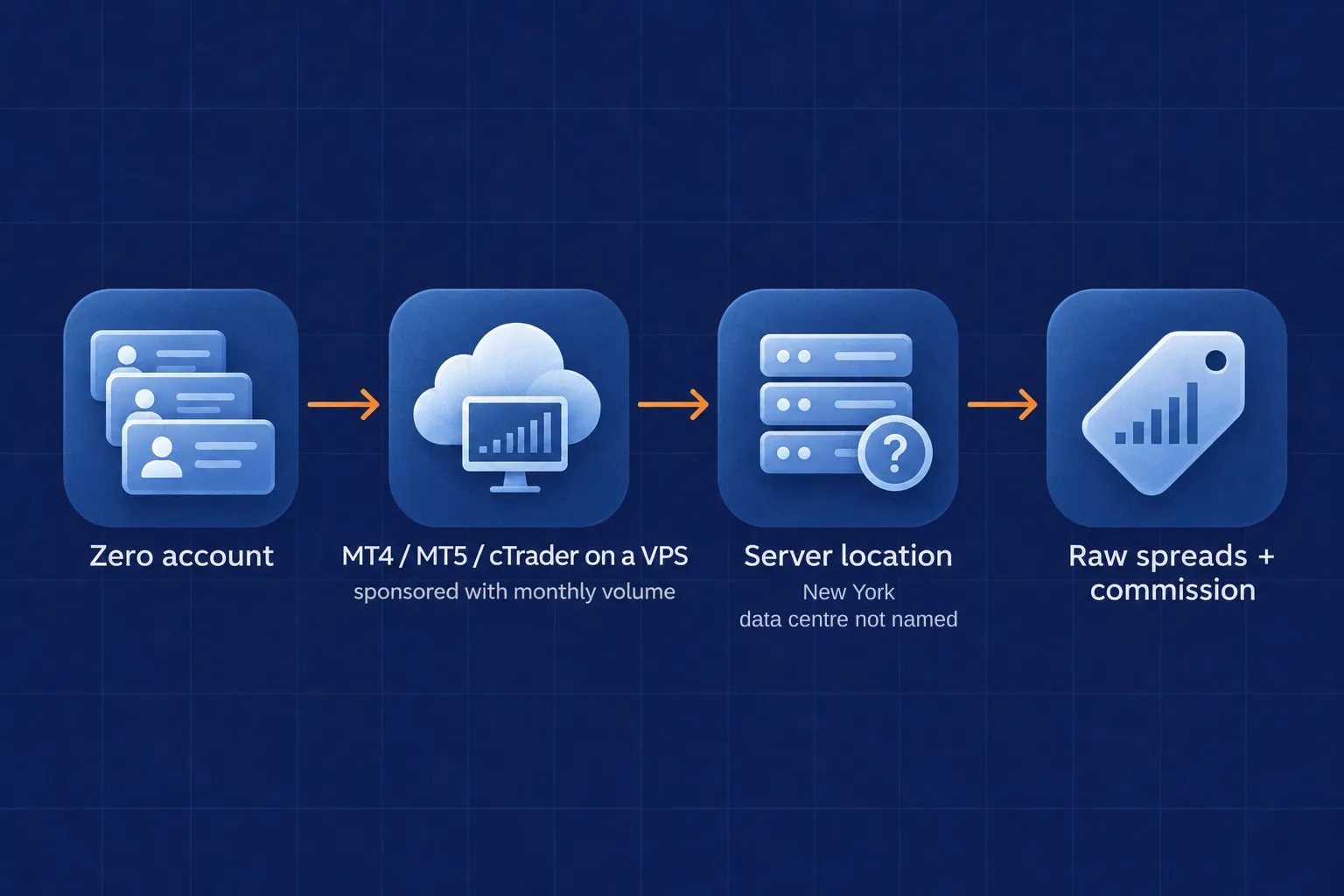
| Server location | New York (no data centre named) |
Fusion's FAQ says the company launched trading for clients in June 2019 and has its head office in Melbourne, with offices in Vanuatu and Seychelles.
Regulation and Safety
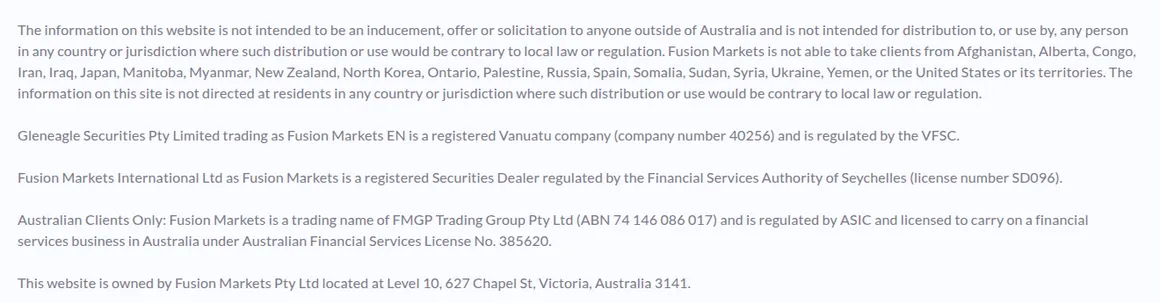
Fusion Markets operates through three regulated companies, and which one holds your account depends on where you live. Regulation is quoted here as Fusion's own regulations page and site footer state it.
- Fusion Markets International Ltd: "Fusion Markets International Ltd as Fusion Markets is a registered Securities Dealer regulated by the Financial Services Authority of Seychelles (license number SD096)."
- Gleneagle Securities Pty Limited: "Gleneagle Securities Pty Limited trading as Fusion Markets EN is a registered Vanuatu company (company number 40256) and is regulated by the VFSC."
- FMGP Trading Group Pty Ltd: "Australian Clients Only: Fusion Markets is a trading name of FMGP Trading Group Pty Ltd (ABN 74 146 086 017) and is regulated by ASIC and licensed to carry on a financial services business in Australia under Australian Financial Services License No. 385620."
Clients outside Australia are therefore served by the Seychelles or the Vanuatu entity. Fusion publishes separate legal documents for each, but its pages don't say which international clients go to which. Both regulators are offshore, and their retail rules are looser than ASIC's: Fusion's FAQ lists leverage of up to 500:1 on forex and metals for "Fusion VFSC & FSA clients".
On client money, the regulations page says Fusion "deposits all its client monies into segregated Client Trust Accounts" and names National Australia Bank as the bank. The FAQ adds a caveat worth reading: "While funds are technically not guaranteed under Applicable Law, the regulator has put in place rules that govern how we are to handle client money." Negative balance protection applies automatically to eligible clients of the VFSC and FSA entities, except residents of Mongolia, Türkiye, Indonesia, Hong Kong, Taiwan, Vietnam and mainland China, according to the same FAQ.
Fusion doesn't publish a percentage of retail accounts that lose money. Its footer carries a general warning instead: "Trading in margin foreign exchange and derivatives carries a high level of risk and you may incur a loss that is far greater than the amount you invested."
Account Types and Trading Costs
Fusion Markets keeps its line-up short: two live account types with the same products, a demo account and swap-free versions for Islamic traders. Every figure below is Fusion's published "from" spread or commission, not a spread we observed.
| Account | Platforms | Commission per side | Spreads from | Minimum account size | Server location |
|---|---|---|---|---|---|
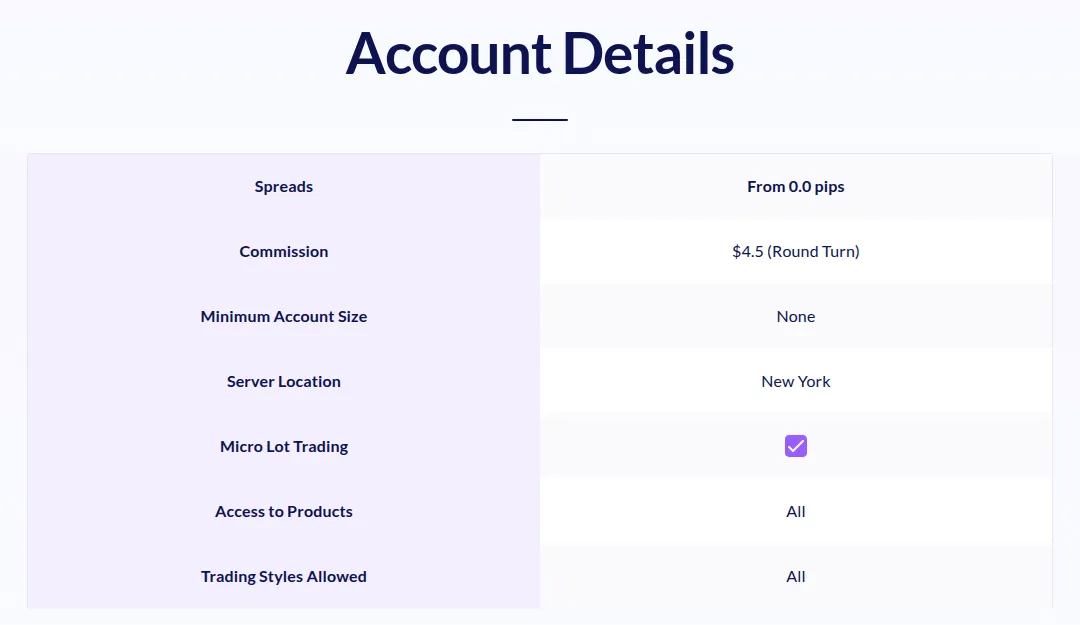
| Zero | MT4, MT5, cTrader, TradingView | $2.25 per lot ($4.50 round turn) | 0.0 pips | None | New York |
| Classic | MT4, MT5 | None (built into the spread) | 0.9 pips | None | New York |
Fusion Markets Spreads and Commission
On the Zero account you pay the raw spread plus $2.25 per standard lot on each side, so a one-lot trade opened and closed costs $4.50 in commission plus the spread at the time. AUD accounts are also charged $4.50 round turn, according to the FAQ.
The Classic account has no commission and spreads from 0.9 pips instead. Fusion's own comparison on the Zero page puts the all-in cost at "approximately 0.5 pips" on Zero against "around 0.9 pips" on Classic; both are Fusion's estimates.
On cTrader and TradingView the Zero account is charged by notional value: "$2.25 per $100,000 of notional volume traded (both in the base currency traded)". One lot of EUR/USD therefore costs EUR 2.25 per side, and one lot of AUD/USD costs AUD 2.25, so the per-lot cost moves a little with the base currency. Fusion's trading conditions page lists average, minimum and per-symbol spreads for anyone who wants more than the "from" figure.
Limits That Matter for Automated Trading
Fusion's FAQ sets a few hard limits. MT4 and MT5 live accounts can hold up to 200 positions, and 200 orders including pending orders, against 2,000 positions on cTrader. The maximum trade size is 100 lots.
The products page lists more than 250 CFDs, including 90+ currency pairs, metals, energy, indices, cryptocurrencies and US share CFDs, which trade on MetaTrader 5 only.
Platforms
Fusion Markets offers MetaTrader 4, MetaTrader 5, cTrader and TradingView on desktop, web and mobile, plus its own Fusion+ copy trading, DupliTrade and a multi-account manager. The platform you choose decides which account types you can use and how your automation is written.
- MetaTrader 4 and 5 run on both the Zero and Classic accounts. Fusion's MT5 page lists "Full EA functionality with MQL5", and its FAQ walks through installing an expert advisor in the MQL4 or MQL5 Experts folder. Fusion's FAQ says it executes MT4 orders by market execution, taking the offered price "without any requotes".
- cTrader runs on the Zero account only. Fusion's cTrader page says traders can use cAlgo to "create their own powerful automated strategies or install their own EAs or trading bots", written in C#.
- TradingView is "powered by cTrader" and also requires a Zero account. The FAQ is clear that "EAs are not available on TradingView"; automation there means Pine Script strategies and alerts.
Fusion's FIX API is only for institutional clients. If you're choosing between those two, our cTrader vs MetaTrader comparison explains how EAs and cBots differ.
Fusion Markets for EA Traders
Fusion Markets allows automated trading and says so on its account pages. The Zero account page describes its execution as "Perfect for EAs or anyone that wants to avoid any lag on their trades", and both account tables list "Trading Styles Allowed: All".
Scalping, Hedging and Arbitrage Rules
Fusion's FAQ answers the three policy questions EA traders ask most. On scalping: "Yes, you can enter trades and exit them as quickly as you would like with no restrictions on-hold time or where you set your stop loss or take profit." On hedging: "Yes, Fusion Markets allow hedging", meaning you can hold a long and a short position in the same product at once. On trade frequency: "You have the flexibility to open and close as many trades as you wish within a day, regardless of the hold time of each trade. Except in cases of deliberately taking advantage of platform faults."
The limit is arbitrage. Fusion says: "Latency arbitrage, swap arbitrage, or any strategy designed to exploit the technical, pricing, or execution characteristics of our trading environment is strictly prohibited under our terms and conditions." Statistical arbitrage based on genuine market analysis is accepted.
Zero Account Costs for EAs
An EA that trades often pays the commission on every trade, so the Zero account's $2.25 per side is the number to put into a backtest: add $4.50 per lot round turn on top of the spread in the Strategy Tester. Test with variable spreads, because "from 0.0 pips" is the floor rather than the typical spread. Grid and basket EAs should also check the 200-position cap on MetaTrader accounts before going live; cTrader allows 2,000.
Sponsored VPS Terms
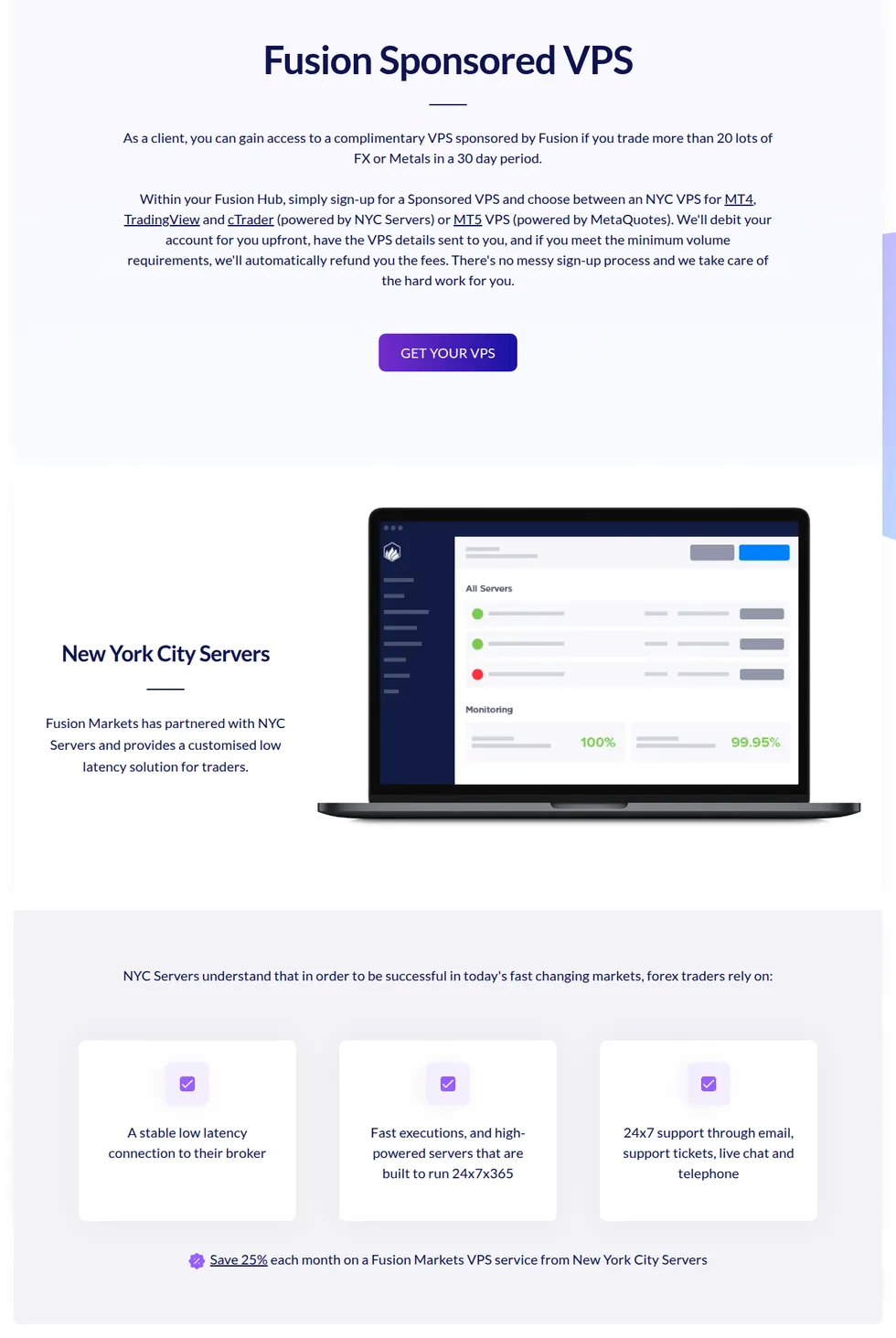
Fusion's VPS page offers a "complimentary VPS sponsored by Fusion if you trade more than 20 lots of FX or Metals in a 30 day period". You sign up for it in the Fusion Hub and choose between "an NYC VPS for MT4, TradingView and cTrader (powered by NYC Servers) or MT5 VPS (powered by MetaQuotes)". Fusion debits the VPS fee from your account upfront and, "if you meet the minimum volume requirements, we'll automatically refund you the fees". If you miss the volume, Fusion's FAQ says you are told by email that you didn't qualify that month.
The same page also offers a discount to clients who pay for their own VPS: "Save 25% each month on a Fusion Markets VPS service from New York City Servers". Fusion Markets offers NYC Servers' VPS at a discount to its clients; that partnership plays no part in this review's verdict.
Where Fusion Markets' Servers Are
Fusion publishes a city but not a data centre. The Zero and Classic account tables both list "Server Location: New York", and none of the pages we checked names the building or the provider. For an EA, that points to a VPS in or near New York, and the exact distance to Fusion's servers is something to check rather than assume.
Our Fusion Markets VPS page lists the latency to Fusion's servers, so you can check it before you choose a plan. For brokers chosen mainly on execution infrastructure, see our guide to HFT brokers.
Deposits, Withdrawals and Minimum Deposit
Fusion Markets has no minimum deposit. Both account tables list "Minimum Account Size: None", and the FAQ says: "there is no minimum amount to deposit. We believe that you should start with what you feel most comfortable." The FAQ adds that most clients fund with $1,500 or more, which is a description of its clients rather than a requirement. In practice, each payment method has its own floor: the deposit options page lists 10 USD for bank wire, cards, PayPal, Skrill, Neteller and crypto, 20 USD for BinancePay and 1 AUD for PayID.
Fusion charges $0 for deposits across more than 30 funding options. Cards, PayPal, e-wallets and crypto are listed as instant, and bank wire as 1–5 business days. The FAQ warns that an international wire into Fusion's Australian trust account will likely cost USD 20–30 in bank fees, which Fusion doesn't control.
Withdrawals are requested from the client area and only paid to accounts in your own name. The withdrawal options page lists no Fusion fees, a 35 USD minimum for bank wire and 10 USD for most other methods. Fusion states that "85% of withdrawals are processed in under an hour", which measures its own processing; arrival then depends on the method, from instant for PayPal, Skrill, Neteller and crypto to 1–2 business days for local bank transfer and 3–5 for international wire.
Who Can Open an Account
Fusion Markets accepts clients from most countries, but not the United States. Its footer says: "Fusion Markets is not able to take clients from Afghanistan, Alberta, Congo, Iran, Iraq, Japan, Manitoba, Myanmar, New Zealand, North Korea, Ontario, Palestine, Russia, Spain, Somalia, Sudan, Syria, Ukraine, Yemen, or the United States or its territories." The FAQ spells out the territories as American Samoa, Guam, Puerto Rico, the Northern Mariana Islands and the U.S. Virgin Islands.
Australian residents open accounts with the ASIC-licensed entity. Fusion's Zero account page sets out the steps: register, then "Proceed with ID Verification and pass the quiz to ensure that you understand the risk of Forex and CFD trading", before creating the live account.
Pros and Cons
Pros
- The Zero account charges $2.25 per lot per side ($4.50 round turn), below the $3.50 per side IC Markets publishes for its Raw Spread account.
- Scalping, hedging and EAs are allowed in writing, with no restriction on hold time or stop distance.
- No minimum deposit, and no Fusion fees on deposits or withdrawals.
- MT4, MT5, cTrader and TradingView at one broker, with US share CFDs on MT5.
- A sponsored VPS for more than 20 lots of forex or metals in 30 days, for MetaTrader, cTrader and TradingView.
Cons
- Non-Australian accounts sit with entities regulated in Seychelles and Vanuatu, both offshore regulators.
- No US clients, and none from Japan, New Zealand, Spain or three Canadian provinces.
- Fusion names New York as its server location but not the data centre.
- The sponsored VPS is charged upfront and refunded only when you reach the volume.
- MetaTrader accounts cap open positions at 200, which can limit grid and basket EAs.
Who It Suits
Fusion Markets suits traders outside the US who run EAs on MetaTrader or cBots on cTrader and trade enough volume for a low commission to make a real difference. It fits traders who already trade more than 20 lots of forex or metals in 30 days, because the VPS fee is then refunded, and those who want to start small.
It suits less well if you need a top-tier regulator and live outside Australia, if you want a broker that names its data centre so you can place a VPS in the same building, or if your EA holds hundreds of positions at once on MetaTrader.
Verdict
On its published terms, Fusion Markets offers low costs for running an EA on a raw-spread account: $2.25 per side, no minimum deposit, clear written permission for scalping, hedging and automated trading, and a VPS that is sponsored when you trade more than 20 lots of forex or metals in 30 days. The trade-offs are regulation and transparency about infrastructure. International clients are served by Seychelles and Vanuatu entities, and the server location is given only as New York.
If you're comparing raw-spread brokers, check each one's commission per side, entity, server location and VPS terms against how your EA trades; our BlackBull Markets review covers another broker with raw pricing, MT4, MT5, cTrader and TradingView. Trading leveraged CFDs carries a high risk of losing money, and no broker, account type or VPS makes an EA profitable; trade only with money you can afford to lose.
FAQ
What is the Fusion Markets minimum deposit?
Fusion Markets has no minimum deposit: its account tables list "Minimum Account Size: None", and the FAQ says "there is no minimum amount to deposit". Each payment method has a small floor of its own, 10 USD for most methods including cards, bank wire, PayPal and crypto.
What is Fusion Markets' Trustpilot rating?
Fusion's homepage displayed a Trustpilot widget showing "TrustScore 4.5" from 1,728 reviews on 26 November 2026. Trustpilot's own page refused our automated check that day, so we couldn't confirm the figure there.
What are Fusion Markets' spreads and commission?
The Zero account has spreads from 0.0 pips plus $2.25 per lot per side ($4.50 round turn) on MetaTrader, or $2.25 per 100,000 of the base currency on cTrader and TradingView. The Classic account has no commission and spreads from 0.9 pips. These are Fusion's published "from" figures.
Does Fusion Markets offer a free VPS?
Yes, on volume. Fusion sponsors a VPS when you trade more than 20 lots of forex or metals in 30 days: it charges the fee upfront and refunds it if you meet the volume. You choose an NYC Servers VPS for MT4, TradingView and cTrader or a MetaQuotes VPS for MT5. The same page also offers 25% off an NYC Servers VPS.
Does Fusion Markets allow EAs and scalping?
Yes. Fusion lists "Trading Styles Allowed: All", allows scalping "with no restrictions on-hold time" and allows hedging. EAs run on MT4 and MT5 and cBots on cTrader. Latency and swap arbitrage are prohibited.
Fusion Markets vs IC Markets: which suits EA traders?
Both allow EAs, scalping and hedging, offer MT4, MT5, cTrader and TradingView, and don't accept US clients. Fusion's raw-account commission is lower, $2.25 per lot per side against $3.50 on IC's Raw Spread account, according to each broker's pages on 26 November 2026 (IC's account overview and why-IC page, which also says "Scalping, hedging, and automated trading are all allowed"). IC's trading servers page names its data centres (Equinix NY4 for MetaTrader and LD5 for cTrader), while Fusion names only New York. IC's VPS page makes its VPS free from 15 lots a month in forex and metals; Fusion's needs more than 20 lots in 30 days. IC's global entity is regulated in Seychelles under licence SD018 and excludes US residents, according to its regulation page; one of Fusion's two international entities is also regulated in Seychelles.
Does Fusion Markets accept US clients?
No. Fusion's footer says it "is not able to take clients from … the United States or its territories", and its FAQ lists American Samoa, Guam, Puerto Rico, the Northern Mariana Islands and the U.S. Virgin Islands among them.
Is Fusion Markets regulated?
Yes. Its international entities are regulated by the Seychelles FSA (licence SD096) and the Vanuatu Financial Services Commission (company number 40256), and its Australian entity holds ASIC licence 385620.
Matthew Hinkle
Lead Writer & Full Time Retail Trader
Matthew is NYCServers' lead writer. In addition to being passionate about forex trading, he is also an active trader himself. Matt has advanced knowledge of useful indicators, trading systems, and analysis.
- Forex Trading
- Technical Analysis
- Trading Systems
- Market Indicators
Written by Matthew on
View profile