
FXConstant EA Review: Price Action Robot Analysis
Honest FXConstant EA review with verified Myfxbook results, aggressive vs normal settings, and full drawdown analysis. See if this robot fits your strategy.

What Is FXConstant EA?
FXConstant EA is a fully automated expert advisor that trades EURUSD and AUDUSD using pure price action analysis. Unlike most forex robots that rely on technical indicators like RSI or moving averages, FXConstant analyzes raw price movement through 20 independent trading patterns developed by its creators.
The EA runs on both MetaTrader 4 and MetaTrader 5. It’s designed as a conservative, low-frequency trading system. You might see only a handful of trades per month during quiet market conditions. This makes FXConstant a portfolio diversification tool rather than a standalone aggressive profit generator.
At $267 (discounted from $295), it sits in the mid-range price bracket for commercial EAs. You get one license that works on any account type with unlimited online account changes. The 30-day money-back guarantee includes a notable provision: full refund if drawdown exceeds 35% when using recommended settings.
How FXConstant’s Price Action Strategy Works
Price action trading means making decisions based on actual price movement rather than lagging indicators. FXConstant takes this approach and automates it through pattern recognition algorithms.
Here’s how the system operates:
- No indicators: The EA doesn’t use RSI, MACD, Bollinger Bands, or any other technical indicators
- 20 independent patterns: Each pattern constantly scans market conditions for specific price behaviors
- Pattern activation: When current market behavior matches a pattern’s built-in instructions, that pattern activates and opens a position
- Dynamic adaptation: Because it reads price directly, the system can adjust to changing market conditions without indicator lag
The developers spent years analyzing historical market data to identify these 20 patterns. Each pattern operates independently, meaning multiple patterns can be active simultaneously or the EA might wait for extended periods when no patterns match current conditions.
Why Price Action EAs Differ From Indicator-Based Robots
Most forex EAs follow a simple formula: when Indicator A crosses Indicator B, buy or sell. This approach has a fundamental flaw. Indicators are mathematical calculations derived from past price data. They always lag behind current price action.
Price action systems like FXConstant attempt to identify patterns as they form rather than after indicators confirm them. This can mean earlier entries and better prices. However, it also requires more sophisticated pattern recognition logic and extensive backtesting to validate each pattern’s effectiveness.
The trade-off is frequency. Indicator-based EAs often generate more signals because indicators provide continuous data streams. Price action EAs wait for specific conditions that may not appear for days or weeks. FXConstant embraces this conservative approach deliberately.

Live Myfxbook Performance Analysis
FXConstant publishes verified live trading results on Myfxbook, which provides independent tracking and verification. Let’s examine what the numbers actually show.
EURUSD Account Performance
The primary EURUSD live account started in July 2019 with a $1,000 deposit. Key statistics:
- Total gain: 357.74%
- Monthly return: 7.79% average
- Maximum drawdown: 7%
- Trading period: Over 20 months of live trading
These numbers represent strong, consistent performance. A 7% maximum drawdown combined with nearly 8% monthly returns suggests effective risk management. However, this account used more conservative settings than some of the newer accounts.
AUDUSD Account Performance
A second verified account focuses on AUDUSD, started March 2022:
- Total gain: 706.60%
- Monthly return: 8.61% average
- Maximum drawdown: 50.35%
- Profit factor: 1.20
The AUDUSD results tell a different story. Higher gains came with substantially higher drawdown. This account likely used more aggressive settings or experienced specific market conditions that stressed the system.
Understanding the Drawdown Variance
The gap between 7% and 50% drawdown across accounts raises important questions. Several factors explain this variance:
- Settings differences: Aggressive mode uses higher lot sizes relative to account balance
- Currency pair behavior: AUDUSD tends toward larger swings than EURUSD
- Market conditions: The 2022-2023 period included significant volatility from interest rate changes
- Account age: Longer-running accounts have more time to recover from drawdowns, improving overall statistics
For traders considering FXConstant, the EURUSD account with 7% drawdown represents realistic expectations when using normal settings. The AUDUSD account shows what happens when pushing risk higher. If you’re running an expert advisor on a forex VPS, consistent execution matters regardless of your risk settings.
Aggressive vs Normal Settings Comparison
FXConstant offers two preset configurations that dramatically affect performance and risk. Understanding the difference is crucial before going live.
Normal Mode Settings
Normal mode prioritizes capital preservation. The money management system sizes positions conservatively relative to account equity. Key characteristics:
- Lower lot sizes per trade
- Wider stop losses relative to position size
- Account survives drawdown events with capital remaining
- Monthly returns typically range 5-8%
- Maximum historical drawdown around 7%
This mode suits traders who want steady compounding over time. Even if the EA hits a losing streak, enough capital remains to recover. The 7% drawdown from the original EURUSD account demonstrates this approach.
Aggressive Mode Settings
Aggressive mode maximizes profit potential at the cost of higher risk. The developer describes it as “made taking into account that the system should not reach a Stop Loss soon.”
- Larger lot sizes relative to account balance
- Higher monthly return potential (10%+ average)
- Drawdowns can exceed 40% during adverse conditions
- Less room for error if multiple losing trades occur
The aggressive approach assumes favorable conditions will continue. When they don’t, drawdowns compound quickly. The 50% drawdown on the AUDUSD account illustrates this risk.

Which Setting Should You Choose?
The answer depends on your risk tolerance and account size. Consider these guidelines:
| Factor | Normal Mode | Aggressive Mode |
|---|---|---|
| Account Size | $200-$5,000 | $5,000+ (can absorb drawdowns) |
| Risk Tolerance | Conservative to moderate | High risk acceptance |
| Time Horizon | Long-term compounding | Shorter-term growth goals |
| Portfolio Role | Core position | Aggressive allocation slice |
| Expected Drawdown | Up to 15% | Up to 50%+ |
The developer recommends setting RiskLimit to 35% for normal operation. This parameter caps the maximum risk exposure the EA will take. Staying within this guideline qualifies you for the refund guarantee if drawdown exceeds 35%.
Minimum Deposit and Account Requirements
FXConstant requires a $200 minimum deposit when trading 0.01 lots. This relatively low barrier makes it accessible for testing with real money before scaling up.
Recommended Account Setup
- Minimum deposit: $200 for 0.01 lot trading
- Recommended deposit: $500-$1,000 for meaningful returns
- Account type: Any (Standard, Cent, ECN all work)
- Leverage: 1:100 or higher recommended
- Spread requirements: Works with most spreads, ECN accounts preferred
The EA functions with any broker that allows expert advisor trading. However, execution quality affects results. Brokers with tighter spreads and faster execution will generally produce better outcomes.
Platform Compatibility
FXConstant works on both MT4 and MT5. Your license covers both platforms with unlimited account changes through the developer’s licensing system. For traders running MetaTrader on a VPS, installation follows standard EA deployment procedures.
Why Low-Frequency EAs Still Need a VPS
FXConstant doesn’t trade every day. Some months might see only a few positions. So why would you need 24/7 VPS uptime for an EA that trades infrequently?
The answer lies in how price action patterns work. FXConstant monitors the market continuously, comparing current conditions against its 20 patterns. When a pattern match occurs, the EA must execute immediately. Missing that moment means missing the trade entirely.
The Cost of Missed Setups
Consider this scenario: FXConstant identifies a valid pattern at 3 AM your local time. The setup triggers, but your home computer is off or your internet connection dropped. The EA misses the entry. That single missed trade might have been the month’s only opportunity on that pair.
Low-frequency systems make every trade count. Missing 20% of signals due to downtime has a larger impact than missing 20% of signals from an EA that trades daily. Each FXConstant trade represents a carefully identified opportunity from weeks of market monitoring.
VPS Benefits for FXConstant
- 24/7 market monitoring: Patterns can trigger anytime across global sessions
- Consistent execution: No home internet or power interruptions
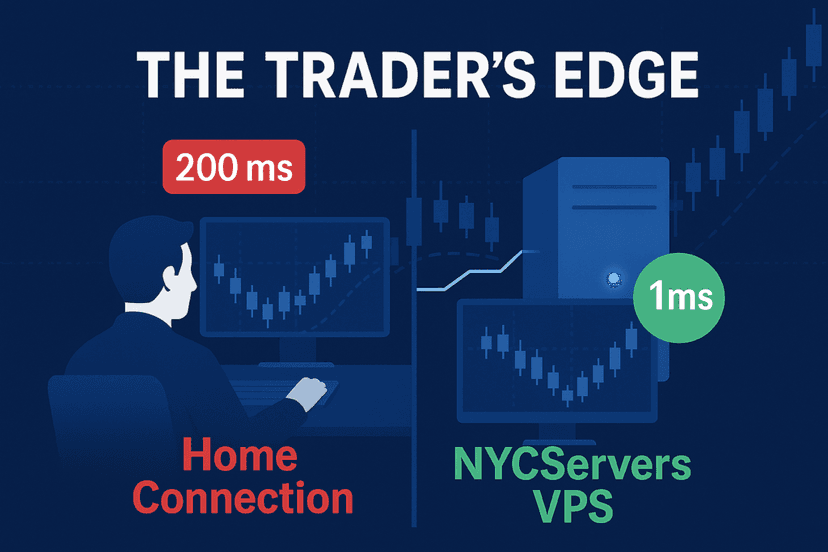
- Lower latency: Faster order execution when patterns activate
- Multiple pairs: Run both EURUSD and AUDUSD simultaneously without resource concerns
A forex VPS positioned near broker servers ensures FXConstant captures every setup it identifies. For a system designed around infrequent but high-quality trades, reliable infrastructure becomes essential rather than optional.
Trade Duration and Frequency Expectations
Setting realistic expectations about trade frequency helps avoid frustration with FXConstant’s conservative approach.
Typical Trade Duration
According to Myfxbook statistics, FXConstant trade durations range widely:
- Shortest trades: 4-5 minutes
- Longest trades: 6-7 days
- Most common: Closed within one hour
The EA doesn’t hold positions indefinitely. It has clear exit criteria built into each of its 20 patterns. When conditions change, it exits regardless of profit or loss.
Monthly Trade Count
Trade frequency varies significantly based on market conditions:
- Quiet months: 2-5 trades per pair
- Active months: 10-15 trades per pair
- Average: Approximately 5-8 trades per pair monthly
This low frequency makes FXConstant ideal for portfolio diversification. You can run it alongside other EAs or manual trading strategies without worrying about excessive trade volume or conflicting signals.
Pros and Cons of FXConstant EA
After analyzing FXConstant’s approach, performance data, and user feedback, here’s an honest assessment.
Advantages
- Verified live results: Multiple Myfxbook accounts with years of track record
- Unique strategy: Price action approach differs from most indicator-based EAs
- Low maintenance: Set-and-forget operation once configured
- MT4 and MT5 support: Works on both platforms with same license
- Money-back guarantee: 30-day refund with drawdown protection clause
- Portfolio friendly: Low trade frequency minimizes overlap with other systems
- Reasonable price: $267 one-time cost is mid-range for commercial EAs
Disadvantages
- Drawdown variance: Results range from 7% to 50%+ depending on settings and pairs
- Low frequency frustration: May go weeks without trades in quiet conditions
- Limited pairs: Only EURUSD and AUDUSD supported
- Backtest concerns: Some reviewers question whether backtests used tick data and variable spreads
- Pattern opacity: The 20 patterns aren’t explained in detail, limiting understanding

Who Should Use FXConstant EA?
FXConstant fits specific trader profiles better than others. Here’s who benefits most from this EA.
Ideal Users
- Portfolio diversifiers: Traders running multiple EAs who want a low-correlation strategy
- Patient investors: Those comfortable with weeks between trades
- Set-and-forget seekers: Traders who don’t want daily monitoring requirements
- Conservative risk profiles: Users who prioritize capital preservation over aggressive returns
- EURUSD/AUDUSD focused: Traders already active in these pairs
Not Recommended For
- Impatient traders: If you need daily trading activity, look elsewhere
- High-frequency strategy seekers: FXConstant trades infrequently by design
- Multi-pair diversifiers: Only two currency pairs limits geographic exposure
- Transparency demanders: If you need to understand exactly how an EA works, the pattern opacity may frustrate you
- Small account traders seeking fast growth: Normal settings won’t rapidly compound micro accounts
FXConstant vs Other Conservative EAs
In the conservative forex robot space, several options compete for the low-risk, steady-return niche. Here’s how FXConstant positions itself.
Competitive Positioning
| Feature | FXConstant | Typical Conservative EA |
|---|---|---|
| Strategy Type | Price action patterns | Indicator-based |
| Trade Frequency | Very low (5-10/month) | Low to moderate (20-50/month) |
| Drawdown Range | 7-50% (setting dependent) | 10-25% typical |
| Currency Pairs | 2 (EURUSD, AUDUSD) | Often 4-8 pairs |
| Price Range | $267 | $150-$500 |
| Track Record | Since 2019 (verified) | Varies widely |
FXConstant’s main differentiator is the price action approach. Most conservative EAs use moving averages, RSI, or other indicators with tight risk parameters. The pattern-based system offers a genuinely different signal generation method, which adds value for portfolio diversification.
Installation and Setup Guide
Getting FXConstant running involves standard EA installation with a few specific configuration steps.
Step-by-Step Setup
- Download: After purchase, download the EA files from the FXConstant member area
- Installation: Copy .ex4 or .ex5 files to your MetaTrader’s Experts folder
- Restart MT4/MT5: The platform needs to restart to recognize new EA files
- Attach to chart: Open EURUSD or AUDUSD chart (any timeframe works)
- Configure settings: Set RiskLimit (35% recommended), choose Normal or Aggressive mode
- Enable AutoTrading: Ensure the AutoTrading button is enabled in MT4/MT5
- Verify connection: Check that the EA shows a smiley face indicating successful activation
Recommended Broker Settings
While FXConstant works with any broker, optimal performance requires:
- ECN or Raw Spread account type
- Spreads under 1.5 pips on EURUSD
- No restrictions on EA trading
- Fast execution (under 100ms ideal)
The developer recommends brokers like IC Markets, Global Prime, and OANDA for best results.

FXConstant EA Review Verdict
FXConstant EA delivers what it promises: a low-frequency, price action-based trading system with verified live performance. The multi-year track record on Myfxbook provides transparency that many competitors lack.
The drawdown variance between accounts is the main concern. A 7% drawdown sounds excellent until you realize another account hit 50%. Understanding that settings choices directly cause this variance is crucial. Stick with normal settings and realistic expectations.
At $267 with a conditional money-back guarantee, the risk-reward for testing FXConstant is reasonable. It won’t be your only EA, and it shouldn’t be. But as a portfolio component adding uncorrelated returns from a unique strategy, FXConstant earns consideration.
Final Rating
- Strategy uniqueness: 8/10
- Track record transparency: 9/10
- Risk management options: 7/10
- Value for price: 7/10
- Ease of use: 8/10
- Overall: 7.5/10
Running FXConstant on Reliable Infrastructure
FXConstant’s low-frequency approach makes every trade valuable. Missing a setup because your home computer went to sleep or your internet dropped costs real money over time.
A dedicated trading VPS ensures FXConstant monitors markets 24/7 and executes instantly when patterns trigger. At NYCServers, we provide forex-optimized VPS hosting with 1ms latency to major brokers, 100% uptime during trading hours, and MT4/MT5 pre-installed.
Our Basic VPS at $25/month handles FXConstant on both pairs comfortably. For traders running multiple EAs alongside FXConstant, the Standard or Professional plans provide additional resources without compromising execution speed.
Check our forex VPS plans to ensure your FXConstant setup never misses a trade.
Frequently Asked Questions
Is FXConstant EA profitable?
Based on verified Myfxbook results, FXConstant has demonstrated profitability over multiple years. The EURUSD account showed 357% gain with 7% drawdown, while the AUDUSD account achieved 706% gain with 50% drawdown. Results depend heavily on which settings you use and market conditions during your trading period.
What is the minimum deposit for FXConstant EA?
The minimum deposit is $200 when trading 0.01 lots. However, the developer recommends $500-$1,000 for more meaningful returns and better risk distribution. Smaller accounts using aggressive settings face higher risk of significant drawdowns.
Does FXConstant EA work on MT5?
Yes, FXConstant supports both MetaTrader 4 and MetaTrader 5. Your single license covers both platforms with unlimited online account changes. The EA functions identically on both platforms.
What currency pairs does FXConstant trade?
FXConstant trades only EURUSD and AUDUSD. The developer’s 20 price action patterns were specifically developed and tested for these two pairs. Running it on other pairs is not recommended and not supported.
How often does FXConstant EA trade?
FXConstant is a low-frequency EA. Expect 5-10 trades per pair per month on average. During quiet market conditions, you might see only 2-5 trades. The system prioritizes quality setups over trade quantity.
What is the difference between aggressive and normal mode?
Normal mode uses conservative position sizing with expected drawdowns around 7-15%. Aggressive mode increases lot sizes relative to account balance, pushing potential returns higher but also increasing drawdown risk to 40-50% or more. The developer recommends normal mode for most users.
Does FXConstant EA have a money-back guarantee?
Yes, FXConstant offers a 30-day money-back guarantee. The guarantee includes a specific provision: if drawdown exceeds 35% while using recommended settings (RiskLimit=35), you qualify for a full refund. This gives buyers protection against catastrophic performance.

About the author
Thomas Vasilyev
Writer & Full Time EA Developer
Tom is our associate writer, and has advanced knowledge with the technical side of things, like VPS management. Additionally Tom is a coder, and develops EAs and algorithms.
Areas of Expertise