
FX Replay Review 2026: Pricing, Features, Pros & Cons
FX Replay review for 2026: pricing, features, pros, cons, alternatives, and who should use it for forex, futures, crypto, and prop firm backtesting.
FX Replay Review 2026: Quick Verdict
This FX Replay review is for manual traders who want to practice entries, exits, risk management, and prop firm-style rules before risking live capital. FX Replay is a browser-based backtesting and market replay platform for forex, futures, stocks, indices, and crypto. It is strongest for discretionary traders who want TradingView-style charts, simulated execution, automatic journaling, and fast practice sessions in one place.
The short verdict: FX Replay is worth considering if you are a manual trader who actually reviews trades after each session. It is especially useful for traders preparing for funded account challenges, building screen time, or testing a repeatable discretionary setup. It is less compelling if you want automated strategy testing, one-time license pricing, deep coding workflows, or the kind of institutional-grade research environment you would get from a platform like QuantConnect.
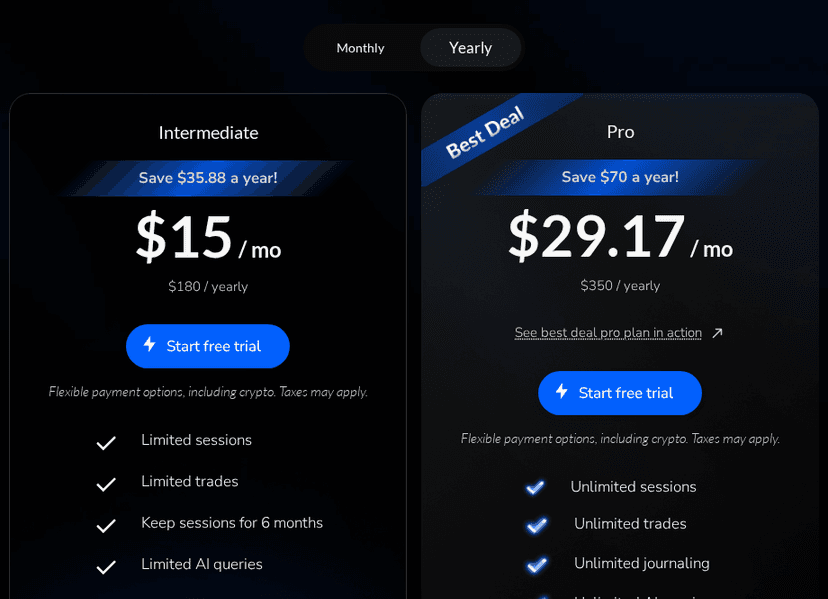
The biggest 2026 change from older reviews is pricing. The old 13-month pricing angle is no longer the best way to describe the product. As of May 22, 2026, the public FX Replay pricing page shows a free plan, Intermediate at $17.99 per month or $180 per year, and Pro at $35 per month or $350 per year. Taxes may apply, and regional pricing can vary, so check the pricing page before subscribing.
For most serious users, Pro is the plan to evaluate because it unlocks the broader data and unlimited-use features. Intermediate can work for lighter practice, but its limits make it less attractive if backtesting is part of your weekly trading routine.
What Is FX Replay?
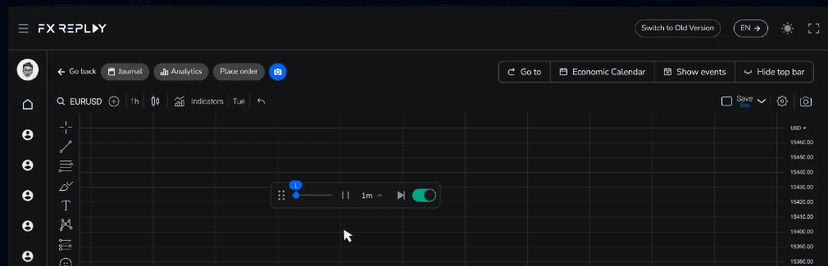
FX Replay is a market replay platform. You choose a market, select a historical date, replay price action, place simulated trades, and review the results afterward. The point is not to predict the past perfectly. The point is to build a repeatable process by taking many realistic practice trades in compressed time.
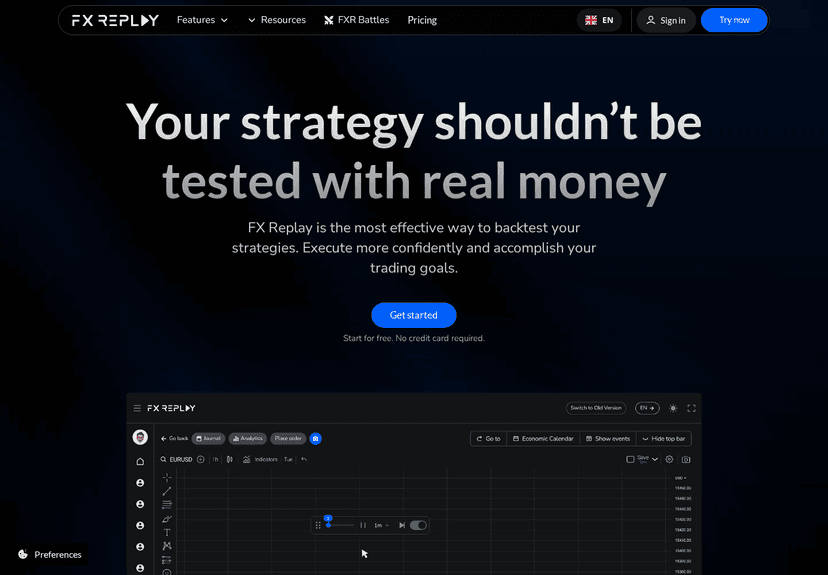
The platform is built around a familiar browser charting workflow. If you already use TradingView, the layout feels intuitive: candles, drawing tools, indicators, watchlists, multiple time frames, and a replay-style practice environment. That is a major advantage over older desktop backtesting tools that can feel isolated from the charts many retail traders already use every day.
FX Replay is not the same thing as live trading software. It does not replace your broker, your execution platform, or your live risk controls. It also does not replace automated strategy research tools. If you are comparing charting and execution platforms more broadly, our TradingView vs MetaTrader comparison is a better starting point for that platform-level decision.
Think of FX Replay as a practice room. It lets you rehearse decisions, log outcomes, review mistakes, and build confidence before you put real money on the line.
FX Replay Pricing And Plans
FX Replay has three practical pricing tiers: Free, Intermediate, and Pro. The free option is useful for testing the interface and deciding whether the workflow suits you. It should not be treated as a complete long-term backtesting setup.
| Plan | Monthly price | Annual price | Best for |
|---|---|---|---|
| Free | $0 | $0 | Trying the platform and learning the workflow |
| Intermediate | $17.99/month | $180/year, shown as about $15/month | Light practice with limited sessions and limited trades |
| Pro | $35/month | $350/year, shown as about $29.16/month | Serious backtesting, journaling, broader data, and prop firm simulation |
The Intermediate plan includes limits on sessions, trades, AI queries, data retention, and premium data access. FX Replay’s pricing page also indicates that Intermediate does not include futures and stocks data or seconds data. Pro is positioned as the unlimited plan, with unlimited sessions, unlimited trades, unlimited journaling, unlimited AI queries, futures and stocks data, and seconds data.
If you are only curious, start free. If you plan to use FX Replay for one focused month before a prop firm challenge, monthly Pro may be easier to justify. If you know backtesting will be part of your routine for the full year, the annual Pro plan is the better value.
The key pricing question is not whether $35 per month is cheap or expensive in isolation. The better question is whether you will use it enough to improve execution quality. A trader who reviews 100 simulated trades per month may get a lot of value from FX Replay. A trader who opens it twice and never reviews the journal probably will not.
Core FX Replay Features
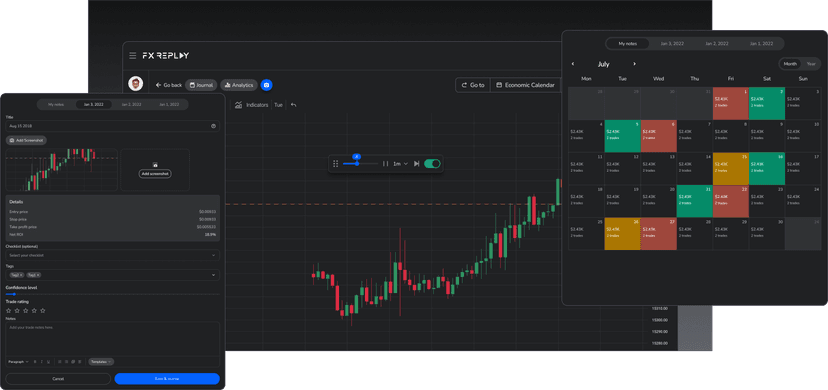
FX Replay’s main feature is replay mode. You load historical market data, choose a start point, and advance candles as if the session were live. You can pause, speed up, slow down, and place simulated trades while the chart unfolds. This helps remove one of the biggest problems with manual backtesting: seeing the future accidentally while scrolling through historical charts.
The second major feature is simulated execution. You can place practice trades, define entries and exits, and review performance afterward. This is valuable because many traders can mark good historical setups after the fact but struggle to execute them in real time. Replay forces the decision before the outcome is known.
The journal and analytics layer is another important part of the product. FX Replay can track results from your practice sessions, which helps you see whether your setup works across more than a few cherry-picked examples. You can review win rate, profit and loss patterns, timing, drawdown, and repeated mistakes.
FX Replay also promotes Mentor AI, custom FXR Script functionality, indicators, assets, and a prop firm simulator. These features make the platform more than a simple candle replay tool, but they should still be evaluated through the lens of your own workflow. A trader who follows two simple intraday setups may care more about clean replay and journaling than advanced scripting or AI feedback.
The prop firm simulator is one of the more practical features for funded-account traders. It lets you rehearse within challenge-style rules before paying for a real evaluation. That does not guarantee you will pass a challenge, but it can expose rule-breaking habits before they cost money.
Supported Markets, Data, And Access Limits
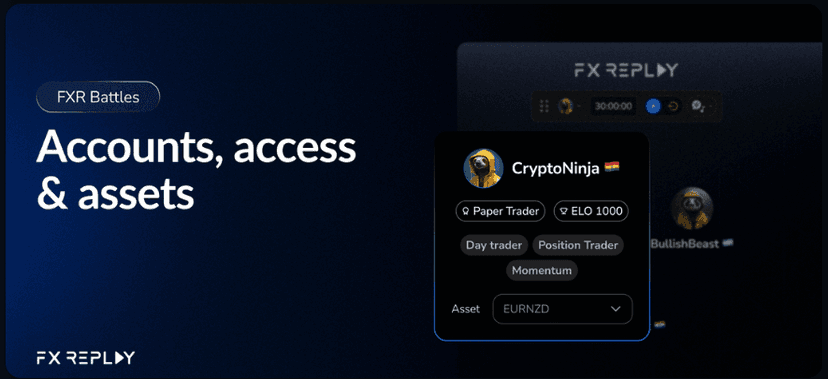
FX Replay markets include forex, futures, stocks, indices, and crypto, but the exact access depends on your plan and the specific feature you are using. For example, FX Replay’s support material says free users can trade non-premium pairs in battles, while Pro users get access to all assets in that context. If asset coverage is a deciding factor, verify the latest details on the FX Replay supported assets support page before choosing a plan.
This matters because backtesting quality depends on relevant data. If you trade major forex pairs on higher time frames, your needs are different from a futures scalper who wants seconds data. The right plan depends on the instruments, time frames, and session style you actually trade.
FX Replay is browser based, so it avoids the installation friction of older desktop replay tools. That is helpful for Mac users, Chromebook users, and traders who move between machines. The tradeoff is that you depend on the web app, your browser, and the platform’s own performance. If the interface feels slow on the free plan, do not assume a paid plan will magically fix every workflow issue.
For traders building a wider trading stack, FX Replay should sit next to charting, execution, journaling, and research tools rather than replacing all of them. Our guide to the best free forex trading tools can help fill in calendars, calculators, sentiment tools, and basic research resources around it.
FX Replay Pros
The biggest advantage is convenience. FX Replay runs in the browser and gives discretionary traders a dedicated place to practice without opening a live broker account or risking capital. For traders who are still building screen time, that is a real benefit.
The second advantage is familiarity. The charting workflow feels close to what many traders already know from TradingView-style tools. That lowers the learning curve and makes it easier to focus on process instead of software mechanics.
The third advantage is structured repetition. Good manual trading requires more than knowing a setup. You need enough reps to recognize the setup under pressure, skip low-quality versions, and manage exits consistently. FX Replay gives you a way to take those reps faster than live markets allow.
The journaling and analytics are also useful. Many traders backtest casually and never record enough information to learn from it. A built-in journal makes it easier to review session quality, timing, mistakes, and actual performance instead of relying on memory.
The prop firm simulator is another strong point. Many funded-account failures come from poor risk control, overtrading, or misunderstanding challenge constraints. Practicing under similar limits can help expose those issues before you pay for an evaluation.
FX Replay Cons
The first limitation is that FX Replay is primarily for manual practice. If you want to test code, import Expert Advisors, run large automated research batches, or evaluate algorithmic strategies, this is not the right primary tool. You may be better served by platform-specific testing tools or a research platform. Our QuantConnect review covers one of the more serious options for algorithmic research and backtesting.
The second limitation is subscription cost. The Pro plan is not outrageous for a trader who uses it every week, but it adds up if you only backtest occasionally. Traders who prefer lifetime software licenses may prefer desktop alternatives such as Forex Tester, depending on their data and workflow needs.
The third limitation is that free and Intermediate users need to pay attention to plan restrictions. Limited sessions, limited trades, limited retention, and restricted data access can become frustrating once backtesting becomes a habit.
The fourth limitation is that a browser tool is only as good as its stability for your workflow. If you are sensitive to loading delays or need very fast replay sessions, test the free plan carefully before paying. User-reported performance complaints should be treated as a reason to test, not as proof that the product will or will not work for you.
Finally, FX Replay will not fix a vague strategy. If your rules are unclear, a replay platform will just help you take more unclear trades. Write down your setup, risk rules, session rules, and review process before judging the software.

FX Replay Vs TradingView Bar Replay, Forex Tester, And Trading Journals
FX Replay competes with several different categories, so the best comparison depends on what problem you are solving.
Compared with TradingView Bar Replay, FX Replay is more purpose-built for structured practice and post-session review. TradingView is excellent for charting and general analysis, but FX Replay is designed around backtesting sessions, simulated trades, journaling, and trader development. If you only need to replay candles occasionally, TradingView may be enough. If you want a dedicated practice workflow, FX Replay has the advantage.
Compared with Forex Tester, FX Replay is more convenient because it runs in the browser and feels closer to modern charting tools. Forex Tester may still appeal to traders who prefer desktop software, one-time licensing, or deeper offline workflows. The decision is partly about features and partly about how you actually like to practice.
Compared with a trading journal, FX Replay is more focused on simulated historical practice. A journal is usually best for reviewing real trades you already took. FX Replay is best for taking practice trades against historical price action. Many serious traders could use both: FX Replay for training, and a journal for live execution review.
Compared with automation platforms, FX Replay is not a replacement. It is not where you go to run a portfolio of coded strategies across years of data. It is where you go to train decision-making on a discretionary setup.

Who Should Use FX Replay?
FX Replay makes the most sense for manual forex, futures, crypto, and index traders who want more deliberate practice. If you trade price action, session-based setups, supply and demand, support and resistance, ICT-style concepts, trend continuation, reversals, or news-session behavior, replay practice can be useful.
It also makes sense for prop firm traders. If you are about to pay for a challenge, practicing under rules and drawdown limits first is a rational step. The software will not make a weak strategy profitable, but it can help reveal whether you are breaking rules before real money is involved.
FX Replay is less useful for fully automated traders, high-frequency traders, and users who need direct broker execution testing. If you trade MT4 or MT5 Expert Advisors, your backtesting and forward-testing workflow should happen closer to MetaTrader and your execution environment.
After backtesting, execution still matters. If your validated strategy depends on live alerts, remote access, platform uptime, or broker connection stability, then your trading infrastructure becomes part of the system. That is where a dedicated VPS for TradingView or a broader trading VPS setup can make sense, especially when you move from practice to live execution.
Is FX Replay Worth It In 2026?
FX Replay is worth it in 2026 if you will use it consistently and review your results honestly. The platform is not cheap enough to buy casually and forget. Its value comes from repeated, structured practice.
Choose the free plan first if you are unsure. Use it to test the interface, replay workflow, chart behavior, and whether you actually enjoy the practice process. If you find yourself using it every week, Pro is the plan that best matches serious backtesting because it removes many of the limits that can interfere with deeper testing.
Skip FX Replay if your goal is automated system research, if you need a one-time purchase, or if you are not willing to define your trading rules before testing. The software can accelerate useful practice, but it cannot create discipline, strategy rules, or review habits for you.
The strongest use case is simple: you have a manual strategy, you want more reps, and you want a cleaner way to review whether that strategy works before risking capital. For that trader, FX Replay is one of the more practical browser-based backtesting tools available.
FAQ
Is FX Replay free?
Yes. FX Replay has a free plan, but it is best treated as a trial and learning option. Serious users should compare the limits against Intermediate and Pro before relying on it for regular backtesting.
How much does FX Replay cost?
As of May 22, 2026, FX Replay lists Intermediate at $17.99 per month or $180 per year, and Pro at $35 per month or $350 per year. Taxes may apply, and regional pricing can vary.
Does FX Replay work for automated trading strategies?
FX Replay is mainly for manual replay practice and discretionary decision training. It is not the best primary tool for importing Expert Advisors, running coded strategies, or doing large-scale automated research.
Can FX Replay help with prop firm challenges?
Yes, it can help you practice under prop firm-style rules and review whether you manage drawdown, position sizing, and daily discipline well enough before paying for a real challenge.
What is the best FX Replay alternative?
The best alternative depends on your goal. TradingView Bar Replay is useful for basic chart replay, Forex Tester is popular for desktop backtesting, QuantConnect is stronger for algorithmic research, and a dedicated trading journal is better for reviewing real executed trades.
Does FX Replay replace a VPS?
No. FX Replay is a backtesting and practice platform. A VPS is used for live trading infrastructure, remote platform access, uptime, and execution reliability after you move from testing to live trading.

About the author
Matthew Hinkle
Lead Writer & Full Time Retail Trader
Matthew is NYCServers' lead writer. In addition to being passionate about forex trading, he is also an active trader himself. Matt has advanced knowledge of useful indicators, trading systems, and analysis.
Areas of Expertise