
What Is Slippage in Forex and How VPS Reduces It
Learn what slippage in forex is, how it costs you real money on every trade, and how a low-latency forex VPS with sub-1ms execution virtually eliminates it.
What Is Slippage in Forex?
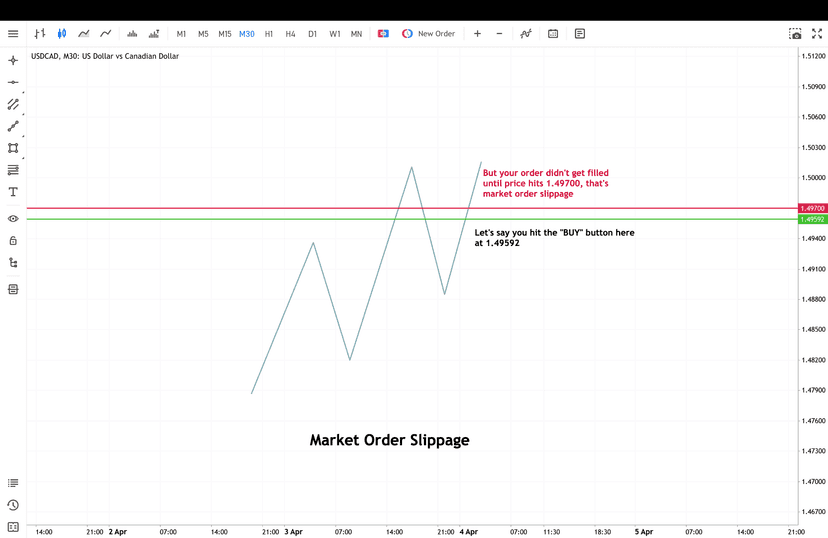
Slippage in forex is the difference between the price you expect on a trade and the price you actually get. You click buy at 1.0850, but the order fills at 1.0852. Those two pips didn’t vanish. They came out of your pocket.
It happens because forex is a live, decentralized market. Prices move in milliseconds. Between the moment your platform sends the order and the moment your broker’s server executes it, the price can shift. That shift is slippage.
Slippage isn’t always a scam or a sign of a bad broker. It’s a mechanical reality of how electronic order execution works. Every trader encounters it. The question is how much you’re losing to it and whether you’re doing anything to control it.
For manual traders placing a few trades per week, slippage might seem like a minor annoyance. For EA traders running scalping strategies with tight profit targets, it can be the difference between a profitable month and a losing one.
Types of Slippage: Positive vs. Negative
Not all slippage works against you. There are two distinct types, and understanding both matters for setting realistic expectations.
Negative Slippage
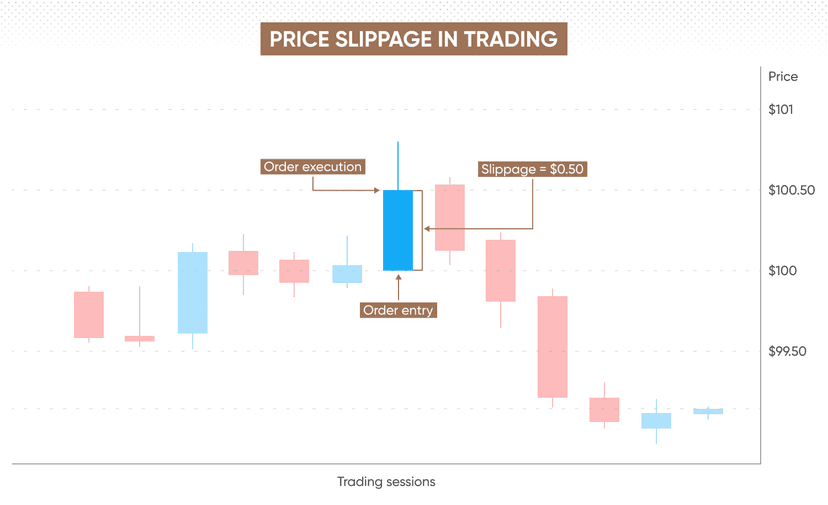
This is the one traders complain about. Negative slippage means you got a worse price than expected. You wanted to buy EUR/USD at 1.0850, but the order filled at 1.0853. You’re instantly down 3 pips before the trade even moves in your direction.
Negative slippage is more common during fast-moving markets, news releases, and periods of low liquidity. It’s also more frequent when your order execution is slow, which is where latency becomes a critical factor.
Positive Slippage
Positive slippage is the opposite. The market moves in your favor between order submission and execution. You wanted to buy at 1.0850, and the fill comes back at 1.0848. You just saved 2 pips.
Positive slippage does happen, but here’s the catch: studies consistently show that negative slippage occurs more frequently than positive slippage for retail traders. The asymmetry comes from market microstructure. During high-volatility moments, prices tend to gap against the majority of retail order flow.
Partial Fills and Re-Quotes
Slippage also shows up as partial fills, where only part of your order executes at the requested price, with the remainder filling at a different level. Re-quotes are a related issue: the broker rejects your order entirely and offers a new price. While re-quotes aren’t technically slippage, they create the same problem of not getting the price you wanted.
Key takeaway: Slippage isn’t random noise. It’s a quantifiable cost that compounds over hundreds or thousands of trades. Managing it is as important as managing your spread costs.
What Causes Slippage in Forex?
Slippage doesn’t come from a single source. It’s the result of several factors working together. Some you can’t control. Others, you can.
Market Volatility
Fast-moving markets create the biggest slippage events. During NFP releases, central bank decisions, or geopolitical shocks, prices can jump 20-50 pips in under a second. If your order is in transit during that spike, the fill price will reflect wherever the market lands, not where it was when you clicked.
High-impact news events are the most obvious triggers, but volatility also spikes during less predictable moments: flash crashes, unexpected economic data, and the first few minutes of the London or New York session open.
Low Liquidity
Liquidity refers to how many buyers and sellers are active at a given price. During the Asian session overlap or around major holidays, liquidity thins out. With fewer market participants, your order has a harder time finding a counterparty at the exact price you want.
Exotic currency pairs suffer the most here. Trading USD/TRY or EUR/ZAR during off-hours almost guarantees wider spreads and more slippage compared to EUR/USD during the London-New York overlap.
Order Execution Speed
This is the factor most traders underestimate. The time between when your platform sends the order and when the broker processes it is your execution window. The longer that window stays open, the more time the market has to move against you.
Execution speed depends on three things:
- Network latency — the physical distance between your trading terminal and the broker’s server
- Processing speed — how fast your machine handles the order locally before sending it
- Broker infrastructure — how quickly the broker’s matching engine processes incoming orders
You can’t control broker infrastructure. But you have full control over network latency and processing speed, and that’s where a VPS makes a measurable difference.
Broker Type: ECN vs. Market Maker
ECN brokers route your order directly to liquidity providers, which generally results in faster execution and less slippage. Market makers fill orders internally, and while they can offer tighter spreads, the execution quality can vary, especially during volatile conditions.
Regardless of broker type, latency still matters. Even with an ECN broker, a slow connection adds unnecessary execution time and increases your exposure to price movement.
Order Size
Larger orders are harder to fill at a single price. A 0.1-lot order on EUR/USD fills instantly at almost any time. A 50-lot order needs significantly more liquidity to absorb, and the fill might span multiple price levels. This is called market impact, and it’s a form of slippage that affects institutional and high-volume retail traders alike.
The Real Cost of Slippage: Quantified
Most traders think of slippage as “a pip here, a pip there.” Let’s put actual dollar amounts on it.
Single-Trade Slippage Cost
| Lot Size | Pip Value (EUR/USD) | 1 Pip Slippage Cost | 2 Pip Slippage Cost | 3 Pip Slippage Cost |
|---|---|---|---|---|
| 0.1 lot (micro) | $1.00 | $1.00 | $2.00 | $3.00 |
| 1.0 lot (standard) | $10.00 | $10.00 | $20.00 | $30.00 |
| 5.0 lots | $50.00 | $50.00 | $100.00 | $150.00 |
| 10.0 lots | $100.00 | $100.00 | $200.00 | $300.00 |
On a 10-lot EUR/USD trade, 1 pip of slippage costs you $100. That’s real money, gone before the trade even begins working.
Compounded Over Time
Now scale that across a trading month. A scalping EA that runs 20 trades per day, 22 trading days per month, executes 440 trades. If average slippage is just 0.5 pips per trade at 1 standard lot:
- Per trade: $5.00
- Per month: $2,200
- Per year: $26,400
That’s $26,400 per year lost to half a pip of average slippage on a modest trading frequency. For traders running multiple EAs or larger lot sizes, the number climbs fast.
Slippage vs. Spread Comparison
Traders obsess over finding the tightest spread but ignore slippage. Consider this: if you switch from a broker with a 1.0-pip spread to one with a 0.7-pip spread, you save 0.3 pips per trade. Great. But if your execution setup adds 0.5 pips of average slippage, you’ve erased that saving and then some.
Execution quality is as important as spread width. Both are transaction costs. You should optimize for both.
The math is clear: Reducing average slippage by even 0.3 pips on a high-frequency setup saves thousands of dollars annually. The ROI on a VPS pays for itself many times over.
How to Reduce Slippage in Forex
There’s no way to eliminate slippage completely. Markets move, and there will always be some degree of price difference between request and fill. But you can reduce it dramatically with the right approach.
Use Limit Orders Instead of Market Orders
Market orders tell your broker to fill at whatever price is available. Limit orders set a maximum (or minimum) price you’re willing to accept. If the market moves beyond your limit, the order simply doesn’t fill rather than filling at a bad price.
For EAs, this means programming entry logic with limit orders or using slippage tolerance parameters. Most MT4 and MT5 EAs support a MaxSlippage input, which you should always configure.
Avoid Trading During High-Impact News
The first 30 seconds after an NFP, CPI, or interest rate decision are the worst for slippage. If your strategy doesn’t specifically require news trading, add a news filter to your EA or avoid placing manual trades during these windows.
Economic calendars from ForexFactory or the built-in MQL5 calendar make it straightforward to identify and avoid these periods programmatically.
Trade During Peak Liquidity Hours
The London-New York overlap (8:00 AM to 12:00 PM EST) offers the deepest liquidity for major pairs. Tighter spreads and more available counterparties mean less slippage. If your strategy allows it, concentrate execution during these hours.
Choose an ECN Broker with Fast Execution
Not all brokers are equal when it comes to execution speed. ECN brokers like IC Markets, Exness, or Axi route orders directly to liquidity pools, reducing the chance of re-quotes and excessive slippage. Look for brokers that publish their average execution times.
Reduce Your Execution Latency with a VPS
This is the single highest-impact change most traders can make. Moving your trading platform from a home computer to a VPS located near your broker’s server cuts latency from hundreds of milliseconds down to single digits. That reduction directly translates to less slippage.
We’ll dive deep into exactly how and why this works in the next section.
How a Forex VPS Eliminates Slippage
Forex VPS hosting gives you a remote Windows server that runs your trading platform 24/7 from a data center. Instead of executing trades from your home computer over a consumer internet connection, your orders travel from a server that sits physically close to your broker’s infrastructure.
Here’s why that matters for slippage.
Latency: The Core Mechanism
Latency is the round-trip time for data to travel between your trading platform and your broker’s server. On a typical home setup:
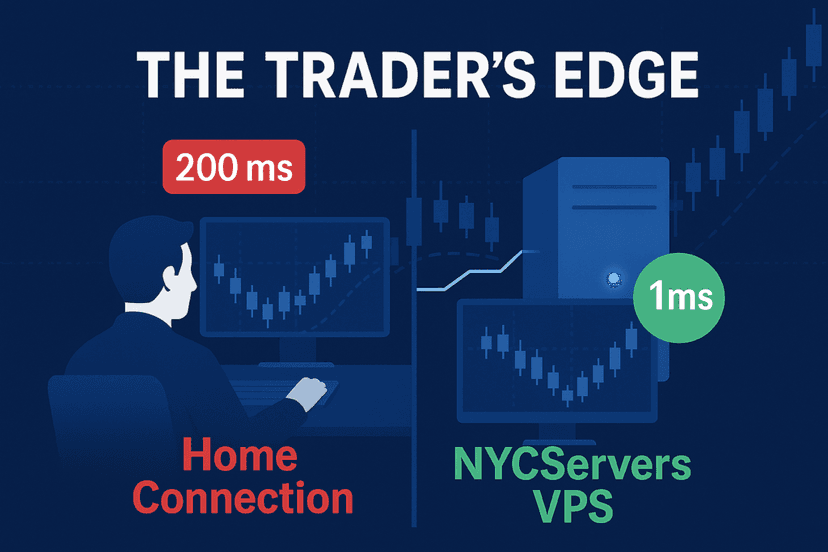
- Home WiFi + consumer ISP: 50-200ms latency to broker
- Home wired + decent ISP: 20-80ms latency to broker
- VPS in same data center as broker: 0.5-2ms latency to broker
The difference is staggering. A VPS co-located with your broker processes orders 50-100x faster than a home connection. In a market that moves by the millisecond, that speed advantage directly reduces slippage.
Co-Location and Proximity
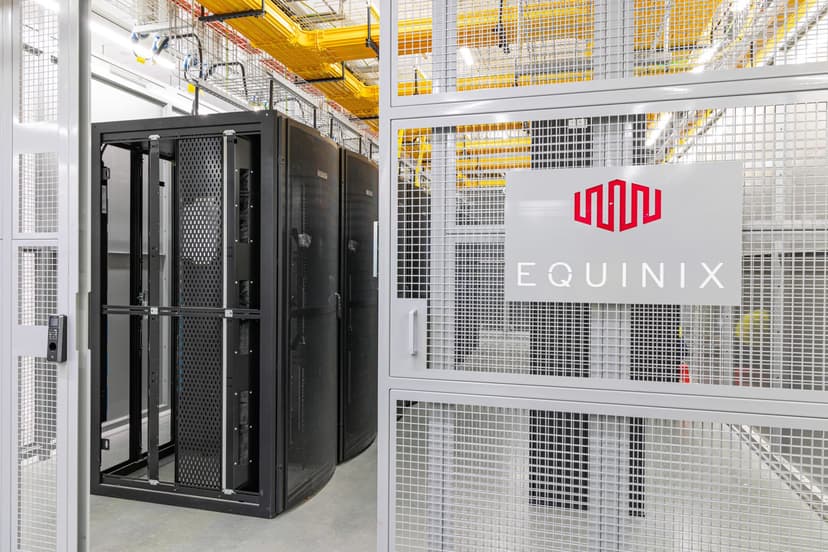
Many major forex brokers host their trading servers in Equinix data centers, particularly NY4 in New York and LD4 in London. When your VPS sits in the same facility, or within the same network backbone, the physical distance between your order and the broker’s matching engine is measured in meters, not miles.
NYCServers operates from Equinix NY4 in New York, London, and Tokyo data centers. This means your MT4, MT5, or cTrader terminal connects to brokers like IC Markets, FTMO, Axi, and Exness with under 1ms latency. At that speed, the execution window is so small that market prices barely have time to move between your order submission and fill.
Always-On, Always-Connected
A VPS doesn’t sleep, reboot for updates, or lose connection when your ISP has an outage. Your EA runs continuously with a stable, enterprise-grade network connection. This consistency matters because intermittent connectivity issues on home setups cause random spikes in execution time, each one an opportunity for slippage.
With a 100% uptime guarantee during trading hours, your orders execute with the same low latency on every single trade, whether it’s 2 PM on a Tuesday or 3 AM on a Friday.
Dedicated Resources
When you run MT4 or MT5 on your personal computer, your trading platform competes with your browser, email, antivirus scans, and Windows updates for CPU and memory. A VPS dedicates its resources exclusively to trading. No background processes fighting for priority when your EA needs to fire an order.
This matters more than most traders realize. A CPU spike from a Windows update during a fast market can add 50-100ms to order processing time on a local machine. On a properly configured VPS, that doesn’t happen.
| Factor | Home Computer | Forex VPS (Co-Located) |
|---|---|---|
| Latency to broker | 50-200ms | 0.5-2ms |
| Uptime | Variable (power, ISP, reboots) | 100% during trading hours |
| Connection stability | Dependent on ISP | Enterprise-grade network |
| CPU competition | Shared with OS, apps, updates | Dedicated to trading |
| Monthly slippage cost (scalper, 1 lot) | $1,500-$3,000+ | $100-$300 |
Real-World Slippage Reduction
Let’s revisit the earlier example. A scalper running 440 trades per month at 1 standard lot with 0.5-pip average slippage loses $2,200 monthly. By moving to a VPS with sub-1ms latency, average slippage typically drops to 0.05-0.1 pips on liquid pairs during normal market hours.
- Before VPS: 0.5 pip avg. slippage x 440 trades x $10/pip = $2,200/month
- After VPS: 0.08 pip avg. slippage x 440 trades x $10/pip = $352/month
- Monthly savings: $1,848
- Annual savings: $22,176
A forex VPS costs $25-60 per month. The ROI isn’t close. You’re spending $300-720 per year to save over $22,000. That’s a 30:1 return on a tool that also gives you better uptime, remote access, and peace of mind.

VPS Setup for Minimum Slippage: Practical Steps
Knowing that a VPS helps is one thing. Configuring it properly for minimum slippage is another. Here’s the implementation checklist.
Step 1: Choose the Right Server Location
Match your VPS location to your broker’s server location. If your broker runs on NY4 infrastructure (common for IC Markets, FTMO, and many ECN brokers), choose a New York VPS. If your broker is London-based, pick a London server.
If you’re unsure where your broker’s servers are hosted, check your MT4/MT5 terminal’s connection status. The server address often reveals the location. Alternatively, NYCServers offers a broker latency checker where you can test ping times to your specific broker before committing.
Step 2: Select a Plan with Adequate Resources
For a single EA on one broker, a basic VPS plan with 2 GB RAM handles the job. If you’re running multiple MT4/MT5 instances or several EAs simultaneously, step up to 4 GB or 8 GB RAM. Running out of memory causes your platform to slow down, which adds latency at the worst possible moment.
A good rule of thumb:
- 1-2 MT4/MT5 terminals: 2 GB RAM
- 3-4 terminals or resource-heavy EAs: 4 GB RAM
- 5+ terminals or high-frequency setups: 8 GB RAM or dedicated server
Step 3: Optimize Your MT4/MT5 Configuration
Once your VPS is running, fine-tune your platform for speed:
- Disable unnecessary chart windows. Each open chart consumes memory and CPU cycles.
- Turn off news feeds and alerts you don’t need.
- Set the MaxBars parameter in Tools → Options → Charts to 5,000 or less. Default values load unnecessary historical data.
- Use the “Keep personal settings and data at startup” option to prevent MT4/MT5 from re-downloading data on restart.
Step 4: Configure EA Slippage Parameters
Most EAs include a MaxSlippage or Slippage input parameter. On a VPS with sub-1ms latency, you can set this tighter than you would on a home connection. A setting of 1-2 pips is usually appropriate. This tells the EA to reject any fill that deviates more than your threshold, protecting you during unexpected volatility spikes.
Step 5: Monitor and Verify
After migrating to a VPS, track your execution quality:
- Compare fill prices against requested prices in your MT4/MT5 journal log.
- Use a trade journal or tracking spreadsheet to log slippage per trade over a sample period.
- Check that ping times from your VPS to broker stay under 2ms. If they spike, contact your VPS provider.
Consistent monitoring ensures your VPS setup remains optimized and catches any issues before they cost you money.
Step 6: Keep Your VPS Lean
Resist the temptation to install browsers, games, or other software on your trading VPS. Every additional process consumes resources. Treat it as a dedicated trading machine. Log in via Remote Desktop to manage your EAs, run updates during weekends when markets are closed, and keep the environment as clean as possible.
When Slippage Is Unavoidable
Even with a perfectly configured VPS, some slippage events can’t be avoided. Gap openings on Sunday evening, major geopolitical events, and flash crashes create price dislocations that no amount of low latency can overcome. The market simply jumps past your requested price.
The goal isn’t zero slippage. The goal is controlling the controllable. A VPS eliminates the avoidable slippage that comes from slow execution, bad connections, and unreliable hardware. The unavoidable slippage from genuine market events is a cost of doing business in forex, and it affects every trader equally regardless of setup.
Where a VPS gives you an edge is on the other 95% of trades: the normal market conditions where execution speed is the primary determinant of slippage. Shave 50-150ms off every order, and the cumulative impact on your bottom line is significant. For a deeper look at how connection speed affects trading performance, read our guide on why latency is important for forex trading.
Frequently Asked Questions
What is a normal amount of slippage in forex?
On major pairs like EUR/USD during peak liquidity hours, slippage of 0-0.5 pips per trade is typical for retail traders. During high-impact news events or on exotic pairs, slippage can reach 3-10 pips or more. A properly configured VPS with sub-1ms broker latency keeps normal-condition slippage well below 0.2 pips on average.
Can a forex VPS completely eliminate slippage?
No. A VPS dramatically reduces slippage caused by slow execution and network latency, but it can’t prevent slippage from market gaps, extreme volatility, or low liquidity conditions. It eliminates the avoidable portion, which accounts for the majority of slippage on typical trades during regular market hours.
Does slippage affect limit orders?
Limit orders are designed to protect against negative slippage. A buy limit at 1.0850 won’t fill above 1.0850. However, in fast markets, limit orders may not fill at all if the price jumps past your level without trading at it. Stop orders (including stop-losses) are more vulnerable to slippage because they convert to market orders once triggered.
Is slippage worse with market maker brokers than ECN brokers?
Generally, yes. ECN brokers route orders to external liquidity providers with competitive pricing, resulting in faster fills and less slippage. Market makers fill internally and may have wider execution windows. However, the difference shrinks significantly when you use a VPS co-located with either broker type. Execution speed matters more than broker model for reducing slippage.
How much latency is acceptable for forex trading?
For manual trading, anything under 50ms is generally fine. For EA trading, especially scalping strategies, you want under 5ms. For high-frequency approaches, under 1ms is ideal. NYCServers consistently delivers sub-1ms latency to major brokers from its NY4, London, and Tokyo data centers, which is the gold standard for retail forex VPS.
Does positive slippage happen on a VPS?
Yes. Faster execution doesn’t just reduce negative slippage. It also means your orders fill closer to the requested price in both directions. On a VPS, the distribution of positive and negative slippage becomes more balanced because the execution window is so narrow. Some traders report a slight increase in positive slippage events after switching to a VPS, likely because their orders reach the broker before the majority of slower retail order flow.
Will a VPS help with slippage on a prop firm challenge?
Absolutely. Prop firm challenges like FTMO have strict drawdown limits where every pip counts. Excessive slippage can push you past a daily loss limit or prevent you from hitting profit targets. Running your EA or manual trading setup from a VPS co-located near the prop firm’s servers gives you the tightest possible execution, which is especially important during evaluation phases where there’s zero room for unnecessary costs.
Stop Losing Money to Slippage
Slippage is a hidden cost that most traders accept without question. They spend hours backtesting strategies, comparing spreads across brokers, and optimizing entry signals, then run everything from a laptop on WiFi and wonder why live results don’t match the backtest.
The numbers don’t lie. Even modest slippage of half a pip per trade adds up to thousands of dollars annually for active traders. A forex VPS with sub-1ms latency to your broker is the most cost-effective upgrade you can make to your trading infrastructure.
Explore our low-latency VPS plans to ensure your trading setup never misses a beat. With servers in NY4, London, and Tokyo, 24/7 support, and a 14-day money-back guarantee, you can test the difference in execution quality risk-free.

About the author
Matthew Hinkle
Lead Writer & Full Time Retail Trader
Matthew is NYCServers' lead writer. In addition to being passionate about forex trading, he is also an active trader himself. Matt has advanced knowledge of useful indicators, trading systems, and analysis.
Areas of Expertise