
cTrader Copy Trading Guide 2026: How to Copy & Provide Strategies
Learn how cTrader Copy works in 2026. Complete guide to following strategies, becoming a provider, fee structures, and maximizing copy trading returns.

What Is cTrader Copy Trading?
cTrader Copy is a fully integrated copy trading platform built directly into the cTrader ecosystem. Unlike third-party signal services that require external subscriptions and complex setup, cTrader Copy works natively within the platform—you can discover strategies, allocate funds, and start copying in just two clicks.
The system connects two types of participants: strategy providers who share their trading activity, and investors who allocate capital to replicate those trades automatically. When a provider opens a position, every investor copying that strategy receives a proportional trade in their own account. No manual intervention required.
What makes cTrader Copy different from competitors like ZuluTrade or eToro is its equity-to-equity copying model. Rather than copying fixed lot sizes, the system calculates position sizes based on the ratio between your equity and the provider’s equity. This means a $1,000 investor copying a $10,000 provider receives 10% of each position size—maintaining proportional risk regardless of account size differences.
The platform supports three fee structures that providers can mix and match: performance fees (up to 30% of profits), management fees (up to 10% annually), and volume fees (up to $10 per million traded). All fees are transparent and displayed before you commit funds.

How the Equity-to-Equity Model Works
Understanding the copying mechanics helps you make better decisions about which strategies to follow and how much to invest. The formula driving every copied trade is straightforward:
Copied Volume = (Your Equity ÷ Provider’s Equity) × Provider’s Position Size
For example, if a strategy provider with $50,000 equity opens a 1.0 lot EUR/USD position, and your copy account has $5,000 equity, you’ll receive a 0.1 lot position (5,000 ÷ 50,000 × 1.0 = 0.1).
This proportional approach automatically adjusts when either party deposits or withdraws funds. If the provider doubles their account, your copied positions effectively halve in relative size. If you add funds, your copied positions increase proportionally. The system recalculates continuously to maintain alignment.
For traders running copy strategies around the clock, a cTrader VPS ensures your platform stays connected 24/5. Missed trades due to disconnections can create position mismatches between your account and the strategy you’re copying.
Copying Limitations
Not every trade can be copied. The system blocks copying when:
- Your account lacks sufficient margin for the proportional position
- The traded instrument isn’t available from your broker
- Your leverage is lower than the provider’s leverage
- Markets are closed for the specific symbol
- The provider trades stocks or shares (explicitly excluded from copying)
Position sizes also adjust automatically if they fall outside your broker’s minimum or maximum lot requirements. A provider’s micro-lot trade might round to zero on your account if the proportional size falls below the minimum tradeable volume.
Finding and Evaluating Strategies

The strategy discovery interface lives under the Copy tab in cTrader’s left menu. You’ll find a filterable list showing performance metrics, fee structures, and investor counts for each available strategy.
Key Metrics to Evaluate
Before committing funds, examine these indicators:
- ROI (Return on Investment): Overall percentage gain since strategy inception. Higher isn’t always better—check how it was achieved.
- Maximum Drawdown: The largest peak-to-trough decline. A 500% ROI with 80% drawdown suggests extreme risk.
- Win Rate: Percentage of profitable trades. Context matters—a 40% win rate with 3:1 reward-to-risk can outperform 70% win rates with poor risk management.
- Trading Frequency: How often the strategy trades. High-frequency strategies require more margin and generate more volume fees.
- Track Record Length: Longer histories provide more statistical significance. A 200% gain over three months means less than 50% over two years.
- Investor Count: How many others are copying. Popular strategies aren’t necessarily better, but zero investors might indicate issues.
Demo vs Live Strategies
Strategies marked with a blue “Demo” badge operate on demo accounts—no real money at risk for the provider. Live strategies (green indicator) show the provider trading their own capital. Most experienced investors prefer live strategies where providers have financial skin in the game.
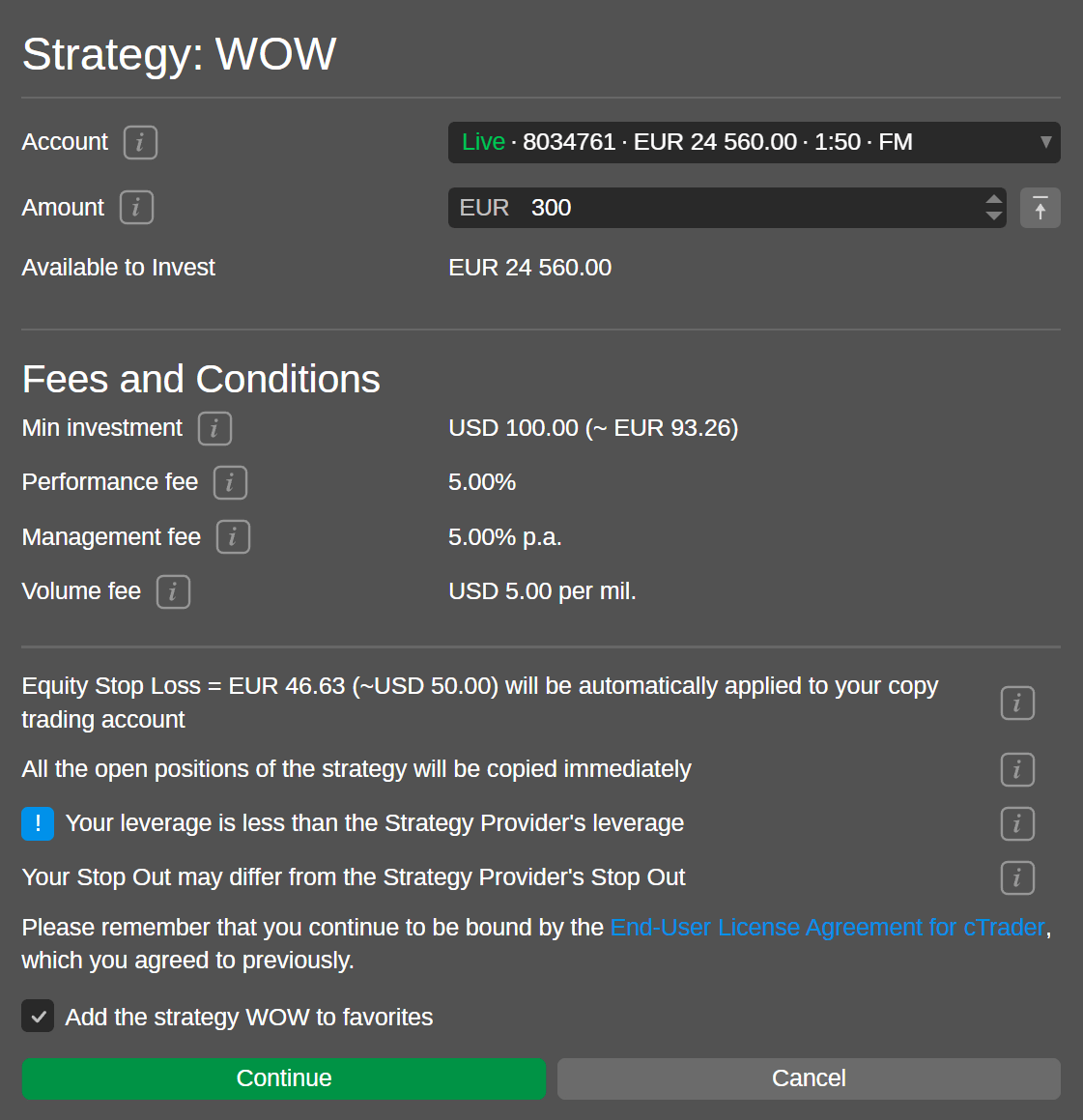
Starting Your First Copy
Once you’ve identified a suitable strategy, the copying process takes seconds:
- Select the strategy and click “Start Copying”
- Choose which account to copy from (if you have multiple)
- Enter your investment amount (must meet the strategy’s minimum)
- Review and accept the fee terms
- Confirm to begin copying
Your invested funds transfer to a dedicated copy-trading account—a separate account linked to your cTrader ID that exclusively handles positions from this specific strategy. You cannot manually trade in copy accounts; they exist solely for replicating the provider’s activity.
Setting Your Equity Stop Loss
Risk management doesn’t end at strategy selection. cTrader Copy includes an equity stop loss feature that automatically stops copying and closes all positions when your account equity drops below a specified threshold.
For example, setting an equity stop loss at $800 on a $1,000 investment limits your maximum loss to 20%. When equity hits $800, the system immediately exits all copied positions and transfers remaining funds back to your main account.
This protection triggers regardless of what the strategy provider does. Even if they hold through a 50% drawdown, your stop loss activates independently based on your own risk tolerance.
Becoming a Strategy Provider
Profitable traders can monetize their skills by providing strategies for others to copy. The platform handles all the infrastructure—trade replication, fee collection, and investor management—while you focus on trading.
Provider Requirements
Not every account qualifies for strategy provision. You must have:
- A live trading account (not demo)
- A hedging account type (netting accounts don’t qualify)
- Positive account balance
- At least one executed deal within the past 72 hours
- All-time ROI better than -90%
Creating Your Strategy
Navigate to the Copy tab, select your live account, and choose “Become a strategy provider.” You’ll configure:
- Strategy name: Up to 80 characters, no special symbols
- Description: Explain your approach, trading style, and risk parameters
- Minimum investment: The lowest amount investors can allocate
- Fee structure: Choose your combination of performance, management, and volume fees
- Visibility: Public (anyone can discover) or private (invitation links only)
Designate a separate live account for receiving fee payments. When investors are charged monthly on the 1st, your earnings transfer immediately to this account.
Fee Strategy Considerations
How you structure fees affects both your earnings and your strategy’s ranking in search results. The platform algorithm downgrades strategies that charge management or volume fees, favoring performance-only models that align provider incentives with investor outcomes.
Performance fees using the high-water mark model only trigger when investors reach new profit peaks. If an investor’s account grows from $10,000 to $12,000, you earn your percentage of the $2,000 gain. If they subsequently drop to $11,000 and recover to $12,000, no additional fee applies until they exceed the previous high.
For providers running strategies continuously, optimized VPS infrastructure ensures your trades execute reliably and copy to all investors without delay or disconnection issues.
Managing Your Investments
Active management maximizes your copy trading results. The platform provides several tools for ongoing oversight:
Adding and Removing Funds
You can increase your investment at any time by adding funds from your main account. Removing funds works similarly—available capital (not tied up in open positions) transfers back instantly.
Important: removing funds while positions are open affects the equity-to-equity ratio. Your remaining capital copies proportionally smaller positions, which can create misalignment with the provider’s strategy if significant withdrawals occur mid-trade.
Stopping and Restarting
Stopping a copy liquidates all open positions and returns funds to your main account. This happens automatically if you trigger your equity stop loss, or manually if you lose confidence in the strategy.
Restarting follows the same process as initial setup—select the strategy, specify an amount, and confirm. Your copy account recreates from scratch with no memory of previous copying sessions.
Copying Multiple Strategies
Diversification applies to copy trading too. You can simultaneously copy multiple strategies, each in its own dedicated copy account. This spreads risk across different trading styles, instruments, and providers.
Monitor aggregate exposure carefully. Five strategies each risking 2% might seem conservative individually, but correlated positions during market stress could compound losses across all accounts.
cTrader Copy Fees Explained
Understanding the complete fee picture prevents surprises when charges appear.
Performance Fee
Capped at 30% of net profits, calculated monthly using the high-water mark. You only pay when your account reaches new equity highs. The model prevents double-charging on the same profits and aligns provider incentives with your success.
Management Fee
Up to 10% annually, accrued daily against your equity regardless of performance. A strategy charging 6% management fee costs approximately 0.016% daily. On a $10,000 investment, that’s about $1.60 per day or $600 annually—paid whether you profit or lose.
Volume Fee
Up to $10 per million in volume, charged per side (opening and closing). Active strategies with high trading frequency accumulate volume fees quickly. A strategy trading $5 million monthly at $10 per million costs $100 in volume fees alone.
When Fees Trigger
All fees charge on the 1st of each month. Additional triggers include: the provider stopping their strategy (closing your positions), you stopping your copy, or withdrawing funds from your copy account.
Brokers Supporting cTrader Copy
Not all cTrader brokers offer the Copy feature. Major brokers with full cTrader Copy support include:
- IC Markets: Known for tight spreads (0.02 pips average EUR/USD) and strong execution. $200 minimum deposit for cTrader accounts.
- FP Markets: Competitive commissions ($3 per side per lot), regulated by ASIC and CySEC. $100 minimum deposit.
- Deriv: Offers cTrader Copy with comprehensive educational resources and multi-language support.
- BlackBull Markets: New Zealand-based with ECN execution and detailed copy trading guides.
Verify Copy availability with your specific broker, as some offer cTrader without the Copy module.
Frequently Asked Questions
Is cTrader Copy free for investors?
The platform itself is free—no subscription to use cTrader Copy. However, strategy providers may charge performance fees (up to 30%), management fees (up to 10% annually), and volume fees (up to $10 per million). Check each strategy’s fee structure before investing.
Can I copy multiple strategies simultaneously?
Yes. Each strategy you copy creates a separate copy-trading account. You can diversify across multiple providers with different trading styles. Monitor total exposure carefully as correlated strategies can amplify drawdowns.
What happens if I stop copying mid-trade?
All open positions close immediately at current market prices. Remaining equity transfers back to your main account. Any unrealized profits or losses crystallize at that moment.
Can I manually close copied positions?
No. Copy-trading accounts only accept trades from the strategy you’re copying. You cannot manually open, close, or modify positions. Use the equity stop loss feature for automated risk management.
How are profits and losses distributed?
You keep all profits minus any applicable fees. Losses reduce your copy account equity directly. The provider doesn’t share in your losses—their income comes only from fees, not from your capital.
What if the strategy provider closes their account?
All your copied positions close automatically, and funds return to your main account. Any pending fees are charged before the transfer completes.
Are there minimum investment amounts?
Each strategy provider sets their own minimum investment. Common minimums range from $100 to $1,000, though some strategies require more. The minimum appears on the strategy’s profile page.
Can I become a provider while copying others?
Yes. You can simultaneously provide your own strategy from one account while copying other strategies in separate copy accounts. These operate independently.
Do stop losses copy exactly?
Stop loss levels copy proportionally based on the equity ratio. If a provider sets a 50-pip stop loss, your position will have the same pip distance, but the monetary value differs based on your position size.
How do I find the best strategies to copy?
Focus on strategies with: verified live accounts (not demo), track records exceeding 12 months, maximum drawdowns within your risk tolerance, transparent fee structures, and consistent performance rather than spectacular short-term gains.

About the author
Matthew Hinkle
Lead Writer & Full Time Retail Trader
Matthew is NYCServers' lead writer. In addition to being passionate about forex trading, he is also an active trader himself. Matt has advanced knowledge of useful indicators, trading systems, and analysis.
Areas of Expertise