

Copygram Review 2026: Worth It? Pricing, AI Copier Tested
Honest Copygram review 2026 — pricing, AI validation, and prop firm rules tested. Is this cloud trade copier worth it? Pros, cons, and verdict inside.

What Is Copygram?
Copygram is a cloud-based trade copier that automates signal execution across multiple trading platforms. Unlike traditional copiers that require a trading VPS or dedicated computer, Copygram runs entirely in the cloud. This means your trades execute 24/7 without you keeping your laptop open.
The platform connects over 20 different trading platforms and signal sources. You can copy trades from Telegram channels, TradingView alerts, MT4/MT5 accounts, and various prop firm platforms. The signal flows through what Copygram calls “Rooms” — virtual spaces where senders broadcast trades and receivers automatically execute them.
With 12,000+ active traders and 200,000+ daily automated trades, Copygram has become a popular choice for prop firm traders managing multiple challenge accounts. The platform’s AI-powered validation feature adds an extra layer of confidence by analyzing market sentiment before executing trades.

How Copygram Works
The core concept is simple but powerful. You create a Room, connect your signal source as the sender, and add your trading accounts as receivers. When the sender places a trade, every receiver account executes the same trade within milliseconds.
This architecture solves several problems manual traders face:
- Missed entries: No more watching charts all day waiting for signals
- Execution delays: Trades copy instantly, not when you notice the alert
- Multi-account management: Run the same strategy across unlimited accounts
- Emotional trading: Automation removes hesitation and second-guessing
The cloud infrastructure means you don’t need to worry about power outages, internet disconnections, or computer crashes affecting your trades. Copygram’s servers maintain constant connectivity to your brokers and signal sources.
Key Features Breakdown
Room-Based Architecture
Rooms are the foundation of Copygram’s system. Each Room represents a trading strategy or signal source. You can create unlimited Rooms, each with its own configuration and risk settings.
A typical setup might include:
- Telegram Room: Copies trades from your favorite signal provider
- TradingView Room: Executes alerts from your Pine Script strategies
- Master Account Room: Copies trades from your primary trading account to challenge accounts
- Prop Firm Room: Dedicated Room for passing evaluation challenges
This separation lets you manage different strategies independently. You can pause individual Rooms without affecting others, adjust risk per Room, and track performance separately.
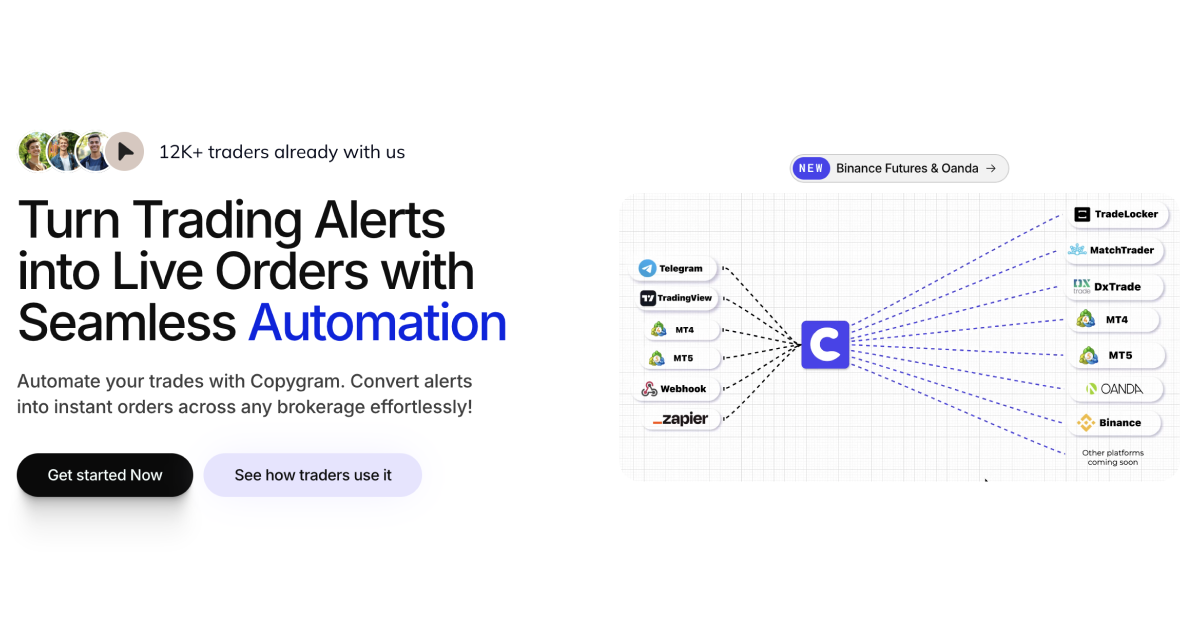
Platform Integrations
Copygram supports more platforms than most competing copiers. The current integration list includes:
| Signal Sources | Execution Platforms |
|---|---|
| Telegram | MT4 |
| TradingView | MT5 |
| MT4 | DxTrade |
| MT5 | TradeLocker |
| Discord | MatchTrader |
| Oanda | |
| Webhooks | Tradovate |
| Binance Futures | |
| Bybit |
This flexibility matters for prop firm traders. Many firms use proprietary platforms like DxTrade or TradeLocker. Copygram bridges these platforms with popular signal sources, letting you use Telegram signals on platforms that don’t natively support them.

Copygram AI: Sentiment Validation
The standout feature is Copygram AI, which adds intelligence to automated trading. Before executing a trade, the AI analyzes sentiment from multiple sources:
- X (Twitter): Real-time sentiment from trading communities
- TradingView: Technical analysis consensus
- StockTwits: Retail trader sentiment
- Forex Factory: News and fundamental sentiment
The AI generates a confidence score for each trade. If sentiment contradicts the signal direction, you can configure Copygram to skip the trade or alert you. This acts as a safety net against entering trades during major news events or when market sentiment has shifted.
For example, if your signal provider sends a EUR/USD buy at 1.0850, but Copygram AI detects negative Euro sentiment due to an unexpected ECB announcement, it might flag the trade as high-risk. You decide whether to proceed or skip based on this additional context.
Smart Alerts and Notifications
Copygram keeps you informed without overwhelming you. The alert system includes:
- Trade execution alerts: Confirmations when trades copy successfully
- Error notifications: Immediate alerts when a trade fails to execute
- Daily summaries: Performance reports for each Room
- AI validation alerts: Notifications when sentiment conflicts with signals
Alerts arrive via email and Telegram, letting you monitor your automated trading from your phone. The error notifications are particularly valuable — if your broker disconnects or a trade fails for any reason, you know immediately rather than discovering it hours later.
Advanced Logging and Analytics
Every trade gets logged with detailed information:
- Entry price and time
- Slippage (difference between signal and execution price)
- Execution speed
- Account balance impact
- AI confidence score (if applicable)
These logs help you identify issues with specific brokers or signal providers. If you notice consistent slippage with one broker but not others, you might need to adjust your setup or consider a different broker with better execution.

Copygram Pricing and Plans
Copygram offers three subscription tiers:
| Plan | Price | Rooms | Accounts | Best For |
|---|---|---|---|---|
| Starter | $25/month | 3 | 10 | Single strategy traders |
| Pro | $49/month | 10 | 30 | Multi-account prop traders |
| Elite | $82/month | Unlimited | Unlimited | Professional trading operations |
All plans include the same features — the difference is capacity. The AI validation, smart alerts, and platform integrations are available on every tier.
The Starter plan suits traders running one or two strategies across a handful of accounts. If you’re copying a single Telegram channel to your personal account plus a prop challenge, Starter covers your needs.
Prop firm traders typically need the Pro plan. Managing multiple challenge accounts across different firms quickly exceeds the 10-account Starter limit. The 30 accounts in Pro accommodate most serious prop traders.
The Elite plan targets professional traders and small hedge funds. Unlimited Rooms let you segment strategies finely — perhaps separate Rooms for each currency pair or each signal provider. Unlimited accounts support large-scale operations copying to dozens or hundreds of sub-accounts.
Copygram for Prop Firm Trading
Prop firm traders represent Copygram’s core user base. The platform addresses specific challenges these traders face:
Passing Evaluation Challenges
Copygram helps you pass prop firm challenges by executing your proven strategy consistently across evaluation accounts. The automation removes the human error that causes many traders to fail challenges — hesitating on entries, missing trades while away from the computer, or emotional overtrading.
The AI validation adds value here too. Prop firms have strict risk rules. A trade entered during high-impact news might hit your daily loss limit before you realize what happened. Copygram AI can flag these high-risk setups, letting you skip trades that might jeopardize your challenge.
Managing Multiple Funded Accounts
Once you pass challenges, the real work begins. Managing 5, 10, or 20 funded accounts manually is nearly impossible. Copygram lets you trade your master account normally while automatically copying every trade to all your funded accounts.
This scaling capability transforms prop trading from a time-intensive job into a manageable business. Instead of logging into 15 different platforms, you trade once and Copygram handles the rest.
Platform Compatibility
Prop firms use various platforms — some use standard MT4/MT5, others use proprietary systems. Copygram’s broad platform support matters here:
- DxTrade: Used by several major prop firms
- TradeLocker: Growing platform in the prop firm space
- MatchTrader: Popular with European prop firms
Without Copygram, you’d need different solutions for each platform. Copygram unifies them under one interface.
Setting Up Copygram
Getting started takes about 10 minutes. Here’s the basic workflow:
Step 1: Create your Copygram account and choose a plan.
Step 2: Create your first Room. Select your signal source type (Telegram, TradingView, MT4, etc.).
Step 3: Configure the sender. For Telegram, you add the Copygram bot to your signal channel. For TradingView, you set up webhook alerts. For MT4/MT5, you install the Copygram EA.
Step 4: Add receiver accounts. Connect your broker accounts where trades should execute. Copygram supports most major brokers and prop firm platforms.
Step 5: Set risk parameters. Configure lot sizing, maximum daily loss, and other risk limits per account.
Step 6: Test with a demo account. Run the Room for a few days on demo to verify everything works correctly.
Step 7: Go live. Switch your receiver accounts to live trading once you’re confident in the setup.
The ChatGPT integration deserves mention here. When Copygram parses Telegram messages, it uses AI to understand natural language signals. A message saying “Buy EURUSD at market, SL 50 pips, TP 100 pips” gets interpreted correctly even if the formatting isn’t perfectly structured.
Performance and Reliability
Copygram’s cloud infrastructure provides several reliability advantages:
- 99.9% uptime: Redundant servers ensure constant operation
- Sub-second execution: Trades typically copy within 500ms of the signal
- No local dependencies: Your computer can be off; trades still execute
- Automatic reconnection: If a broker disconnects, Copygram retries automatically
Execution speed varies by broker and platform. MT4/MT5 accounts typically see faster execution than web-based prop firm platforms. However, even the slower platforms usually execute within 1-2 seconds — fast enough for most swing and day trading strategies.
For scalping strategies where every millisecond matters, you might want to pair Copygram with a low-latency VPS. While Copygram handles the signal copying in the cloud, running your MT4/MT5 terminals on a VPS near your broker’s servers reduces execution latency.
Copygram vs Competitors
Several trade copiers compete in this space. Here’s how Copygram compares:
Copygram vs Duplikate
Duplikate focuses primarily on MT4-to-MT4 copying. It lacks the broad platform support Copygram offers. If you only trade MT4 and don’t need TradingView or prop firm platform support, Duplikate might suffice. For multi-platform needs, Copygram wins.
Copygram vs TelegramFxCopier
TelegramFxCopier specializes in Telegram-to-MT4 copying. It’s simpler than Copygram but limited to that single workflow. Copygram’s Room concept and multi-platform support make it more versatile for traders using multiple signal sources and platforms. For a detailed comparison of Telegram copiers, see our guide to the best Telegram MetaTrader copiers.
Copygram vs FX Blue Trade Copier
FX Blue Trade Copier is a mature MT4/MT5 solution with excellent reliability. However, it requires a VPS and doesn’t support modern prop firm platforms like DxTrade or TradeLocker. Copygram’s cloud architecture and broader platform support give it an edge for contemporary prop trading.
Copygram vs Social Trader Tools
Social Trader Tools offers similar multi-platform support but at a higher price point. Their plans start at $60/month compared to Copygram’s $25/month entry point. Copygram also offers more granular control through the Room system.
Pros and Cons
What We Like
- True cloud operation: No VPS needed, runs 24/7 without your computer
- AI sentiment validation: Unique feature that adds intelligence to automation
- Broad platform support: 20+ integrations covering most trading setups
- Competitive pricing: Starts at $25/month, cheaper than many alternatives
- Prop firm focus: Built with prop traders’ specific needs in mind
- Fast setup: Most users trading within 10 minutes
- Good documentation: Clear setup guides for each platform
What Could Improve
- Mobile app: Currently web-only; native apps would improve mobile monitoring
- Backtesting: No built-in strategy backtesting; you need other tools for that
- Advanced risk management: Could offer more sophisticated position sizing options
- Community features: No built-in signal marketplace or trader community
Who Should Use Copygram?
Copygram fits several trader profiles:
Signal Followers: If you subscribe to Telegram or Discord signal channels, Copygram automates the tedious part — manually entering trades when alerts arrive. You get the signal provider’s edge without the execution hassle.
Prop Firm Traders: Managing multiple challenge or funded accounts is Copygram’s sweet spot. The platform was built with prop traders in mind, and it shows in the feature set.
TradingView Strategy Users: If you’ve built Pine Script strategies but struggle with broker integration, Copygram bridges the gap. Your TradingView alerts become live trades on any supported platform.
Multi-Account Managers: Whether managing family accounts or a small fund, Copygram scales your trading across unlimited accounts.
Part-Time Traders: If you can’t watch charts all day due to a day job, Copygram lets you trade actively without being glued to your screen.

Final Verdict
Copygram delivers on its promise of cloud-based trade automation. The platform’s combination of broad platform support, AI validation, and competitive pricing makes it a strong choice for prop firm traders and signal followers.
The AI sentiment analysis sets it apart from simpler copiers. While not foolproof, it provides valuable context that can help you avoid bad trades. For prop firm traders specifically, this safety net could mean the difference between passing and failing a challenge.
The cloud architecture eliminates the VPS hassle that plagues traditional copiers. You don’t need technical knowledge to keep a server running — Copygram handles all of that.
At $25/month for the Starter plan, it’s accessible to most traders. The Pro plan at $49/month offers enough capacity for serious prop firm operations. Only professional trading operations need the $82/month Elite plan.
If you’re manually copying trades or struggling to manage multiple accounts, Copygram is worth the investment. The time savings alone justify the cost, and the improved execution consistency could easily pay for the subscription through better trading results.
For traders running automated strategies on a VPS, Copygram offers an alternative approach. While a VPS gives you more control over your trading environment, Copygram’s managed cloud service reduces your technical overhead. Many traders use both — Copygram for signal copying and a VPS for running EAs and indicators.
Frequently Asked Questions
Is Copygram safe to use with prop firms?
Yes, Copygram is widely used by prop firm traders. The platform has 12,000+ users with zero reported issues regarding prop firm compliance. However, always check your specific prop firm’s terms of service regarding automation tools.
Does Copygram work with all brokers?
Copygram supports most major brokers and platforms including MT4, MT5, DxTrade, TradeLocker, MatchTrader, Oanda, and Tradovate. If your broker uses one of these platforms, Copygram likely works. Check their website for the full supported broker list.
Can I copy from TradingView to MT4?
Yes, this is one of Copygram’s popular use cases. You set up TradingView alerts as your signal source and connect MT4 accounts as receivers. When your TradingView strategy generates an alert, it automatically executes on MT4. For more details on cross-platform copying, read our guide on how to build your own trade copier using the MetaTrader API.
How fast does Copygram execute trades?
Execution speed varies by platform but typically ranges from 200ms to 2 seconds. MT4/MT5 accounts see the fastest execution, while web-based prop firm platforms take slightly longer. This is fast enough for most day trading and swing trading strategies.
Does Copygram require a VPS?
No, Copygram runs entirely in the cloud. You don’t need a VPS or to keep your computer running. However, some traders choose to run their MT4/MT5 terminals on a VPS for additional latency reduction and 24/7 uptime.
What happens if my internet goes down?
Nothing — Copygram continues operating. Since it runs in the cloud, not on your computer, your local internet connection doesn’t affect trade execution.
Does Copygram work with crypto trading?
Yes, Copygram supports Binance Futures and Bybit for cryptocurrency trading. You can copy signals to these platforms just like forex brokers.

About the author
Thomas Vasilyev
Writer & Full Time EA Developer
Tom is our associate writer, and has advanced knowledge with the technical side of things, like VPS management. Additionally Tom is a coder, and develops EAs and algorithms.
Areas of Expertise