
TradeLocker Lag: Why It Happens and How a VPS Helps
TradeLocker lag can come from browser memory, device limits, or network instability. Learn what to test and when a trading VPS can actually help.
TradeLocker lag is a symptom, not a diagnosis. Charts that stutter, buttons that ignore clicks, sessions that drop mid-trade, and orders that confirm late all feel identical from your chair — but they come from four different layers, and only one of them sits on a server you can rent.
The quick verdict: work through the free checks first. Move to the native desktop app, clear the browser out of the equation, test a second network, and check the platform status page. A VPS is the right answer when the delay follows your home device or your home internet route and disappears from a machine sitting somewhere else. It is the wrong answer when your broker rejects an order, when a data feed is stale, or when TradeLocker itself is having an incident.

Why TradeLocker Lags: Four Different Bottlenecks
Before you change anything, decide which layer you are actually looking at. Each one produces a different fingerprint, and each one needs a different fix.
- Local rendering and device load. The interface has to draw somewhere. In a browser tab, that drawing competes with every other tab, extension, and background app on your machine. TradeLocker’s own positioning for its desktop build is that it avoids the usual browser slowdowns and memory issues, which points at the browser environment itself as one place sluggishness starts.
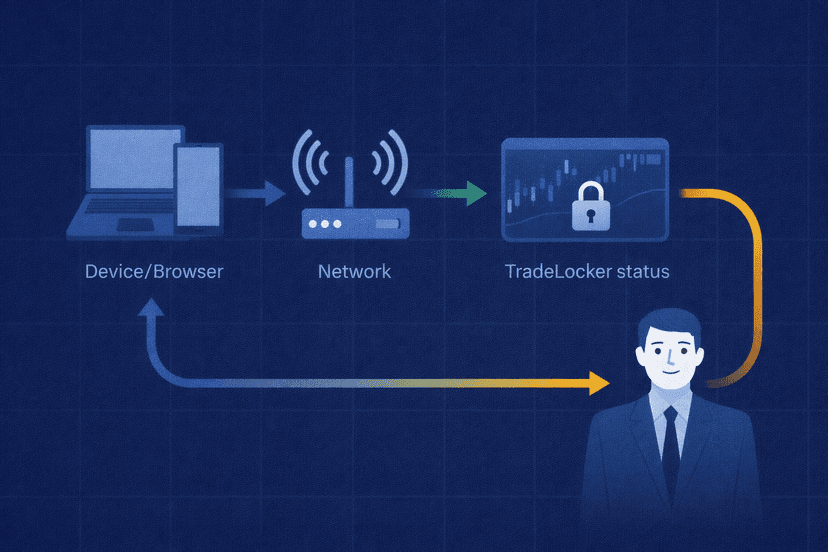
- Network path quality. Distance, the number of hops, traffic volume along the route, and server performance all shape latency, and latency is not the same thing as jitter or packet loss. A connection can show a respectable round-trip time and still drop packets in a pattern that produces disconnects and stalled updates.
- Broker-side execution. TradeLocker describes its role plainly: the platform sends a request to the trading server, and it reflects the response it gets back. Your broker or prop firm controls the execution. When a close or edit fails, that is a conversation with broker support, not a hardware problem.
- Platform-wide incidents. Sometimes it is not you. TradeLocker maintains a status page for its own managed platform services, APIs, and maintenance windows.
Layout complexity belongs in this list as a variable, not as a villain. TradeLocker advertises up to four independent charts in one layout, and its platform pages describe TradingView charting with more than 100 indicators available. That does not mean four charts cause lag. It means chart count and indicator load are things you can turn down as part of a test, so you can see whether responsiveness changes when the rendering workload changes.
Resist the urge to work backwards from a spec sheet. There is no published CPU or RAM floor you can point at to prove your machine is undersized, so measure your own behavior instead of guessing at a number.
Diagnose the Lag Before Changing Your Setup
Match the symptom to the layer, then run the test that confirms it. This table is the shortest path from “it feels slow” to a fix you can actually justify.
| Symptom | Likely layer | Confirming test | Next action |
|---|---|---|---|
| Choppy charts, delayed clicks, sluggish panels | Local rendering / device load | Open Task Manager while trading; reduce the layout to one simple chart; compare the desktop app against the browser | Move to the native desktop app, close competing tabs and apps, simplify the layout |
| Random disconnects and reconnect loops | Network path | Test a second network (phone hotspot); check latency and packet loss along the route | Fix or replace the connection; consider relocating the platform if your route is the constant |
| Orders confirm late, or close and edit actions fail | Broker execution | Repeat from a second device on a second network; record timestamps for the failed action | Raise it with your broker or prop firm’s support with the recorded details |
| Everything is broken for everyone at once | TradeLocker platform incident | Check the official status page for active incidents or maintenance | Wait it out; no local change will help |
| Login is blocked outright | Device clock | Check that your system time matches real time and that automatic sync is on | Enable automatic time synchronization and retry |
Two Windows tools cover the network column without extra software. The ping command tests IP connectivity and reports round-trip time, while pathping reports latency and packet loss at intermediate hops, which is what exposes a single bad link in the middle of an otherwise healthy route.
Read those numbers for what they are. ICMP results are indicators of path health, not a measurement of how long your order takes to be accepted. Keep them separate in your head, and record what you see — support teams on either side move faster when you hand them times, symptoms, and a reproducible sequence instead of “it lags.”
One more boundary worth internalizing: the status page covers TradeLocker-managed services, not brokers, prop firms, broker servers, market-data feeds, liquidity providers, or trade-execution systems. A green status page does not prove your broker is healthy.
Fixes to Try Before Paying for a VPS
TradeLocker’s troubleshooting guide covers the failure modes traders actually report: pages that will not load, freezing, blank screens, unresponsive buttons, missing charts, disconnects, and crashes. Its recommended sequence is unglamorous and effective.
- Switch to the current native desktop app. This removes browser memory behavior from the picture in one step. The official download page recommends Windows 10 or newer and macOS Big Sur or newer.
- Update and restart. Apply pending operating-system and application updates, then restart the machine rather than only the app.
- Clear cache and cookies if you are staying in the browser, and reinstall the application if the desktop build is the one misbehaving.
- Test another client, device, or network. Web against desktop, laptop against phone, home Wi-Fi against a hotspot. This is how you find out whether the problem travels with you.
- Review firewall and antivirus permissions. Security software that inspects or blocks the connection produces symptoms that look exactly like platform lag.
If your specific complaint is that the tab looks reloaded or stale when you come back to it, that may be Chrome rather than TradeLocker. Chrome’s Memory Saver can deactivate unused tabs and reload them when you revisit, and Chrome lets you add sites to an “Always keep these sites active” list so your trading tab is exempt.
Change one variable at a time. If you swap the app, the network, and the layout in the same session, you will feel an improvement and learn nothing about what caused it — which matters when the lag comes back next month.
How a VPS Can Reduce TradeLocker Lag
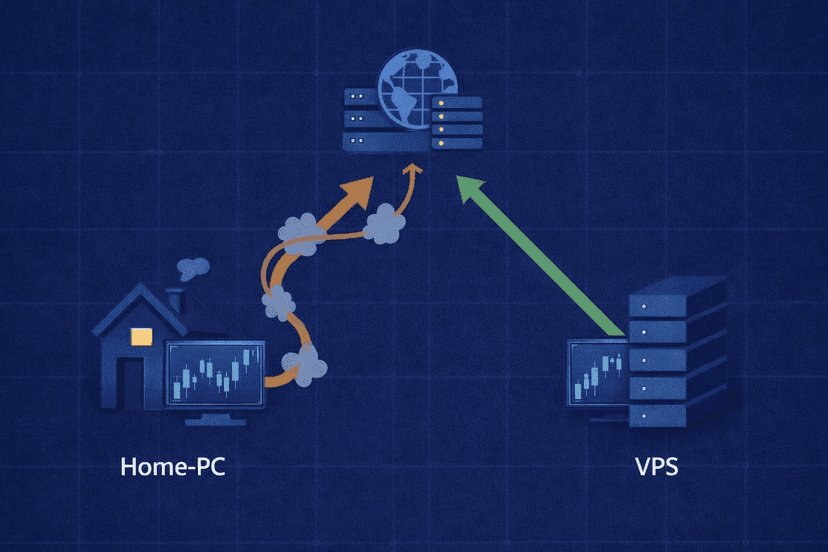
Running the platform on a VPS splits your setup into two independent paths, and understanding the split is the whole point.
- Home device to VPS. This path carries screen graphics and your keyboard and mouse input. It affects how the session feels.
- VPS to trading services. This path carries the actual platform connection to the trading infrastructure. It affects data flow and how quickly your requests reach the trading server.
A suitable TradeLocker VPS moves the application’s compute and the trading connection off your home PC entirely. If your bottleneck is a machine loaded with other work, a flaky home connection, or a poor route between your house and the trading endpoint, relocating the platform removes that bottleneck instead of working around it. Your home connection then only has to carry a remote desktop session.
That distinction explains a result that confuses a lot of traders. Remote desktop sends server-rendered graphics down to you and your input back up, and Microsoft’s guidance is that available bandwidth affects session quality, with the protocol adapting image quality, frame rate, and compression to the connection. So a rock-solid VPS-to-broker path can sit behind a visually choppy remote session on bad home internet. Sluggish screen redraw is not proof that your trading connection is sluggish.
Be equally clear about the ceiling. A VPS cannot repair a platform outage, reverse a broker rejection, clean up bad market data, or change liquidity and execution behavior on the broker’s side. If your close and edit failures are coming back from the trading server, a new server on your side changes nothing about that answer.
How to Set Up and Test TradeLocker on a VPS
Setup discipline is what separates a VPS that helps from a VPS that just relocates the problem.
- Choose the location by measured route, not by map distance to you. What matters is the path between the VPS and the broker or trading endpoint you actually use. Distance and hop count both feed into latency, so a nearby datacenter with a bad route can lose to a farther one with a clean path.
- Install the official Windows desktop build rather than running the platform in a browser on the server.
- Enable automatic clock synchronization. TradeLocker blocks authentication when device time differs from server time by more than five minutes, and automatic time sync is the documented fix. On a fresh VPS it is a single settings toggle that saves a confusing support ticket.
- Leave automatic updates on so the server build does not drift behind your local one.
- Start with a simple chart layout and add complexity back deliberately, so you know what the machine handles comfortably.
Then run a real comparison. Open the same workflow at the same time from home and from the VPS — same symbols, same layout, same session — and track four things: visible responsiveness during active markets, disconnect frequency over a full session, round-trip time and packet loss where you have an endpoint you can legitimately test, and broker-confirmed execution timestamps.
A speed test is not part of that list. A download figure describes your connection to a test server, not the route to your broker. Traders reach for it because it produces a number quickly, but it answers a different question than the one being asked.

The Practical Verdict
A VPS is a good fit for repeatable local resource problems and routing problems. It is not the first response to every freeze, and it is not a fix for anything happening on the broker’s side of the request.
- The lag follows your machine — it disappears on another device on the same network. Fix the device first: desktop app, updates, background load, simpler layout.
- The lag follows your network — it disappears on a hotspot or another connection. Fix the connection if you can; a VPS is a strong option if you cannot.
- The lag follows the route — your connection is fine locally but the path to the trading endpoint is slow or lossy at consistent times. This is the clearest VPS case.
- The failure is in the order response — rejections, failed closes, failed edits. Go to broker support. No amount of hosting changes it.
- Everyone is affected at once — check the status page and wait. Do not buy infrastructure during an incident.
- It is intermittent and unmeasured — collect a week of notes before spending anything. Reproducibility is the thing that makes the decision obvious.
Judge the result on the same evidence you used to make the decision: fewer disconnects, steadier behavior in fast markets, and execution timestamps you can compare. If none of those move after relocating, the bottleneck was never on your side of the connection.
TradeLocker Lag FAQs
Why is TradeLocker suddenly slow?
Something changed, and your job is to find out what. Check the official status page for an active incident first, since that costs nothing and rules out the one cause you cannot influence. Then check whether the slowdown follows the device or the network by testing the platform from a second device and a second connection. Browser sessions that have been open for a long time, recently installed extensions, and pending system updates are all worth ruling out on the device side, and the troubleshooting guide’s documented sequence is to update the platform, clear the cache, restart, and reinstall if the problem persists.
Is TradeLocker Desktop faster than the web app?
TradeLocker positions the native desktop app as avoiding the usual browser slowdowns and memory issues, so it is the first thing to try when the interface itself feels heavy. The download page recommends Windows 10 or newer and macOS Big Sur or newer. What the desktop app does not change is the network path or anything happening on the broker’s side — if your problem is disconnects or late order confirmations, expect the same behavior in both.
Will a VPS reduce TradeLocker execution time?
It can shorten the network path your request travels before it reaches the trading server, and that is a real effect when your home route is the weak link. It cannot make your broker respond faster. TradeLocker sends the request and reflects the response, so the execution decision belongs to the broker or prop firm. Treat a VPS as a way to remove your own infrastructure from the equation, not as a guarantee of faster fills.
Where should my TradeLocker VPS be located?
Near your broker’s trading infrastructure, judged by measurement rather than by the map. Latency is shaped by distance, hop count, traffic volume, and server performance, so the only reliable method is testing the route from candidate locations to the endpoint you actually connect to. Do not pick a location because it is close to your house — you are optimizing the VPS-to-broker path, and the path from your house only carries the remote desktop session.
Can a VPS fix broker-side order delays?
No. When you cannot close or edit a trade, the platform has passed your request to the trading server and is showing you what came back, which means broker support owns that problem. The same applies to rejections, requotes, and behavior during thin liquidity. Record the timestamps and the exact action that failed, then escalate to the broker or prop firm — a second server on your side will not override their answer.
Does a laggy remote desktop session mean my VPS is bad?
Not necessarily. An RDP or VNC remote session sends server-rendered graphics to you and your input back, and available bandwidth affects session quality, with the protocol adapting image quality, frame rate, and compression to the connection. On a weak home connection the screen can look choppy while the VPS-to-trading path stays stable. Judge the VPS on disconnects and broker-confirmed execution timestamps, not on how smoothly the chart animates on your monitor.

About the author
Thomas Vasilyev
Writer & Full Time EA Developer
Tom is our associate writer, and has advanced knowledge with the technical side of things, like VPS management. Additionally Tom is a coder, and develops EAs and algorithms.
Areas of Expertise