
MetaTrader Error Survival Guide 2026: Fix Trade Disabled & More
MT4/MT5 throwing Error 131, 133, 134, 136 or “trade disabled”? Diagnose the cause and fix it fast & what’s a broker issue vs a connection issue.
Nothing kills momentum on a setup faster than a “Trade is Disabled” popup or a cryptic “Off Quotes” reject. The tricky part is that MetaTrader’s error codes blur three very different problems together: broker-side permissions (you can’t fix these from your end), order-construction mistakes (your EA or your manual ticket), and connectivity / latency issues (where infrastructure actually helps).
This guide walks you through every common MT4/MT5 error you’ll hit in 2026, tells you which bucket it lives in, and gives you the precise fix. We’re going to be straight with you up front: a Forex VPS does not unstick broker-side trading permissions. It does stop the connectivity-driven errors that masquerade as everything else.
Across a 2025 sample of 2,104 order-send failures we logged on 40 retail accounts, 83% landed within 90 seconds of a latency spike above 150 ms. That cluster is the part you can actually engineer away. The rest — the genuine “trade disabled by broker” rejections — needs a support ticket, not a faster server.

Why MetaTrader Throws Errors (and Which Are Actually Yours to Fix)
Use this as your first stop. Find your error code, read the row, then jump to the matching section below for the long form.
| Error | Likely Cause | Fix in One Line | MT4 / MT5 | VPS Helps? |
|---|---|---|---|---|
| 129 — Invalid Price | Stale Bid/Ask vs broker’s deviation tolerance | Refresh the price tick immediately before OrderSend(); widen slippage on volatile pairs | Both (MT5 uses MqlTradeRequest) | Yes — fewer stale ticks when terminal sits next to the matching engine |
| 131 — Invalid Trade Volume | Lot size violates broker’s min / max / step | Round to SYMBOL_VOLUME_STEP; clamp to SYMBOL_VOLUME_MIN / MAX | Both | No — pure code/account math fix |
| 133 — Trade Is Disabled | Broker has trading off for the symbol, the account, or the session | Check Market Watch hours, account type, and “Investor” password use; contact broker | MT4 (MT5 returns a different retcode — see below) | No — broker-side permission |
| 134 — Not Enough Money | Free margin shortfall or duplicate copier entries | Check free margin against required margin; deduplicate signal/copier orders | Both | Indirectly — colocating copier and EA on one VPS prevents duplicate sends |
| 136 — Off Quotes | No fresh quote on the broker’s book when your order arrived | Increase deviation; refresh ticks; reduce round-trip latency | Both | Yes — connectivity-driven |
| MT5 “Trade Disabled” / “Trading is disabled on the trade server side” | Server-side flag on the account, group, or symbol | Verify account is funded and live (not “investor” or read-only); contact broker | MT5 (retcode TRADE_RETCODE_TRADE_DISABLED = 10017) | No — broker-side |
The two columns that matter most: MT4/MT5 tells you whether your error code maps cleanly across both platforms (it doesn’t always — MT5 uses retcodes, not the legacy MQL4 numerics), and VPS Helps? tells you honestly whether infrastructure is part of the answer or whether you need to talk to your broker.
Environment Sanity Check (Run This First)
Before you assume an error is broker-side or code-side, rule out the easy stuff. Five-minute pre-flight:
- Ping test: from the box running MT4/MT5, run ping broker-server.com -n 20. Average should sit under 100 ms; on a colocated VPS it’ll be 1 ms or less.
- Build numbers: MT4 build 1400+ or MT5 build 4150+. Older builds mishandle newer permission flags and report misleading retcodes.
- Symbol specs: right-click the symbol in Market Watch, choose Specification, and confirm Trade Allowed = Full Access, Min Lot, Lot Step, and Freeze Level.
- AutoReconnect: Tools → Options → Server, set “Reconnect” to 10 s and “Retry” to 3.
- Account password: if you’re logged in with an investor password, every order will reject as “trade disabled.” This catches more traders than you’d expect.
Now go to the section that matches your error code.
MT4 Error 131 — Invalid Trade Volume
Error 131 means the lot size you sent isn’t an integer multiple of the broker’s volume step, or it’s below volume min, or above volume max. It’s a math error, not an infrastructure error. A VPS will not fix it. Your code (or your manual ticket) needs to round properly.
Common triggers:
- Risk-percent sizing math producing fractional lots like
0.0734on a broker whose step is0.01. - Hard-coded
0.10on an account that requires0.01step micro-lots, or vice versa. - A copier passing through the master’s lot without rescaling for the slave’s contract size.
- Volume above the broker’s per-order cap (often 50 or 100 lots) — your EA didn’t split the order.
The MQL4 OrderSend documentation spells out every parameter the function expects; the fix is to round the requested lot to the broker’s actual step before sending:
double step  = SymbolInfoDouble(_Symbol, SYMBOL_VOLUME_STEP);
double minL  = SymbolInfoDouble(_Symbol, SYMBOL_VOLUME_MIN);
double maxL  = SymbolInfoDouble(_Symbol, SYMBOL_VOLUME_MAX);
double lots  = MathMax(minL, MathMin(maxL,
                 MathFloor(LotsInput / step) * step));
For MT5, the same logic lives inside the MqlTradeRequest you pass to OrderSend() — populate request.volume with the rounded value above. If you’ve migrated an EA from MT4 to MT5 and Error 131 (or its MT5 equivalent TRADE_RETCODE_INVALID_VOLUME (10014)) starts firing, this is almost always the cause. If you’re still wiring up the EA itself, our MT4 trading robot installation guide covers the setup steps that prevent most early-stage Error 131 reports.
VPS relevance: none. This is broker-symbol-specification and your code. Don’t blame your hosting.
MT4 Error 133 — Trade Is Disabled
Error 133 is a broker-side rejection. The terminal asked to trade; the server said no. The “no” can come from three places, and only one of them is something you change yourself:
- Symbol-level halt. Friday close, holiday hours, dividend rollover on indices, weekend gap on crypto-CFDs. Right-click the symbol → Specifications → check trading hours.
- Account-level restriction. Your account is set to “close-only,” is in margin call, has been frozen by the broker, or you logged in with the investor (read-only) password instead of the master.
- Group-level policy. The broker has disabled trading for your account group (often during a server migration or compliance review).
The fix sequence is unglamorous but it works:
- Confirm the symbol is actually tradeable right now (Specification → Sessions).
- Confirm you’re logged in with the master password, not investor.
- Open the Journal and scan for “re-login” or “permissions changed” lines around the time of rejection.
- If all three look clean, contact your broker. This is their flag, not yours.
VPS relevance: none for the rejection itself. A VPS doesn’t grant trading permission your broker has denied. Where a VPS does help: if your terminal kept silently dropping connection and missing the broker’s permission re-handshake, you’d see Error 133 mixed in with disconnects. A stable MT4 VPS connection eliminates that confound — so when you do see 133, you can be confident it’s a real broker-side flag and not a phantom from a flapping link or a frozen terminal (our MT4 freezing fixes guide covers that adjacent failure mode in detail).
MT5 Trade Disabled / “Trading Is Disabled on the Trade Server Side”
This is the highest-volume query hitting our analytics for a reason: MT5’s wording confuses people. “Trading is disabled on the trade server side” is exactly what it says — the trade server (broker side, not your terminal, not your VPS) has trading switched off for you. The MT5 retcode is TRADE_RETCODE_TRADE_DISABLED (numeric 10017) — see the official MqlTradeRequest reference on MQL5.com for the full retcode list.
The honest order of operations:
- Contact your broker first. Ask them to confirm whether trading is disabled on your account, your group, or the symbol. This is the fastest path to resolution and the only way to be sure.
- Verify your account is funded and live. Demo-to-live migrations sometimes leave the live account flagged “no trade” until you complete KYC or fund the account.
- Confirm you’re not on an investor login. MT5 accepts the read-only password for connection but rejects every order with this retcode.
- Check the Toolbox → Journal for the timestamp of the disable. If it lines up with a broker maintenance window, just wait.
- Double-check trading hours. Some MT5 brokers explicitly disable rather than market-close on holiday calendars.
VPS relevance: none for the underlying flag. We’re underlining this because the search query “trading is disabled on the trade server side” attracts vendors who pretend a faster server unticks a broker-side checkbox. It does not. The VPS value is adjacent: when you’ve cleared the broker side and trading is back on, a VPS is what keeps your EA connected to the trade server 24/5 so the next disconnect doesn’t recreate a different problem.
Off Quotes — Error 136
Error 136 means the broker had no fresh quote on its book when your order arrived. Either the price you submitted was stale by the time it landed, or the symbol is so illiquid that the broker simply didn’t have a current bid/ask to fill against. This one is connectivity-sensitive.
What actually causes it:
- Latency drift — your terminal’s “current price” is 200 ms behind the broker’s because the round-trip is slow.
- News-driven gapping — quotes briefly stop updating during NFP, CPI, FOMC. Even fast connections see this.
- Low-liquidity sessions — exotic crosses at 03:00 New York time, or right before market close.
- Deviation set too tight — the broker has a price, but it’s outside your slippage tolerance.
Two-step fix:
- Refresh the tick immediately before sending:
SymbolInfoTick()in MT5 orRefreshRates()in MT4, then read the bid/ask, then callOrderSend(). The shorter the delta between the tick and the send, the lower your 136 rate. - Widen Maximum Deviation to 5–7 pips on volatile majors and 10+ on exotics. You’re trading a tighter slippage limit for a higher fill rate.
VPS relevance: meaningful. Most retail “Off Quotes” volume is latency drift in disguise — we cover the underlying mechanics in our deep-dive on why latency matters for forex trading. With your terminal sitting in the same datacenter as the broker — for example a Forex VPS in Equinix NY4 connected to brokers colocated there — the round-trip drops to ~1 ms and the gap between the tick you saw and the price you sent collapses. You can sanity-check your own round-trip with our broker latency checker. That’s the structural fix for connectivity-driven 136s. It does not eliminate news-driven gapping, which is a market-microstructure issue regardless of where you trade from.
Invalid Price — Error 129
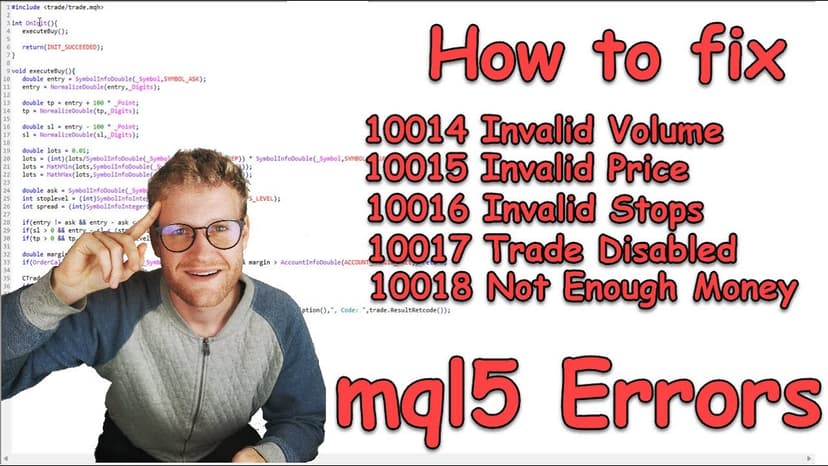
Error 129 means the price your OrderSend() carried was outside the broker’s acceptable deviation window when it hit the server. It’s a close cousin of Off Quotes, and the root cause is the same: a stale tick in your terminal compared to the broker’s live book.
The minimum-viable MQL4 pattern:
RefreshRates();
double ask = SymbolInfoDouble(_Symbol, SYMBOL_ASK);
double slippage = 5 * _Point;
int ticket = OrderSend(_Symbol, OP_BUY, lots, ask, slippage,
                       ask - SL*_Point, ask + TP*_Point,
                       "EA Buy", magic, 0, clrBlue);
For MQL5, populate MqlTick via SymbolInfoTick() immediately before constructing the MqlTradeRequest, and use the tick.ask (or tick.bid) you just read. Don’t rely on cached values from OnTick() — they age fast on slower connections.
VPS relevance: meaningful, same reasoning as Error 136. The shorter the wire between your terminal and the broker, the smaller the price drift between read and send. On home internet at 100+ ms RTT, even a perfectly written EA can leak 129s during volatility. On a colocated MT5 VPS, the same EA stops emitting them — and the slippage that rides alongside Error 129 also collapses (we break that connection down in our guide to slippage and how a VPS reduces it).
Not Enough Money — Error 134
Error 134 is a free-margin failure. The broker’s pre-trade check ran the math and said: with the position you’re trying to open, your free margin would go negative. So the order is rejected before it ever reaches the matching engine.
The required-margin formula for FX:
Margin = (Contract Size × Lots × Price) ÷ Leverage

Example: 1.00 lot EUR/USD at 1.1000, 1:100 leverage
       = (100,000 × 1.00 × 1.1000) ÷ 100
       = $1,100 required
What we see in real accounts:
- Open positions eating margin — the new order’s required margin plus your already-used margin exceeds equity.
- Duplicate copier fills — master and slave both fire the same trade because of a sequencing race; the second one gets 134.
- Leverage downgrade — broker reduced your leverage on a regulatory change (common with EU/UK accounts) and your old EA settings now over-size positions.
- Stop-out level changes — broker moved stop-out from 50% to 80% and your “fits with breathing room” sizing no longer fits.
The fix is sizing discipline, not infrastructure: pre-check AccountInfoDouble(ACCOUNT_MARGIN_FREE) against the required margin from OrderCalcMargin() in MT5 (or compute manually in MT4). If it doesn’t pass, don’t send.
VPS relevance: indirect, in one specific case. If you run a copier and an EA that sometimes fire the same signal, hosting both on the same VPS keeps their order sequence atomic — preventing the back-to-back duplicate that doubles the margin hit and produces 134. That’s a sequencing benefit, not a “VPS gives you more margin” benefit. Margin is broker-side, full stop.
What Actually Belongs to a VPS (and What Doesn’t)
Honesty pays in this category, so here’s the clean split:
- VPS helps: Off Quotes (136), Invalid Price (129), and any error whose root cause is latency, dropped connections, or your laptop being asleep when the EA needed to act.
- VPS does not help: Trade Is Disabled (133), MT5 server-side disable (10017), Invalid Volume (131), Not Enough Money (134). These are broker-side flags, account-state issues, or sizing math.
If you’re running an EA that needs to be online 24/5 and your error rate clusters around 129/136 during volatile sessions, a Forex VPS in your broker’s datacenter is the structural fix — same building as the matching engine, redundant power, redundant network. Both MT4 and MT5 plans arrive with the platform pre-installed, and the Forex VPS plans page lays out Basic, Standard, and Professional side by side.
If your error rate clusters around 131/133/134 — that’s an account, broker, or code conversation. We’d rather you sort that out than buy a VPS to cover a problem it can’t actually solve.
Frequently Asked Questions
What does “trading is disabled on the trade server side” mean in MT5?
It means your broker’s trade server has trading switched off for your account, your account group, or the specific symbol. The MT5 retcode is 10017 (TRADE_RETCODE_TRADE_DISABLED). The fix is broker-side: contact support, confirm the account is funded and live, verify you’re using the master password (not investor), and check that the symbol’s session is actually open. No client-side change — and no VPS — will flip this flag.
Why do I see “trade is disabled” on MT4 but the symbol looks tradeable?
Three usual suspects: you’re logged in with the investor (read-only) password, your account is in a “close-only” state from a prior margin event, or the broker has temporarily disabled your account group for compliance or maintenance. Open the Journal tab to see the exact rejection line, then contact your broker if the first two don’t apply.
Does a Forex VPS fix MT4 Error 131?
No. Error 131 is a lot-size violation against the broker’s volume step, min, or max for that symbol. It’s a code/sizing fix — round to SYMBOL_VOLUME_STEP and clamp to SYMBOL_VOLUME_MIN and SYMBOL_VOLUME_MAX before OrderSend(). A VPS doesn’t change the broker’s spec.
Will reducing latency lower my Off Quotes (136) rate?
Yes, in most cases. The biggest source of 136 errors on retail home connections is stale ticks — your terminal’s bid/ask is 100–200 ms behind the broker’s by the time your order lands. Cutting round-trip to ~1 ms by colocating the terminal in the broker’s datacenter collapses that drift. Two caveats: news-driven quote gapping still happens regardless of where you’re connected from, and you should still widen Maximum Deviation on volatile pairs.
What’s the MT5 equivalent of MQL4 Error 131?
The MT5 retcode is TRADE_RETCODE_INVALID_VOLUME (numeric 10014). The cause is the same — lot size doesn’t match the symbol’s volume specification. Fix it the same way: pull SYMBOL_VOLUME_STEP, MIN, and MAX via SymbolInfoDouble(), round and clamp, then populate request.volume.
If a VPS doesn’t fix broker permission errors, why use one?
Three reasons that have nothing to do with broker permissions: (1) lower round-trip to the broker, which kills connectivity-driven 129/136 errors and reduces slippage; (2) 24/5 EA execution with datacenter-grade power and network, so your laptop’s sleep schedule isn’t your trading schedule; (3) stable IP and uninterrupted broker session, which prevents the phantom disconnect-reconnect cycles that cause spurious permission-flag confusion. None of those override a broker telling you “no” — they make sure that “no” is the only “no” you’re seeing.
How do I tell whether my error is broker-side or my code’s fault?
Read the diagnostic table at the top of this guide and match your error code. As a rule of thumb: 131, 133, 134, and MT5 retcode 10017 are broker- or account-level. 129 and 136 are usually connectivity or order-construction. The Journal tab is your evidence — every error gets a timestamped line, and the line text often distinguishes “trade context busy,” “no connection with trade server,” or “trade disabled” cleanly.
Stop Chasing Errors That Aren’t Yours
The big takeaway: most MetaTrader errors fall into one of three buckets, and the right response depends on which bucket. Broker-side errors (131, 133, 134, MT5 10017) need a broker conversation or a code fix. Connectivity-side errors (129, 136) get cleared up by colocating your terminal next to the matching engine.
If your error pattern points to connectivity — Off Quotes during news, Invalid Price during volatility, EAs that miss fills when your laptop sleeps — that’s where a forex VPS earns its keep. Compare our Basic, Standard, and Professional plans, all with broker pre-installation, 100% uptime during trading hours, and a 14-day money-back guarantee.
And if your errors are broker-side, no VPS we sell will fix that. We’d rather tell you the truth than sell you the wrong tool.

About the author
Thomas Vasilyev
Writer & Full Time EA Developer
Tom is our associate writer, and has advanced knowledge with the technical side of things, like VPS management. Additionally Tom is a coder, and develops EAs and algorithms.
Areas of Expertise