
NYCServers vs FXVM Review: Outages, Pricing & Features
NYCServers vs FXVM comparison. A comprehensive review of services, pricing, outages, and more. Helping traders select the best VPS for their needs.

Choosing a Forex VPS is not a cosmetic decision — it directly impacts execution speed, trade stability, and risk exposure. For traders running automated strategies, scalping systems, or always-on Expert Advisors, even a few minutes of downtime can translate into missed entries, unmanaged positions, or real financial losses.
Two well-known providers in this space are NYCServers and FXVM. Both have operated in the Forex VPS market for over a decade, both serve traders globally, and both promote low-latency infrastructure designed for MT4, MT5, and algorithmic trading. On the surface, their offerings can appear similar.
However, once you look beyond marketing claims, important differences emerge — in infrastructure design, redundancy, incident history, and corporate structure.
FXVM and ForexVPS.net are owned by the same parent company — ThinkHuge Ltd, headquartered in Hong Kong. They share the same infrastructure, the same status page, and the same vulnerabilities. In August 2025, this shared infrastructure experienced approximately 24 hours of downtime affecting New York servers during active trading hours.
What We Found
- FXVM experienced a documented ~24-hour New York outage in August 2025 — the same outage that affected ForexVPS.net, as both brands share ThinkHuge Ltd’s infrastructure
- FXVM and ForexVPS.net are the same company — both operated by ThinkHuge Ltd from the same Hong Kong address, sharing infrastructure, staff, and more
- NYCServers offers more RAM at entry level — 2GB for $25/month vs FXVM’s 1.5GB Lite VPS for $20/month
- NYCServers automatically places your VPS in the optimal data center — FXVM requires manual location selection
- FXVM does not offer secure data backups — NYCServers offers weekly VPS data backup addon for $10/month
- FXVM is one of several ThinkHuge brands — the parent company also operates several other brands, raising questions about VPS focus
For full transparency, we operate NYCServers. That said, every claim in this article is supported by publicly available information — including published pricing pages, terms of service, status updates, and verified customer reviews — so readers can independently validate the facts.
Quick Comparison Table
| Feature | NYCServers | FXVM |
|---|---|---|
| Starting Price | $25/mo | $14/mo (Virtual Desktop) / $20/mo (Lite VPS) |
| Entry Plan RAM | 2GB | 1.5GB (Lite VPS) |
| Sister Brands | None | More than 6 additional brands |
| Server Locations | 3 (NY, London, Tokyo) | 15 (global) |
| VPS Data Backups | Yes, available addon | None available |
| Hardware Transparency | Yes | Limited – none |
| Pre-installed Platforms | Yes — selected at checkout | No — manual installation |
| Automatic Broker Optimization | Yes | No — manual location selection |
| Uptime SLA | 100% during trading hours | 99.99% |
| Money-Back Guarantee | 14 days | 7 days |
| Founded | 2012 | 2013 |

What is NYCServers?
NYCServers has provided forex-focused VPS hosting since 2012. The infrastructure is built specifically for traders running MetaTrader 4, MetaTrader 5, cTrader, and Expert Advisors.
Servers are located in New York, London, and Tokyo — the same data center regions used by major forex brokers including IC Markets, FTMO, Axi, and Exness. This co-location delivers sub-millisecond latency to broker trading servers.
The service model is straightforward: you select your broker at checkout, and your VPS arrives with trading platforms pre-installed and configured for optimal latency.
The service is streamlines a trader’s setup experience from the time of order to the first trader placed on the VPS to ensure optimization, and no friction.
What is FXVM?
FXVM is a forex VPS provider that launched in 2013. The company is owned and operated by ThinkHuge Ltd, a Hong Kong-based company located at 26th Floor, Beautiful Group Tower, 77 Connaught Road Central.
ThinkHuge operates more than 6 different brands. 3 of the brands are in the hosting space specifically:
- FXVM — forex VPS hosting
- ForexVPS.net — forex VPS hosting
- PingPlayers — game server hosting
The hosting brands share the same service locations and underlying infrastructure.
Uptime, Reliability & Incident History
For Forex traders running automated strategies, uptime is not a marketing claim — it is a risk factor. When a VPS goes offline, trading platforms stop executing, open positions may go unmanaged, and protective logic within Expert Advisors can fail.

August 2025: ~24-Hour New York Outage
In August 2025, FXVM’s parent company ThinkHuge Ltd experienced a significant service interruption affecting New York infrastructure. According to publicly accessible status updates on status.thinkhuge.net, service disruption began on August 11, 2025 and was not fully restored until approximately 24 hours later.
The incident was attributed to a fiber-related network failure, with additional damage identified during remediation.
During this period, traders lost access to their VPS instances and trading platforms entirely. This is particularly concerning for traders who run live traders and expert advisors. When an outage of this nature occurs it means that expert advisors are not able to manage or close trades, which can lead to devastating results, as noted in a Trustpilot review for FXVM:

The Importance Of True Infrastructure Redundancy
Most traders don’t investigate who actually owns their VPS provider. In most cases as long as the brand name is different, it is easy to see how traders can come to the conclusion that their VPSs are hosted in separate environments and infrastructure. However, events like these highlight that is not always the case.
For example, a trader who has their primary VPS service with ForexVPS.net might explore FXVM as a secondary service or backup VPS provider for diversifying purposes. However in reality, even if you have a separate service with each provider – both VPSs are using the same underlying infrastructure and therefore there is no diversity or infrastructure redundancy.
As demonstrated by the August 2025 event – an infrastructure issue at ThinkHuge affects both services simultaneously, even if they are under different brands.
Plans and Pricing Comparison
FXVM Pricing

| Plan | Price | CPU | RAM | Storage | Notes |
|---|---|---|---|---|---|
| Virtual Desktop | $14/mo | 2 cores | 3GB | 10GB | Limited to 1 trading platform only |
| Lite VPS | $20/mo | 2 cores | 1.5GB | 60GB | Recommended for 1-2 terminals |
| Basic VPS | $29/mo | 2 cores | 2.5GB | 80GB | Recommended for 3-4 terminals |
| Advanced VPS | $50/mo | 2 cores | 4GB | 90GB | Recommended for 4-6 terminals |
| Dedicated Server | $175/mo | 16+ cores | 16GB+ | 120GB+ | Full dedicated hardware |
NYCServers Pricing

| Plan | Price | CPU | RAM | Storage |
|---|---|---|---|---|
| Basic VPS | $25/mo | 2 cores | 2GB | 60GB SSD |
| Standard VPS | $40/mo | 2 cores | 4GB | 70GB SSD |
| Professional VPS | $60/mo | 4 cores | 8GB | 100GB SSD |
| Dedicated Server | $125/mo | 8+ cores | 16GB+ | 250GB |
Price-to-Value Analysis
FXVM’s pricing structure can be confusing. Their cheapest option — the $14/month Virtual Desktop — and comes with a significant limitations:
- One Trading Platform Only – Not possible to install more trading software
- No DLL support – Many popular EAs and trading software are not compatible with this service
- Share Environment – Limited separation between different customers. Underlying operating system shared with multiple users
This virtual desktop service is not the same as a standard forex VPS service.
For a realistic comparison, look at the Lite VPS ($20/month) vs NYCServers Basic ($25/month):
- FXVM Lite: 2 CPU, 1.5GB RAM, 60GB SSD — $20/month
- NYCServers Basic: 2 CPU, 2GB RAM, 60GB SSD — $25/month
For $5 more per month, NYCServers provides 33% more RAM (2GB vs 1.5GB). That difference matters when running multiple MT4 terminals or memory-intensive EAs.
At the mid-tier level, the gap widens:
- FXVM Advanced: 2 CPU, 4GB RAM, 90GB SSD — $50/month
- NYCServers Standard: 2 CPU, 4GB RAM, 70GB SSD — $40/month
Same RAM, NYCServers is $10/month cheaper ($120/year savings).

VPS Locations & Latency Optimization
In Forex trading, latency is not an abstract technical metric — it directly affects order execution, slippage, and strategy performance. A VPS located closer to your broker’s trading server reduces round-trip time by milliseconds, which matters most for scalping systems, high-frequency strategies, and automated trading.
Why Broker Proximity Matters
Most major Forex brokers host their MT4 and MT5 trading servers in a small number of financial data centers, primarily in New York, London, and Tokyo. Placing a VPS in the same region — or ideally the same data center campus — minimizes network hops and reduces execution delay.
Choosing a VPS location without knowing where your broker’s servers are hosted can result in unnecessary latency, even if the VPS provider advertises many global locations.
Available Locations
FXVM: 15 Locations
New York, Chicago, Miami, London, Amsterdam, Zurich, Frankfurt, Singapore, Tokyo, Mumbai, Sydney, Hong Kong, Dubai, Seoul, Johannesburg
NYCServers: 3 Strategic Locations
New York, London, and Tokyo. The central hubs where the majority of brokers house their trading servers.
Automatic vs Manual Location Selection

NYCServers assigns VPS locations automatically based on the broker you select during checkout. The system places your VPS in the data center that provides the lowest possible latency to your broker’s trading servers — no research or guesswork required.
FXVM requires customers to manually select from their list of global locations. While this offers flexibility, it places responsibility on the trader to know exactly where their broker’s servers are hosted. Selecting an incorrect location can result in higher latency and suboptimal execution.
FXVM does provide a broker latency page showing ping times to various brokers from different locations, which helps inform the decision. But the research and selection still falls on the trader.
For example, the majority of brokers have multiple trading servers for MT4, MT5, and cTrader platforms. It is quite common for brokers to house their trading servers in different locations. For example, MT4/MT5 servers in NY, and London. cTrader servers in London.
However, FXVM’s latency checker does not take this fact into account. Instead the latency checker just displays a generic “best location” when a broker is selected. The reality is that the broker has multiple servers which are not accounted for in a latency checker of this nature.
The automatic placement of NYCServers system completely eliminates any possible mistakes, or added friction in making sure that the best location is selected for your broker.

Understanding “3 vs 15” VPS Locations
At first glance, 15 VPS locations may appear superior to 3. In practice, what matters is not the number of locations offered, but whether those locations align with where brokers actually host their trading servers.
NYCServers focuses on New York, London, and Tokyo — the primary hubs used by Forex brokers, liquidity providers, and trading infrastructure. These three regions cover the vast majority of retail and institutional Forex trading activity. Additionally, the broker latency tool allows traders to check broker’s server location on a server by server basis for the most accurate reading of where the best location is for VPS services.
Additional locations can be useful in specific niche cases — if your broker’s trading server is based in Mumbai, Dubai, or Johannesburg, FXVM’s broader coverage matters. But the vast majority of traders, these additional locations do not serve a purpose since their brokers’ trading servers are not located there. In fact, in correctly picking one of these locations might lead to higher latency between their VPS and their broker’s server.
A VPS in the “wrong” city, even if geographically closer to the trader, can introduce unnecessary latency — defeating the purpose of having a VPS in the first place.
Setup Experience

NYCServers
- Select your plan
- Choose your broker from the list
- Complete checkout
- Receive VPS with your broker’s MT4/MT5/cTrader pre-installed and optimized
Time to trading: approximately 5-10 minutes after payment confirmation.
FXVM
- Select your plan
- Choose server location manually (requires knowing where your broker’s servers are)
- Complete checkout
- Connect to blank Windows VPS
- Download and install trading platforms yourself
- Configure connection settings
Time to trading: 30-60 minutes depending on your technical comfort level, and assumption that the right VPS location was selected
Hardware & Performance Transparency
When running trading platforms continuously, hardware performance directly affects platform stability, chart responsiveness, indicator calculations, and the execution of automated strategies. While VPS plans are often marketed using generic resource counts, the underlying hardware specifications can vary significantly between providers.
Why Hardware Transparency Matters for Traders
Two VPS plans may advertise identical resources — such as “2 vCPU” and “4GB RAM” — yet perform very differently depending on CPU generation, clock speed, memory type, and storage technology.
For Forex traders these differences can impact order processing speed, platform responsiveness, and overall system stability during volatile market conditions.

NYCServers Hardware Disclosure
NYCServers publicly discloses the core hardware technologies used across its VPS infrastructure, including: AMD CPUs, DDR5 RAM, and NVMe storage.
The screenshot example above shows hardware used for VPS hosting.
This level of transparency allows traders to understand what powers their VPS and assess whether the infrastructure aligns with their trading workload.
FXVM Hardware Disclosure
FXVM’s pricing pages list allocated resources such as CPU count, RAM, and storage capacity, but do not specify the underlying CPU models or memory generation used.
Without this information, traders cannot evaluate whether the hardware is optimized for trading workloads or compare performance expectations against other providers.
Real-World Performance Implications
Higher clock speeds improve the responsiveness of MT4 and MT5 terminals, reduce indicator recalculation delays, and help Expert Advisors react more quickly to incoming price data.
While raw core count matters for running multiple terminals or accounts, the performance of individual cores is often more important for trading workloads than the total number of virtual CPUs allocated.
Hardware transparency does not guarantee performance on its own, but it allows traders to make informed decisions and set realistic expectations about how their VPS will behave under load.
Without hardware transparency, a trader might sign up for a service expecting to use the latest generation hardware – but find that the server hardware powering their critical live trading server is actually more than 10 years old. This can lead to slow performance, lag, freezing, and even crashes – like described in a Trustpilot review for FXVM by a reported client

VPS Management, Monitoring & Automation
Beyond raw performance, a Forex VPS should give traders visibility and control. Management tools, monitoring, and automation features determine how quickly issues can be detected, resolved, or avoided entirely — without waiting on support.
Control Panel Capabilities
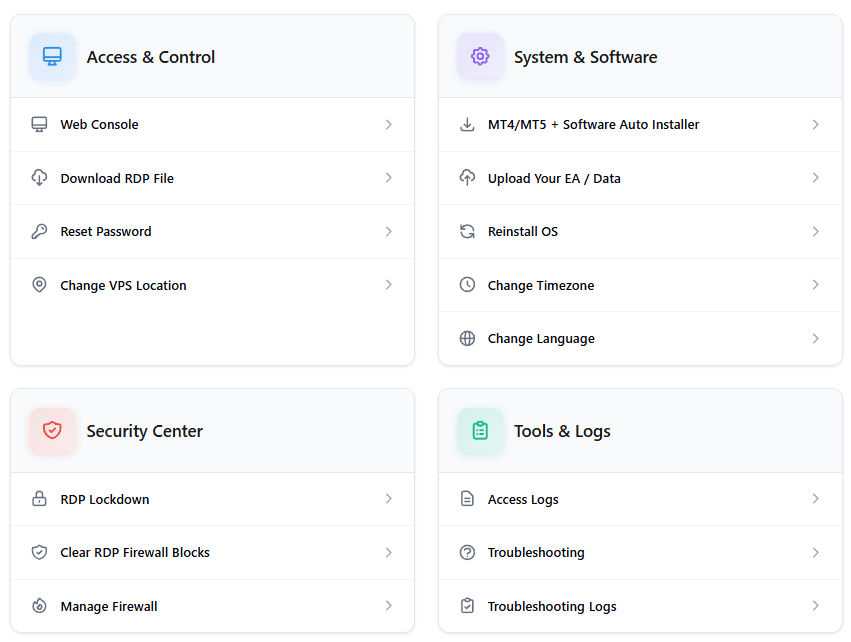
NYCServers provides an advanced VPS control panel designed specifically for Forex trading workflows. Traders can perform common tasks instantly without contacting support:
- One-click trading platform installation (100+ brokers supported, including multiple MT4/MT5 instances)
- Upload Expert Advisors and data files directly via browser
- Change VPS language
- Manage firewall rules
- Remote power actions (restart, shutdown)
This self-service approach allows traders to manage their environments on demand, without waiting for support tickets to be processed.
FXVM offers standard VPS management tools typical of general-purpose hosting environments. Advanced automation and trading-specific workflows are not prominently featured in their documentation.
Monitoring & Alerting

NYCServers includes built-in monitoring with automated alerts through custom-built software that comes pre-installed on each service. Traders can configure instant notifications for various events, allowing immediate response before trading activity is impacted.
FXVM does not prominently advertise integrated monitoring or alerting tools in their publicly available documentation. Without proactive alerts, traders may only become aware of problems after trades fail or platforms stop responding.
For automated trading systems, monitoring is critical. Receiving an alert for high RAM usage or connectivity issues allows for immediate action to prevent performance slowdowns or crashes. Without alerts, you won’t know there’s a problem until it’s too late.
Self-Service vs Support Dependency
When routine tasks require support intervention, resolution time depends on ticket queues and response speed. Self-service management tools allow traders to take immediate action on their own terms.
For traders managing multiple VPS instances, accounts, or strategies, automation and visibility are not convenience features — they are operational necessities.
Data Backups
For traders running Expert Advisors, custom indicators, or managing multiple accounts, data backups provide a safety net against accidental deletion, configuration errors, or system failures. The ability to restore a VPS to a previous state can save hours of reconfiguration and prevent permanent data loss.
NYCServers
NYCServers offers automated daily backups as an optional add-on for $10/month. When enabled, backups run automatically and can be restored through the control panel without contacting support.
This approach keeps the base VPS price lower while giving traders who need backup protection the option to add it.
FXVM
FXVM does not offer a data backup service. Their VPS plans do not include backup functionality, and there is no add-on option available for automated backups.

As per their terms of service, FXVM is not responsible for any files, software or data lost by the customer.
Traders using FXVM who want backup protection would need to implement their own solution — either manually copying files to external storage or using third-party backup software. This adds complexity and requires technical knowledge to set up and maintain.
Why Backups Matter for Trading
Without backups, a corrupted EA configuration, accidental file deletion, or Windows update issue could require rebuilding your entire trading setup from scratch. For traders running optimized settings developed over months of testing, this represents significant lost time and potential trading disruption.
The availability of professional backup options — even as a paid add-on — provides peace of mind that FXVM’s infrastructure does not currently offer.
Features Comparison
| Feature | NYCServers | FXVM |
|---|---|---|
| Pre-installed trading platforms | ✓ | ✗ |
| Automatic broker optimization | ✓ | ✗ |
| Data backups available | ✓ ($10/mo add-on) | ✗ |
| 24/7 support | ✓ | ✓ |
| Dedicated IP address | ✓ | ✓ |
| MT4/MT5 auto-startup | ✓ | ✓ |
| $0.99 trial | ✗ | ✓ |
| Broker latency checker | Yes, advanced | Yes, basic |
| Advanced Monitoring & Alerts | Yes, included with all services | ✗ |
Terms and Policies
Refund Policy
- FXVM: 7-day money-back guarantee – unless paid with crypto*
- NYCServers: 14-day money-back guarantee
FXVMs terms of service state that refunds for crypto for provided through account credits only.
Support Experience & Company Focus
Support quality is often difficult to evaluate during normal operations, when everything is working as expected. Its true value becomes clear during incidents, configuration issues, or time-sensitive trading events. How a VPS provider communicates, responds, and resolves problems directly affects trader confidence and risk exposure.
Support During Normal Operations
NYCServers provides 24/7 support with a team focused exclusively on Forex VPS infrastructure. Because the platform includes extensive self-service tools, many routine tasks can be handled immediately without waiting for support intervention.
FXVM offers 24/7 support for its VPS services, with customer reviews frequently praising individual support representatives by name (Rowe, Eleazar, Ken, Nivin). Response times during normal operations are generally well-regarded, as evidenced by Trustpilot reviews:

Dedicated Forex VPS Focus vs Multi-Brand Diversification
NYCServers operates with a singular focus on Forex VPS hosting. All infrastructure investment, development resources, and support processes are designed specifically around trading platforms, automated strategies, and low-latency execution. There are no competing priorities — the entire operation exists to serve Forex traders.

FXVM is one of several brands operated by ThinkHuge Ltd, a holding company based in Hong Kong.
ThinkHuge’s portfolio includes more than 6 different brands, including:
- Two separate Forex VPS brands — ForexVPS.net and FXVM.net, which compete in the same market
- Trading software tools — AlgoBuilder (EA creation) and TrackaTrader (analytics)
- Trading education — HowToTrade (Market analysis, signals, and more)
- Game server hosting — PingPlayers, an AI-powered game server platform
- Enterprise AI solutions — AI Agents for B2B automation
- B2B infrastructure services — white-label hosting across 60+ data centers
While diversification can provide business benefits, it also means that development resources, infrastructure investment, and support capacity are distributed across multiple product lines and industries rather than concentrated on a single service.
For Forex traders, the practical question is whether a provider’s primary operational focus aligns directly with the stability, performance, and reliability of their trading environment. Is VPS hosting is one product among several competing for attention OR is VPS hosting their only priority, like with NYCServers.
NYCServers Benefits and Limitations
Benefits
- Independent infrastructure — not shared with competing brands
- Located in the three primary focus trading hubs – New York, London, and Tokyo
- Pre-installed trading platforms configured for your broker
- Automatic location selection based on broker
- 14-day money-back guarantee
- 100% uptime guarantee during trading hours
- Service monitoring and alerts included with all services
- Data backup addon available for all VPS services
- Founded in 2012 — over a decade in forex VPS specifically
Limitations
- 3 server locations vs FXVM’s 15 — limited options for exotic broker locations
- No $0.99 trial option
- Entry price ($25) is higher than FXVM’s stripped-down Virtual Desktop ($14)
FXVM Benefits and Limitations
Benefits
- 15 server locations globally — good coverage for niche brokers
- $0.99 trial available for testing
- Lower entry price with Virtual Desktop option
- Established provider since 2013
Limitations
- Shares infrastructure with multiple brands
- August 2025 NY outage affected trading during market hours
- No data backup service available
- Manual platform installation required
- Manual location selection required
- Virtual Desktop restricted to 1 trading platform and no DLL supported. Shared operating system
- Lite VPS has only 1.5GB RAM
- Limited hardware transparency
- Hong Kong corporate registration
Which Provider Should You Choose?
Choose NYCServers if:
- You want independent infrastructure not shared with other brands
- Your broker is in New York, London, or Tokyo – the majority of traders
- You prefer a ready-to-trade VPS with platforms pre-installed
- You require server hardware transparency, and want to know what you’re getting before you order
Choose FXVM if:
- Your broker is in a location NYCServers doesn’t cover (Mumbai, Dubai, Sydney, etc.)
- You want to test with their $0.99 trial before committing
- You need only minimal resources (Virtual Desktop at $14/month)
- You’re comfortable with manual platform installation and location selection
Frequently Asked Questions
Are FXVM and ForexVPS.net the same company?
Yes. Both FXVM and ForexVPS.net are owned and operated by ThinkHuge Ltd, a Hong Kong-based company. They share the same corporate address, infrastructure, and status page. Choosing between them does not provide infrastructure redundancy.
What happened during FXVM’s August 2025 outage?
In August 2025, ThinkHuge’s infrastructure experienced approximately 24 hours of downtime affecting New York servers during active trading hours. The outage was reported on their shared status page (status.thinkhuge.net) and affected customers of both FXVM and ForexVPS.net.
Which provider has better entry-level value?
It depends on your needs. FXVM’s Virtual Desktop ($14/month) is cheaper but restricted to one trading platform with only 10GB storage. Their Lite VPS ($20/month) has only 1.5GB RAM. NYCServers Basic ($25/month) offers 2GB RAM with no platform restrictions — 33% more RAM for $5 more per month.
Does FXVM pre-install trading platforms?
No. FXVM provides a blank Windows VPS. You need to download and install MT4, MT5, cTrader, or other platforms yourself. NYCServers pre-installs trading platforms based on the broker you select at checkout.
Conclusion
FXVM is a legitimate provider with responsive support and a long track record. Their 15 server locations offer good global coverage, and the $0.99 trial lets you test before committing.
However, the shared infrastructure with ForexVPS.net is a genuine concern. The August 2025 outage demonstrated that both brands are vulnerable to the same infrastructure issues. Combined with lower RAM at entry tiers and manual setup requirements, these factors should weigh into your decision.
NYCServers offers independent infrastructure, strategic placement in the same locations used by major brokers, and pre-installed platforms. For traders prioritizing reliability and simplicity, it’s the more straightforward choice.
For traders who need server locations in regions NYCServers doesn’t cover, FXVM’s broader network may be worth the trade-offs — just be careful if you decide to pick another provider for a backup or secondary service. Sharing infrastructure always introduces lack of redundancy risks.

About the author
Matthew Hinkle
Lead Writer & Full Time Retail Trader
Matthew is NYCServers' lead writer. In addition to being passionate about forex trading, he is also an active trader himself. Matt has advanced knowledge of useful indicators, trading systems, and analysis.
Areas of Expertise