

10 Best TradingFXVPS Alternatives & Competitors (2026)
Comparing TradingFXVPS alternatives? We analyze 10 forex VPS providers on latency accuracy, pricing, OS support & features to find your ideal match.

TradingFXVPS has built a reputation for premium hardware — AMD Ryzen 9 processors, DDR5 memory, and NVMe storage. For traders who prioritize raw single-thread CPU performance, it’s an appealing option with 8 server locations and competitive entry pricing.
But hardware specifications don’t tell the complete story. Traders exploring alternatives have discovered concerning gaps: a latency checker that only covers MT4 servers (no MT5 data), broker location information that hasn’t been updated as brokers relocate their servers, and Windows Server 2016 as the default operating system — years past Microsoft’s mainstream support.
This guide examines the top 10 TradingFXVPS alternatives for 2026, comparing latency tools, pricing, features, and operational reliability to help you find the right VPS for your trading setup.
Our Findings:
- What traders like about TradingFXVPS: Premium AMD Ryzen 9 hardware, DDR5 RAM, NVMe storage, 8 server locations including Chicago for CME proximity, and a 30-day money-back guarantee.
- Why traders seek alternatives: MT4-only latency checker with outdated broker data (e.g., Blueberry Markets shows Tokyo but servers moved to London), Windows Server 2016 default, no backup option, and the company sells forex EAs/signals alongside VPS hosting.
- Best alternative for most traders: NYCServers provides accurate server-by-server latency data for both MT4 and MT5, modern Windows Server 2022+, pre-installed broker platforms, built-in monitoring with alerts, and more resources at entry level — all while focusing 100% on VPS infrastructure.

What is TradingFXVPS?
TradingFXVPS launched in 2014 and operates under Next Era Pte. Ltd. (also known as High Frequency Trading Network Pte Ltd), based in Singapore. The company positions itself as a high-performance provider targeting traders who run CPU-intensive Expert Advisors, scalping strategies, and algorithmic systems.
Their infrastructure emphasizes premium hardware — specifically AMD Ryzen 9 processors with high single-thread performance, DDR5 RAM, and NVMe storage. TradingFXVPS operates 8 server locations: New York, London, Frankfurt, Amsterdam, Chicago, Singapore, Tokyo, and Hong Kong.
Beyond VPS hosting, TradingFXVPS also sells forex signals and promotes a third-party Expert Advisor called “Strive Scalper” (formerly GoldPecker) directly on their website — creating a mixed business model that combines hosting infrastructure with speculative trading products.
Plans start at $25/month ($17.50/month when billed annually) for 1 vCPU, 2GB RAM, and 30GB NVMe storage.
What Traders Like About TradingFXVPS
TradingFXVPS has earned loyalty from performance-focused traders for several reasons:
Premium hardware stack. The AMD Ryzen 9 9950X processors deliver exceptional single-thread performance — critical for MT4/MT5 workloads where most operations run on a single core. Combined with DDR5 RAM and NVMe storage, this hardware configuration handles complex EAs and indicator-heavy charts efficiently.
Chicago location for futures traders. Unlike many forex-only VPS providers, TradingFXVPS offers Chicago servers with proximity to CME Group exchanges. Traders running futures strategies benefit from sub-millisecond latency to CME infrastructure.
30-day money-back guarantee. The extended evaluation period exceeds most competitors’ 7-14 day windows, giving traders more time to test performance across different market conditions.
$3.99 trial option. The low-cost 7-day trial reduces commitment for traders who want to verify performance before subscribing.
Why Traders Look for TradingFXVPS Alternatives
Despite strong hardware, several operational issues have pushed traders to explore alternatives:
MT4-Only Latency Data
TradingFXVPS’s latency checker page explicitly states: “Note: Latency tests were performed for MT4 servers (not MT5).” This is a significant limitation for the growing number of traders using MT5 — they have no way to verify latency to their specific MT5 trading server before ordering.
The data also shows only aggregate broker-level latency, not individual server addresses. Many brokers operate multiple MT4 and MT5 servers in different locations. Without per-server data, traders can’t verify latency to their specific server assignment.
Outdated Broker Location Information
More concerning, the latency data doesn’t appear to be regularly updated. For example, Blueberry Markets shows 2ms latency to Tokyo on TradingFXVPS’s checker — but Blueberry has since relocated their trading servers to London. Traders relying on this data would select Tokyo when they should choose London, adding unnecessary latency to every trade.
When brokers move servers and latency data isn’t updated, the entire value proposition of “low latency hosting” breaks down.
Windows Server 2016 Default
TradingFXVPS defaults to Windows Server 2016 and still offers Windows Server 2012 as an option. Both operating systems have significant support limitations:
- Windows Server 2012: Extended support ended October 2023 — no longer receives security updates
- Windows Server 2016: Mainstream support ended January 2022
Running end-of-life operating systems introduces security vulnerabilities and compatibility risks. While TradingFXVPS does offer Windows Server 2022, it’s not the default — and requires paying extra per month.
No Visible Backup Option
TradingFXVPS mentions RAID array storage in their FAQ, which protects against hardware drive failure. However, RAID is not a backup solution — it doesn’t help if you need to restore your VPS to a previous state after a software issue, misconfiguration, or accidental deletion.
No backup add-on option is visible on TradingFXVPS’s website or order form. Traders cannot restore their VPS to a previous snapshot if something goes wrong.
Sells EAs and Signals Alongside VPS
TradingFXVPS promotes “Strive Scalper” (formerly GoldPecker), a forex EA, directly on their website. Their forex signals page includes a disclaimer stating they are “not affiliated” with Strive Scalper — yet they sell the EA license directly on their portal and prominently feature it across their marketing.
Mixing VPS hosting with speculative trading products creates potential conflicts of interest. When a company profits from selling EAs, questions arise about where development resources and operational attention are focused — on improving VPS infrastructure or on promoting trading products?
Manual Platform Installation Required
TradingFXVPS delivers a standard Windows environment. Traders must manually download their broker’s MT4/MT5 installer, install the platform, configure server connections, and set up any Expert Advisors. This adds friction to the setup process and creates opportunities for configuration errors.
Manual Location Selection
With 8 locations to choose from, traders must research where their broker hosts trading servers and manually select the correct VPS location. TradingFXVPS doesn’t automatically optimize placement based on broker selection — and given their outdated latency data, traders may not have accurate information to make the right choice.
Top 10 TradingFXVPS Alternatives Comparison
| Provider | Entry Price | vCPU | RAM | Storage | Locations | Latency Tool | Refund |
|---|---|---|---|---|---|---|---|
| NYCServers | $25/mo | 2 | 2GB | 60GB NVMe | 3 | MT4 + MT5, per-server | 14 days |
| ForexVPS.net | $35/mo | 2 | 4GB | 100GB | 22 | Broker-level | 14 days |
| FXVM | $20/mo | 2 | 1.5GB | 60GB | 15 | Broker-level | 7 days |
| QuantVPS | $59/mo | 4 | 8GB | 70GB NVMe | 4 | CME-focused | No refunds |
| VPSForexTrader | $25.59/mo | 3 | 4GB | 120GB NVMe | 4 | Not provided | 14 days |
| FxSVPS | $1.99/mo | 1 | 512MB | 20GB | 16+ | Not provided | Unclear |
| MyForexVPS | $14.99/mo | 2 | 2GB | 50GB SSD | 3 | Not provided | 7 days |
| ForexVPS365 | €17/mo | 1 | 2GB | 20GB | 9 | Not provided | ~7 days |
| FXVPSPro | $4.89/mo | 1 | 1GB | 18GB HDD | 4 | Not provided | 3 days |
| Cloudzy | $28/mo | 2 | 4GB | 120GB | 15+ | Not provided | 7 days |

#1: NYCServers
Best for: Forex traders who want accurate latency data, pre-installed platforms, modern operating systems, and built-in monitoring — without the EA sales and outdated information.
NYCServers has provided forex VPS hosting since 2012, focusing exclusively on trading infrastructure. Unlike TradingFXVPS’s mixed business model, NYCServers doesn’t sell Expert Advisors, trading signals, or other financial products — every development resource goes toward improving VPS performance and reliability.
NYCServers vs TradingFXVPS
| Feature | NYCServers | TradingFXVPS |
|---|---|---|
| Entry Price | $25/mo ($16.67 annual) | $25/mo ($17.50 annual) |
| Entry CPU | 2 cores | 1 core |
| Entry RAM | 2GB | 2GB |
| Entry Storage | 60GB NVMe | 30GB NVMe |
| Locations | 3 (NY, LD, Tokyo) | 8 |
| Latency Checker | MT4 + MT5, per-server | MT4 only, broker-level |
| Auto Location Selection | Yes — at checkout | No |
| Pre-installed Platforms | Yes | No |
| Monitoring & Alerts | Included | Not advertised |
| Default OS | Windows Server 2022+ | Windows Server 2016 |
| Backups | $10/mo add-on | Not available |
| Uptime SLA | 100% during trading hours | Not specified |
| Business Focus | 100% VPS infrastructure | VPS + EA sales + Signals |
| Refund Period | 14 days | 30 days |
Performance & Reliability

Financial Hub Co-Location
NYCServers operates from Equinix data centers — NY4 in Secaucus (New York), LD4 in London, and TY3 in Tokyo. These aren’t generic “city” locations; they’re the specific facilities where major forex brokers house their trading infrastructure. Your VPS sits in the same buildings as broker matching engines, minimizing network hops and delivering sub-millisecond latency.
The result: verified latency under 1ms to brokers like IC Markets, FTMO, Pepperstone, Axi, and Exness. You can check latency to your specific broker before ordering using the Broker Latency Checker tool.
Accurate, Updated Latency Data
Unlike TradingFXVPS’s MT4-only, broker-level data, NYCServers provides server-by-server latency for both MT4 and MT5 platforms. You can verify latency to your exact trading server address — not just aggregate broker data that may be outdated.
This matters because brokers move servers. When Blueberry Markets relocated from Tokyo to London, traders using accurate latency data knew immediately. Those relying on outdated information selected the wrong VPS location.
Modern Operating Systems
All NYCServers VPS instances run Windows Server 2022 or newer — fully supported by Microsoft with ongoing security updates. No end-of-life operating systems, no extra charge for current software, no security vulnerabilities from outdated platforms.
100% Uptime During Trading Hours
NYCServers guarantees 100% uptime during forex trading hours, backed by the Service Level Agreement. All maintenance and infrastructure upgrades are scheduled outside market hours, ensuring your EAs run uninterrupted when positions are at stake.
Plans & Pricing
| Plan | vCPU | RAM | Storage | Price |
|---|---|---|---|---|
| Basic | 2 | 2GB | 60GB NVMe | $25/mo |
| Standard | 2 | 4GB | 70GB NVMe | $40/mo |
| Professional | 4 | 8GB | 100GB NVMe | $60/mo |
| Dedicated | 8+ | 16GB+ | 250GB NVMe | From $125/mo |
At entry level, NYCServers provides double the CPU cores (2 vs 1) and double the storage (60GB vs 30GB) compared to TradingFXVPS — at a lower annual price ($16.67/mo vs $17.50/mo).
Support & User Experience

Pre-Installed Trading Platforms
Select your broker at checkout, and your VPS arrives with your broker’s specific MT4, MT5, or cTrader build pre-installed and configured. Not a generic MetaTrader download — your broker’s actual terminal with correct server connections preset.
This eliminates common setup friction: no downloading wrong versions, no hunting for server addresses, no configuration errors. Connect via RDP, enter your credentials, and start trading. Time from order to first trade: approximately 5-10 minutes.

Automatic Location Optimization
TradingFXVPS offers 8 locations — but leaves traders to research which one matches their broker, using latency data that may be outdated. Pick wrong, and you add unnecessary latency to every order.
NYCServers eliminates this guesswork. Select your broker at checkout, and the system automatically provisions your VPS in the optimal data center based on where that broker actually hosts their trading servers today — not where they were located years ago.

Built-In Monitoring & Alerts
Every NYCServers VPS includes monitoring software that tracks CPU usage, RAM consumption, disk space, and platform status. When something needs attention, you receive alerts before it impacts your trading.
This matters for automated trading. Without monitoring, you might not discover your EA crashed until you check hours later — after positions have gone unmanaged. With NYCServers’ alert system, you know immediately when:
- RAM usage spikes (potential memory leak in an EA)
- CPU is overloaded (too many indicators or terminals)
- Disk space runs low (log files accumulating)
- A new RDP login occurs (security awareness)
TradingFXVPS doesn’t advertise equivalent monitoring. Traders discover problems only when platforms stop responding.
Trading-Focused Control Panel
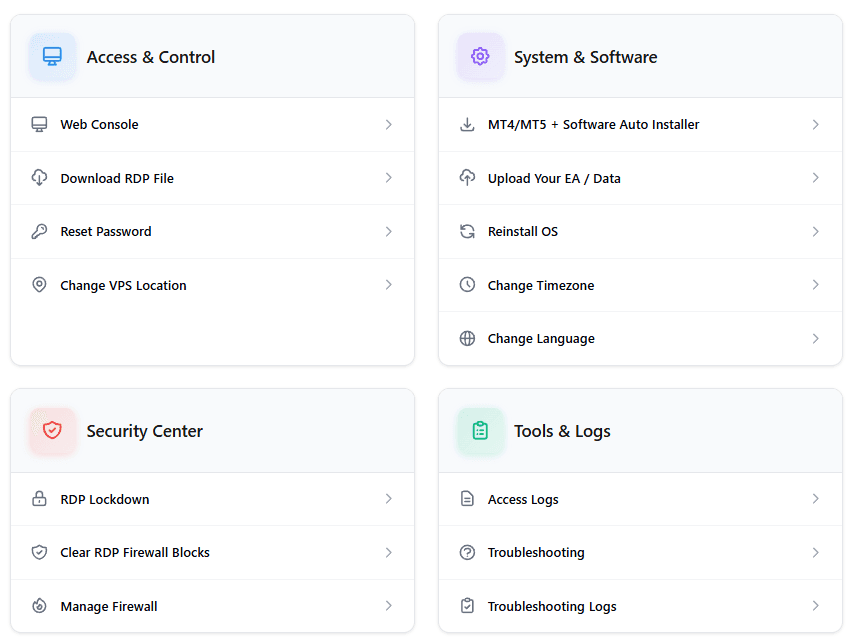
The NYCServers control panel is built specifically for forex traders. Self-service features include one-click trading platform installation for 100+ brokers, direct EA file uploads via browser, language and timezone settings, firewall management without command line, and remote power actions without RDP access.
24/7 Trading-Specific Support
NYCServers provides 24/7 support with a team that understands forex trading. When you contact support about MT4 configuration, EA behavior, or broker connectivity, you’re talking to people who know the terminology — not general hosting support reading from scripts.
Key Advantages Over TradingFXVPS
- Double the resources at entry level — 2 CPU cores and 60GB storage vs 1 CPU and 30GB
- Lower annual price — $16.67/mo vs $17.50/mo
- Accurate latency data — MT4 + MT5, server-by-server, regularly updated
- Modern operating systems — Windows Server 2022+ vs 2016 default
- Pre-installed platforms — ready to trade immediately
- Auto location selection — no guessing, no outdated data
- Built-in monitoring & alerts — know about issues before they impact trading
- 100% VPS focus — no EA sales or trading signals distracting from infrastructure
- Backup option available — $10/mo add-on for data protection

#2: ForexVPS.net
Best for: Traders who prioritize geographic coverage over everything else — but should understand the parent company operates multiple competing brands.
ForexVPS.net launched in 2014 and is operated by ThinkHuge Ltd, headquartered in Hong Kong. They position themselves as a premium provider with the largest server network in the industry — 22 locations globally. However, ForexVPS.net is just one of several brands under ThinkHuge, which also operates FXVM (a competing forex VPS), PingPlayers (game servers), and other products.
ForexVPS.net vs TradingFXVPS
| Feature | ForexVPS.net | TradingFXVPS |
|---|---|---|
| Entry Price | $35/mo | $25/mo ($17.50 annual) |
| Entry Resources | 2 vCPU, 4GB, 100GB | 1 vCPU, 2GB, 30GB |
| Locations | 22 | 8 |
| Parent Company | ThinkHuge Ltd (6+ brands) | Next Era Pte. Ltd. |
| Pre-installed Platforms | No | No |
| Refund Period | 14 days | 30 days |
Performance & Reliability
ForexVPS.net’s 22 locations provide the broadest geographic coverage in the forex VPS market. For traders using brokers in less common regions — South Africa, India, Brazil — this network offers options that most providers can’t match.
However, in August 2025, ForexVPS.net’s New York infrastructure experienced approximately 24 hours of downtime due to a fiber-related network failure. The outage affected both ForexVPS.net and FXVM simultaneously — revealing that both “competing” brands share the same underlying infrastructure.
Plans & Pricing
| Plan | vCPU | RAM | Storage | Price |
|---|---|---|---|---|
| Core | 2 | 4GB | 100GB | $35/mo |
| Edge | 4 | 6GB | 150GB | $55/mo |
| Prime | 6 | 8GB | 200GB | $75/mo |
ForexVPS.net’s entry price ($35/mo) is $10 more than TradingFXVPS, but includes more resources. The pricing page shows “Backups: Included” — however, at checkout, backups are revealed as a $10/month add-on.
Support & User Experience
ForexVPS.net enjoys strong Trustpilot ratings (4.8/5 from 5,000+ reviews) and provides 24/7 support. Like TradingFXVPS, they deliver a standard Windows environment requiring manual platform installation and location selection.
Account credits expire after 6 months of inactivity — a policy that frustrates traders who pause their VPS during slow market periods.
Key Limitations
- Multi-brand parent company — ThinkHuge operates 6+ brands including competing forex VPS (FXVM)
- August 2025 outage — ~24-hour NY downtime affected both ForexVPS.net and FXVM
- Hidden backup fees — shown as “included” on pricing page, $10/mo at checkout
- Credits expire — account balances lost after 6 months of inactivity
- No pre-installed platforms — manual setup required
- $10/mo more expensive — $35 vs $25 entry price

#3: FXVM
Best for: Budget-conscious traders who understand they’re using the same infrastructure as ForexVPS.net.
FXVM launched in 2013 and is operated by ThinkHuge Ltd — the same parent company as ForexVPS.net. This means FXVM shares ForexVPS.net’s infrastructure, staff, and vulnerabilities. The August 2025 NY outage affected both brands simultaneously.
FXVM vs TradingFXVPS
| Feature | FXVM | TradingFXVPS |
|---|---|---|
| Entry Price | $20/mo | $25/mo ($17.50 annual) |
| Entry Resources | 2 vCPU, 1.5GB, 60GB | 1 vCPU, 2GB, 30GB |
| Locations | 15 | 8 |
| Parent Company | ThinkHuge Ltd | Next Era Pte. Ltd. |
| Refund Period | 7 days | 30 days |
Performance & Reliability
FXVM operates 15 server locations with sub-millisecond latency claims. Hardware transparency is limited — they list allocated resources but don’t specify underlying CPU models. Third-party reviews found older Intel Xeon Silver CPUs, which may explain lower pricing compared to TradingFXVPS’s Ryzen 9 hardware.
Critical note: FXVM and ForexVPS.net share infrastructure. Choosing FXVM as a “backup” to ForexVPS.net provides zero redundancy.
Plans & Pricing
| Plan | vCPU | RAM | Storage | Price |
|---|---|---|---|---|
| Virtual Desktop | 2 | 3GB | 10GB | $14/mo |
| Lite VPS | 2 | 1.5GB | 60GB | $20/mo |
| Basic VPS | 2 | 2.5GB | 80GB | $29/mo |
| Advanced VPS | 2 | 4GB | 90GB | $50/mo |
The $14/month Virtual Desktop is limited to one trading platform, has no DLL support (breaking many EAs), and uses a shared operating system.
Key Limitations
- Same infrastructure as ForexVPS.net — no redundancy between brands
- Only 1.5GB RAM on Lite VPS — less than TradingFXVPS’s 2GB
- 7-day refund — much shorter than TradingFXVPS’s 30 days
- No backup service
- Limited hardware transparency
- Virtual Desktop restrictions — $14 plan limited to 1 platform, no DLL support

#4: QuantVPS
Best for: CME futures traders who need Chicago exchange proximity — not forex traders.
QuantVPS positions itself for US futures trading with Chicago-centric infrastructure optimized for CME Group connectivity. They advertise <0.52ms latency to CME exchanges and target traders using NinjaTrader, TradeStation, and Tradovate.
QuantVPS vs TradingFXVPS
| Feature | QuantVPS | TradingFXVPS |
|---|---|---|
| Entry Price | $59/mo | $25/mo ($17.50 annual) |
| Entry Resources | 4 vCPU, 8GB, 70GB NVMe | 1 vCPU, 2GB, 30GB NVMe |
| Primary Focus | CME futures | Forex + Futures |
| Locations | 4 | 8 |
| Refund Period | No refunds | 30 days |
Performance & Reliability
QuantVPS offers impressive hardware — AMD EPYC/Ryzen processors, DDR5 RAM, NVMe storage. Their Chicago infrastructure delivers sub-millisecond CME connectivity for futures traders. They also offer New York, London, and Tokyo locations.
Plans & Pricing
| Plan | vCPU | RAM | Storage | Monthly | Annual |
|---|---|---|---|---|---|
| VPS Lite | 4 | 8GB | 70GB NVMe | $59 | $49/mo |
| VPS Pro | 6 | 16GB | 150GB NVMe | $99 | $69/mo |
| VPS Ultra | 12+ | 32GB+ | 250GB+ NVMe | $199 | $139/mo |
Why It’s Wrong for Most Forex Traders
QuantVPS’s Chicago infrastructure is optimized for CME exchange proximity. Forex traders gain no benefit from CME latency — execution depends on connectivity to broker MT4/MT5 servers, not futures exchanges. The premium pricing pays for infrastructure optimization that provides no practical forex benefit.
Key Limitations
- Built for futures, not forex — CME optimization irrelevant for broker connectivity
- Premium pricing — $59/mo entry vs $25/mo TradingFXVPS
- No refunds — strict policy with no evaluation period
- Only 4 locations — fewer than TradingFXVPS’s 8
- Overkill resources — 8GB RAM entry tier exceeds most forex traders’ needs

#5: VPSForexTrader
Best for: Traders who prioritize high resource allocations and appreciate the no-termination-during-trading-hours policy.
VPSForexTrader is a division of HOSTLINE, JSC, a Lithuanian company operating since 2011. They emphasize AMD EPYC processors, ECC RAM, and NVMe storage with higher resource allocations at each tier.
VPSForexTrader vs TradingFXVPS
| Feature | VPSForexTrader | TradingFXVPS |
|---|---|---|
| Entry Price | $25.59/mo (annual) | $17.50/mo (annual) |
| Entry Resources | 3 vCPU, 4GB, 120GB NVMe | 1 vCPU, 2GB, 30GB NVMe |
| Locations | 4 | 8 |
| Pre-installed Platforms | No | No |
| Refund Period | 14 days | 30 days |
Performance & Reliability
VPSForexTrader offers strong hardware at competitive pricing — 3 vCPU, 4GB RAM, 120GB NVMe at entry level. Their 4 locations include New York, London, Amsterdam, and Hong Kong (no Tokyo).
A notable policy: VPSForexTrader advertises no service termination during forex trading hours for overdue payments — protecting traders from mid-session shutdowns due to billing issues.
Plans & Pricing
| Plan | vCPU | RAM | Storage | Monthly | Annual |
|---|---|---|---|---|---|
| VPS Smart | 3 | 4GB | 120GB NVMe | ~$30 | $25.59/mo |
| VPS Boost | 6 | 6GB | 180GB NVMe | ~$45 | $37.99/mo |
| VPS Max | 8 | 8GB | 250GB NVMe | ~$60 | $49.99/mo |
Key Limitations
- No Tokyo location — Asia-Pacific traders have limited options
- No monitoring or alerts
- Manual platform installation
- Only 4 locations — fewer than TradingFXVPS’s 8
- Backups are extra
- No latency verification tool

#6: FxSVPS
Best for: Demo account testing only — not recommended for live trading due to resource constraints and trust concerns.
FxSVPS competes aggressively on price with entry plans starting at $1.99/month. Founded in 2012, they position themselves as an ultra-budget option. However, extreme low pricing comes with significant trade-offs.
FxSVPS vs TradingFXVPS
| Feature | FxSVPS | TradingFXVPS |
|---|---|---|
| Entry Price | $1.99/mo (quarterly) | $17.50/mo (annual) |
| Entry Resources | 1 vCPU, 512MB, 20GB | 1 vCPU, 2GB, 30GB NVMe |
| Windows Version | Server 2012 | Server 2016 default |
| Locations | 16+ | 8 |
| Refund Policy | “Fair use” (unclear) | 30 days |
Performance & Reliability
FxSVPS’s entry plan provides only 512MB RAM — critically insufficient for trading. Windows Server alone consumes 500-700MB at idle, leaving nearly nothing for MT4/MT5 and EAs.
Their “Cheap Forex VPS” plans use Windows Server 2012, which hasn’t received security updates since October 2023.
Critical Concerns
- 512MB RAM is insufficient — Windows uses most of it, nothing left for trading
- Windows Server 2012 — end-of-life, no security updates
- Unclear refund policy — “fair use” not defined
- Public billing complaints — reviews report unauthorized charges after cancellation
- VPS terminations — reports of accounts terminated for CPU overload

#7: MyForexVPS
Best for: Budget-conscious traders who don’t need weekend support or Asia-Pacific coverage.
MyForexVPS has operated since 2012 (UK-based) with straightforward pricing and decent entry-level specifications at $14.99/month.
MyForexVPS vs TradingFXVPS
| Feature | MyForexVPS | TradingFXVPS |
|---|---|---|
| Entry Price | $14.99/mo | $17.50/mo (annual) |
| Entry Resources | 2 vCPU, 2GB, 50GB SSD | 1 vCPU, 2GB, 30GB NVMe |
| Support | 24/5 | 24/7 |
| Locations | 3 | 8 |
| Refund Period | 7 days | 30 days |
Performance & Reliability
MyForexVPS operates in three locations: New York, London, and Amsterdam. No Tokyo option limits Asia-Pacific traders. Hardware details aren’t prominently disclosed.
Key Limitations
- 24/5 support only — weekend issues require email with delayed response
- 7-day refund — much shorter than TradingFXVPS’s 30 days
- No Tokyo location
- No dedicated server option — traders who outgrow VPS must migrate elsewhere
- No monitoring or alerts
- Limited hardware transparency

#8: ForexVPS365
Best for: Approach with caution — no independent reviews exist anywhere, raising significant trust concerns.
ForexVPS365 launched in 2019 and is registered in Latvia. They offer 9 server locations with pricing starting at €17/month (~$18 USD). The complete absence of independent reviews creates substantial uncertainty.
ForexVPS365 vs TradingFXVPS
| Feature | ForexVPS365 | TradingFXVPS |
|---|---|---|
| Entry Price | €17/mo (~$18) | $17.50/mo (annual) |
| Entry Resources | 1 vCPU, 2GB, 20GB | 1 vCPU, 2GB, 30GB NVMe |
| Locations | 9 (tier-gated) | 8 |
| Trustpilot | No presence | 4.7/5 (300+ reviews) |
| Uptime SLA | 99.9% | Not specified |
Critical Concerns
- Zero independent reviews — no Trustpilot, ForexPeaceArmy, or Myfxbook presence
- ScamAdviser flags low trust score
- Location tier-gating — entry plan limits to 4 of 9 locations
- Dedicated servers Netherlands-only
- Limited resources — only 20GB storage at entry (vs 30GB TradingFXVPS)
- 99.9% SLA — allows ~8.76 hours annual downtime

#9: FXVPSPro
Best for: Demo accounts only — multiple serious red flags make this unsuitable for live trading.
FXVPSPro offers extremely low pricing starting at $4.89/month. However, documented concerns about billing practices, fake reviews, and service reliability create significant risk.
FXVPSPro vs TradingFXVPS
| Feature | FXVPSPro | TradingFXVPS |
|---|---|---|
| Entry Price | $4.89/mo | $17.50/mo (annual) |
| Entry Resources | 1 vCPU, 1GB, 18GB HDD | 1 vCPU, 2GB, 30GB NVMe |
| Storage Type | HDD | NVMe |
| Refund Period | 3 days | 30 days |
| Trustpilot | 2.7/5 | 4.7/5 |
Critical Concerns
- 1GB RAM with HDD storage — inadequate for trading platforms
- ForexPeaceArmy flagged for fake reviews — “large numbers of fake positive reviews”
- Billing complaints — reports of unauthorized charges and wrongful suspensions
- 3-day refund window — barely time to configure
- VPS failures causing losses — users report EAs unable to manage positions
- HDD storage — 10-20x slower than NVMe

#10: Cloudzy
Best for: General cloud workloads — not optimized or positioned for forex trading specifically.
Cloudzy (formerly RouterHosting, founded 2008) is a general-purpose cloud provider offering forex VPS among many services including Linux VPS, gaming servers, and GPU hosting. Trading VPS is one product line among many.
Cloudzy vs TradingFXVPS
| Feature | Cloudzy | TradingFXVPS |
|---|---|---|
| Entry Price | $28/mo | $17.50/mo (annual) |
| Entry Resources | 2 vCPU, 4GB, 120GB | 1 vCPU, 2GB, 30GB NVMe |
| Primary Focus | General cloud | Forex/Futures |
| Locations | 15+ | 8 |
| Uptime SLA | 99.95% | Not specified |
| Refund Period | 7 days | 30 days |
Performance & Reliability
Cloudzy offers solid hardware — NVMe storage, DDR5 RAM, AMD processors. Their 15+ locations span multiple continents.
However, their data centers are positioned as “major cities” rather than financial hubs. A VPS in “New York City” may not be in Equinix NY4/NY5 where forex brokers operate, adding 5-10ms unnecessary latency.
Security Concerns
In August 2023, cybersecurity firm Halcyon published an investigation into Cloudzy’s operations. According to their report (covered by Reuters and SecurityWeek), Cloudzy allegedly provided infrastructure to state-sponsored hacking groups, with more than half of servers allegedly supporting malicious activities.
Cloudzy’s CEO disputed these findings. However, for traders hosting live trading infrastructure, these concerns add risk beyond standard hosting considerations.
Key Limitations
- 2023 Halcyon security report — linked to state-sponsored threat actors (disputed but concerning)
- General-purpose infrastructure — not positioned in financial data centers
- 180-day Windows trial only — no full license included
- 99.95% uptime SLA — allows ~4.4 hours annual downtime
- No pre-installed platforms
- No automatic broker optimization
How to Choose the Right TradingFXVPS Alternative
If You Trade With Major Brokers (IC Markets, FTMO, Pepperstone, etc.)
Choose a VPS positioned in financial hubs where these brokers actually host servers — and verify latency data is accurate and current. NYCServers provides server-by-server latency data for both MT4 and MT5, automatically optimizes placement based on broker selection, and pre-installs your trading platform.
If You Need Asia-Pacific Coverage
Look for providers with Tokyo locations and accurate latency verification. NYCServers operates in Tokyo (TY3). Avoid providers like VPSForexTrader and MyForexVPS that lack Asia-Pacific presence, or those with outdated location data.
If Budget Is Your Priority
Consider MyForexVPS ($14.99/mo) — but understand trade-offs: 24/5 support, 7-day refund, no Tokyo. Avoid ultra-budget options like FxSVPS and FXVPSPro where resource constraints and trust issues create operational risk.
If You Trade CME Futures (Not Forex)
QuantVPS is purpose-built for CME proximity — or stick with TradingFXVPS’s Chicago location. But if you trade forex, Chicago-centric infrastructure provides no benefit for broker connectivity.
If Latency Data Accuracy Matters
Avoid providers with MT4-only or outdated broker information. NYCServers provides server-by-server latency data for both MT4 and MT5, regularly updated as brokers relocate infrastructure.
Why NYCServers is the Best TradingFXVPS Alternative
TradingFXVPS built its reputation on premium hardware — AMD Ryzen 9 processors, DDR5 memory, NVMe storage. For traders who need raw single-thread CPU performance, it delivers. But hardware specifications don’t protect you from outdated latency data, end-of-life operating systems, or the confusion of a company that sells EAs alongside VPS hosting.
Accurate Latency Data You Can Trust
TradingFXVPS’s latency checker only covers MT4 servers — leaving MT5 traders guessing. The data shows aggregate broker-level latency, not individual server addresses. And critically, it’s not regularly updated: Blueberry Markets still shows Tokyo when their servers moved to London.
NYCServers provides server-by-server latency data for both MT4 and MT5 platforms. You can verify latency to your exact trading server before ordering — not outdated aggregate data that might point you to the wrong continent.
The Broker Latency Checker shows actual ping times to each individual server your broker operates. When brokers relocate infrastructure, the data reflects current reality — not historical assumptions.
Modern Operating Systems by Default
TradingFXVPS defaults to Windows Server 2016 — an operating system past Microsoft’s mainstream support since January 2022. They still offer Windows Server 2012, which stopped receiving security updates in October 2023.
Every NYCServers VPS runs Windows Server 2022 or newer. No extra charge for current software. No security vulnerabilities from outdated platforms. No end-of-life operating systems exposing your trading environment to unpatched risks.
Double the Resources at Entry Level
TradingFXVPS’s entry plan provides 1 vCPU, 2GB RAM, and 30GB storage for $17.50/month (annual billing).
NYCServers Basic provides 2 vCPU, 2GB RAM, and 60GB storage for $16.67/month (annual billing).
That’s double the CPU cores, double the storage, at a lower price. For traders running multiple MT4/MT5 instances or resource-intensive EAs, the additional CPU core matters. For traders accumulating history data and log files, double storage prevents the disk space issues that crash platforms.
Pre-Installed Platforms, Zero Setup Friction
TradingFXVPS delivers a blank Windows environment. You download MT4/MT5 yourself, install it, find your broker’s server address, configure connections, and hope you got the right terminal build.
NYCServers delivers your VPS with your broker’s specific trading platform already installed and configured. Select your broker at checkout. Connect via RDP. Enter your credentials. Start trading. The entire process takes 5-10 minutes — not the hours of research and configuration TradingFXVPS requires.
Automatic Location Selection Based on Reality
TradingFXVPS offers 8 locations — but expects you to research which one matches your broker, using latency data that may be years out of date. Pick wrong, and you add unnecessary latency to every trade. Worse, you might not discover the mistake until you notice execution issues.
NYCServers eliminates this risk. Select your broker at checkout, and the system automatically provisions your VPS in the optimal data center based on where that broker actually hosts their trading servers today. No guessing. No outdated information. No wrong choices.
Built-In Monitoring That Catches Problems Early
TradingFXVPS doesn’t advertise monitoring or alerting features. When your EA crashes at 3 AM, when a memory leak slowly consumes RAM, when disk space fills with log files — you don’t know until you manually check, hours or days later, after positions have gone unmanaged.
Every NYCServers VPS includes monitoring software that tracks CPU usage, RAM consumption, disk space, and platform status. You receive automated alerts for:
- High RAM usage (catching memory leaks before they crash platforms)
- CPU overload (too many indicators or terminals running)
- Low disk space (log files accumulating toward the limit)
- New RDP logins (security awareness for unauthorized access attempts)
Issues are flagged before they impact trading — not discovered after the damage is done.
100% VPS Focus, No EA Sales Distractions
TradingFXVPS sells forex signals and promotes Strive Scalper (formerly GoldPecker) directly on their website. They claim they’re “not affiliated” with the EA while selling licenses on their portal. This mixed business model raises questions: when a company profits from both VPS hosting and EA sales, where do development resources go?
NYCServers focuses 100% on forex VPS infrastructure. No Expert Advisors. No trading signals. No speculative products. Every development hour, every infrastructure upgrade, every support process improvement goes toward one thing: making your VPS faster, more reliable, and easier to use.
Backup Protection Available
TradingFXVPS mentions RAID storage — which protects against hardware drive failure but doesn’t help you restore after software issues, misconfigurations, or accidental deletions. No backup add-on is visible on their website.
NYCServers offers backups as a $10/month add-on. When something goes wrong — a bad EA update, an accidental file deletion, a configuration mistake — you can restore your VPS to a previous state instead of rebuilding from scratch.
The Bottom Line
TradingFXVPS delivers premium hardware. AMD Ryzen 9 processors, DDR5 RAM, NVMe storage — the specifications are impressive. But specifications don’t help when the latency checker points you to the wrong server location. Premium CPUs don’t protect you when Windows Server 2012 stops receiving security updates. Fast storage doesn’t matter when there’s no backup option and your configuration is lost.
NYCServers delivers what forex traders actually need: accurate latency data for both MT4 and MT5, modern operating systems with ongoing security support, pre-installed platforms that eliminate setup friction, automatic location selection based on current broker infrastructure, and monitoring that catches problems before they impact your trading. All with more resources at entry level, at a lower annual price, from a company focused 100% on VPS infrastructure.
Frequently Asked Questions
Is TradingFXVPS good for forex trading?
TradingFXVPS offers premium hardware — AMD Ryzen 9 processors with strong single-thread performance, DDR5 RAM, and NVMe storage. For CPU-intensive EAs, the hardware delivers. However, their latency checker only covers MT4 servers (no MT5 data), the broker location information appears outdated, and they default to Windows Server 2016 which is past Microsoft’s mainstream support. Traders should verify latency independently and request current Windows versions.
Why does TradingFXVPS’s latency checker only show MT4?
TradingFXVPS explicitly states their latency tests were performed for MT4 servers only. This leaves MT5 traders — an increasingly large segment of the market — without verification data. NYCServers provides server-by-server latency data for both MT4 and MT5 platforms.
Is TradingFXVPS’s broker latency data accurate?
The data appears to not be regularly updated. For example, Blueberry Markets shows 2ms latency to Tokyo on TradingFXVPS’s checker, but Blueberry relocated their trading servers to London. Traders relying on this outdated information would select the wrong VPS location, adding unnecessary latency.
Why does TradingFXVPS default to Windows Server 2016?
TradingFXVPS defaults to Windows Server 2016 and still offers Windows Server 2012 as an option. Both operating systems have passed Microsoft’s mainstream support dates. Windows Server 2022 is available but costs extra. Traders should explicitly request current Windows versions to ensure ongoing security updates.
Does TradingFXVPS offer backups?
TradingFXVPS mentions RAID array storage, which protects against hardware drive failure. However, RAID is not a backup solution — it doesn’t help restore after software issues or misconfigurations. No backup add-on option is visible on their website. NYCServers offers backups as a $10/month add-on.
Why does TradingFXVPS sell forex EAs?
TradingFXVPS promotes “Strive Scalper” (formerly GoldPecker) on their website and sells licenses through their portal, despite claiming they’re “not affiliated” with the product. This mixed business model combines VPS infrastructure with speculative trading products. NYCServers focuses 100% on VPS hosting with no EA or signal sales.
Which TradingFXVPS alternative offers the best value?
For most forex traders, NYCServers offers the best value — double the CPU cores and storage at entry level, lower annual pricing, accurate MT4/MT5 latency data, modern Windows Server 2022+, pre-installed platforms, and built-in monitoring. TradingFXVPS’s premium hardware advantage is offset by operational gaps in latency verification, OS currency, and setup experience.
Does TradingFXVPS have more server locations than NYCServers?
TradingFXVPS operates 8 locations; NYCServers operates 3 (NY, London, Tokyo). However, the vast majority of forex brokers host their trading servers in New York and London — exactly where NYCServers focuses. More locations don’t help if the latency data pointing you to those locations is outdated.

About the author
Matthew Hinkle
Lead Writer & Full Time Retail Trader
Matthew is NYCServers' lead writer. In addition to being passionate about forex trading, he is also an active trader himself. Matt has advanced knowledge of useful indicators, trading systems, and analysis.
Areas of Expertise