
NYCServers vs FxSVPS: Is An Ultra Budget Forex VPS Worth the Risk?
NYCServers vs FxSVPS: Pricing, refund policies, resources, and risks compared. Everything you need to choose the right VPS provider.

Choosing a Forex VPS is ultimately a trade-off between cost, reliability, and operational risk. While some traders prioritize the lowest possible monthly price, others value stability, automation, and predictable performance — especially when running live accounts or automated strategies where downtime has real financial consequences.
NYCServers and FxSVPS are both established Forex VPS providers founded in 2012, with over a decade in the industry. However, they target very different segments of the market.
NYCServers focuses on a premium, trader-first experience built around automation, broker optimization, and infrastructure concentrated in major financial hubs. FxSVPS competes aggressively on price, offering some of the lowest-cost Forex VPS plans available — with entry tiers starting under $4/month.
Key Takeaways
- FxSVPS offers extremely low prices — but entry-level plans provide as little as 512MB RAM, which may not run MT4/MT5 reliably with indicators or EAs.
- NYCServers offers a 14-day money-back guarantee — FxSVPS has an unclear refund policy.
- Public reviews report billing issues with FxSVPS — including continued charges after cancellation and difficulty obtaining refunds.
- FxSVPS charges additional fee for some service locations and other restrictions — there are no additional fees or restrictions for service location selection with NYCServers.
- NYCServers pre-installs trading platforms based on broker selection — FxSVPS requires manual installation and configuration.
- Ultra-budget VPS plans introduce operational risk — limited resources, older Windows versions, and support constraints can affect stability during live trading.
This comparison evaluates NYCServers vs FxSVPS across pricing, performance, locations, setup experience, policies, and risk considerations — so you can decide which provider aligns best with your trading style and tolerance for operational trade-offs.
For full transparency, we operate NYCServers. That said, every claim in this article is supported by publicly available information — including published pricing pages, terms of service, and verified customer reviews — so readers can independently validate the facts.
This comparison is based on publicly available information, provider documentation, pricing pages, and user-reported experiences as of December 2025. Features and policies may change over time.
Quick Comparison: NYCServers vs FxSVPS
The table below highlights the most important differences before diving into detailed analysis.
| Feature | NYCServers | FxSVPS |
|---|---|---|
| Founded | 2012 | 2012 |
| Entry Price | $25/month | $1.99/month (Quarterly billing required) |
| Entry Resources | 2 CPU, 2GB RAM, 60GB storage | 1 CPU, 512MB, 20GB storage |
| Windows Version | Windows Server 2022 | Windows Server 2012, 2016, 2019 (cheap tiers) |
| Server Locations | 3 (New York, London, Tokyo) | 16+ global locations |
| Pre-installed Platforms | Yes (MT4, MT5, cTrader) | No manual installation required |
| Broker-Based Location Selection | Yes — automatic at checkout | No — manual selection |
| Uptime Guarantee | 100% during trading hours | 99.99% |
| Money-Back Guarantee | 14 days | Unclear |
| Monitoring & Alerts | Built-in | Not documented |
| Account Credits | Never expire | Not specified |
| DDoS Protection | Included | Included |
Data verified from publicly available pricing pages, terms of service, and customer reviews as of December 2025.
Pricing & Long-Term Cost: Is Cheaper Always Better?
FxSVPS is one of the lowest-priced Forex VPS providers on the market. Its “Cheap Forex VPS” plans start under $4 per month, with even lower rates when prepaid quarterly or annually. On the surface, this pricing is extremely attractive — especially for new traders or those experimenting with VPS hosting for the first time.
NYCServers starts at $25 per month, positioning itself as a premium service. The price difference raises an obvious question: what do you gain — or give up — by paying less?
FxSVPS Pricing Overview
FxSVPS divides its plans into two categories:

“Cheap Forex VPS” Plans:
- Ultra Cheap: $1.99/month (quarterly billing required) — 1 vCPU, 512MB RAM, 20GB storage
- Eco Starter: $3.50/month (quarterly billing required) — 1 vCPU, 1GB RAM, 25GB storage
- Eco Zone: $4.79/month (quarterly billing required) — 1 vCPU, 1.5GB RAM, 30GB storage
- Eco Pro: $5.94/month (quarterly billing required) — 2 vCPU, 2GB RAM, 35GB storage

“Exclusive Forex VPS” Plans:
- Lite VPS: $9.99/month — 2 vCPU, 3GB RAM, 40GB storage
- Basic VPS: $16.78/month — 2 vCPU, 4GB RAM, 60GB storage
- Premium VPS: $35.99/month — 4 vCPU, 6GB RAM, 80GB storage
- Professional: $42.99/month — 6 vCPU, 8GB RAM, 100GB storage
It is important to note that there are other additional fees which may apply. For example:
- Dedicated IP Address Fee – $1.00/month
- Additional fee for Windows Server 2022 or 2025
- Additional fees for selecting specific service locations
Note: FxSVPS pricing varies by billing cycle and promotions.

NYCServers Pricing Overview
- Basic: $25/month ($250/year) — 2 vCPU, 2GB RAM, 60GB storage
- Standard: $40/month — 2 vCPU, 4GB RAM, 70GB storage
- Professional: $60/month — 4 vCPU, 8GB RAM, 100GB storage
- Dedicated Server: From $125/month — full dedicated hardware
There are no additional fees for a dedicated IP address, service location selection, or Windows operating system.
All NYCServers plans include Windows Server, 24/7 support, pre-installed trading platforms, broker-based location optimization, built-in monitoring, and a trading-specific control panel.
Entry-Level Resource Comparison
The pricing difference becomes clearer when comparing actual resources:
| Specification | NYCServers Basic ($25/mo) | FxSVPS Ultra Cheap ($1.99/mo) |
|---|---|---|
| RAM | 2GB | 512MB |
| Storage | 60GB | 20GB |
| CPU | 2 vCPU | 1 vCPU |
| Windows Version | 2022 | 2012 |
| Pre-installed Platforms | Yes | No |
FxSVPS’s cheapest plans provide as little as 512MB of RAM — which leaves minimal headroom once the Windows operating system and trading platform are loaded. Running MT4 or MT5 with multiple charts, indicators, or Expert Advisors on 512MB is likely to result in slow performance, freezes, or crashes.
NYCServers’ entry plan provides 4x the RAM and 4x the storage, with a modern Windows environment designed for stable MT4/MT5 operation.
In addition, the Windows Server version offered by FxSVPS is Windows Server 2012. This operating system is more than 13 years old, and can lack compatibility with some modern software. Most importantly this operating system is no longer supported by Microsoft – which means there are no further security updates released. This is important to note for traders who take the security of their service seriously.
The Real Cost of “Cheap”
In practice, a VPS that freezes or crashes during active trades can cost far more than the monthly price difference between plans. For traders running live accounts or automated strategies, the question isn’t just “what’s the cheapest option?” — it’s “what’s the true cost of instability?”
Budget VPS plans can work for non-critical use cases like testing strategies or running backup terminals. For live trading, the operational risk of minimal resources often outweighs the monthly savings.
Refund Policies: A Critical Discrepancy
Before committing to any VPS provider, traders should understand the refund policy — especially when evaluating a service for the first time.
NYCServers: 14-Day Money-Back Guarantee
NYCServers offers a clear 14-day money-back guarantee. This provides a reasonable evaluation window to:
- Test latency to your broker’s trading servers
- Verify platform stability under real market conditions
- Confirm that your EAs and trading workflows perform as expected
If the service doesn’t meet your requirements, you can request a refund within the evaluation period.
FxSVPS: Unclear Refund Policy
The refund policy at FxSVPS is unclear.

According to FxSVPS’s website:
“We offer a fair use fund policy – contact support within the first billing cycle if you face unresolved issues.”
The definition of fair use is unclear, and we could not find any further information on this topic on their website or terms of service.
Public Reports of Billing Issues
Beyond the refund policy uncertainty, multiple public reviews report billing-related concerns with FxSVPS:

“Do not purchase from this site. If you will purchase this VPS service you can not cancel it. After unsubscribing your service they will keep on charging you until and unless you block your credit or debit card.”— ForexPeaceArmy reviewer

“FxSVPS would not let me cancel my VPS to the next due date (as their policy says) but they have charged me for an extra month, that I can’t get refunded.”— ForexPeaceArmy reviewer

“THEY WILL NOT ALLOW YOU TO CANCEL A SERVER AND DO NOT REPLY TO YOUR EMAILS. ALSO THEY CONTINUE USING YOUR CREDIT CARD FOR MONTHLY PAYMENT AFTER HAVING SENT MAILS TO CANCEL YOUR VPS SERVER.”— ForexPeaceArmy reviewer
Note: These are individual customer experiences and may not reflect every user’s outcome. However, the pattern of billing-related complaints across multiple review platforms warrants caution.
Uptime, Stability & Trading Risk
For Forex traders — especially those running automated strategies — uptime is a risk factor, not a convenience. When a VPS becomes unreachable, trading platforms stop executing and open positions may go unmanaged.
Uptime Guarantees
NYCServers guarantees 100% uptime during trading hours, aligning its SLA with how traders actually use the service — continuously while markets are open.
FxSVPS advertises a 99.99% uptime guarantee, which is standard in budget hosting. While 99.99% sounds impressive, it still allows for approximately 52 minutes of downtime per year — which could occur during critical market moments.
Resource Constraints and Stability
Beyond uptime guarantees, the stability of ultra-budget VPS plans depends heavily on available resources:
- 512MB RAM: Windows Server alone consumes significant memory. Adding MT4/MT5 with charts and indicators can push the system to its limits.
- Older Windows versions: Windows Server 2012 lacks security updates and optimizations available in newer versions.
- Shared infrastructure: Budget providers often oversubscribe servers, meaning your VPS competes for resources with other users.
Public reviews of FxSVPS include reports of performance issues:
“I have both a Cheap Forex VPS and a Best Forex VPS but they can both only handle 1 or 2 accounts. FxSVPS have terminated me 2 times because the CPU was overloaded.”— ForexPeaceArmy reviewer
For traders running live accounts, limited resources and stability concerns introduce operational risk that may exceed the monthly cost savings.
Server Locations & Latency Optimization
Latency — the time it takes for your trading platform to communicate with your broker’s servers — directly affects execution quality. Lower latency generally improves responsiveness and can reduce slippage.

FxSVPS: Broad Geographic Coverage
According to the graphic on their website, FxSVPS operates 16+ locations across North America, Europe, and Asia-Pacific, including cities such as Mumbai, New Delhi, Moscow, Roubaix, Sydney, Singapore, and Amsterdam.
This broad coverage can be useful for traders needing servers in less common locations or regional markets outside the major financial hubs.

NYCServers: Focus on Forex Broker Hubs
NYCServers intentionally limits its footprint to New York, London, and Tokyo — the primary hubs where the majority of Forex brokers host their MT4/MT5 trading servers.
This focused approach prioritizes execution quality over sheer location count. For most Forex traders, hosting in one of these three financial centers delivers better real-world latency than hosting in secondary cities with few or no broker servers nearby.
Location Quantity vs Quality
Having 16 server locations sounds impressive, but the real question is: where does your broker host its trading servers?
If your broker’s servers are in New York or London — as most major brokers are — then additional locations in Mumbai, Moscow, or Roubaix provide no execution benefit. A VPS in the “right” city (near your broker) will always outperform a VPS in the “wrong” city (far from your broker), regardless of how many total locations the provider offers.
NYCServers provides a Broker Latency Checker tool so traders can verify latency to their specific broker’s servers before ordering.
Setup Experience & Platform Readiness
Setup friction is often underestimated. Every additional step increases the chance of configuration errors and delays — especially when deploying multiple terminals or accounts.

NYCServers: Ready-to-Trade Setup
NYCServers provisions VPS instances with trading platforms pre-installed and optimized based on the selected broker:
- Select your broker during checkout
- VPS is automatically placed in the optimal data center
- MT4, MT5, or cTrader is pre-installed and configured
- Connect via Remote Desktop and start trading immediately
This eliminates common setup mistakes — downloading the wrong terminal version, connecting to the wrong broker server, or choosing a suboptimal VPS location.
FxSVPS: Manual Setup Required
FxSVPS delivers a standard VPS environment. Traders must:
- Connect via Remote Desktop
- Download and install MT4 or MT5 manually
- Configure broker connections and server settings
- Ensure platforms auto-start correctly after reboots
For experienced users, manual setup may be acceptable. However, some FxSVPS reviews report slow provisioning times:

“6 Hours have passed and still no VPS setup. The email sent says setup is usually between 10-20 mins.”— ForexPeaceArmy reviewer

“The service is of very poor quality, the server takes a very long time to load; in my case, it took more than 12 hours. They do everything manually.”— Trustpilot reviewer
For traders who need to deploy quickly, these delays can be frustrating — especially during active market conditions.
VPS Management, Monitoring & Automation
Easy to use management tools takes the stress out of trading. For always-on trading systems, monitoring and alerting can be the difference between a small disruption and a costly operational failure.
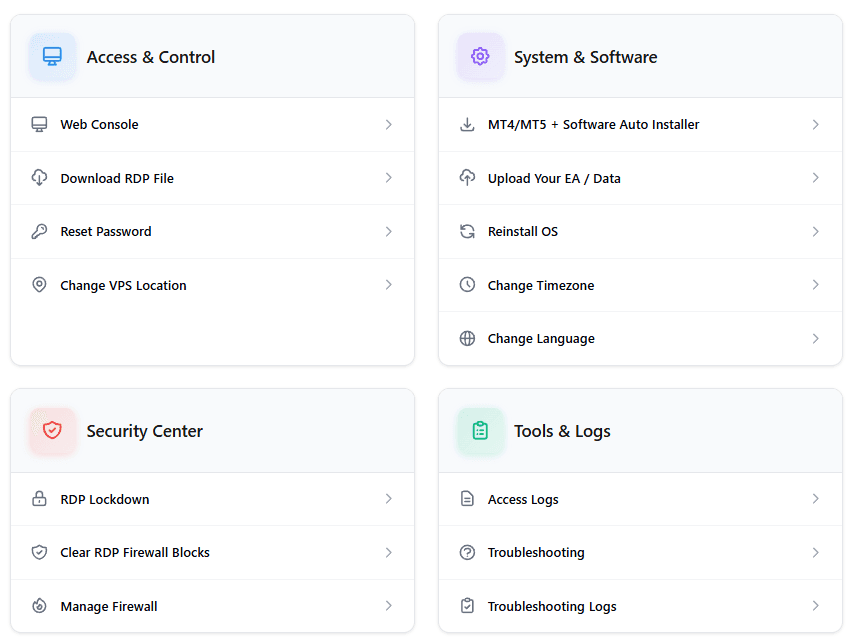
NYCServers: Trading-Specific Control Panel
NYCServers includes a custom control panel built specifically for traders:
- One-click trading platform installation
- Upload Expert Advisors and data files via browser
- Built-in monitoring with automated alerts
- Change VPS location from the client area
- Remote power actions (restart, shutdown)
- Firewall and security management
This self-service approach allows traders to manage routine tasks immediately without waiting for support.

NYCServers: Service Monitoring & Alerts System
All services provided by NYCServers includes their custom service monitoring and alert system. This is a critical tool for traders to leverage in order to make sure that their service is always working as expected to avoid any surprise interruptions.
For example, my using the monitoring system traders can receive an immediate when their VPS is experiencing high RAM usage. This simple alert allows the trader to immediately investigate the cause to ensure that their VPS always has enough resources for their operations.
FxSVPS: Standard VPS Management
FxSVPS provides a basic VPS control panel typical of budget hosting environments. Furthermore, we could not find any documentation that suggest that there is any sort of monitoring or alert system in place for clients.
This is a critical note that traders who value control and service monitoring should make note of.
Support Experience & Customer Reports
Support quality becomes critical during platform issues, connectivity problems, or time-sensitive trading events.
NYCServers Support
Because the platform includes extensive self-service tools, many routine tasks can be handled immediately without waiting for support intervention – but when support is required, NYCServers 24/7 team is ready to provide assistance.
A sample of some of the reviews published by reported customers include:


FxSVPS Support: Mixed Reviews
FxSVPS customer reviews show a polarized distribution. Some users report positive experiences with responsive support, while others describe significant challenges:
“I have sent many chats and no one has answered as after a while the chat automatically closes, so I have to open another one. I have also submitted a ticket with no reply.”— ForexPeaceArmy reviewer
Conversely, other reviews praise quick assistance:

“Whenever encountered any issue, Julie James has been super helpful and efficient.”— Trustpilot reviewer
This variability means support experiences may differ significantly between users. For traders who depend on consistent, reliable support during critical moments, this unpredictability introduces additional risk.
Who Should Choose Which Provider?
Choose NYCServers if you:
- Trade Forex with real capital or rely on automated strategies
- Want pre-installed, broker-optimized trading platforms
- Prefer predictable uptime and lower operational risk
- Trade with brokers located in New York, London, or Tokyo
- Value built-in monitoring, alerts, and trading-specific tools
- Want a clear 14-day money-back guarantee
- Prefer transparent billing with no cancellation issues
Choose FxSVPS if you:
- Are highly budget-conscious and testing VPS trading for the first time
- Need servers in secondary or niche locations not covered by major hubs
- Use VPS hosting for non-critical or backup purposes only
- Are comfortable with manual setup, limited automation, and no end user monitoring & alerts sytem
- Understand and accept the refund policy limitations
Final Verdict
NYCServers and FxSVPS represent opposite ends of the Forex VPS spectrum.
FxSVPS delivers some of the lowest prices in the industry, making it appealing for experimentation and cost-sensitive use cases. However, ultra-budget plans introduce meaningful trade-offs: minimal resources (as low as 512MB RAM), older Windows versions, discrepancies and uncertainty around refund policies, and documented support reliability concerns in public reviews.
NYCServers charges more, but delivers a complete, ready-to-trade environment optimized for Forex brokers and automated strategies. For traders running live accounts where uptime, execution quality, and operational reliability matter, the higher price often reflects lower total risk.
The right choice depends on how critical your VPS is to your trading:
- For casual testing or backup use: FxSVPS’s budget plans may be sufficient — but verify the refund policy and accept the risks carefully.
- For live trading with real capital: NYCServers provides a more robust, predictable, and lower-risk foundation.
In trading, as in VPS hosting, you often get what you pay for.
Ready to try NYCServers?
Test our Forex VPS with a 14-day money-back guarantee. Select your broker at checkout and your VPS will be ready to trade in minutes — with pre-installed platforms and broker-optimized latency. Get Started →
Frequently Asked Questions
Is FxSVPS good for automated Forex trading?
FxSVPS can run MT4 or MT5 and may be suitable for basic automated trading or testing purposes. However, its lowest-tier plans provide as little as 512MB RAM — which can affect stability when running multiple charts, indicators, or Expert Advisors. Public reviews include reports of VPS terminations due to CPU overload. Traders relying on automation for live accounts often prioritize higher resource availability and uptime consistency.
Why is FxSVPS significantly cheaper than NYCServers?
FxSVPS competes primarily on price by offering minimal-resource VPS plans with older Windows versions and fewer included features. NYCServers focuses on broker-optimized infrastructure, pre-installed platforms, modern Windows Server versions, built-in monitoring, and tooling designed to reduce operational risk — which results in higher but more predictable pricing.
Does FxSVPS really offer a money-back guarantee?
FxSVPS advertises a “fair use refund policy” on their website – however the exact definition of what the fair use policy is could not be found anywhere.
Does having more VPS locations improve Forex execution?
Not necessarily. For most Forex traders, execution quality depends more on proximity to the broker’s MT4/MT5 trading servers than on the total number of VPS locations offered. Most major brokers host servers in financial hubs like New York, London, and Tokyo. A VPS in the correct city (near your broker) will outperform a VPS in the wrong city, regardless of total location count.
Which VPS is better for MT4 and MT5?
Both providers support MT4 and MT5. NYCServers includes pre-installed, broker-aligned platforms designed for immediate use, reducing setup time and configuration errors. FxSVPS requires manual installation and configuration. For traders who want to start trading immediately without setup friction, NYCServers offers a faster path to live trading.
Is a low-cost Forex VPS risky?
Low-cost VPS plans can work for non-critical use cases, such as testing strategies or running backup terminals. However, limited resources (512MB-1GB RAM), shared infrastructure, older Windows versions, and potential support or billing constraints may increase operational risk when trading live accounts or running automated strategies continuously. The monthly savings may not justify the potential cost of VPS instability during active trading.
This comparison is based on publicly available information, including provider websites, published pricing, terms of service, and customer reviews as of December 2025. Features, pricing, and policies may change over time. Readers are encouraged to verify details directly with each provider before making a decision.

About the author
Matthew Hinkle
Lead Writer & Full Time Retail Trader
Matthew is NYCServers' lead writer. In addition to being passionate about forex trading, he is also an active trader himself. Matt has advanced knowledge of useful indicators, trading systems, and analysis.
Areas of Expertise