
NYCServers vs ForexVPS365: Pricing, Reviews & Trust Compared
Compare NYCServers and ForexVPS365 for forex trading. See pricing, server locations, reviews, and why social proof matters for VPS providers.

ForexVPS365 positions itself as a budget-friendly forex VPS provider with servers across nine global locations. They’ve been operating since 2019 and target cost-conscious traders who want reliable performance without premium pricing.
But when evaluating a VPS provider for automated trading, price is only part of the equation. Trust, transparency, and verifiable track record matter just as much — especially when your trading capital depends on the service staying online.
This comparison examines both providers across pricing, features, reputation, and operational transparency to help you make an informed decision.
Disclosure: We operate NYCServers. Every claim in this article is based on publicly available information from official websites, third-party review platforms, and verifiable sources.
Key Takeaways
- ForexVPS365 has no presence on major review platforms — No Trustpilot reviews, no ForexPeaceArmy listing, no Myfxbook feedback. This makes verifying service quality difficult.
- Server locations are tier-restricted — ForexVPS365’s entry plan only provides access to 4 of 9 locations. Tokyo, Singapore, Frankfurt, and Hong Kong require upgrading to higher tiers.
- NYCServers offers more resources at entry level — 2 CPU cores and 60GB storage vs ForexVPS365’s 1 CPU core and 20GB storage at comparable pricing.
- Dedicated servers at ForexVPS365 are Netherlands-only — Professional traders needing dedicated hardware near NY or London brokers cannot get it.
- ForexVPS365’s SLA is 99.9% — NYCServers guarantees 100% uptime during trading hours.
- Company transparency differs significantly — ForexVPS365 is registered in Latvia with limited public information; NYCServers is a US company with published contact details.
Quick Comparison: NYCServers vs ForexVPS365
| Feature | NYCServers | ForexVPS365 |
|---|---|---|
| Founded | 2012 | 2019 |
| Company Location | USA (Connecticut) | Latvia |
| Starting Price | $16.67/month (annual) | €17/month (~$17.85 USD) |
| Entry Plan CPU | 2 cores | 1 core |
| Entry Plan RAM | 2GB | 2GB |
| Entry Plan Storage | 60GB | 20GB |
| VPS Locations | 3 – accessible on all plans | 9 – plan tier-restrictions |
| Dedicated Server Locations | NY, London, Tokyo | Netherlands only |
| Auto Location Selection | Yes — at checkout | No |
| Pre-installed Platforms | Yes — selected at checkout | No |
| Control Panel | Advanced trading-specific panel | Standard VPS management |
| Monitoring & Alerts | Built-in with all plans | Not advertised |
| Self-Service Tools | One-click installs, EA uploads, firewall, + more | Basic RDP access |
| Uptime SLA | 100% during trading hours | 99.9% |
| Trial | No | €5.90 / 10 days |
| Money-Back Guarantee | 14 days – full refund, no fees | Limited + fees |

What is NYCServers?
NYCServers has provided forex VPS hosting since 2012. We operate in three locations — New York (Equinix NY4), London (LD4), and Tokyo — the primary hubs where most forex brokers host their trading servers.
Our approach prioritizes operational simplicity: select your broker at checkout, and your VPS arrives with trading platforms pre-installed and configured. Built-in monitoring alerts you to issues before they affect your trading. Automatic location selection ensures you’re placed in the optimal data center without guesswork.
Plans start at $25/month (or $16.67/month when billed annually), including 2 CPU cores, 2GB RAM, 60GB storage, and a 100% uptime guarantee during trading hours.

What is ForexVPS365?
ForexVPS365 launched in 2019 and is registered in Latvia. They position themselves as a budget-friendly provider targeting cost-conscious traders who need reliable performance at lower price points.
They operate servers in nine locations: Netherlands, UK (London), US (East), Germany (Frankfurt), Japan (Tokyo), Singapore, Hong Kong, South Africa (Johannesburg), and UAE (Dubai). Their infrastructure uses Intel Xeon processors and SSD storage in RAID 10 configurations.
Plans start at €17/month for their Lite tier, with a paid trial option of €5.90 for 10 days. They also offer dedicated servers starting at €195/month, though these are only available in the Netherlands.
The Social Proof Problem
When choosing a VPS provider for automated trading, independent user feedback provides crucial insight into real-world performance, support quality, and reliability. This is where a significant difference emerges between the two providers.
ForexVPS365: No Independent Reviews
Despite operating since 2019, ForexVPS365 has virtually no presence on major review platforms:
- Trustpilot: No company profile or reviews
- ForexPeaceArmy: Not listed
- Myfxbook: No reviews
- HostAdvice: Not reviewed
Multiple independent sources confirm this gap. Another recent provider comparison articles explicitly state that ForexVPS365 is “practically non-existent beyond their website. No customer reviews, no TrustPilot presence, no independent reviewer’s mention.”
ScamAdviser, a website trust verification service, assigns ForexVPS365 a “very low trust score” and recommends caution when using the site.
This doesn’t necessarily mean ForexVPS365 provides poor service — but it does mean there’s no way to verify their claims through independent user experiences. For a service that runs your automated trading 24/7, this uncertainty creates risk.
NYCServers: Verifiable Track Record
NYCServers has been operating since 2012 with reviews available across multiple platforms. Our company information is publicly available, including our US registration (GreenHill Technologies Inc.) and mailing address in Connecticut.


The NYCServers TrustPilot page displays reviews for service quality over a vast number of years. From reviews left a few weeks, to experiences more than 5 years ago – there is clear transparency about the service quality.
When evaluating any VPS provider, the ability to verify service quality through independent sources should be a key consideration — especially when your trading capital is at stake.
Server Locations: Quantity vs Access
ForexVPS365 advertises nine server locations, which appears advantageous compared to NYCServers’ three. However, the practical reality is more nuanced.
Tier-Restricted Location Access

ForexVPS365 restricts server location access based on your plan tier:
| Plan | Price | Locations Available |
|---|---|---|
| Lite | €17/month | 4 locations (Netherlands, UK, US East, Brazil) |
| Basic+ | €26/month | 9 locations (all) |
| Advanced | €41/month | 8 locations (one fewer than Basic+) |
| Professional | €73+/month | 8 locations |
If you’re on the entry-level Lite plan and your broker’s servers are in Tokyo, Singapore, Frankfurt, or Hong Kong, you cannot access those locations. You’d need to upgrade to Basic+ (€26/month) just to reach those regions.
Curiously, the Advanced plan (€41/month) provides access to fewer locations than the Basic+ plan (€26/month) — an inconsistency that’s difficult to explain.
Dedicated Servers: Netherlands Only

ForexVPS365 offers dedicated servers starting at €195/month, but with a significant limitation: they’re only available in the Netherlands.
For professional traders running high-frequency strategies who need dedicated hardware near major broker hubs in New York or London, this is a dealbreaker. The Netherlands isn’t where most forex brokers host their trading servers.
NYCServers: All Locations, All Plans

NYCServers provides access to all three locations (New York, London, and Tokyo) on every plan tier — including our dedicated servers. There’s no tier-gating or location restrictions. Additionally, there are no extra fees for specific locations.
Our three locations cover the primary financial hubs where the vast majority of forex brokers host their trading servers. Automatic location selection at checkout ensures you’re placed optimally based on your broker.
Pricing & Plans Comparison
Both providers offer tiered VPS plans, but the value proposition differs significantly at each level.

NYCServers Plans
| Plan | CPU | RAM | Storage | Monthly | Annual (per month) |
|---|---|---|---|---|---|
| Basic | 2 cores | 2GB | 60GB | $25 | $16.67 |
| Standard | 2 cores | 4GB | 70GB | $40 | $26.67 |
| Professional | 4 cores | 8GB | 100GB | $60 | $40 |
All NYCServers plans include Windows Server, 24/7 support, 100% uptime guarantee during trading hours, pre-installed trading platforms, built-in monitoring with alerts, and access to all three server locations.
ForexVPS365 Plans

| Plan | CPU | RAM | Storage | Monthly | Annual (per month) |
|---|---|---|---|---|---|
| Lite | 1 core | 2GB | 20GB | €17 | €14 |
| Basic+ | 2 cores | 4GB | 40GB | €26 | €23 |
| Advanced | 4 cores | 8GB | 50GB | €41 | €37 |
ForexVPS365 plans include Windows Server 2019, a dedicated IP address, and 99.9% uptime SLA. Location access varies by tier as noted above.
Entry-Level Value Comparison
At the entry level, the resource difference is substantial:
| NYCServers Basic | ForexVPS365 Lite | |
|---|---|---|
| Price (Monthly) | $25 (~€23.80) | €17 (~$17.85) |
| Price (Annual/mo) | $16.67 (~€15.87) | €14 (~$15.75) |
| CPU Cores | 2 | 1 |
| Storage | 60GB | 20GB |
| Locations | 3 | 4 |
When billed annually, the pricing is nearly identical — but NYCServers provides double the CPU cores and triple the storage. For traders running multiple MT4/MT5 terminals or resource-intensive Expert Advisors, this difference matters.
Additionally, with NYCServers there are no location restrictions – which makes upgrading to a higher plan simple and straight forward. With ForexVPS365 there are location restrictions, which may make upgrading challenging. What happens if the plan you wish to upgrade to is not available in your service location?
Setup Experience & Platform Readiness
For many traders, the best Forex VPS is the one that’s ready to trade immediately. Setup friction matters: every extra step introduces delays, configuration mistakes, and avoidable troubleshooting — especially for traders installing platforms for the first time or managing multiple accounts.
Pre-Installed Trading Platforms

NYCServers: Traders select their broker during checkout, and the VPS is provisioned with trading platforms (MT4, MT5, or cTrader) already installed and configured. After receiving login credentials, you connect via Remote Desktop and your platform is ready to trade.
This reduces time-to-first-trade and avoids common issues such as downloading the wrong installer, using an outdated terminal build, or configuring the incorrect broker server connection.
ForexVPS365: VPS instances are delivered as a standard Windows environment. Clients must manually install their broker trading platform software, or open a support ticket with support and wait for them to handle the installations.
The automatic software installer that NYCServers offers streamlines the entire setup process significantly. While manual software installation might not necessarily be difficult for experienced traders, having a fully integrated automatic setup option reduces chance for friction or mistakes. It also reduces dependency on having to contact technical support, further slowing down your setup time.
Time-to-First-Trade Comparison
From a workflow perspective, the difference is straightforward:
- NYCServers: Order → Receive credentials → Connect via RDP → Start trading
- ForexVPS365: Order → Receive credentials → Connect via RDP → Download platform → Install → Configure → Start trading
For traders running automated strategies, reducing time-to-first-trade also reduces the chance of missing market opportunities and simplifies onboarding when deploying multiple terminals across multiple VPS instances.
Automatic vs Manual Location Selection

NYCServers: Assigns VPS locations automatically based on the broker selected during checkout. This removes guesswork and ensures your VPS is placed in the data center that provides the lowest possible latency to your broker’s trading servers.
ForexVPS365: Requires manual location selection from available options (which vary by plan tier). Traders must know where their broker’s servers are hosted to make an optimal choice. Selecting an incorrect location can result in higher latency and suboptimal execution.
For experienced traders who already know their broker’s infrastructure, manual selection may be sufficient – but still requires additional work and effort to verify the correct location. For most traders, automatic placement reduces the risk of making a costly mistake.
Reducing Setup Errors for MT4 & MT5
Installing multiple MT4 and MT5 trading platforms on the same VPS can be tricky and time-consuming if done incorrectly. It may also result in platforms not operating correctly due to incorrect installation settings or folder conflicts.
The ability to pre-install trading platforms removes guesswork and room for errors. Setup is done correctly the first time — a valuable feature for traders who would rather spend their time focused on trading, not tech support.
VPS Management & Control Panel
Beyond raw performance, a Forex VPS should give traders visibility and control. Management tools and self-service capabilities determine how quickly issues can be resolved without waiting on support.
Control Panel Capabilities
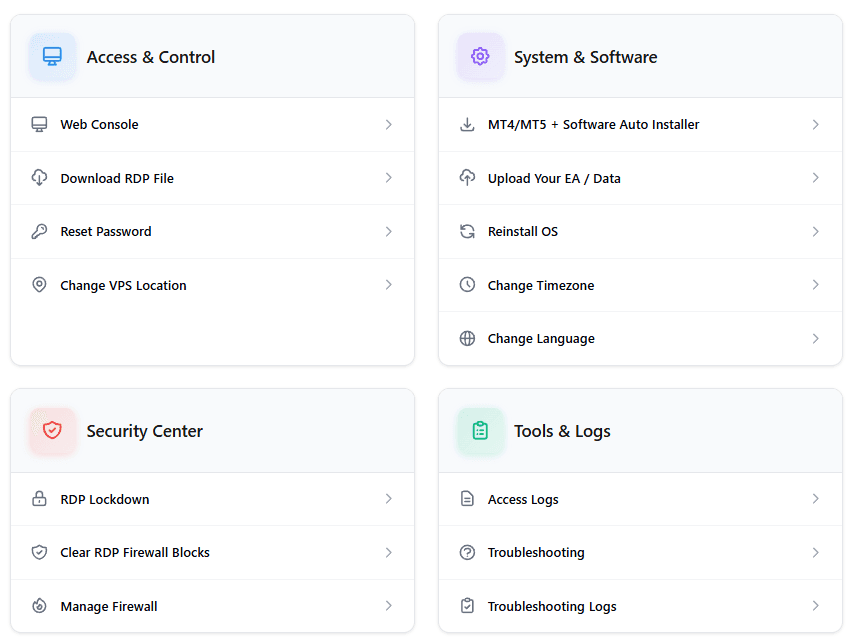
NYCServers: Provides an advanced VPS control panel designed specifically for Forex trading workflows. Common tasks traders can perform instantly without contacting support include:
- One-click trading platform and software installation (100+ brokers supported, including multiple MT4/MT5 installations)
- Upload Expert Advisors and data files via browser
- Change VPS language and regional settings
- Manage firewall rules
- Remote power actions (restart, shutdown)
This self-service approach allows traders to manage their environments on demand, anytime. Common actions such as installing additional trading platforms, and uploading EA data can be carried out immediately from the NYCServers control panel, without having to contact and wait for technical support.
ForexVPS365: Offers standard VPS management tools typical of general-purpose hosting environments. Their client area provides basic functions like viewing service details and accessing RDP credentials, but advanced automation and trading-specific workflows are not documented or advertised.
For routine tasks like installing additional MT4 instances or uploading EA files, traders would typically need to handle these manually via Remote Desktop rather than through an integrated control panel.
Self-Service vs Support Dependency
When routine tasks require support intervention, resolution time depends on ticket queues and response speed. Self-service management tools allow traders to take immediate action on their own terms.
For traders managing multiple VPS instances, accounts, or strategies, automation and self-service capabilities are not convenience features — they’re operational necessities that save hours of cumulative time.
Monitoring & Alerts
For automated trading systems, monitoring is critical. Knowing about problems before they impact your trading can be the difference between catching an issue early and waking up to find your EA has been offline for hours.
Proactive Monitoring

NYCServers: Includes built-in monitoring with automated alerts through custom software that comes pre-installed on each service. Traders can set up instant notifications for events such as:
- High RAM or CPU usage
- Disk space running low
- New remote desktop logins
- And more
Receiving an alert for high RAM usage, for example, allows immediate action to prevent performance slowdowns or crashes. Without proactive alerts, you won’t know there’s a problem until it’s too late.
ForexVPS365: Publicly available documentation does not reference integrated monitoring or alerting tools. Their service appears to be a standard VPS delivery without trading-specific monitoring capabilities.
In such cases, traders may only become aware of problems after trades fail, platforms stop responding, or they manually check their VPS. For automated strategies running 24/7, this gap in visibility creates operational risk.
Why Monitoring Matters for Automated Trading
Expert Advisors and automated strategies are designed to run continuously without manual intervention. But VPS resources can become strained — memory leaks from long-running MT4 instances, disk space filling with logs, or high CPU usage due to software overload can all affect your VPS service performance.
Without monitoring:
- A memory issue could cause MT4 to crash overnight with no notification
- Disk space exhaustion could prevent new trades from being logged
- High CPU usage can cause your platforms to lag or perform poorly
The monitoring and alerts software offered by NYCServers allows traders to rest easy knowing that their service is being monitoring around the clock – even when they are not logged in. Furthermore, the auto start option ensure that clients software is running at all times.
Uptime Guarantees
Uptime commitments differ between the two providers:
ForexVPS365: 99.9% uptime SLA
NYCServers: 100% uptime guarantee during trading hours
A 99.9% SLA allows for up to 8.76 hours of downtime per year. While this is industry-standard for general hosting, forex traders running automated strategies during market hours need higher reliability.
NYCServers’ 100% trading hours guarantee reflects how traders actually use forex VPS — continuously during active market sessions where every minute of uptime matters. Any maintenance activities that may affect client services are always performed outside of market trading hours.
Latency Tools
Both providers offer broker latency information, though with different approaches.
ForexVPS365 Latency Checker

ForexVPS365 provides a broker latency page showing latency from four locations (Netherlands, UK, Tokyo, US) to various brokers. The data appears to be updated regularly.
However, the tool shows broker-level latency rather than individual trading server latency. Many brokers operate multiple servers, and each server in different locations. For example, the brokers “Live-01” server might be located in New York, while the “Live-02” server is located in London.
A simple table style broker latency checker like this does not take this into account. Therefore, a trader could very easily select the wrong location for their broker because their specific trading server location is not accounted for on the latency check.
NYCServers Latency Checker

Our broker latency page provides server-by-server latency data for both MT4 and MT5 platforms. Combined with automatic location selection at checkout, this ensures you’re placed optimally without manual research.
ForexVPS365: Benefits and Limitations
Benefits
- Budget-friendly pricing: Entry plans start at €17/month, among the lowest in the market
- Nine server locations: Broader geographic coverage than many competitors (with tier restrictions)
- Paid trial option: €5.90 for 10 days allows testing before commitment
Limitations
- No independent reviews: Zero presence on Trustpilot, ForexPeaceArmy, Myfxbook, or other review platforms
- Tier-restricted locations: Entry plan limits you to 4 of 9 locations; key hubs require upgrading
- Dedicated servers Netherlands-only: No dedicated hardware options near NY or London brokers
- Limited resources at entry: Only 1 CPU core and 20GB storage on Lite plan
- No automatic broker optimization: Manual location selection required; no broker-based provisioning
- Standard VPS management only: No trading-specific control panel or one-click platform installation
- No monitoring or alerts: No documented proactive monitoring; issues discovered only manually when it’s too late
- 99.9% SLA: Lower than the 99.99% standard offered by some competitors
- ScamAdviser warning: Site flagged with low trust score (though this may be algorithmic rather than indicative of actual issues)
NYCServers: Benefits and Limitations
Benefits
- Established track record: Operating since 2012 with verifiable reviews
- More resources at entry level: 2 CPU cores and 60GB storage vs 1 core and 20GB
- All locations on all plans: No tier-gating for server access
- Dedicated servers in key hubs: Available in NY, LD, and TKY
- Automatic location selection: Optimal placement based on broker at checkout
- Pre-installed platforms: Ready to trade immediately after provisioning
- Advanced trading-specific control panel: One-click platform installs, EA uploads, firewall management, and more — without waiting for support
- Built-in monitoring with alerts: Proactive notifications for RAM, CPU, disk, and more
- 100% trading hours uptime: Stronger guarantee when it matters most
- US company transparency: Published address, clear corporate identity
- 14-day money-back guarantee: Risk-free evaluation period
Limitations
- 3 locations only: Traders with brokers outside NY, London, or Tokyo may need alternatives
- No paid trial: Must rely on money-back guarantee to evaluate
- Higher monthly price: $25/month vs €17/month at entry level (though annual pricing is comparable)
Which Should You Choose?
Choose ForexVPS365 if you:
- Prioritize the lowest possible monthly cost above other factors
- Are comfortable with a provider that has no independent review history
- Need server locations in regions NYCServers doesn’t cover
- Want to test with a low-cost paid trial before committing
- Don’t require dedicated server hardware near major broker hubs
- Are willing to upgrade plans to access additional server locations
Choose NYCServers if you:
- Value verifiable track record and independent reviews
- Trade with brokers in New York, London, or Tokyo (most major brokers)
- Want more CPU cores and storage at the entry price point
- Prefer automatic location selection and pre-installed platforms
- Need proactive monitoring and alerts
- Require dedicated server options near major broker hubs
- Want a clear money-back guarantee and transparent company information
Final Verdict
ForexVPS365 offers an aggressive budget entry point with broader geographic coverage. For traders who need locations outside the major financial hubs, or who prioritize the absolute lowest monthly cost, it may be worth considering.
However, the complete absence of independent reviews creates a significant trust gap. When you’re choosing a provider to run your automated trading 24/7, the inability to verify service quality through other users’ experiences is a material risk factor. The tier-restricted location access, Netherlands-only dedicated servers, and limited company transparency add additional considerations.
For most forex traders — especially those running automated strategies with major brokers in New York or London — NYCServers provides a more complete and verifiable solution. More resources per dollar at entry level, all locations accessible on all plans, automatic broker-based optimization, built-in monitoring, and over a decade of operational history create a foundation of trust that budget pricing alone cannot replace.
Our 14-day money-back guarantee lets you test the service risk-free. Get started with NYCServers →
Frequently Asked Questions
Is ForexVPS365 legitimate?
ForexVPS365 is a registered company in Latvia that has been operating since 2019. However, the provider has no presence on review platforms like Trustpilot, ForexPeaceArmy, or Myfxbook, making it difficult to verify service quality through independent user feedback. ScamAdviser also flags the site with a low trust score. While this doesn’t mean the service is necessarily bad, the lack of social proof creates uncertainty for prospective customers.
Why does ForexVPS365 restrict server locations on cheaper plans?
ForexVPS365 uses tier-gated location access as part of their pricing strategy. The entry-level Lite plan (€17/month) only provides access to 4 of their 9 server locations. To access locations like Tokyo, Singapore, Frankfurt, or Hong Kong, you must upgrade to the Basic+ plan (€26/month) or higher. NYCServers provides access to all 3 locations on every plan with no restrictions.
Which provider offers more resources at entry level?
NYCServers provides significantly more resources at the entry level. For approximately the same annual price, NYCServers offers 2 CPU cores and 60GB storage, while ForexVPS365’s Lite plan provides only 1 CPU core and 20GB storage. NYCServers delivers double the CPU cores and triple the storage.
Where is ForexVPS365 located?
ForexVPS365 is registered in Latvia. Their servers are located in Netherlands, UK (London), US (East), Germany (Frankfurt), Japan (Tokyo), Singapore, Hong Kong, South Africa (Johannesburg), UAE (Dubai), and Brazil. However, their dedicated servers are only available in the Netherlands.

About the author
Thomas Vasilyev
Writer & Full Time EA Developer
Tom is our associate writer, and has advanced knowledge with the technical side of things, like VPS management. Additionally Tom is a coder, and develops EAs and algorithms.
Areas of Expertise