
Why Forex VPS Location Matters: Match Your Broker’s Server
Your forex VPS location only cuts latency if it matches your broker’s server. Learn how to find your broker’s data center and pick the right VPS
The Forex VPS Location Mistake Most Traders Make
Your forex VPS location should be close to your broker’s trade server—not close to your home and not simply in a famous financial center. That is the quick verdict: identify the server handling your account, test the latency from candidate VPS regions, and choose the region with the shortest reliable route.
A trader in Singapore may need a VPS in New York if the broker routes that account to Equinix NY4. A trader in New York may need London if the account connects to an LD4 or LD5 server. Your physical location matters when you remotely control the VPS, but the latency affecting an EA’s orders is primarily the round trip between the VPS and the broker.
This distinction corrects a common shortcut: “Pick London, New York, or Tokyo because each is a financial hub.” Those cities are useful only when the selected facility matches your broker’s infrastructure. The broker-server match is the decision; the city name is supporting information.
What Latency Means for a Forex VPS
Forex VPS latency is the round-trip time for data to travel from the VPS to the broker’s trade server and back. It is normally measured in milliseconds. In MetaTrader, the connection indicator gives you a practical view of that network delay for the server to which your terminal is logged in.
That measurement is not the same as the delay from your laptop to the VPS. Once an Expert Advisor is running remotely, it can monitor prices and send orders without waiting for your home connection. Your remote-desktop session may feel less responsive from far away, while the EA still has a fast path to the broker.
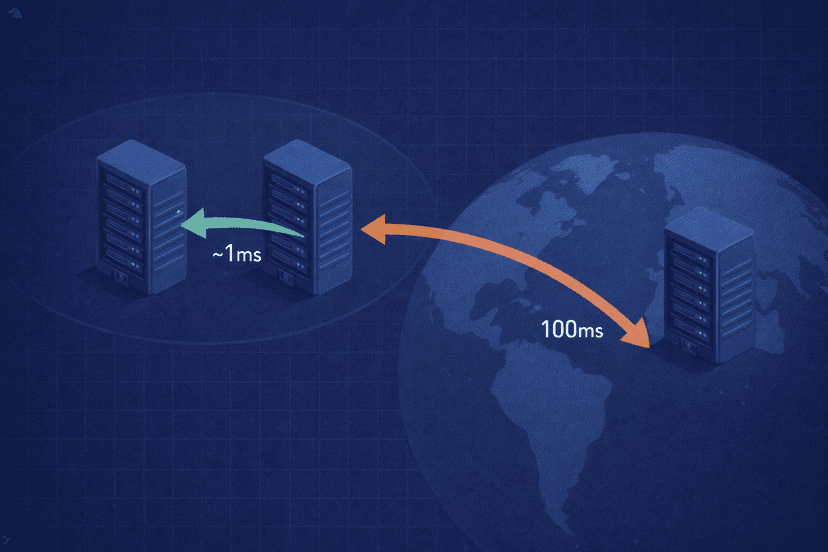
MetaQuotes illustrates the size of the gap on its MQL5 VPS network: normal home or retail-terminal network delays start around 100 ms, while an optimized co-located setup can achieve 0–5 ms. It reports that 96% of broker servers are reachable in under 10 ms and 84% in under 3 ms across more than 30 hosting access points worldwide.
Lower latency reduces the time between an EA’s decision and the broker receiving its request. That is most relevant to scalpers, news-sensitive systems, high-frequency strategies, and EAs that submit or modify orders often. It can improve execution consistency and reduce one contributor to forex slippage, but it cannot guarantee a fill price or make an unprofitable strategy profitable.
Why Distance Drives Forex VPS Latency
Network data travels quickly, but it still crosses physical fiber. A route spanning thousands of kilometers cannot beat a short route inside the same data-center campus under otherwise similar conditions. Long paths also tend to cross more carrier networks, switches, and routers, with each handoff adding processing time and another place for congestion or inefficient routing.
“Co-located” does not necessarily mean that your VPS sits in the same rack as the broker. For this decision, it usually means that both systems are in the same Equinix campus or metro and benefit from short, well-connected routes. That is still a major structural advantage over sending every order across an ocean from a home PC.
Keep the distance rule practical:
- Match the endpoint: Optimize the VPS-to-broker path, not the trader-to-VPS path.
- Prefer measured routes: A nearby building is promising, but an actual ping test shows how the networks connect.
- Compare the exact server: Test the login or trade server assigned to your account rather than the broker’s public website.
- Judge stability too: A consistently low result is more useful than one exceptional reading surrounded by spikes.
Where Forex Brokers Host Their Trade Servers
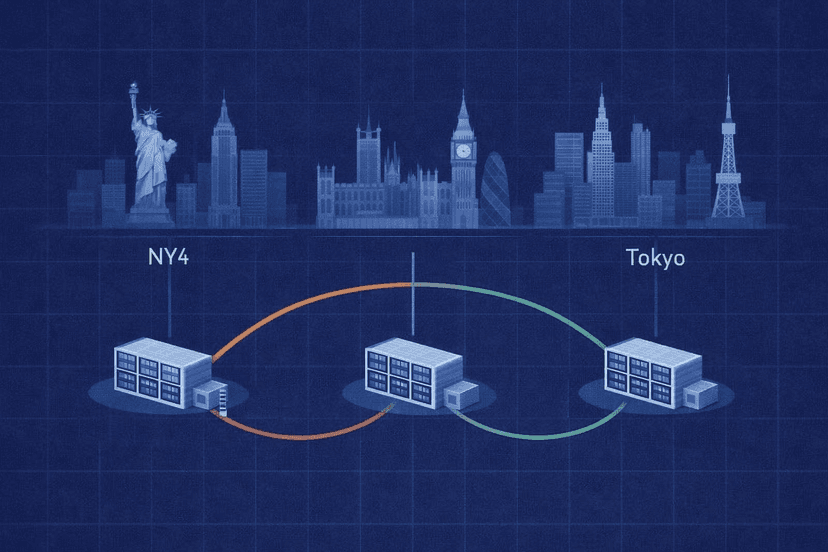
Much of the MT4 and MT5 ecosystem clusters in a small number of carrier-neutral Equinix facilities. Equinix calls these sites International Business Exchange, or IBX, data centers. As of 2025, its wider footprint comprised 260 data centers in 33 countries, but retail forex traffic is concentrated around a smaller set of financial campuses.
NY4 in Secaucus serves a dense New York financial-services market. IC Markets provides a verified real-world example: it says its order-matching engine is located in Equinix NY4 and processes millions of trades per day, with more than two-thirds coming from automated systems. In Europe, Equinix’s LD4 and LD5 facilities sit at Slough Trading Estate and host a large multi-asset trading community. CMC Markets separately promotes a London-based server for fast execution, although that claim does not by itself identify a particular Equinix building.
| Hub | Equinix code | Who it may suit |
|---|---|---|
| New York metro | NY4 | Accounts assigned to a New York or Secaucus trade server; IC Markets is a verified NY4 example |
| London metro | LD4 / LD5 | Accounts assigned to a London or Slough server; CMC Markets confirms London-based infrastructure |
| Tokyo | TY3 / TKY3 | Accounts using a broker’s Tokyo gateway |
| Singapore | SG1 | Accounts routed to a Singapore gateway |
| Hong Kong | HK1 | Accounts routed to a Hong Kong gateway |
Do not infer your server from the broker’s headquarters, regulation, or the currencies you trade. A global broker can maintain several gateways and place different clients on different servers. Confirm the endpoint attached to your own account.
How to Find Your Broker’s Server Location
You do not need to guess from a list of broker names. Use the account’s MetaTrader server, the broker’s own information, and comparative testing to narrow the location.
- Check MT4 or MT5. Open the login window and record the exact server selected for your account. Then inspect the connection or ping value shown in the lower-right area of the terminal. The server label may include a city or region, but treat that as a clue rather than proof.
- Ask broker support. Give support the complete login-server name and ask which city or data center hosts it. The broker’s VPS, execution, or server-information page may state the same detail. Ask about the account server—not just the company’s main trading infrastructure.
- Test candidate regions. Resolve or obtain the trade-server hostname, then run ping or traceroute tests from VPS trial systems in likely regions. A broker-latency checker can make this comparison faster. Repeat the test at more than one time of day and compare typical results, spikes, and route stability.
Ping is a network diagnostic, not a promise of order-execution speed. Broker processing, liquidity, market conditions, and the trading platform add delays outside the VPS provider’s control. Still, testing isolates the network path and gives you a much stronger location decision than choosing the city closest to you.
Match Your VPS to the Right Broker Location
Start with the lowest stable latency to your assigned trade server, then verify the VPS has the reliability and resources your platform needs. The six available regions cover the main routes you are likely to compare:
- NY4: Test an NY4 forex VPS when the account server is in New York or Secaucus.
- LD4: Test an LD4 forex VPS for broker servers in London or Slough.
- TKY3: Use Tokyo as a candidate when the broker confirms a Tokyo gateway.
- SG1: Compare Singapore for accounts assigned to a Singapore endpoint.
- HK1: Compare Hong Kong when the trade server or route terminates there.
- DUB1: Include Dublin when your broker identifies an Ireland endpoint or testing shows it has the best stable route.
The right result can differ between accounts at the same broker. If you trade through multiple brokers, collect the server name and measured latency for each one. One VPS is sensible when all important endpoints are well served from the same region. If one broker is in NY4 and another is in LD4, separate VPS instances may be the cleaner option for latency-sensitive automation.
After migration, confirm the MetaTrader VPS ping and watch live operation for connection interruptions or unusual latency spikes. Retest after a broker moves your account to another server or changes its infrastructure.
When the Closest VPS Is Not the Whole Story
Physical proximity sets the floor, but network quality determines whether you reach it consistently. Two VPS providers in the same metro can use different carriers, peering arrangements, and routes. A slightly longer but cleaner route can outperform a poorly connected local one, which is why measured latency and packet stability should confirm the map.
Uptime, CPU and memory headroom, storage performance, security, and support also matter. A 2 ms connection is not useful if the VPS stalls when several terminals are running or reboots without warning. Test your complete workload rather than selecting on the smallest advertised ping alone.
There are also diminishing practical returns once latency is already a few milliseconds. A scalping EA that reacts to short-lived prices may care about every reduction. A swing-trading EA that sends a handful of orders per week may not behave differently at 1 ms and 5 ms. Define the strategy’s sensitivity, then balance latency against stability and operational quality.
The final decision is straightforward: find the exact broker server, compare it from relevant regions, and choose the lowest stable path that can run your platform reliably. Broker proximity—not your home address—is what makes a forex VPS location useful.
Forex VPS Location FAQ
Does a VPS closer to me reduce trading latency?
Not necessarily. A nearby VPS can make remote desktop control feel faster, but automated trade latency depends on the route from the VPS to your broker’s server. Choose the VPS near that server, even if it is far from you.
How do I know which Equinix data center my broker uses?
Record the exact MT4 or MT5 login server, ask broker support where that server is hosted, and compare ping or traceroute results from candidate regions. Do not rely on the broker’s headquarters or a generic broker list.
Is 1 ms versus 30 ms noticeable for my EA?
It can matter for scalping, news-sensitive, and frequently trading EAs because orders reach the broker sooner. It may have little practical effect on a slow swing strategy. Lower latency improves the network path; it does not guarantee execution or profit.
Can one VPS location serve multiple brokers?
Yes, if all relevant broker servers have low, stable latency from that location and the VPS has enough resources for every terminal. If the brokers use distant hubs, separate VPS locations may give each EA a cleaner path.
Do I need NY4 if I trade from Asia?
You need NY4 only when your assigned broker server is in or near NY4 and testing confirms the route. If the account uses Tokyo, Singapore, or Hong Kong infrastructure, an Asian VPS may be faster regardless of where you personally trade.

About the author
Thomas Vasilyev
Writer & Full Time EA Developer
Tom is our associate writer, and has advanced knowledge with the technical side of things, like VPS management. Additionally Tom is a coder, and develops EAs and algorithms.
Areas of Expertise