
7 Steps To Secure Your Forex VPS
Strengthen your forex VPS security: harden RDP, enable 2FA, lock down the Windows firewall, patch, apply least privilege, and back up your trading server.
Quick verdict: strong forex VPS security comes down to limiting remote access, using a unique password plus two-factor authentication, patching Windows, running the firewall with tight rules, and keeping recoverable backups. Do those five things and you remove the most avoidable ways an attacker can reach your always-on trading server.
Your host protects the physical server, virtualization layer, and provider network. You still control the Windows operating system, Remote Desktop settings, user accounts, trading software, and files inside your VPS. That shared-responsibility line matters because a server holding broker logins and running an EA around the clock needs more than a default Administrator password.
If you only have 20 minutes today, use this quick hardening checklist:
- Require Network Level Authentication for RDP and remove users who do not need remote access.
- Set a long, unique password, enable 2FA, and lock the account after 10 invalid sign-in attempts.
- Install current Windows, MetaTrader, EA, and add-on updates.
- Keep inbound firewall access denied unless a service genuinely needs it, and restrict RDP to known IP addresses or a VPN where practical.
- Use a standard account for trading, keep Microsoft Defender active, and take a tested backup or snapshot.
Lock Down RDP for Better Forex VPS Security
Remote Desktop is usually the main entry point to a Windows trading VPS. Microsoft warns that enabling Remote Desktop opens a listening port and makes the machine accessible, so it should not be exposed more broadly than necessary. Treat RDP as a controlled administration channel, not a public front door.
First, require Network Level Authentication. NLA makes a user authenticate before Windows creates a full remote session, reducing what an unauthenticated connection can reach. Then review who may log in: Windows allows members of the Administrators group and users you explicitly authorize for Remote Desktop, but your trading VPS should contain only the smallest possible set.
For context, a Windows computer can host Microsoft Remote Desktop only when it runs a supported Pro, Enterprise, Education, or Server edition; Windows Home cannot act as the RDP host. On a provisioned Windows VPS, confirm the edition and security settings instead of assuming the provider’s initial configuration is still intact.
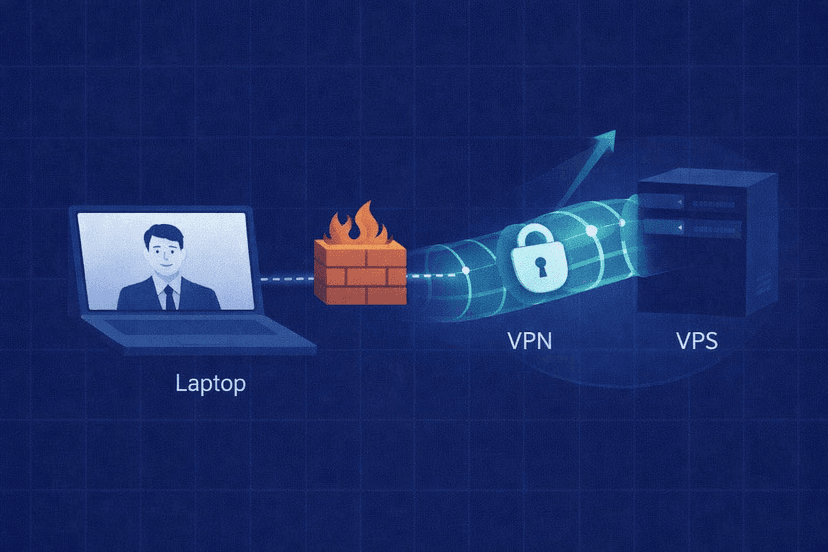
Accessing RDP from outside a private network normally involves port forwarding or a VPN. For a public VPS, the stronger approach is to scope the firewall rule to a fixed office or home IP, or place RDP behind a VPN. If your IP changes frequently, document how you will regain access before tightening the rule.
Changing the default TCP port from 3389 can reduce automated scan noise, but it is not a security boundary. Scanners can find services on other ports. Use a port change only as a minor extra step after NLA, firewall restrictions, strong authentication, and 2FA. If you are comparing remote-access options more broadly, the same exposure questions are central to choosing RDP versus VNC for a forex VPS.
Use Strong Authentication and 2FA
A password should be long, unique to the VPS, and absent from known breached-password lists. Do not recycle the password from your broker, email account, or local computer. Every account allowed to connect remotely needs the same standard; one weak secondary login can defeat a strong Administrator password.
Prefer length over forced complexity
NIST SP 800-63B says user-chosen passwords must be at least eight characters and that systems should allow at least 64. It also recommends screening passwords against compromised-password lists and advises against piling on arbitrary complexity rules. For your VPS, use a password manager to generate and store a long value rather than relying on a short pattern with predictable symbol swaps.
Add a second factor and a lockout threshold
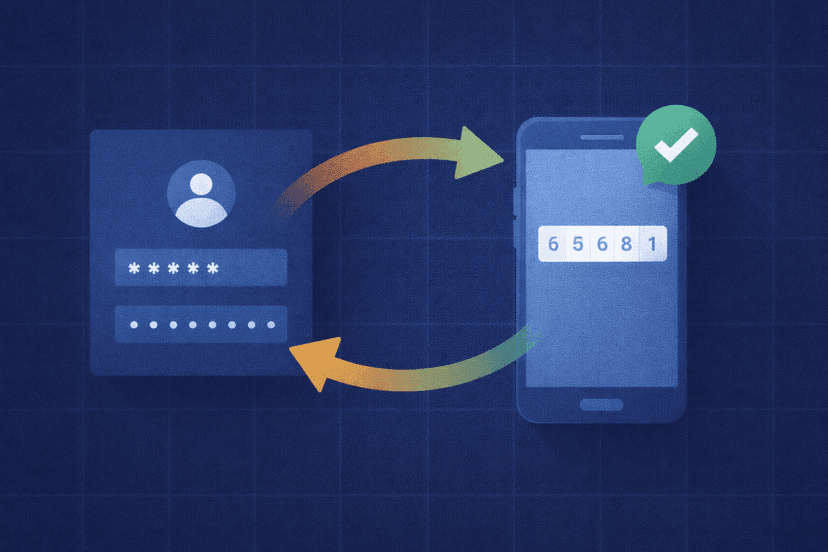
A second factor means a stolen password is not enough to complete the login. CISA recommends turning on multifactor authentication because the additional requirement makes online accounts significantly safer. For Windows trading servers, a product such as Duo Authentication for Windows Logon can add two-factor checks to Remote Desktop, local Windows logons, and User Account Control prompts.
Also configure the Windows account lockout threshold. Microsoft’s security baseline recommends 10 invalid sign-in attempts as a practical starting point, while the Windows default of zero means the account never locks because of failed attempts. Make sure you understand the lockout duration and recovery procedure before applying the policy so you do not strand yourself during a trading session.
Keep Windows and Trading Software Patched
Windows follows a service model that delivers continuing security updates. Enable automatic updating rather than leaving an internet-facing trading server on an old patch level. If a restart is required, schedule it outside your active trading window, confirm open positions and EA behavior first, then reconnect afterward to verify that MetaTrader and every required EA restarted correctly.
The operating system is only one layer. Keep MT4 or MT5, your EAs, indicators, trade copiers, and management utilities current as well. Remove abandoned tools instead of leaving unnecessary software installed. Get updates from the original developer or marketplace account you already trust; an unverified download offered as an urgent “security fix” creates a new risk rather than solving one.
Do not disable Windows Update or Microsoft Defender to chase a small performance gain. A properly sized trading VPS should have enough capacity for basic security services. If an update or scan appears to affect execution, investigate resource use and schedule maintenance intelligently instead of removing the protection.
Harden the Windows Firewall and Network Exposure
Windows Firewall filters inbound and outbound traffic through host-based rules. Start with inbound traffic blocked by default, then permit only the services your setup actually requires. A typical MetaTrader VPS needs outbound connectivity to the broker and tightly controlled inbound access for administration; it does not need a collection of public server ports.
Review the enabled inbound rules and remove obsolete exceptions left by old software. For RDP, narrow the rule to known source IP addresses or a VPN range whenever your connection setup allows it. Keep the rule limited to the correct network profile and protocol rather than opening a broad “any source, any port” exception.
| Service | Safer baseline | Avoid |
|---|---|---|
| Remote Desktop | NLA plus a known-IP or VPN-scoped firewall rule | Unrestricted public RDP with password-only login |
| File transfer | SFTP or FTPS | Plain FTP carrying credentials without protection |
| Trading platform | Only required broker and vendor connectivity | Broad exceptions for unused tools |
Use SFTP or FTPS when moving EA files, presets, or reports; do not expose plain FTP for convenience. After changing firewall rules, test RDP from your normal connection and verify that the trading platform can still reach the broker. Change one rule at a time so a failed test points to a specific setting.
Apply Least Privilege and Clean Up Accounts
Do not use the built-in Administrator account for routine chart checks, EA configuration, file downloads, or web browsing. Create a standard Windows user for day-to-day trading and use a separate administrator account only when a change genuinely requires elevated rights. That separation limits what a mistake or malicious file can do during a normal session.
Rename or disable the default administrator login after confirming that your separate administrative account works. Remove unused accounts, and give each person their own login rather than sharing one credential among traders, developers, and support contractors. Separate identities make it possible to revoke one person’s access without changing everybody’s workflow.
Review group membership whenever a contractor finishes work or a team member changes roles. A user who only checks charts does not need administrator rights. Likewise, an EA should not require you to remain logged in as the built-in Administrator unless its vendor can explain a specific, necessary dependency.
Back Up the VPS and Monitor for Suspicious Activity
A backup is your recovery path after ransomware, a failed update, an accidental deletion, or a bad configuration change. Protect the files required to rebuild the setup: EA files, indicators, platform profiles, templates, presets, and a record of the settings needed to reconnect. Use provider snapshots when available, but keep a separate backup of essential configuration so one provider-side problem does not remove every copy.
Set a schedule based on how often your trading configuration changes. A snapshot from before a major EA update is useful; an old image that predates months of configuration work is not. Test a restore procedure before you need it, and store backup credentials separately from the Windows account they protect.
Keep Microsoft Defender or another reputable antivirus service active, and review its alerts instead of automatically dismissing them. Check Windows sign-in and audit logs for unfamiliar usernames, source addresses, repeated failed logins, or successful access at times you were not working. Unexpected new users, disabled protection, or changed firewall rules should trigger an immediate credential reset and investigation.
Monitoring should be light but consistent. Add a monthly account-and-firewall review to your trading operations checklist, and repeat it after a developer or support technician has accessed the VPS. Security settings drift when software installers add exceptions or temporary accounts become permanent.
Make VPS Security Part of Your Trading Routine
Securing a trading server is not a one-time installation task. Start with the highest-value controls: restrict RDP, require NLA and 2FA, use long unique passwords, patch every layer, enforce least privilege, and maintain tested backups. Then review accounts, firewall rules, Defender alerts, and sign-in logs on a simple recurring schedule.
A secure forex VPS still has to be usable. Plan updates outside active sessions, test access immediately after changing RDP or firewall settings, and document how to recover your account and restore the trading stack. That turns security from an emergency reaction into a repeatable part of running an automated strategy.
Forex VPS Security FAQ
Is a forex VPS safe?
A forex VPS can be safe when the provider protects its infrastructure and you secure the Windows guest system. Your side includes RDP exposure, passwords, 2FA, patches, firewall rules, local accounts, antivirus, and backups. Treat the default configuration as a starting point, not proof that the server is fully hardened.
Do I need antivirus on a trading VPS?
Yes. Keep Microsoft Defender active unless you use another reputable antivirus service. Do not disable protection solely to reduce resource usage; schedule scans sensibly and address an undersized VPS or unnecessary software if security services compete with your trading platform.
Should I change the default RDP port?
You can change port 3389 to reduce routine scan noise, but the change does not hide RDP from a determined scanner. NLA, a restricted firewall rule or VPN, a unique password, 2FA, and current patches provide the meaningful protection. Never treat a nonstandard port as a replacement for those controls.
Does 2FA slow down my EA?
No. Two-factor authentication applies when a person signs in through Remote Desktop or Windows logon; it does not add a confirmation step to each trade the EA sends. Your automated strategy continues running on the VPS while you are disconnected, provided its platform and session are configured correctly.
Who is responsible for VPS security: me or the provider?
Both parties have responsibilities. The provider manages the datacenter, hardware, virtualization platform, and upstream network controls. You manage Windows accounts, RDP permissions, passwords, trading applications, firewall policy inside the guest OS, and your backup and monitoring routine.

About the author
Thomas Vasilyev
Writer & Full Time EA Developer
Tom is our associate writer, and has advanced knowledge with the technical side of things, like VPS management. Additionally Tom is a coder, and develops EAs and algorithms.
Areas of Expertise